---
title: "China's Rise: GDP Ranking Changes (1960-2020)"
subtitle: "From 5th to 2nd: The WTO Effect on China's Economic Ascen<br>
Values shown in trillion USD (2020)"
description: "A bump chart visualization showcasing China's remarkable economic rise from 1960 to 2020, highlighting how WTO membership accelerated its ascent from 8th to 2nd in global GDP rankings."
author: "Steven Ponce"
date: "2025-04-05"
categories: ["30DayChartChallenge", "2025"]
tags: [
"ggplot2", "ggbump", "World Bank", "GDP", "economic rankings", "bump chart", "China", "WDI", "geopolitics", "economic history", "visualization", "ranking", "comparison", "tidyverse"
]
image: "thumbnails/30dcc_2025_05.png"
format:
html:
toc: true
toc-depth: 5
code-link: true
code-fold: true
code-tools: true
code-summary: "Show code"
editor_options:
chunk_output_type: inline
execute:
freeze: true
cache: true
error: false
message: false
warning: false
eval: true
# filters:
# - social-share
# share:
# permalink: "https://stevenponce.netlify.app/data_visualizations/30DayChartChallenge/2025/30dcc_2025_05.html"
# description: "Visualizing China's dramatic economic rise from 5th to 2nd in global GDP rankings over 60 years, with a clear acceleration after joining the WTO. #30DayChartChallenge Day 5: Comparison & Ranking"
# twitter: true
# linkedin: true
# email: true
# facebook: false
# reddit: false
# stumble: false
# tumblr: false
# mastodon: true
# bsky: true
---
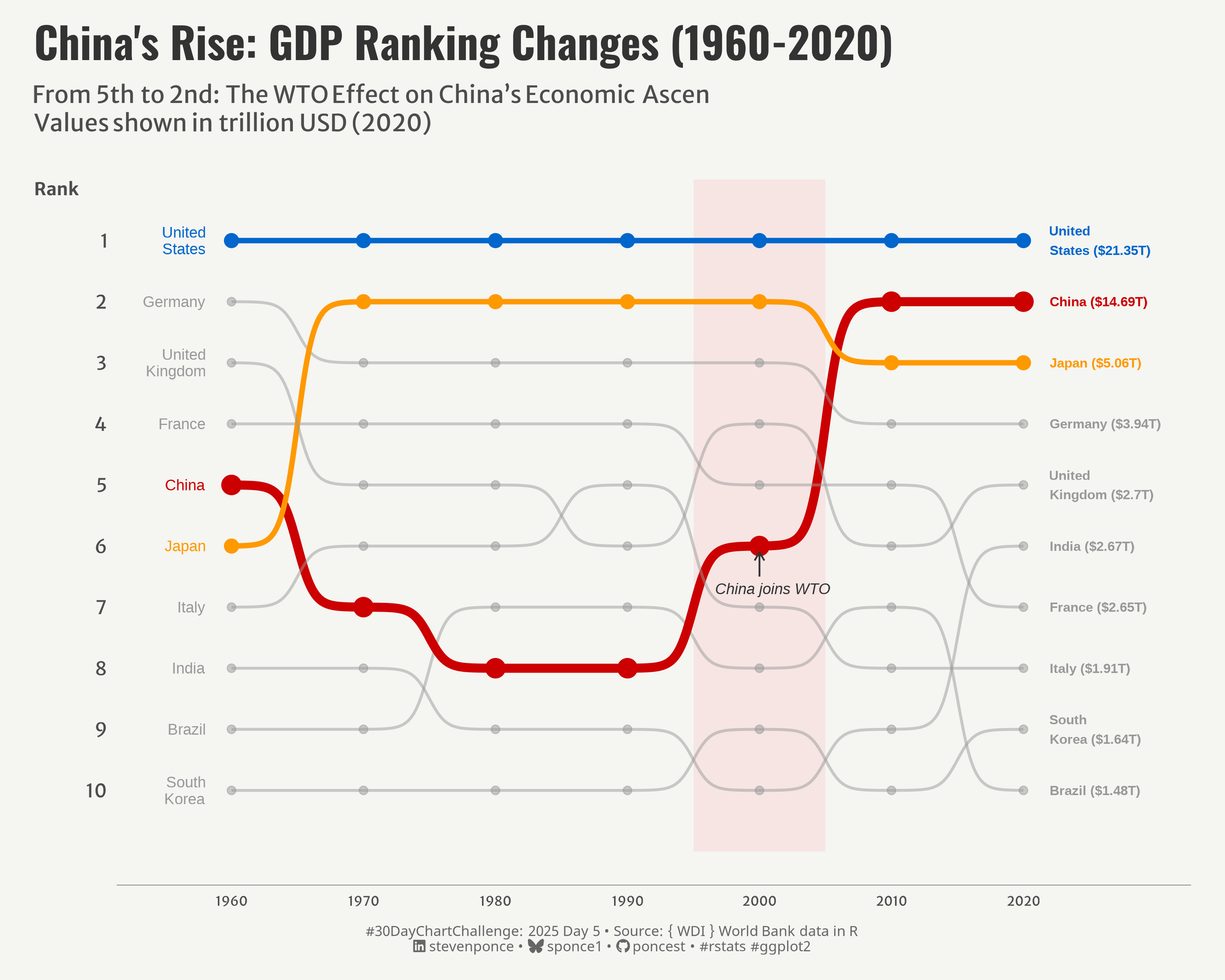{#fig-1}
### <mark> **Steps to Create this Graphic** </mark>
#### 1. Load Packages & Setup
```{r}
#| label: load
#| warning: false
#| message: false
#| results: "hide"
## 1. LOAD PACKAGES & SETUP ----
suppressPackageStartupMessages({
pacman::p_load(
  tidyverse,      # Easily Install and Load the 'Tidyverse'
  ggtext,         # Improved Text Rendering Support for 'ggplot2'
  showtext,       # Using Fonts More Easily in R Graphs
  janitor,        # Simple Tools for Examining and Cleaning Dirty Data
  skimr,          # Compact and Flexible Summaries of Data
  scales,         # Scale Functions for Visualization
  lubridate,      # Make Dealing with Dates a Little Easier
  ggbump,         # Bump Chart and Sigmoid Curves
  ggrepel,        # Automatically Position Non-Overlapping Text Labels with 'ggplot2'
  WDI,            # World Development Indicators and Other World Bank Data
  camcorder       # Record Your Plot History
)
})

### |- figure size ----
gg_record(
    dir    = here::here("temp_plots"),
    device = "png",
    width  = 10,
    height = 8,
    units  = "in",
    dpi    = 320
)

# Source utility functions
suppressMessages(source(here::here("R/utils/fonts.R")))
source(here::here("R/utils/social_icons.R"))
source(here::here("R/utils/image_utils.R"))
source(here::here("R/themes/base_theme.R"))
```
#### 2. Read in the Data
```{r}
#| label: read
#| include: true
#| eval: true
#| warning: false
# Get GDP data (current US$) for top economies
gdp_data <- WDI(
  indicator = c("gdp" = "NY.GDP.MKTP.CD"),                # GDP in current US$
  country = c("US", "CN", "JP", "DE", "GB", "IN", "FR", "IT",
              "BR", "CA", "KR", "RU", "AU", "ES", "MX"),
  start = 1960,
  end = 2020
)
```
#### 3. Examine the Data
```{r}
#| label: examine
#| include: true
#| eval: true
#| results: 'hide'
#| warning: false
glimpse(gdp_data)
skim(gdp_data)
```
#### 4. Tidy Data
```{r}
#| label: tidy
#| warning: false
### |- Tidy ----
# Filter parameters
countries_to_keep <- c("US", "CN", "JP", "DE", "GB", "IN", "FR", "IT", "KR", "BR")
years_to_keep <- c(1960, 1970, 1980, 1990, 2000, 2010, 2020)

# Filter the data
gdp_filtered <- gdp_data |>
  filter(iso2c %in% countries_to_keep) |>
  filter(year %in% years_to_keep) |>
  filter(!is.na(gdp))

# Calculate rankings for each year
gdp_ranked <- gdp_filtered |>
  group_by(year) |>
  mutate(rank = rank(-gdp, ties.method = "first")) |>
  ungroup()

# Classify countries into highlighted vs. background
gdp_ranked <- gdp_ranked |>
  mutate(
    # Only 3 highlighted countries (US, China, Japan)
    highlight_group = case_when(
      iso2c == "US" ~ "US",
      iso2c == "CN" ~ "China",
      iso2c == "JP" ~ "Japan",
      TRUE ~ "Other"
    ),
    # Create a size variable for lines and points
    line_size = case_when(
      iso2c == "CN" ~ 2.5,              # China gets thickest line
      iso2c %in% c("US", "JP") ~ 1.5,   # US and Japan medium
      TRUE ~ 0.8                        # Others thin
    ),
    point_size = case_when(
      iso2c == "CN" ~ 5,                # China gets largest points
      iso2c %in% c("US", "JP") ~ 3.5,   # US and Japan medium
      TRUE ~ 2                          # Others small
    ),
    # Alpha for background countries
    line_alpha = case_when(
      iso2c %in% c("US", "CN", "JP") ~ 1,
      TRUE ~ 0.5
    ),
    # Country labels
    country_label = case_when(
      iso2c == "US" ~ "United\nStates",
      iso2c == "CN" ~ "China",
      iso2c == "JP" ~ "Japan",
      iso2c == "DE" ~ "Germany",
      iso2c == "GB" ~ "United\nKingdom",
      iso2c == "IN" ~ "India",
      iso2c == "FR" ~ "France",
      iso2c == "IT" ~ "Italy",
      iso2c == "KR" ~ "South\nKorea",
      iso2c == "BR" ~ "Brazil",
      TRUE ~ country
    ),
    # Format GDP in trillions
    gdp_trillion = round(gdp / 1e12, 2),
    # GDP label
    gdp_label = paste0("$", gdp_trillion, "T")
  )

# Left label dataset
left_labels <- gdp_ranked |>
  filter(year == 1960) |>
  mutate(
    # horizontal adjustments
    hjust = 1,
    nudge_x = -1.5,
    nudge_y = 0

  )

# Right label dataset
right_labels <- gdp_ranked |>
  filter(year == 2020) |>
  mutate(
    label_line = str_glue("{ country_label } ({ gdp_label })"),
    # horizontal adjustments
    hjust = 0,
    nudge_x = 1.5,
    nudge_y = 0
  )
```
#### 5. Visualization Parameters
```{r}
#| label: params
#| include: true
#| warning: false
### |- plot aesthetics ----
colors <- get_theme_colors(palette = c(
  "US" = "#0066CC",
  "China" = "#CC0000",
  "Japan" = "#FF9900",
  "Other" = "#999999"
  )
)

### |-  titles and caption ----
# text
title_text    <- str_glue("China's Rise: GDP Ranking Changes (1960-2020)")
subtitle_text <- str_glue("From 5th to 2nd: The WTO Effect on China's Economic Ascen<br>
                          Values shown in trillion USD (2020)")

# Create caption
caption_text <- create_dcc_caption(
  dcc_year = 2025,
  dcc_day = 05,
  source_text =  "{ WDI } World Bank data in R"
)

### |-  fonts ----
setup_fonts()
fonts <- get_font_families()

### |-  plot theme ----

# Start with base theme
base_theme <- create_base_theme(colors)

# Add weekly-specific theme elements
weekly_theme <- extend_weekly_theme(
  base_theme,
  theme(
    # Text styling
    plot.title = element_text(face = "bold", family = fonts$title, size = rel(1.14), margin = margin(b = 10)),
    plot.subtitle = element_text(family = fonts$subtitle, color = colors$text, size = rel(0.78), margin = margin(b = 20)),

    # Axis elements
    axis.title.y = element_text(color = colors$text, size = rel(0.8),
                              hjust = 1, vjust = 0.95, angle = 0),
    axis.title.x = element_blank(),
    axis.text.x = element_text(color = colors$text, size = rel(0.7)),
    axis.line.x = element_line(color = "gray50", linewidth = .2),

    # Grid elements
    panel.grid.major = element_blank(),
    panel.grid.minor = element_blank(),

    # Legend elements
    legend.position = "plot",
    legend.title = element_text(family = fonts$text, size = rel(0.8)),
    legend.text = element_text(family = fonts$text, size = rel(0.7)),

    # Plot margins
    plot.margin = margin(t = 10, r = 20, b = 10, l = 20),
  )
)

# Set theme
theme_set(weekly_theme)
```
#### 6. Plot
```{r}
#| label: plot
#| warning: false
### |-  Plot ----
p <- ggplot(gdp_ranked, aes(x = year, y = rank, group = country_label)) +
  # Add background shading
  annotate("rect",
    xmin = 1995, xmax = 2005, ymin = 0, ymax = 11,
    fill = "#FF8B8B", alpha = 0.15
  ) +
  # Geoms
  geom_bump(aes(color = highlight_group, size = line_size, alpha = line_alpha), smooth = 8) +
  geom_point(aes(color = highlight_group, size = point_size, alpha = line_alpha)) +
  geom_text(                                                                    # left side labels
    data = left_labels,
    aes(label = country_label, color = highlight_group, y = rank + nudge_y),
    hjust = 1,
    nudge_x = -2,
    lineheight = 0.9,
    size = 3.2,
  ) +
  geom_text(                                                                    # right side labels
    data = right_labels,
    aes(label = label_line, color = highlight_group, y = rank),
    hjust = 0,
    nudge_x = 2,
    size = 2.8,
    fontface = "bold"
  ) +
  # Annotate
  annotate("text",
    x = 2001, y = 6.7, label = "China joins WTO", color = "gray20",
    size = 3.2, fontface = "italic"
  ) +
  annotate("segment",
    x = 2000, xend = 2000, y = 6.5, yend = 6.1,
    arrow = arrow(length = unit(0.2, "cm")), linewidth = 0.5, color = "gray20"
  ) +
  # Scales
  scale_y_reverse(breaks = 1:10) +
  scale_x_continuous(
    breaks = c(1960, 1970, 1980, 1990, 2000, 2010, 2020),
    limits = c(1955, 2029)
  ) +
  scale_color_manual(values = colors$palette) +
  scale_size_identity() +
  scale_alpha_identity() +
  # Labs
  labs(
    title = title_text,
    subtitle = subtitle_text,
    x = "Year",
    y = "Rank",
    caption = caption_text
  ) +
  # Theme
  theme(
    plot.title = element_text(
      size = rel(1.8),
      family = fonts$title,
      face = "bold",
      color = colors$title,
      margin = margin(t = 5, b = 5)
    ),
    plot.subtitle = element_markdown(
      size = rel(1),
      family = fonts$subtitle,
      color = colors$subtitle,
      lineheight = 1.2,
      margin = margin(t = 5, b = 5)
    ),
    plot.caption = element_markdown(
      size = rel(0.6),
      family = fonts$caption,
      color = colors$caption,
      lineheight = 0.65,
      hjust = 0.5,
      halign = 0.5,
      margin = margin(t = 10, b = 5)
    ),
  )
```
#### 7. Save
```{r}
#| label: save
#| warning: false
### |-  plot image ----

save_plot(
  p,
  type = "30daychartchallenge",
  year = 2025,
  day = 05,
  width = 10,
  height = 8
  )
```
#### 8. Session Info
::: {.callout-tip collapse="true"}
##### Expand for Session Info
```{r, echo = FALSE}
#| eval: true
#| warning: false
sessionInfo()
```
:::
#### 9. GitHub Repository
::: {.callout-tip collapse="true"}
##### Expand for GitHub Repo
The complete code for this analysis is available in [`30dcc_2025_05.qmd`](https://github.com/poncest/personal-website/blob/master/data_visualizations/TidyTuesday/2025/30dcc_2025_05.qmd).
For the full repository, [click here](https://github.com/poncest/personal-website/).
:::
#### 10. References
::: {.callout-tip collapse="true"}
##### Expand for References
1. Data Sources:
- World Bank { World Bank data in R } [indicator = GDP (current US$) ("NY.GDP.MKTP.CD")](https://github.com/vincentarelbundock/WDI)
:::
