---
title: "The Shifting Speeds of Urbanization (1960-2023)"
subtitle: "Annual growth rates show when countries urbanized fastest and when they slowed down"
description: "Exploring the dynamic rates of urbanization across eight countries from 1960 to 2023 using World Bank data. This visualization reveals when countries underwent their most rapid urban transitions and when urbanization slowed or reversed."
date: "2025-04-20"
categories: ["30DayChartChallenge", "2025"]
tags: [
"ggplot2", "timeseries", "urbanization", "World Bank", "WDI", "area chart", "demographic change", "urban development", "global trends", "comparative analysis"
]
image: "thumbnails/30dcc_2025_20.png"
format:
html:
toc: true
toc-depth: 5
code-link: true
code-fold: true
code-tools: true
code-summary: "Show code"
editor_options:
chunk_output_type: inline
execute:
freeze: true
cache: true
error: false
message: false
warning: false
eval: true
# filters:
# - social-share
# share:
# permalink: "https://stevenponce.netlify.app/data_visualizations/30DayChartChallenge/2025/30dcc_2025_20.html"
# description: "Day 20 of #30DayChartChallenge: Visualizing how urbanization rates have shifted across countries from 1960-2023, showing the dramatic differences in when and how quickly nations urbanized."
# twitter: true
# linkedin: true
# email: true
# facebook: false
# reddit: false
# stumble: false
# tumblr: false
# mastodon: true
# bsky: true
---
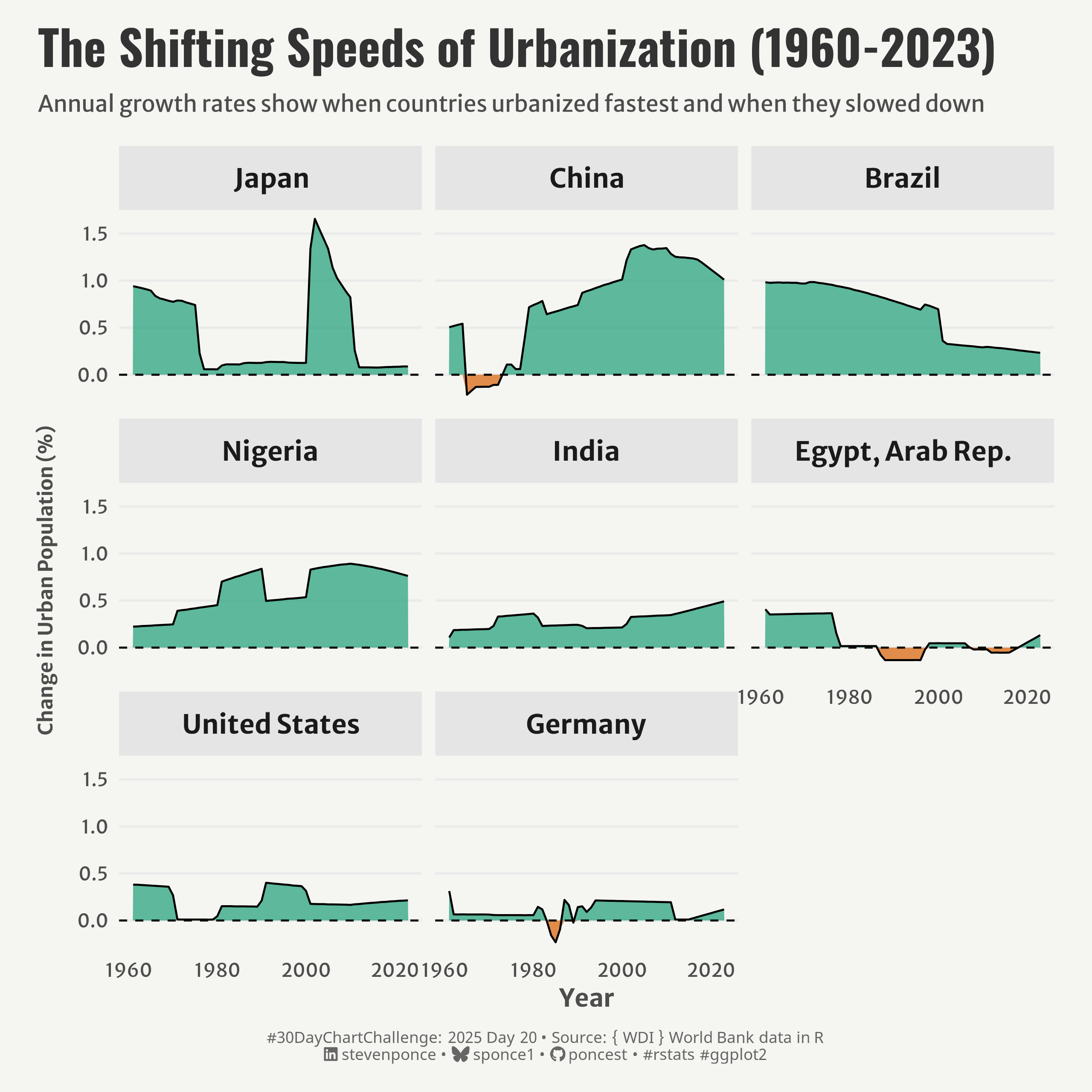{#fig-1}
### <mark> **Steps to Create this Graphic** </mark>
#### 1. Load Packages & Setup
```{r}
#| label: load
#| warning: false
#| message: false
#| results: "hide"
## 1. LOAD PACKAGES & SETUP ----
suppressPackageStartupMessages({
pacman::p_load(
  tidyverse,      # Easily Install and Load the 'Tidyverse'
  ggtext,         # Improved Text Rendering Support for 'ggplot2'
  showtext,       # Using Fonts More Easily in R Graphs
  janitor,        # Simple Tools for Examining and Cleaning Dirty Data
  skimr,          # Compact and Flexible Summaries of Data
  scales,         # Scale Functions for Visualization
  lubridate,      # Make Dealing with Dates a Little Easier
  WDI,            # World Development Indicators and Other World Bank Data
  camcorder       # Record Your Plot History
  )
})

### |- figure size ----
gg_record(
    dir    = here::here("temp_plots"),
    device = "png",
    width  = 8,
    height = 8,
    units  = "in",
    dpi    = 320
)

# Source utility functions
suppressMessages(source(here::here("R/utils/fonts.R")))
source(here::here("R/utils/social_icons.R"))
source(here::here("R/utils/image_utils.R"))
source(here::here("R/themes/base_theme.R"))
```
#### 2. Read in the Data
```{r}
#| label: read
#| include: true
#| eval: true
#| warning: false
# Search for urbanization indicators
urbanization_indicators <- WDIsearch("urban population")
# head(urbanization_indicators)

# Select countries of interest
countries <- c("USA", "CHN", "IND", "BRA", "NGA", "DEU", "JPN", "EGY")

# Get the data
urban_data <- WDI(
  indicator = "SP.URB.TOTL.IN.ZS",    # Urban population (% of total population)
  country = countries,
  start = 1960,
  end = 2024,
  extra = TRUE
)
```
#### 3. Examine the Data
```{r}
#| label: examine
#| include: true
#| eval: true
#| results: 'hide'
#| warning: false
glimpse(urban_data)
skim(urban_data)
```
#### 4. Tidy Data
```{r}
#| label: tidy
#| warning: false
### |- Tidy ----
# Clean and prepare the initial dataset
urban_data_clean <- urban_data |>
  select(country, year, SP.URB.TOTL.IN.ZS, region) |>
  rename(urban_population_pct = SP.URB.TOTL.IN.ZS) |>
  filter(!is.na(urban_population_pct))

# Calculate annual change rates
urban_change <- urban_data_clean |>
  arrange(country, year) |>
  group_by(country) |>
  mutate(change_rate = c(NA, diff(urban_population_pct))) |>
  filter(!is.na(change_rate)) |>
  ungroup()

# Calculate maximum change for each country (for ordering)
country_max_change <- urban_change |>
  group_by(country) |>
  summarize(max_change = max(change_rate, na.rm = TRUE)) |>
  arrange(desc(max_change)) |>
  ungroup()

# Apply the ordering to each country
urban_change <- urban_change |>
  mutate(country = factor(country, levels = country_max_change$country))

# Create separate dataframes for positive and negative changes
urban_change_pos <- urban_change |>
  mutate(y_value = pmax(0, change_rate))

urban_change_neg <- urban_change |>
  mutate(y_value = pmin(0, change_rate))
```
#### 5. Visualization Parameters
```{r}
#| label: params
#| include: true
#| warning: false
### |-  plot aesthetics ----
colors <- get_theme_colors(
  palette = c(
    "pos_color" = "#1B9E77",
    "neg_color" = "#D95F02"
  )
)

### |-  titles and caption ----
# text
title_text    <- str_wrap("The Shifting Speeds of Urbanization (1960-2023)",
                          width = 55)

subtitle_text <- str_wrap("Annual growth rates show when countries urbanized fastest and when they slowed down",
                          width = 85)

caption_text <- create_dcc_caption(
  dcc_year = 2025,
  dcc_day = 20,
  source_text =  "{ WDI } World Bank data in R"
)

### |-  fonts ----
setup_fonts()
fonts <- get_font_families()

### |-  plot theme ----

# Start with base theme
base_theme <- create_base_theme(colors)

# Add weekly-specific theme elements
weekly_theme <- extend_weekly_theme(
  base_theme,
  theme(

    # Axis elements
    axis.title.y = element_text(color = colors$text, size = rel(0.8), margin = margin(r = 10)),
    axis.text = element_text(color = colors$text, size = rel(0.7)),

    # Grid elements
    panel.grid.minor = element_blank(),
    panel.grid.major.x = element_blank(),
    panel.grid.major.y = element_line(color = "gray92"),

    # Legend elements
    legend.position = "plot",
    legend.title = element_blank(),
    legend.text = element_text(family = fonts$text, size = rel(0.7)),

    # Facet elements
    strip.background = element_rect(fill = "gray90", color = NA),
    strip.text = element_text(face = "bold", size = rel(1), margin = margin(10, 0, 10, 0)),

    # Plot margins
    plot.margin = margin(t = 10, r = 20, b = 10, l = 20),
  )
)

# Set theme
theme_set(weekly_theme)
```
#### 6. Plot
```{r}
#| label: plot
#| warning: false
### |-  Plot ----
p <- ggplot() +
  # Geoms
  geom_area(
    data = urban_change_pos,
    aes(x = year, y = y_value),
    fill = colors$palette[1], alpha = 0.7
  ) +
  geom_area(
    data = urban_change_neg,
    aes(x = year, y = y_value),
    fill = colors$palette[2], alpha = 0.7
  ) +
  geom_line(
    data = urban_change,
    aes(x = year, y = change_rate),
    color = "black",
    linewidth = 0.5
  ) +
  geom_hline(
    yintercept = 0,
    linetype = "dashed",
    color = "black",
    linewidth = 0.5
  ) +
  # Scales
  scale_x_continuous(
    breaks = seq(1960, 2020, by = 20)
  ) +
  # Labs
  labs(
    title = title_text,
    subtitle = subtitle_text,
    caption = caption_text,
    x = "Year",
    y = "Change in Urban Population (%)"
  ) +
  # Facet
  facet_wrap(~ country, ncol = 3)  +
  # Theme
  theme(
    plot.title = element_text(
      size = rel(1.8),
      family = fonts$title,
      face = "bold",
      color = colors$title,
      margin = margin(t = 5, b = 5)
    ),
    plot.subtitle = element_text(
      size = rel(0.85),
      family = fonts$subtitle,
      color = colors$subtitle,
      lineheight = 1.2,
      margin = margin(t = 5, b = 15)
    ),
    plot.caption = element_markdown(
      size = rel(0.6),
      family = fonts$caption,
      color = colors$caption,
      lineheight = 0.65,
      hjust = 0.5,
      halign = 0.5,
      margin = margin(t = 10, b = 5)
    ),
  )
```
#### 7. Save
```{r}
#| label: save
#| warning: false
### |-  plot image ----

save_plot(
  p,
  type = "30daychartchallenge",
  year = 2025,
  day = 20,
  width = 8,
  height = 8
  )
```
#### 8. Session Info
::: {.callout-tip collapse="true"}
##### Expand for Session Info
```{r, echo = FALSE}
#| eval: true
#| warning: false
sessionInfo()
```
:::
#### 9. GitHub Repository
::: {.callout-tip collapse="true"}
##### Expand for GitHub Repo
The complete code for this analysis is available in [`30dcc_2025_20.qmd`](https://github.com/poncest/personal-website/blob/master/data_visualizations/TidyTuesday/2025/30dcc_2025_20.qmd).
For the full repository, [click here](https://github.com/poncest/personal-website/).
:::
#### 10. References
::: {.callout-tip collapse="true"}
##### Expand for References
1. Data Sources:
- World Bank { World Bank data in R } [indicator = Urban population (% of total population) ("SP.URB.TOTL.IN.ZS")](https://github.com/vincentarelbundock/WDI)
:::
