---
title: "World Happiness Report 2024"
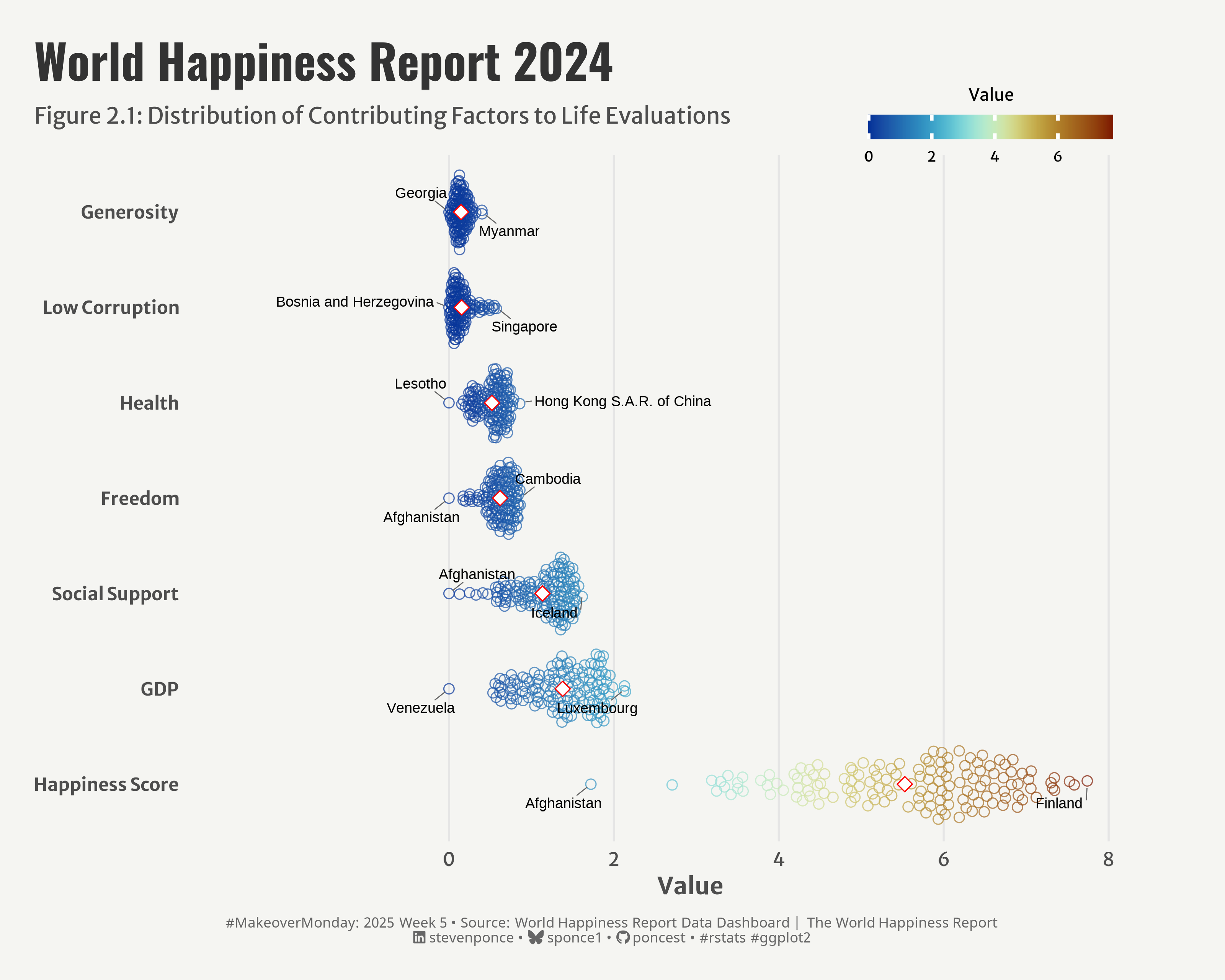
subtitle: "Figure 2.1: Distribution of Contributing Factors to Life Evaluations"
description: "A visual exploration of happiness factors across nations, transforming the World Happiness Report's stacked bar chart into an intuitive beeswarm plot that highlights the distribution and relationships between different contributors to national happiness."
author: "Steven Ponce"
date: "2025-01-30"
categories: ["MakeoverMonday", "2025"]
tags: [
"beeswarm",
"happiness-index",
"data-transformation",
"visualization-makeover",
"world-happiness",
"social-metrics",
"distribution-plot",
"geom-quasirandom",
]
image: "thumbnails/mm_2025_05.png"
format:
html:
toc: true
toc-depth: 5
code-link: true
code-fold: true
code-tools: true
code-summary: "Show code"
editor_options:
chunk_output_type: inline
execute:
freeze: true
cache: true
error: false
message: false
warning: false
eval: true
# filters:
# - social-share
# share:
# permalink: "https://stevenponce.netlify.app/data_visualizations/MakeoverMonday/2025/mm_2025_05.html"
# description: "Visualizing the distribution of happiness factors across nations using R and ggplot2. #MakeoverMonday #rstats #dataviz"
# twitter: true
# linkedin: true
# email: true
# facebook: false
# reddit: false
# stumble: false
# tumblr: false
# mastodon: true
# bsky: true
---
### Original
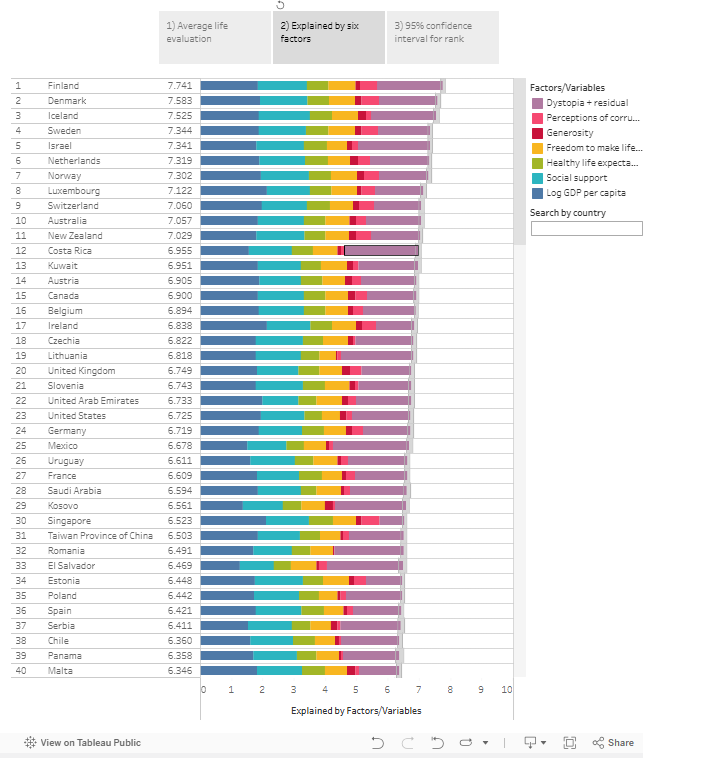
The original visualization comes from the World Happiness Report 2024, Figure 2.1, showing country rankings by life evaluations in 2021-2023.
You can view the interactive visualization [here on Tableau Public](https://public.tableau.com/app/profile/worldhappiness/viz/2024Draft/Figure2_1).
`
Source: [World Happiness Report 2024](https://worldhappiness.report/)
### Makeover
{#fig-1}
### <mark> **Steps to Create this Graphic** </mark>
#### 1. Load Packages & Setup
```{r}
#| label: load
#| warning: false
#| message: false
#| results: "hide"
## 1. LOAD PACKAGES & SETUP ----
suppressPackageStartupMessages({
pacman::p_load(
tidyverse,      # Easily Install and Load the 'Tidyverse'
    ggtext,         # Improved Text Rendering Support for 'ggplot2'
    showtext,       # Using Fonts More Easily in R Graphs
    janitor,        # Simple Tools for Examining and Cleaning Dirty Data
    skimr,          # Compact and Flexible Summaries of Data
    scales,         # Scale Functions for Visualization
    glue,           # Interpreted String Literals
    here,           # A Simpler Way to Find Your Files
    camcorder,      # Record Your Plot History
    readxl,         # Read Excel Files
    ggbeeswarm,     # Categorical Scatter (Violin Point) Plots
    scico,          # Colour Palettes Based on the Scientific Colour-Maps
    ggrepel         # Automatically Position Non-Overlapping Text Labels with 'ggplot2'
)
})

# Source utility functions
suppressMessages(source(here::here("R/utils/fonts.R")))
source(here::here("R/utils/social_icons.R"))
source(here::here("R/utils/image_utils.R"))
source(here::here("R/themes/base_theme.R"))
```
#### 2. Read in the Data
```{r}
#| label: read
#| include: true
#| eval: true
#| warning: false
world_happiness_2024 <- read_excel(
  here::here('data/DataForFigure2.1 with sub bars 2024.xlsx')) |>
  clean_names()
```
#### 3. Examine the Data
```{r}
#| label: examine
#| include: true
#| eval: true
#| results: 'hide'
#| warning: false
glimpse(world_happiness_2024)
skim(world_happiness_2024)
```
#### 4. Tidy Data
```{r}
#| label: tidy
#| warning: false
### |-  tidy data ----
happiness_long <- world_happiness_2024 |>
  select(
    # Rename columns
    country_name,
    "Happiness Score" = ladder_score,
    "GDP" = explained_by_log_gdp_per_capita,
    "Social Support" = explained_by_social_support,
    "Health" = explained_by_healthy_life_expectancy,
    "Freedom" = explained_by_freedom_to_make_life_choices,
    "Generosity" = explained_by_generosity,
    "Low Corruption" = explained_by_perceptions_of_corruption
  ) |>
  # Pivot longer
  pivot_longer(
    -country_name,
    names_to = "metric",
    values_to = "value"
  ) |>
  # add metric mea
  group_by(metric) |>
  mutate(
    metric_mean = mean(value, na.rm = TRUE)
  ) |>
  ungroup() |>
  # Factor reorder by mean
  mutate(
    metric = fct_reorder(metric, metric_mean, .desc = TRUE)
  )

# data labels df
label_data <- bind_rows(
  # Get minimum values
  happiness_long |>
    group_by(metric) |>
    slice_min(order_by = value, n = 1, with_ties = FALSE),

  # Get maximum values
  happiness_long |>
    group_by(metric) |>
    slice_max(order_by = value, n = 1, with_ties = FALSE)
  ) |>
  ungroup() |>
  distinct(metric, country_name, value)
```
#### 5. Visualization Parameters
```{r}
#| label: params
#| include: true
#| warning: false
### |-  plot aesthetics ----
# Get base colors with custom palette
colors <- get_theme_colors()

### |-  titles and caption ----
title_text <- str_glue("World Happiness Report 2024")
subtitle_text <- str_glue("Figure 2.1: Distribution of Contributing Factors to Life Evaluations")

# Create caption
caption_text <- create_mm_caption(
    mm_year = 2025,
    mm_week = 05,
    source_text = "World Happiness Report Data Dashboard | The World Happiness Report"
)

### |-  fonts ----
setup_fonts()
fonts <- get_font_families()

### |-  plot theme ----

# Start with base theme
base_theme <- create_base_theme(colors)

# Add weekly-specific theme elements
weekly_theme <- extend_weekly_theme(
    base_theme,
    theme(
      # Legend
      legend.position = c(0.8, 1.1),
      legend.justification = c(0.5, 1),
      legend.margin = margin(b = 5),
      legend.title = element_text(size = rel(0.7)),
      legend.text = element_text(size = rel(0.6)),
      legend.direction = "horizontal",

      # Axis formatting
      axis.title = element_text(color = colors$text, size = rel(1), face = "bold"),
      axis.text.y = element_text(color = colors$text, size = rel(0.95), face = "bold"),

      # Grid customization
      panel.grid.minor = element_blank(),
      panel.grid.major.y = element_blank(),

      # Plot margins
      plot.margin = margin(t = 20, r = 20, b = 20, l = 20)
    )
)

# Set theme
theme_set(weekly_theme)
```
#### 6. Plot
```{r}
#| label: plot
#| warning: false
### |-  Plot  ----
p <- ggplot(happiness_long, aes(x = metric, y = value)) +
  # Geom
  geom_hline(
    yintercept = seq(0, 8, by = 2),
    color = "gray90",
    linewidth = 0.5
  ) +
  geom_quasirandom(
    aes(color = value),
    width = 0.4,
    size = 2.5,
    alpha = 0.7,
    shape = 21,
    stroke = 0.5
  ) +
  geom_text_repel(
    data = label_data,
    aes(label = country_name),
    size = 3,
    fontface = "plain",
    max.overlaps = Inf,
    box.padding = 0.5,
    point.padding = 0.3,
    segment.color = "gray40",
    segment.size = 0.3,
    min.segment.length = 0,
    seed = 123,
    direction = "both",
    force = 1,
    force_pull = 0.5
  ) +
  geom_point(                     # Mean indicators
    data = distinct(happiness_long, metric, metric_mean),
    aes(y = metric_mean),
    color = "red",
    fill = "white",
    size = 3,
    shape = 23
  ) +
  # Scales
  scale_x_discrete() +
  scale_y_continuous(
    expand = expansion(mult = c(0.35, 0)),
    breaks = seq(0, 8, by = 2),
    limits = c(0, 9)) +
  scale_color_scico(
    palette = "roma",
    direction = -1,
    guide = guide_colorbar(
      title.position = "top",
      barwidth = 10,
      barheight = 1,
      ticks.linewidth = 1,
      title.hjust = 0.5
    )
  ) +
  coord_flip(clip = 'off') +
  # Labs
  labs(
    x = NULL,
    y = "Value",
    color = "Value",
    title = title_text,
    subtitle = subtitle_text,
    caption = caption_text,
  ) +
  # Theme
  theme(
    plot.title = element_text(
      size   = rel(2),
      family = fonts$title,
      face   = "bold",
      color  = colors$title,
      lineheight = 1.1,
      margin = margin(t = 5, b = 5)
    ),
    plot.subtitle = element_text(
      size   = rel(0.95),
      family = fonts$subtitle,
      color  = colors$subtitle,
      lineheight = 1.2,
      margin = margin(t = 5, b = 15)
    ),
    plot.caption = element_markdown(
      size   = rel(0.6),
      family = fonts$caption,
      color  = colors$caption,
      hjust  = 0.5,
      margin = margin(t = 10)
    )
  )
```
#### 7. Save
```{r}
#| label: save
#| warning: false
### |-  plot image ----
save_plot (
  p, type = "makeovermonday",
  year = 2025, week = 05, width = 10, height = 8
  )
```
#### 8. Session Info
::: {.callout-tip collapse="true"}
##### Expand for Session Info
```{r, echo = FALSE}
#| eval: true
#| warning: false
sessionInfo()
```
:::
#### 9. GitHub Repository
::: {.callout-tip collapse="true"}
##### Expand for GitHub Repo
The complete code for this analysis is available in [`mm_2025_05.qmd`](https://github.com/poncest/personal-website/blob/master/data_visualizations/MakeoverMonday/2025/mm_2025_05.qmd).
For the full repository, [click here](https://github.com/poncest/personal-website/).
:::
#### 10. References
::: {.callout-tip collapse="true"}
##### Expand for References
1. Article:
- World Happiness Report 2024: [Figure 2.1: Country Rankings by Life Evaluations in 2021-2023 (Tab 2)](https://worldhappiness.report/ed/2024/happiness-of-the-younger-the-older-and-those-in-between/#ranking-of-happiness-2021-2023)
2. Data:
- Makeover Monday 2025 Week 05: [World Happiness Report 2024](https://data.world/makeovermonday/2025-week-4-world-happiness-report-2024/workspace/project-summary?agentid=makeovermonday&datasetid=2025-week-4-world-happiness-report-2024)
:::

