---
title: "Most Popular Valentine's Candy Across U.S. States (2024)"
subtitle: "Number of states ranking each candy as their 1st, 2nd, or 3rd choice"
description: "Explore the sweet preferences across America with this visualization of Valentine's candy rankings. Using data from Candystore.com, this analysis reveals which candies dominate the Valentine's season, with Conversation Hearts and Heart-Shaped Chocolates emerging as clear favorites among U.S. states."
author: "Steven Ponce"
date: "2025-02-09"
categories: ["MakeoverMonday", "2025"]
tags: [
"ggplot2",
"tidyverse",
"Valentine's Day",
"candy",
"rankings",
"consumer preferences",
"state data",
"stacked bar chart",
"candystore"
]
image: "thumbnails/mm_2025_07.png"
format:
html:
toc: true
toc-depth: 5
code-link: true
code-fold: true
code-tools: true
code-summary: "Show code"
editor_options:
chunk_output_type: inline
execute:
freeze: true
cache: true
error: false
message: false
warning: false
eval: true
# filters:
# - social-share
# share:
# permalink: "https://stevenponce.netlify.app/data_visualizations/MakeoverMonday/2025/mm_2025_07.html"
# description: "Discover which Valentine's candies are most popular across U.S. states in 2024! From Conversation Hearts to M&M's, see how different states rank their favorite sweet treats. #DataViz #MakeoverMonday #rstats"
# twitter: true
# linkedin: true
# email: true
# facebook: false
# reddit: false
# stumble: false
# tumblr: false
# mastodon: true
# bsky: true
---
### Original
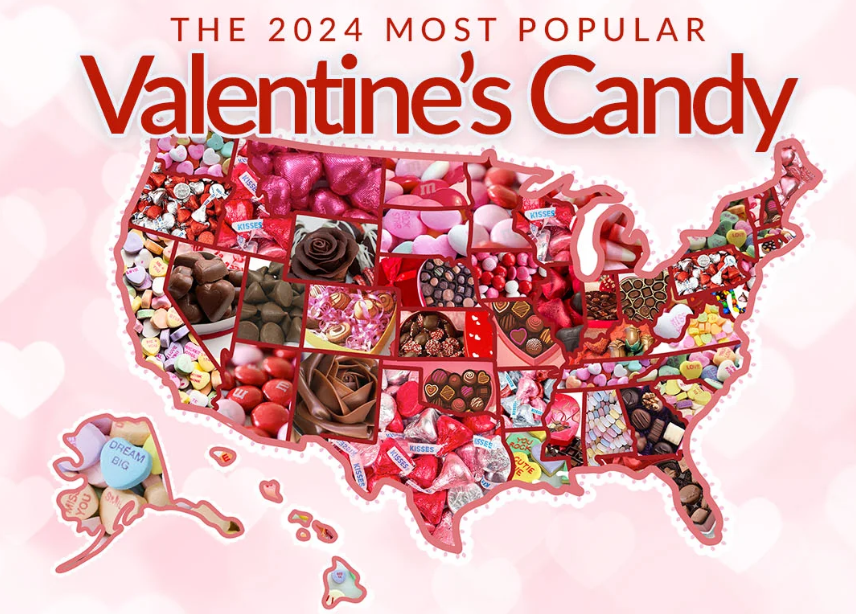
The original visualization Most Popular Valentine's Candy by State comes from [Candystore.com](https://www.candystore.com/blogs/holidays/valentines-candy-popular-states)
### Makeover
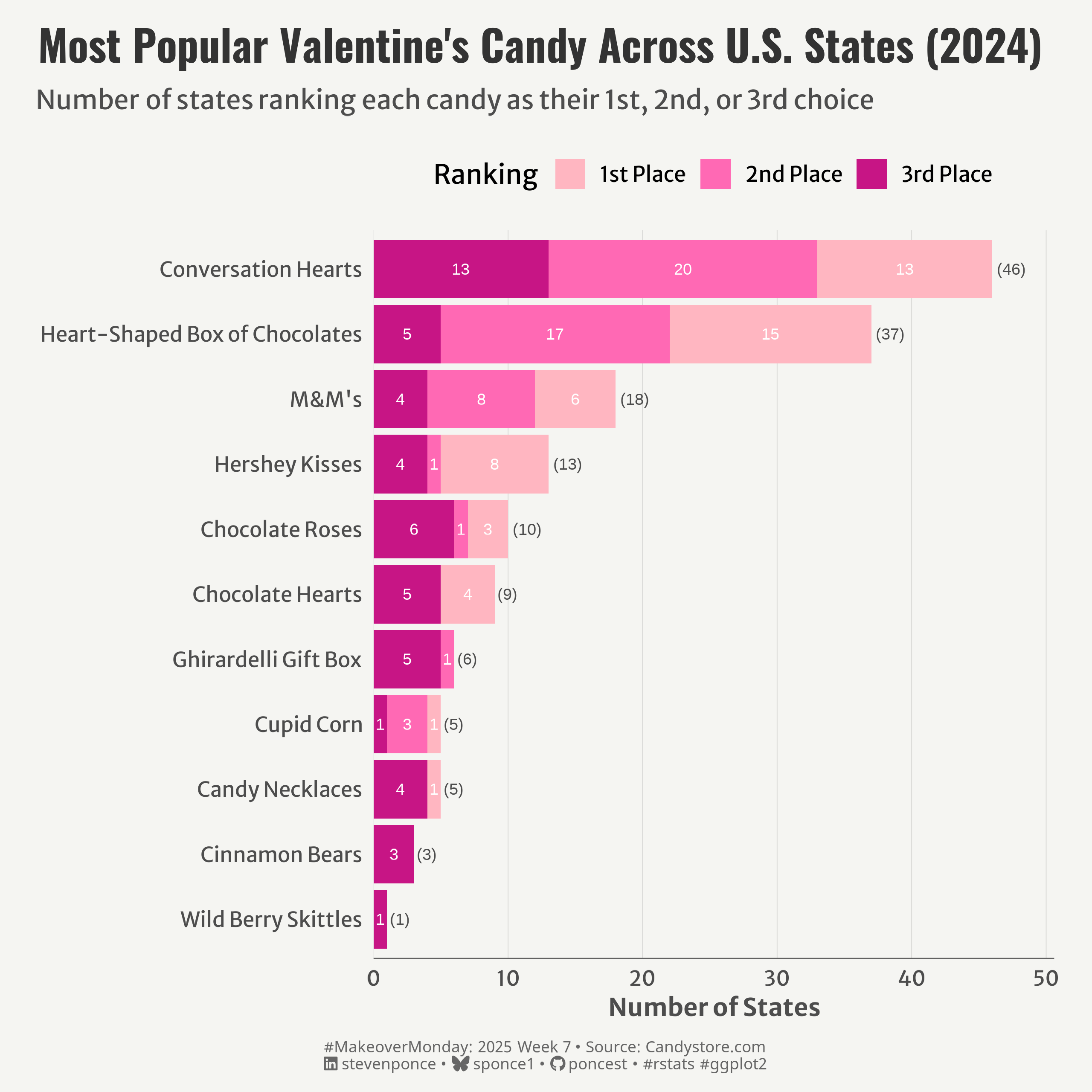{#fig-1}
### <mark> **Steps to Create this Graphic** </mark>
#### 1. Load Packages & Setup
```{r}
#| label: load
#| warning: false
#| message: false
#| results: "hide"
## 1. LOAD PACKAGES & SETUP ----
suppressPackageStartupMessages({
pacman::p_load(
    tidyverse,      # Easily Install and Load the 'Tidyverse'
    ggtext,         # Improved Text Rendering Support for 'ggplot2'
    showtext,       # Using Fonts More Easily in R Graphs
    janitor,        # Simple Tools for Examining and Cleaning Dirty Data
    skimr,          # Compact and Flexible Summaries of Data
    scales,         # Scale Functions for Visualization
    glue,           # Interpreted String Literals
    here,           # A Simpler Way to Find Your Files
    lubridate,      # Make Dealing with Dates a Little Easier
    camcorder       # Record Your Plot History
)
})

### |- figure size ----
gg_record(
    dir    = here::here("temp_plots"),
    device = "png",
    width  =  8,
    height =  8,
    units  = "in",
    dpi    = 320
)

# Source utility functions
suppressMessages(source(here::here("R/utils/fonts.R")))
source(here::here("R/utils/social_icons.R"))
source(here::here("R/utils/image_utils.R"))
source(here::here("R/themes/base_theme.R"))
```
#### 2. Read in the Data
```{r}
#| label: read
#| include: true
#| eval: true
#| warning: false
sv_candies_raw <- read_csv(
  here::here('data/MakeoverMonday_ SV_day.csv')) |>
  clean_names()
```
#### 3. Examine the Data
```{r}
#| label: examine
#| include: true
#| eval: true
#| results: 'hide'
#| warning: false
glimpse(sv_candies_raw)
skim(sv_candies_raw)
```
#### 4. Tidy Data
```{r}
#| label: tidy
#| warning: false
### |-  tidy data ----
sv_candies_clean <- sv_candies_raw |>
  rename_with(~str_remove(., "^x"), starts_with("x"))

# Create long format data
candies_long <- sv_candies_clean |>
  pivot_longer(
    cols = ends_with("2024"),
    names_to = "rank",
    values_to = "candy"
  ) |>
  # Clean up rank names
  mutate(rank = case_when(
    rank == "1st_place_2024" ~ "1st Place",
    rank == "2nd_place_2024" ~ "2nd Place",
    rank == "3rd_place_2024" ~ "3rd Place"
  ),
  rank = factor(rank, levels = c("1st Place", "2nd Place", "3rd Place"))
  )

# Prepare data with totals
candies_with_counts <- candies_long |>
  mutate(rank = factor(rank, levels = c("1st Place", "2nd Place", "3rd Place"))) |>
  count(candy, rank) |>
  group_by(candy) |>
  mutate(
    total = sum(n)
  ) |>
  ungroup() |>
  arrange(-total, candy)

# Create total summary data
total_summary <- candies_with_counts |>
  group_by(candy) |>
  summarize(
    total = sum(n),
    y = total,
    rank = "1st Place"
  )
```
#### 5. Visualization Parameters
```{r}
#| label: params
#| include: true
#| warning: false
### |-  plot aesthetics ----
# Get base colors with custom palette
colors <- get_theme_colors(palette = c("1st Place" = "#FFB6C1",
                                       "2nd Place" = "#FF69B4",
                                       "3rd Place" = "#C71585"))

### |-  titles and caption ----
title_text <- str_glue("Most Popular Valentine's Candy Across U.S. States (2024)")
subtitle_text <- str_glue("Number of states ranking each candy as their 1st, 2nd, or 3rd choice")

# Create caption
caption_text <- create_mm_caption(
    mm_year = 2025,
    mm_week = 07,
    source_text = "Candystore.com"
)

### |-  fonts ----
setup_fonts()
fonts <- get_font_families()

### |-  plot theme ----

# Start with base theme
base_theme <- create_base_theme(colors)

# Add weekly-specific theme elements
weekly_theme <- extend_weekly_theme(
  base_theme,
  theme(
    # Weekly-specific modifications
    axis.line.x           = element_line(color = "#252525", linewidth = .2),

    panel.spacing.x       = unit(2, 'lines'),
    panel.spacing.y       = unit(1, 'lines'),
    panel.grid.major.x    = element_line(color = alpha(colors[5], 0.2), linewidth = 0.2),
    panel.grid.major.y    = element_blank(),
    panel.grid.minor      = element_blank(),

    legend.position = "top"

  )
)

# Set theme
theme_set(weekly_theme)
```
#### 6. Plot
```{r}
#| label: plot
#| warning: false
### |-  Plot  ----
p <- ggplot(candies_with_counts,
       aes(x = reorder(candy, total),
           y = n,
           fill = rank)) +

  # Geoms
  geom_col() +
  geom_text(aes(label = n),
            position = position_stack(vjust = 0.5),
            color = "white",
            size = 3) +
  geom_text(data = total_summary,
            aes(y = y, label = paste0("(", total, ")")),
            hjust = -0.2,
            color = colors$text,
            size = 3) +

  # Scales
  scale_x_discrete() +
  scale_y_continuous(
    expand = expansion(mult = c(0, 0.1))
  ) +
  coord_flip() +
  scale_fill_manual(values = colors$palette) +

  # Labs
  labs(
    x = NULL,
    y = "Number of States",
    fill = "Ranking",
    title = title_text,
    subtitle = subtitle_text,
    caption = caption_text
  ) +

  # Theme
  theme(
    plot.title = element_text(
      size   = rel(1.6),
      family = fonts$title,
      face   = "bold",
      color  = colors$title,
      lineheight = 1.1,
      margin = margin(t = 5, b = 5)
    ),
    plot.subtitle = element_markdown(
      size   = rel(1),
      family = fonts$subtitle,
      color  = colors$subtitle,
      lineheight = 1.2,
      margin = margin(t = 5, b = 15)
    ),
    plot.caption = element_markdown(
      size   = rel(0.6),
      family = fonts$caption,
      color  = colors$caption,
      hjust  = 0.5,
      margin = margin(t = 10)
    )
  )
```
#### 7. Save
```{r}
#| label: save
#| warning: false
### |-  plot image ----
save_plot(
  p,
  type = "makeovermonday",
  year = 2025,
  week = 07,
  width = 8,
  height = 8
  )
```
#### 8. Session Info
::: {.callout-tip collapse="true"}
##### Expand for Session Info
```{r, echo = FALSE}
#| eval: true
#| warning: false
sessionInfo()
```
:::
#### 9. GitHub Repository
::: {.callout-tip collapse="true"}
##### Expand for GitHub Repo
The complete code for this analysis is available in [`mm_2025_07.qmd`](https://github.com/poncest/personal-website/blob/master/data_visualizations/MakeoverMonday/2025/mm_2025_07.qmd).
For the full repository, [click here](https://github.com/poncest/personal-website/).
:::
#### 10. References
::: {.callout-tip collapse="true"}
##### Expand for References
1. Article:
- Most Popular Valentine's Candy by State: [Most Popular Valentine's Candy by State](https://www.candystore.com/blogs/holidays/valentines-candy-popular-states)
2. Data:
- Makeover Monday 2025 Week 07: [Candystore.com](https://data.world/makeovermonday/2025-week-7-most-popular-valentines-candy-by-state)
:::

