Steven Ponce home pageSteven Ponce home page Steven Ponce
  • About
  • Data Visualizations
  • Projects
  • Behind the Viz
  • Resume
  • Email

On this page

  • Original
  • Makeover
  • Steps to Create this Graphic
    • 1. Load Packages & Setup
    • 2. Read in the Data
    • 3. Examine the Data
    • 4. Tidy Data
    • 5. Visualization Parameters
    • 6. Plot
    • 7. Save
    • 8. Session Info
    • 9. GitHub Repository
    • 10. References

The Transformation of the Global Electric Vehicle Market (2013-2023)

  • Show All Code
  • Hide All Code

  • View Source

Growth patterns reveal China’s dominance and the accelerating global adoption of electric vehicles

MakeoverMonday
2025
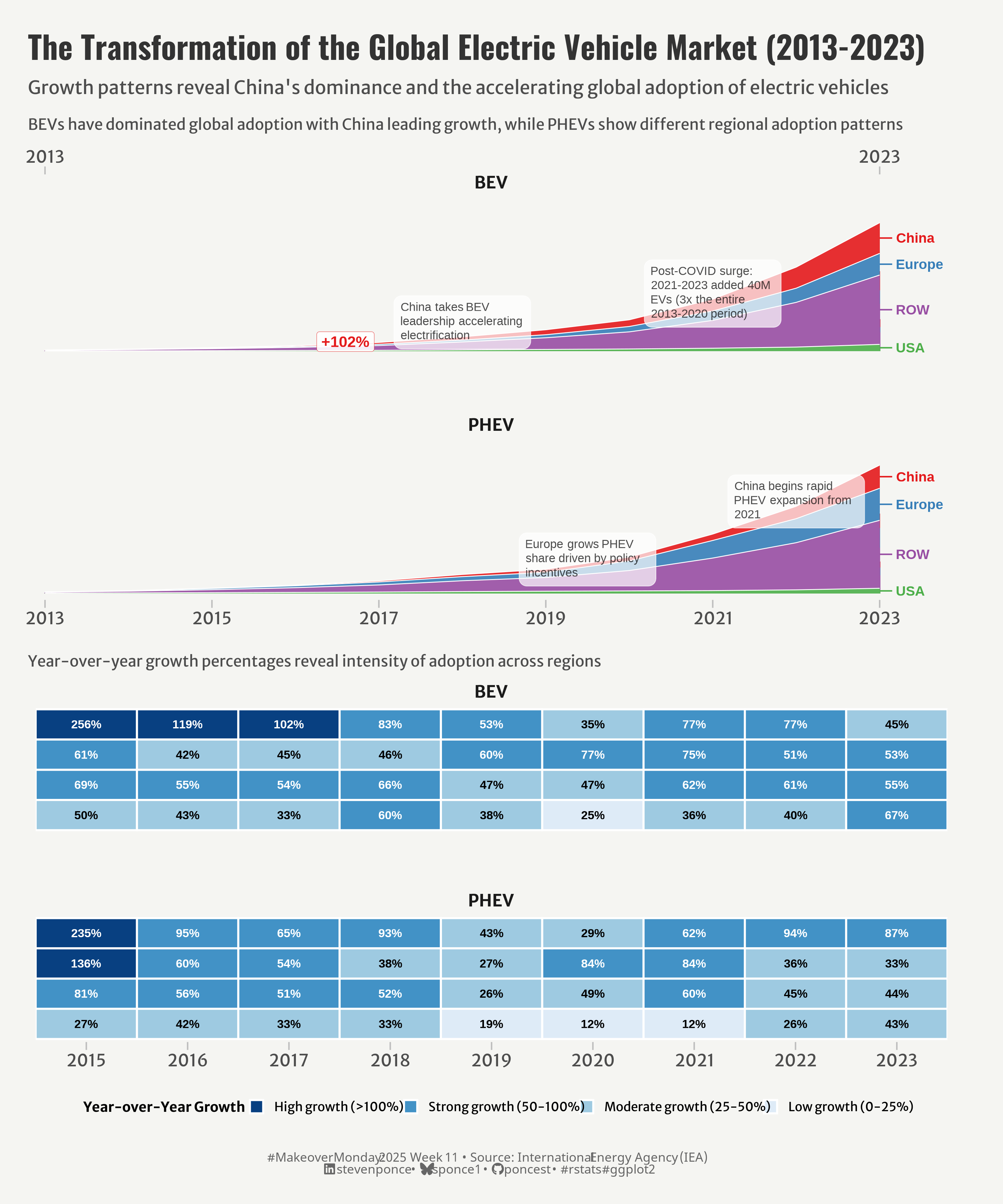
This visualization examines the transformation of the global electric vehicle market from 2013 to 2023, highlighting China’s dominance in both battery electric vehicles (BEVs) and plug-in hybrid electric vehicles (PHEVs). The analysis reveals dramatic growth patterns and regional adoption differences, showcasing how the post-COVID period (2021-2023) added three times more EVs than the entire previous seven years combined.
Author

Steven Ponce

Published

March 11, 2025

Original

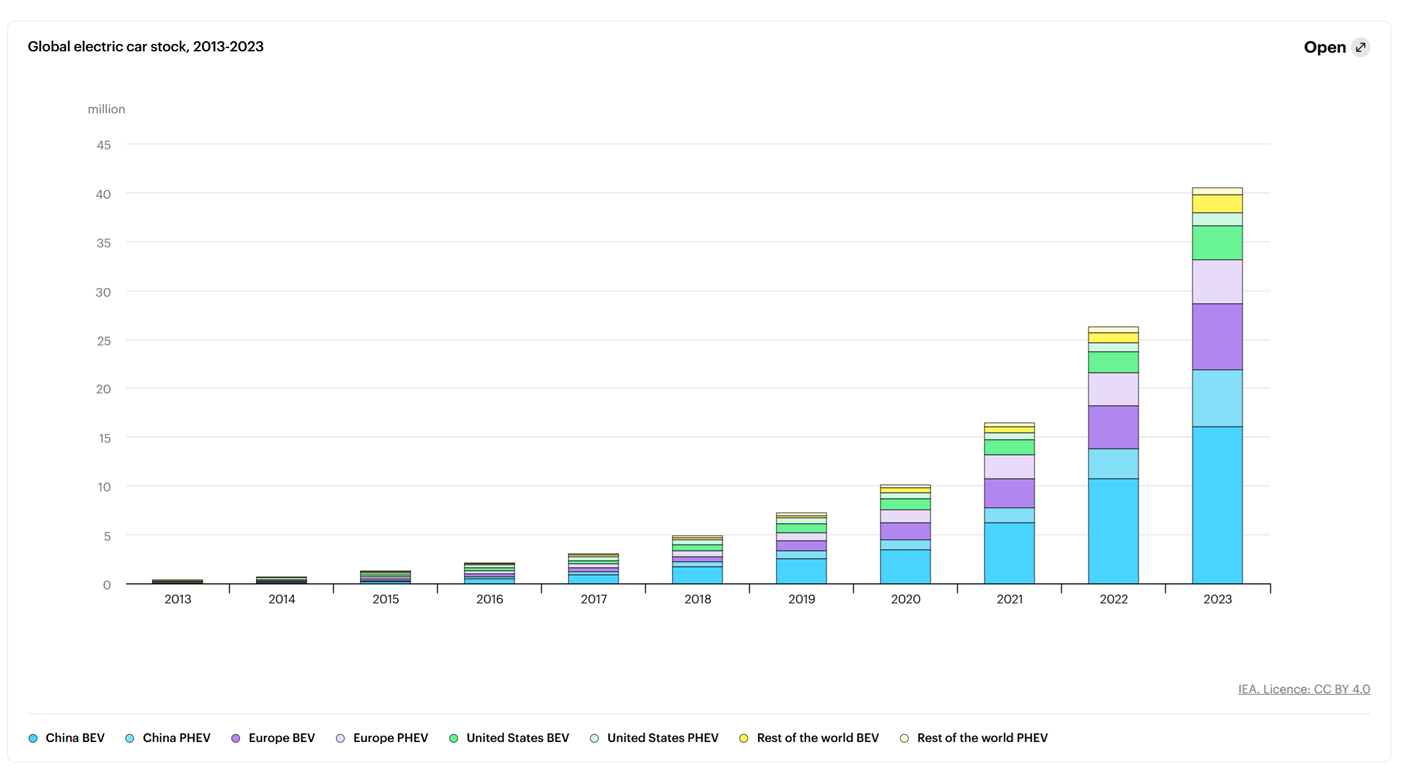
The original visualization Global electric car stock, 2013-2023 comes from International Energy Agency (IEA)

Original visualization

Makeover

Figure 1: The visualization shows the transformation of the global electric vehicle market from 2013-2023. The top section features stacked area charts displaying vehicle stock in millions for BEVs and PHEVs, with regions color-coded (China in red, Europe in blue, ROW in purple, USA in green). China dominates both markets, particularly after 2018. The bottom section presents heatmaps of year-over-year growth percentages by region and powertrain type, with darker blues indicating higher growth rates. Notable patterns include China’s exceptional BEV growth (256% in 2015) and rapid PHEV expansion after 2021. The visualization highlights how the 2021-2023 period added 40M EVs, three times the entire 2013-2020 period.

Steps to Create this Graphic

1. Load Packages & Setup

Show code
## 1. LOAD PACKAGES & SETUP ----
suppressPackageStartupMessages({
  if (!require("pacman")) install.packages("pacman")
  pacman::p_load(
      tidyverse,      # Easily Install and Load the 'Tidyverse'
      ggtext,         # Improved Text Rendering Support for 'ggplot2'
      showtext,       # Using Fonts More Easily in R Graphs
      janitor,        # Simple Tools for Examining and Cleaning Dirty Data
      skimr,          # Compact and Flexible Summaries of Data
      scales,         # Scale Functions for Visualization
      glue,           # Interpreted String Literals
      here,           # A Simpler Way to Find Your Files
      lubridate,      # Make Dealing with Dates a Little Easier
      ggpubr,         # 'ggplot2' Based Publication Ready Plots
      patchwork,      # The Composer of Plots
      camcorder,      # Record Your Plot History 
      ggrepel,        # Automatically Position Non-Overlapping Text Labels with 'ggplot2'
      directlabels,   # Direct Labels for Multicolor Plots
      gghighlight     # Highlight Lines and Points in 'ggplot2'
  )
})

### |- figure size ----
gg_record(
    dir    = here::here("temp_plots"),
    device = "png",
    width  =  12,
    height =  10,
    units  = "in",
    dpi    = 320
)

# Source utility functions
suppressMessages(source(here::here("R/utils/fonts.R")))
source(here::here("R/utils/social_icons.R"))
source(here::here("R/utils/image_utils.R"))
source(here::here("R/themes/base_theme.R"))

2. Read in the Data

Show code
#' The raw data for the week MakeoverMonday challenge can be downloaded 
#' here: https://data.world/makeovermonday/2025-week-10-river-water-quality/workspace/project-summary?agentid=makeovermonday&datasetid=2025-week-10-river-water-quality
#' 

electric_car_raw <- read_csv(
  here::here('data/IEA-EV-dataEV salesHistoricalCars.csv')) |> 
  clean_names()

3. Examine the Data

Show code
glimpse(electric_car_raw)
skim(electric_car_raw)

4. Tidy Data

Show code
### |-  tidy data ----
ev_stock <- electric_car_raw |>
  filter(parameter == "EV stock", 
         mode == "Cars",
         category == "Historical") |>
  # Create a simplified region 
  mutate(
    region_group = case_when(
      region == "China" ~ "China",
      region %in% c("EU27", "UK", "EFTA", "Europe") ~ "Europe", 
      region == "USA" ~ "USA",
      TRUE ~ "ROW"   # Rest of the world
  ))

# P1. Area Chart Data ----

# A. market data
ev_market_data <- ev_stock |>
  filter(year >= 2013, year <= 2023) |>
  filter(powertrain %in% c("BEV", "PHEV")) |>       # Include only BEV and PHEV
  summarize(
    total = sum(value, na.rm = TRUE), 
    .by = c(year, region_group, powertrain)
    ) |>
  # Calculate important metrics for annotations
  mutate(
    annual_powertrain_total = sum(total),
    share_of_powertrain = total / annual_powertrain_total * 100,
    .by = c(year, powertrain)
  ) |>
  # Calculate year-over-year growth rates
  arrange(year) |>
  mutate(
    yoy_growth = (total / lag(total) - 1) * 100,
    growth_category = case_when(
      is.na(yoy_growth) ~ "First year",
      yoy_growth > 100 ~ "High growth (>100%)",
      yoy_growth > 50 ~ "Strong growth (50-100%)",
      yoy_growth > 25 ~ "Moderate growth (25-50%)",
      yoy_growth > 0 ~ "Low growth (0-25%)",
      TRUE ~ "Decline"
    ),
    .by = c(region_group, powertrain)
  ) 

# B. Annotation data for key insights
annotations <- tibble(
  year = c(2018, 2021, 2019.5, 2022),
  powertrain = c("BEV", "BEV", "PHEV", "PHEV"),
  y_pos = c(15000000, 30000000, 8500000, 23000000),
  label = c(
    "China takes BEV leadership\naccelerating electrification",
    "Post-COVID surge:\n2021-2023 added 40M EVs\n(3x the entire 2013-2020 period)",
    "Europe grows PHEV share\ndriven by policy incentives",
    "China begins rapid PHEV\nexpansion from 2021"
  ),
  hjust = c(0.5, 0.5, 0.5, 0.5),
  vjust = c(1, 0, 1, 0)
)

# C. Growth highlights data
growth_highlights <- ev_market_data |>
  filter(!is.na(yoy_growth), yoy_growth > 100, year >= 2017) |>
  group_by(region_group, powertrain) |>
  filter(yoy_growth == max(yoy_growth)) |>
  ungroup() |>
  arrange(desc(yoy_growth)) |>
  mutate(
    label = paste0("+", round(yoy_growth), "%"),
    year = year - 0.2,
    total = total + 4000000 # move up the label
  )

# D. Data for direct labeling of regions at the end (2023)
direct_labels <- ev_market_data |>
  filter(year == 2023) |>
  # Calculate cumulative positions for stacked areas
  arrange(desc(region_group)) |>  # Reverse order to match stacking
  mutate(
    y_pos = cumsum(total) - 0.5 * total,  # Center of each segment
    label = region_group,
    .by = powertrain
  ) 

# E. Milestone data
milestones <- ev_market_data |>
  group_by(powertrain) |>
  summarize(
    total_2023 = sum(total[year == 2023]),
    total_2013 = sum(total[year == 2013]),
    growth_factor = total_2023 / total_2013,
    .groups = "drop"
  ) |>
  mutate(
    label = paste0(powertrain, " growth:\n", round(growth_factor), "x in 10 years")
  )

# P2. Growth Heatmap ----

# A. Reshape growth data for heatmap
growth_heatmap_data <- ev_stock |>
  filter(year >= 2014, year <= 2023) |>    # Start from 2014 to calculate YoY growth
  filter(powertrain %in% c("BEV", "PHEV")) |>
  summarize(
    total = sum(value, na.rm = TRUE), 
    .by = c(region_group, powertrain, year)
    ) |>
  arrange(year) |>
  mutate(
    yoy_growth = (total / lag(total) - 1) * 100,
    growth_category = case_when(
      is.na(yoy_growth) ~ NA_character_,
      yoy_growth > 100 ~ "High growth (>100%)",
      yoy_growth > 50 ~ "Strong growth (50-100%)",
      yoy_growth > 25 ~ "Moderate growth (25-50%)",
      yoy_growth > 0 ~ "Low growth (0-25%)",
      TRUE ~ "Decline"
    ),
    .by = c(region_group, powertrain)
  ) |>
  filter(!is.na(yoy_growth)) 

# change "ROW" to "Rest of the world" 
growth_heatmap_data <- growth_heatmap_data |>
  mutate(region_label = case_when(
    region_group == "ROW" ~ "Rest of world",
    TRUE ~ as.character(region_group)
  ),
  # Create an ordered factor for growth categories
  growth_category_ordered = factor(
    growth_category,
    levels = c(
      "High growth (>100%)", 
      "Strong growth (50-100%)", 
      "Moderate growth (25-50%)", 
      "Low growth (0-25%)",
      "Decline"  
    )
  ))

5. Visualization Parameters

Show code
### |-  plot aesthetics ----
# Get base colors with custom palette
colors <- get_theme_colors(palette = c(
  "China" = "#E41A1C",
  "Europe" = "#377EB8", 
  "USA" = "#4DAF4A",
  "ROW" = "#984EA3",
  "High growth (>100%)" = "#084081",    
  "Strong growth (50-100%)" = "#4292C6", 
  "Moderate growth (25-50%)" = "#9ECAE1",
  "Low growth (0-25%)" = "#DEEBF7"  
))
  
### |-  titles and caption ----
title_text <- str_glue("The Transformation of the Global Electric Vehicle Market (2013-2023)")
subtitle_text <- str_glue("Growth patterns reveal China's dominance and the accelerating global adoption of electric vehicles")

# Create caption
caption_text <- create_mm_caption(
    mm_year = 2025,
    mm_week = 11,
    source_text = "International Energy Agency (IEA)"
)

### |-  fonts ----
setup_fonts()
fonts <- get_font_families()

### |-  plot theme ----

# Start with base theme
base_theme <- create_base_theme(colors)

# Add weekly-specific theme elements
weekly_theme <- extend_weekly_theme(
  base_theme,
  theme(
    # Weekly-specific modifications
    legend.position = "top",
    legend.title = element_text(size = rel(0.79)),
    legend.text = element_text(size = rel(0.71)),
    
    axis.title = element_text(size = rel(1.14)),  
    axis.text = element_text(size = rel(0.86)),  
    axis.text.y = element_blank(),
    axis.title.y = element_blank(),
    axis.ticks.y = element_blank(),
    axis.ticks.x = element_line(color = "gray", linewidth = 0.5), 
    axis.ticks.length = unit(0.2, "cm"), 
    
    strip.text.y = element_text(size = rel(0.7), angle = 0), 
    
    panel.border = element_blank(),
    panel.grid = element_blank(),
    panel.spacing = unit(1, "lines"),  
    panel.spacing.y = unit(0, "lines"),
    
  )
)

# Set theme
theme_set(weekly_theme)

6. Plot

Show code
### |-  Plot  ----
# P1. Area Chart ----
area_chart <- ggplot(
  ev_market_data,
  aes(x = year, y = total, fill = region_group)
  ) +
  # Geom
  geom_area(
    alpha = 0.9, position = "stack"
  ) +
  geom_line(
    aes(color = region_group, group = region_group), 
    position = "stack", 
    color = "white", 
    linewidth = 0.3
  ) +
  geom_textbox(                 # Annotations
    data = annotations,
    aes(x = year, y = y_pos, label = label),
    box.color = "white",
    fill = "white",
    alpha = 0.7,
    width = unit(0.15, "npc"),
    hjust = 0.5,
    vjust = 0.5,
    size = 3,
    box.padding = unit(c(5, 5, 5, 5), "pt"),
    color = "black"
  ) +
  geom_label(                   # growth label
    data = growth_highlights,
    aes(label = label, color = region_group),
    fill = "white",
    alpha = 0.9,
    fontface = "bold",
    label.size = 0.1,
    nudge_x = -0.2,
  ) +
  geom_text(                       # direct label (right)
    data = direct_labels,
    aes(x = 2023.2, y = y_pos, label = label, color = region_group),
    hjust = 0,
    fontface = "bold",
    size = 3.5
  ) +
  geom_segment(                    # connecting lines to direct labels
    data = direct_labels,
    aes(
      x = 2023, 
      xend = 2023.15, 
      y = y_pos, 
      yend = y_pos,
      color = region_group
    ),
    linewidth = 0.5
  ) +
  # Scales
  scale_y_continuous(
    labels = label_number(scale = 1/1000000, suffix = "M"),
    expand = expansion(mult = c(0.05, 0.2))  
  ) +
  scale_x_continuous(
    breaks = seq(2013, 2023, by = 2),
    expand = expansion(mult = c(0.01, 0.06)),  
    sec.axis = sec_axis(
      ~ ., 
      breaks = c(2013, 2023),
      labels = c("2013", "2023")
    )
  ) +
  scale_fill_manual(values = colors$palette) +
  scale_color_manual(values = colors$palette) +
  # Labs
  labs(
    subtitle = "BEVs have dominated global adoption with China leading growth, while PHEVs show different regional adoption patterns",
    x = NULL,
    y = "Vehicle Stock (millions)"
  ) +
  # Facets
  facet_wrap(~ powertrain, ncol = 1, scales = "free_y") +
  # Theme
  theme(
    legend.position = "none",
    plot.margin = margin(t = 10, r = 30, b = 10, l = 10),  
    strip.text = element_text(face = "bold", size = rel(0.86), margin = margin(b = 5)),
    panel.spacing.y = unit(1.5, "cm"),
    panel.grid.minor = element_blank(),
    panel.grid.major.x = element_blank(),
    
    plot.subtitle = element_text(
      size = rel(0.78),
      family = fonts$subtitle,
      color = colors$subtitle,
      margin = margin(b = 10)
    )
  )
  
# P2. Growth Heatmap ---- 
growth_heatmap <- ggplot(
  growth_heatmap_data,
  aes(x = year, y = fct_rev(region_label), fill = growth_category_ordered)
  ) +
  # Geoms
  geom_tile(
    color = "white", linewidth = 0.7
    ) +
  geom_text(
    aes(label = paste0(round(yoy_growth), "%")),
    color = ifelse(growth_heatmap_data$growth_category %in% 
                     c("High growth (>100%)", "Strong growth (50-100%)"), "white", "black"),
    size = 3,
    fontface = "bold"
  ) +
  # Scales
  scale_fill_manual(
    values = colors$palette,
    name = "Year-over-Year Growth",
    guide = guide_legend(
      title.position = "top",
      nrow = 1,
      label.theme = element_text(size = 9),
      reverse = FALSE
    ),
    drop = FALSE      # Drop any unused levels
  ) +
  scale_x_continuous(
    breaks = 2015:2023, 
    expand = expansion(mult = c(0, 0))
  ) +
  # Legend
  guides(
    fill = guide_legend(
      title = "Year-over-Year Growth",
      nrow = 1,
      byrow = TRUE,
      override.aes = list(
        size = 3
      ),
      title.theme = element_text(face = "bold", size = 10),
      label.theme = element_text(size = 9)
    )
  ) +
  # Labels 
  labs(
    subtitle = "Year-over-year growth percentages reveal intensity of adoption across regions",
    x = NULL,
    y = NULL
  ) +
  # Facet 
  facet_wrap(~ powertrain, ncol = 1) +
  # Theme
  theme(
    plot.margin = margin(t = 10, r = 15, b = 10, l = 10),
    panel.grid = element_blank(),
    panel.spacing.y = unit(1.5, "cm"),
    strip.text = element_text(face = "bold", size = rel(0.86), margin = margin(b = 5)),
    legend.position = "bottom",
    legend.title = element_text(face = "bold"),
    legend.key.size = unit(0.8, "lines"),
    
    plot.subtitle = element_text(
      size = rel(0.78),
      family = fonts$subtitle,
      color = colors$subtitle,
      margin = margin(b = 10)
  ))

# Combined Plots ----
combined_plot <- (area_chart/ growth_heatmap ) +
  plot_layout(heights = c(1.2, 1)) +
  plot_annotation(
    title = title_text,
    subtitle = subtitle_text,
    caption = caption_text,
    theme = theme(
      plot.title = element_text(
        size   = rel(1.6),
        family = fonts$title,
        face   = "bold",
        color  = colors$title,
        lineheight = 1.1,
        margin = margin(t = 5, b = 5)
      ),
      plot.subtitle = element_text(
        size   = rel(0.95),
        family = fonts$subtitle,
        color  = colors$subtitle,
        lineheight = 1.2,
        margin = margin(t = 5, b = 5)
      ),
      plot.caption = element_markdown(
        size   = rel(0.65),
        family = fonts$caption,
        color  = colors$caption,
        hjust  = 0.5,
        margin = margin(t = 10)
      ),
      plot.margin = margin(t = 20, r = 10, b = 20, l = 10),
    )
  )

7. Save

Show code
### |-  plot image ----  
save_plot_patchwork(
  combined_plot, 
  type = "makeovermonday", 
  year = 2025,
  week = 11,
  width = 10, 
  height = 12
  )

8. Session Info

TipExpand for Session Info
R version 4.4.1 (2024-06-14 ucrt)
Platform: x86_64-w64-mingw32/x64
Running under: Windows 11 x64 (build 22631)

Matrix products: default


locale:
[1] LC_COLLATE=English_United States.utf8 
[2] LC_CTYPE=English_United States.utf8   
[3] LC_MONETARY=English_United States.utf8
[4] LC_NUMERIC=C                          
[5] LC_TIME=English_United States.utf8    

time zone: America/New_York
tzcode source: internal

attached base packages:
[1] stats     graphics  grDevices datasets  utils     methods   base     

other attached packages:
 [1] gghighlight_0.4.1      directlabels_2024.1.21 ggrepel_0.9.6         
 [4] camcorder_0.1.0        patchwork_1.3.0        ggpubr_0.6.0          
 [7] here_1.0.1             glue_1.8.0             scales_1.3.0          
[10] skimr_2.1.5            janitor_2.2.0          showtext_0.9-7        
[13] showtextdb_3.0         sysfonts_0.8.9         ggtext_0.1.2          
[16] lubridate_1.9.3        forcats_1.0.0          stringr_1.5.1         
[19] dplyr_1.1.4            purrr_1.0.2            readr_2.1.5           
[22] tidyr_1.3.1            tibble_3.2.1           ggplot2_3.5.1         
[25] tidyverse_2.0.0        pacman_0.5.1          

loaded via a namespace (and not attached):
 [1] tidyselect_1.2.1   farver_2.1.2       fastmap_1.2.0      digest_0.6.37     
 [5] timechange_0.3.0   lifecycle_1.0.4    rsvg_2.6.1         magrittr_2.0.3    
 [9] compiler_4.4.0     rlang_1.1.4        tools_4.4.0        utf8_1.2.4        
[13] yaml_2.3.10        knitr_1.49         ggsignif_0.6.4     labeling_0.4.3    
[17] htmlwidgets_1.6.4  curl_6.0.0         bit_4.5.0          xml2_1.3.6        
[21] repr_1.1.7         abind_1.4-8        withr_3.0.2        grid_4.4.0        
[25] fansi_1.0.6        colorspace_2.1-1   cli_3.6.3          rmarkdown_2.29    
[29] crayon_1.5.3       generics_0.1.3     rstudioapi_0.17.1  tzdb_0.4.0        
[33] commonmark_1.9.2   parallel_4.4.0     ggplotify_0.1.2    yulab.utils_0.1.8 
[37] base64enc_0.1-3    vctrs_0.6.5        jsonlite_1.8.9     carData_3.0-5     
[41] car_3.1-3          gridGraphics_0.5-1 hms_1.1.3          bit64_4.5.2       
[45] rstatix_0.7.2      Formula_1.2-5      systemfonts_1.1.0  magick_2.8.5      
[49] gifski_1.32.0-1    codetools_0.2-20   stringi_1.8.4      gtable_0.3.6      
[53] quadprog_1.5-8     munsell_0.5.1      pillar_1.9.0       htmltools_0.5.8.1 
[57] R6_2.5.1           rprojroot_2.0.4    vroom_1.6.5        evaluate_1.0.1    
[61] markdown_1.13      backports_1.5.0    gridtext_0.1.5     broom_1.0.7       
[65] snakecase_0.11.1   renv_1.0.3         Rcpp_1.0.13-1      svglite_2.1.3     
[69] xfun_0.49          fs_1.6.5           pkgconfig_2.0.3   

9. GitHub Repository

TipExpand for GitHub Repo

The complete code for this analysis is available in mm_2025_11.qmd.

For the full repository, click here.

10. References

TipExpand for References
  1. Data:
  • Makeover Monday 2025 Week 11: Electric Car Sales
  1. Article
  • Trend in Electric Cars: Electric Car Sales
Back to top
Source Code
---
title: "The Transformation of the Global Electric Vehicle Market (2013-2023)"
subtitle: "Growth patterns reveal China's dominance and the accelerating global adoption of electric vehicles"
description: "This visualization examines the transformation of the global electric vehicle market from 2013 to 2023, highlighting China's dominance in both battery electric vehicles (BEVs) and plug-in hybrid electric vehicles (PHEVs). The analysis reveals dramatic growth patterns and regional adoption differences, showcasing how the post-COVID period (2021-2023) added three times more EVs than the entire previous seven years combined."
author: "Steven Ponce"
date: "2025-03-11" 
categories: ["MakeoverMonday", "2025"]   
tags: [
 "electric vehicles", "BEV", "PHEV", "sustainability", "automotive industry", "China", "market analysis", "time series", "heatmap", "energy transition", "climate action", "transportation", "global trends", "stacked area chart", "growth visualization"
]
image: "thumbnails/mm_2025_11.png"
format:
  html:
    toc: true
    toc-depth: 5
    code-link: true
    code-fold: true
    code-tools: true
    code-summary: "Show code"
editor_options: 
  chunk_output_type: inline
execute: 
  freeze: true                                                  
  cache: true                                                   
  error: false
  message: false
  warning: false
  eval: true
# filters:
#   - social-share
# share:                     
#   permalink: "https://stevenponce.netlify.app/data_visualizations/MakeoverMonday/2025/mm_2025_11.html"
#   description: "Visualizing a decade of electric vehicle adoption: How China led the global EV revolution and the market tripled in size during the post-COVID period. #DataViz #ElectricVehicles #ClimateAction"
#   twitter: true
#   linkedin: true
#   email: true
#   facebook: false
#   reddit: false
#   stumble: false
#   tumblr: false
#   mastodon: true
#   bsky: true
---

### Original

The original visualization __Global electric car stock, 2013-2023__ comes from [International Energy Agency (IEA)](https://www.iea.org/reports/global-ev-outlook-2024/trends-in-electric-cars)
![Original visualization](https://raw.githubusercontent.com/poncest/MakeoverMonday/master/2025/Week_11/original_chart.png)

### Makeover

![The visualization shows the transformation of the global electric vehicle market from 2013-2023. The top section features stacked area charts displaying vehicle stock in millions for BEVs and PHEVs, with regions color-coded (China in red, Europe in blue, ROW in purple, USA in green). China dominates both markets, particularly after 2018. The bottom section presents heatmaps of year-over-year growth percentages by region and powertrain type, with darker blues indicating higher growth rates. Notable patterns include China's exceptional BEV growth (256% in 2015) and rapid PHEV expansion after 2021. The visualization highlights how the 2021-2023 period added 40M EVs, three times the entire 2013-2020 period.](mm_2025_11.png){#fig-1}

### <mark> **Steps to Create this Graphic** </mark>

#### 1. Load Packages & Setup

```{r}
#| label: load
#| warning: false
#| message: false      
#| results: "hide"     

## 1. LOAD PACKAGES & SETUP ----
suppressPackageStartupMessages({
  if (!require("pacman")) install.packages("pacman")
  pacman::p_load(
      tidyverse,      # Easily Install and Load the 'Tidyverse'
      ggtext,         # Improved Text Rendering Support for 'ggplot2'
      showtext,       # Using Fonts More Easily in R Graphs
      janitor,        # Simple Tools for Examining and Cleaning Dirty Data
      skimr,          # Compact and Flexible Summaries of Data
      scales,         # Scale Functions for Visualization
      glue,           # Interpreted String Literals
      here,           # A Simpler Way to Find Your Files
      lubridate,      # Make Dealing with Dates a Little Easier
      ggpubr,         # 'ggplot2' Based Publication Ready Plots
      patchwork,      # The Composer of Plots
      camcorder,      # Record Your Plot History 
      ggrepel,        # Automatically Position Non-Overlapping Text Labels with 'ggplot2'
      directlabels,   # Direct Labels for Multicolor Plots
      gghighlight     # Highlight Lines and Points in 'ggplot2'
  )
})

### |- figure size ----
gg_record(
    dir    = here::here("temp_plots"),
    device = "png",
    width  =  12,
    height =  10,
    units  = "in",
    dpi    = 320
)

# Source utility functions
suppressMessages(source(here::here("R/utils/fonts.R")))
source(here::here("R/utils/social_icons.R"))
source(here::here("R/utils/image_utils.R"))
source(here::here("R/themes/base_theme.R"))
```

#### 2. Read in the Data

```{r}
#| label: read
#| include: true
#| eval: true
#| warning: false

#' The raw data for the week MakeoverMonday challenge can be downloaded 
#' here: https://data.world/makeovermonday/2025-week-10-river-water-quality/workspace/project-summary?agentid=makeovermonday&datasetid=2025-week-10-river-water-quality
#' 

electric_car_raw <- read_csv(
  here::here('data/IEA-EV-dataEV salesHistoricalCars.csv')) |> 
  clean_names()
```

#### 3. Examine the Data

```{r}
#| label: examine
#| include: true
#| eval: true
#| results: 'hide'
#| warning: false

glimpse(electric_car_raw)
skim(electric_car_raw)
```

#### 4. Tidy Data

```{r}
#| label: tidy
#| warning: false

### |-  tidy data ----
ev_stock <- electric_car_raw |>
  filter(parameter == "EV stock", 
         mode == "Cars",
         category == "Historical") |>
  # Create a simplified region 
  mutate(
    region_group = case_when(
      region == "China" ~ "China",
      region %in% c("EU27", "UK", "EFTA", "Europe") ~ "Europe", 
      region == "USA" ~ "USA",
      TRUE ~ "ROW"   # Rest of the world
  ))

# P1. Area Chart Data ----

# A. market data
ev_market_data <- ev_stock |>
  filter(year >= 2013, year <= 2023) |>
  filter(powertrain %in% c("BEV", "PHEV")) |>       # Include only BEV and PHEV
  summarize(
    total = sum(value, na.rm = TRUE), 
    .by = c(year, region_group, powertrain)
    ) |>
  # Calculate important metrics for annotations
  mutate(
    annual_powertrain_total = sum(total),
    share_of_powertrain = total / annual_powertrain_total * 100,
    .by = c(year, powertrain)
  ) |>
  # Calculate year-over-year growth rates
  arrange(year) |>
  mutate(
    yoy_growth = (total / lag(total) - 1) * 100,
    growth_category = case_when(
      is.na(yoy_growth) ~ "First year",
      yoy_growth > 100 ~ "High growth (>100%)",
      yoy_growth > 50 ~ "Strong growth (50-100%)",
      yoy_growth > 25 ~ "Moderate growth (25-50%)",
      yoy_growth > 0 ~ "Low growth (0-25%)",
      TRUE ~ "Decline"
    ),
    .by = c(region_group, powertrain)
  ) 

# B. Annotation data for key insights
annotations <- tibble(
  year = c(2018, 2021, 2019.5, 2022),
  powertrain = c("BEV", "BEV", "PHEV", "PHEV"),
  y_pos = c(15000000, 30000000, 8500000, 23000000),
  label = c(
    "China takes BEV leadership\naccelerating electrification",
    "Post-COVID surge:\n2021-2023 added 40M EVs\n(3x the entire 2013-2020 period)",
    "Europe grows PHEV share\ndriven by policy incentives",
    "China begins rapid PHEV\nexpansion from 2021"
  ),
  hjust = c(0.5, 0.5, 0.5, 0.5),
  vjust = c(1, 0, 1, 0)
)

# C. Growth highlights data
growth_highlights <- ev_market_data |>
  filter(!is.na(yoy_growth), yoy_growth > 100, year >= 2017) |>
  group_by(region_group, powertrain) |>
  filter(yoy_growth == max(yoy_growth)) |>
  ungroup() |>
  arrange(desc(yoy_growth)) |>
  mutate(
    label = paste0("+", round(yoy_growth), "%"),
    year = year - 0.2,
    total = total + 4000000 # move up the label
  )

# D. Data for direct labeling of regions at the end (2023)
direct_labels <- ev_market_data |>
  filter(year == 2023) |>
  # Calculate cumulative positions for stacked areas
  arrange(desc(region_group)) |>  # Reverse order to match stacking
  mutate(
    y_pos = cumsum(total) - 0.5 * total,  # Center of each segment
    label = region_group,
    .by = powertrain
  ) 

# E. Milestone data
milestones <- ev_market_data |>
  group_by(powertrain) |>
  summarize(
    total_2023 = sum(total[year == 2023]),
    total_2013 = sum(total[year == 2013]),
    growth_factor = total_2023 / total_2013,
    .groups = "drop"
  ) |>
  mutate(
    label = paste0(powertrain, " growth:\n", round(growth_factor), "x in 10 years")
  )

# P2. Growth Heatmap ----

# A. Reshape growth data for heatmap
growth_heatmap_data <- ev_stock |>
  filter(year >= 2014, year <= 2023) |>    # Start from 2014 to calculate YoY growth
  filter(powertrain %in% c("BEV", "PHEV")) |>
  summarize(
    total = sum(value, na.rm = TRUE), 
    .by = c(region_group, powertrain, year)
    ) |>
  arrange(year) |>
  mutate(
    yoy_growth = (total / lag(total) - 1) * 100,
    growth_category = case_when(
      is.na(yoy_growth) ~ NA_character_,
      yoy_growth > 100 ~ "High growth (>100%)",
      yoy_growth > 50 ~ "Strong growth (50-100%)",
      yoy_growth > 25 ~ "Moderate growth (25-50%)",
      yoy_growth > 0 ~ "Low growth (0-25%)",
      TRUE ~ "Decline"
    ),
    .by = c(region_group, powertrain)
  ) |>
  filter(!is.na(yoy_growth)) 

# change "ROW" to "Rest of the world" 
growth_heatmap_data <- growth_heatmap_data |>
  mutate(region_label = case_when(
    region_group == "ROW" ~ "Rest of world",
    TRUE ~ as.character(region_group)
  ),
  # Create an ordered factor for growth categories
  growth_category_ordered = factor(
    growth_category,
    levels = c(
      "High growth (>100%)", 
      "Strong growth (50-100%)", 
      "Moderate growth (25-50%)", 
      "Low growth (0-25%)",
      "Decline"  
    )
  ))
```

#### 5. Visualization Parameters

```{r}
#| label: params
#| include: true
#| warning: false

### |-  plot aesthetics ----
# Get base colors with custom palette
colors <- get_theme_colors(palette = c(
  "China" = "#E41A1C",
  "Europe" = "#377EB8", 
  "USA" = "#4DAF4A",
  "ROW" = "#984EA3",
  "High growth (>100%)" = "#084081",    
  "Strong growth (50-100%)" = "#4292C6", 
  "Moderate growth (25-50%)" = "#9ECAE1",
  "Low growth (0-25%)" = "#DEEBF7"  
))
  
### |-  titles and caption ----
title_text <- str_glue("The Transformation of the Global Electric Vehicle Market (2013-2023)")
subtitle_text <- str_glue("Growth patterns reveal China's dominance and the accelerating global adoption of electric vehicles")

# Create caption
caption_text <- create_mm_caption(
    mm_year = 2025,
    mm_week = 11,
    source_text = "International Energy Agency (IEA)"
)

### |-  fonts ----
setup_fonts()
fonts <- get_font_families()

### |-  plot theme ----

# Start with base theme
base_theme <- create_base_theme(colors)

# Add weekly-specific theme elements
weekly_theme <- extend_weekly_theme(
  base_theme,
  theme(
    # Weekly-specific modifications
    legend.position = "top",
    legend.title = element_text(size = rel(0.79)),
    legend.text = element_text(size = rel(0.71)),
    
    axis.title = element_text(size = rel(1.14)),  
    axis.text = element_text(size = rel(0.86)),  
    axis.text.y = element_blank(),
    axis.title.y = element_blank(),
    axis.ticks.y = element_blank(),
    axis.ticks.x = element_line(color = "gray", linewidth = 0.5), 
    axis.ticks.length = unit(0.2, "cm"), 
    
    strip.text.y = element_text(size = rel(0.7), angle = 0), 
    
    panel.border = element_blank(),
    panel.grid = element_blank(),
    panel.spacing = unit(1, "lines"),  
    panel.spacing.y = unit(0, "lines"),
    
  )
)

# Set theme
theme_set(weekly_theme)
```

#### 6. Plot

```{r}
#| label: plot
#| warning: false

### |-  Plot  ----
# P1. Area Chart ----
area_chart <- ggplot(
  ev_market_data,
  aes(x = year, y = total, fill = region_group)
  ) +
  # Geom
  geom_area(
    alpha = 0.9, position = "stack"
  ) +
  geom_line(
    aes(color = region_group, group = region_group), 
    position = "stack", 
    color = "white", 
    linewidth = 0.3
  ) +
  geom_textbox(                 # Annotations
    data = annotations,
    aes(x = year, y = y_pos, label = label),
    box.color = "white",
    fill = "white",
    alpha = 0.7,
    width = unit(0.15, "npc"),
    hjust = 0.5,
    vjust = 0.5,
    size = 3,
    box.padding = unit(c(5, 5, 5, 5), "pt"),
    color = "black"
  ) +
  geom_label(                   # growth label
    data = growth_highlights,
    aes(label = label, color = region_group),
    fill = "white",
    alpha = 0.9,
    fontface = "bold",
    label.size = 0.1,
    nudge_x = -0.2,
  ) +
  geom_text(                       # direct label (right)
    data = direct_labels,
    aes(x = 2023.2, y = y_pos, label = label, color = region_group),
    hjust = 0,
    fontface = "bold",
    size = 3.5
  ) +
  geom_segment(                    # connecting lines to direct labels
    data = direct_labels,
    aes(
      x = 2023, 
      xend = 2023.15, 
      y = y_pos, 
      yend = y_pos,
      color = region_group
    ),
    linewidth = 0.5
  ) +
  # Scales
  scale_y_continuous(
    labels = label_number(scale = 1/1000000, suffix = "M"),
    expand = expansion(mult = c(0.05, 0.2))  
  ) +
  scale_x_continuous(
    breaks = seq(2013, 2023, by = 2),
    expand = expansion(mult = c(0.01, 0.06)),  
    sec.axis = sec_axis(
      ~ ., 
      breaks = c(2013, 2023),
      labels = c("2013", "2023")
    )
  ) +
  scale_fill_manual(values = colors$palette) +
  scale_color_manual(values = colors$palette) +
  # Labs
  labs(
    subtitle = "BEVs have dominated global adoption with China leading growth, while PHEVs show different regional adoption patterns",
    x = NULL,
    y = "Vehicle Stock (millions)"
  ) +
  # Facets
  facet_wrap(~ powertrain, ncol = 1, scales = "free_y") +
  # Theme
  theme(
    legend.position = "none",
    plot.margin = margin(t = 10, r = 30, b = 10, l = 10),  
    strip.text = element_text(face = "bold", size = rel(0.86), margin = margin(b = 5)),
    panel.spacing.y = unit(1.5, "cm"),
    panel.grid.minor = element_blank(),
    panel.grid.major.x = element_blank(),
    
    plot.subtitle = element_text(
      size = rel(0.78),
      family = fonts$subtitle,
      color = colors$subtitle,
      margin = margin(b = 10)
    )
  )
  
# P2. Growth Heatmap ---- 
growth_heatmap <- ggplot(
  growth_heatmap_data,
  aes(x = year, y = fct_rev(region_label), fill = growth_category_ordered)
  ) +
  # Geoms
  geom_tile(
    color = "white", linewidth = 0.7
    ) +
  geom_text(
    aes(label = paste0(round(yoy_growth), "%")),
    color = ifelse(growth_heatmap_data$growth_category %in% 
                     c("High growth (>100%)", "Strong growth (50-100%)"), "white", "black"),
    size = 3,
    fontface = "bold"
  ) +
  # Scales
  scale_fill_manual(
    values = colors$palette,
    name = "Year-over-Year Growth",
    guide = guide_legend(
      title.position = "top",
      nrow = 1,
      label.theme = element_text(size = 9),
      reverse = FALSE
    ),
    drop = FALSE      # Drop any unused levels
  ) +
  scale_x_continuous(
    breaks = 2015:2023, 
    expand = expansion(mult = c(0, 0))
  ) +
  # Legend
  guides(
    fill = guide_legend(
      title = "Year-over-Year Growth",
      nrow = 1,
      byrow = TRUE,
      override.aes = list(
        size = 3
      ),
      title.theme = element_text(face = "bold", size = 10),
      label.theme = element_text(size = 9)
    )
  ) +
  # Labels 
  labs(
    subtitle = "Year-over-year growth percentages reveal intensity of adoption across regions",
    x = NULL,
    y = NULL
  ) +
  # Facet 
  facet_wrap(~ powertrain, ncol = 1) +
  # Theme
  theme(
    plot.margin = margin(t = 10, r = 15, b = 10, l = 10),
    panel.grid = element_blank(),
    panel.spacing.y = unit(1.5, "cm"),
    strip.text = element_text(face = "bold", size = rel(0.86), margin = margin(b = 5)),
    legend.position = "bottom",
    legend.title = element_text(face = "bold"),
    legend.key.size = unit(0.8, "lines"),
    
    plot.subtitle = element_text(
      size = rel(0.78),
      family = fonts$subtitle,
      color = colors$subtitle,
      margin = margin(b = 10)
  ))

# Combined Plots ----
combined_plot <- (area_chart/ growth_heatmap ) +
  plot_layout(heights = c(1.2, 1)) +
  plot_annotation(
    title = title_text,
    subtitle = subtitle_text,
    caption = caption_text,
    theme = theme(
      plot.title = element_text(
        size   = rel(1.6),
        family = fonts$title,
        face   = "bold",
        color  = colors$title,
        lineheight = 1.1,
        margin = margin(t = 5, b = 5)
      ),
      plot.subtitle = element_text(
        size   = rel(0.95),
        family = fonts$subtitle,
        color  = colors$subtitle,
        lineheight = 1.2,
        margin = margin(t = 5, b = 5)
      ),
      plot.caption = element_markdown(
        size   = rel(0.65),
        family = fonts$caption,
        color  = colors$caption,
        hjust  = 0.5,
        margin = margin(t = 10)
      ),
      plot.margin = margin(t = 20, r = 10, b = 20, l = 10),
    )
  )

```

#### 7. Save

```{r}
#| label: save
#| warning: false

### |-  plot image ----  
save_plot_patchwork(
  combined_plot, 
  type = "makeovermonday", 
  year = 2025,
  week = 11,
  width = 10, 
  height = 12
  )
```

#### 8. Session Info

::: {.callout-tip collapse="true"}
##### Expand for Session Info

```{r, echo = FALSE}
#| eval: true
#| warning: false

sessionInfo()
```
:::

#### 9. GitHub Repository

::: {.callout-tip collapse="true"}
##### Expand for GitHub Repo

The complete code for this analysis is available in [`mm_2025_11.qmd`](https://github.com/poncest/personal-website/blob/master/data_visualizations/MakeoverMonday/2025/mm_2025_11.qmd).

For the full repository, [click here](https://github.com/poncest/personal-website/).
:::


#### 10. References
::: {.callout-tip collapse="true"}
##### Expand for References

1. Data:

  - Makeover Monday 2025 Week 11: [Electric Car Sales](https://data.world/makeovermonday/2025-week-11-electric-car-sales)
  
2. Article

- Trend in Electric Cars: [Electric Car Sales](https://www.iea.org/reports/global-ev-outlook-2024/trends-in-electric-cars)
 
:::

© 2024–2026 Steven Ponce · Built with R + Quarto

Source Issues