---
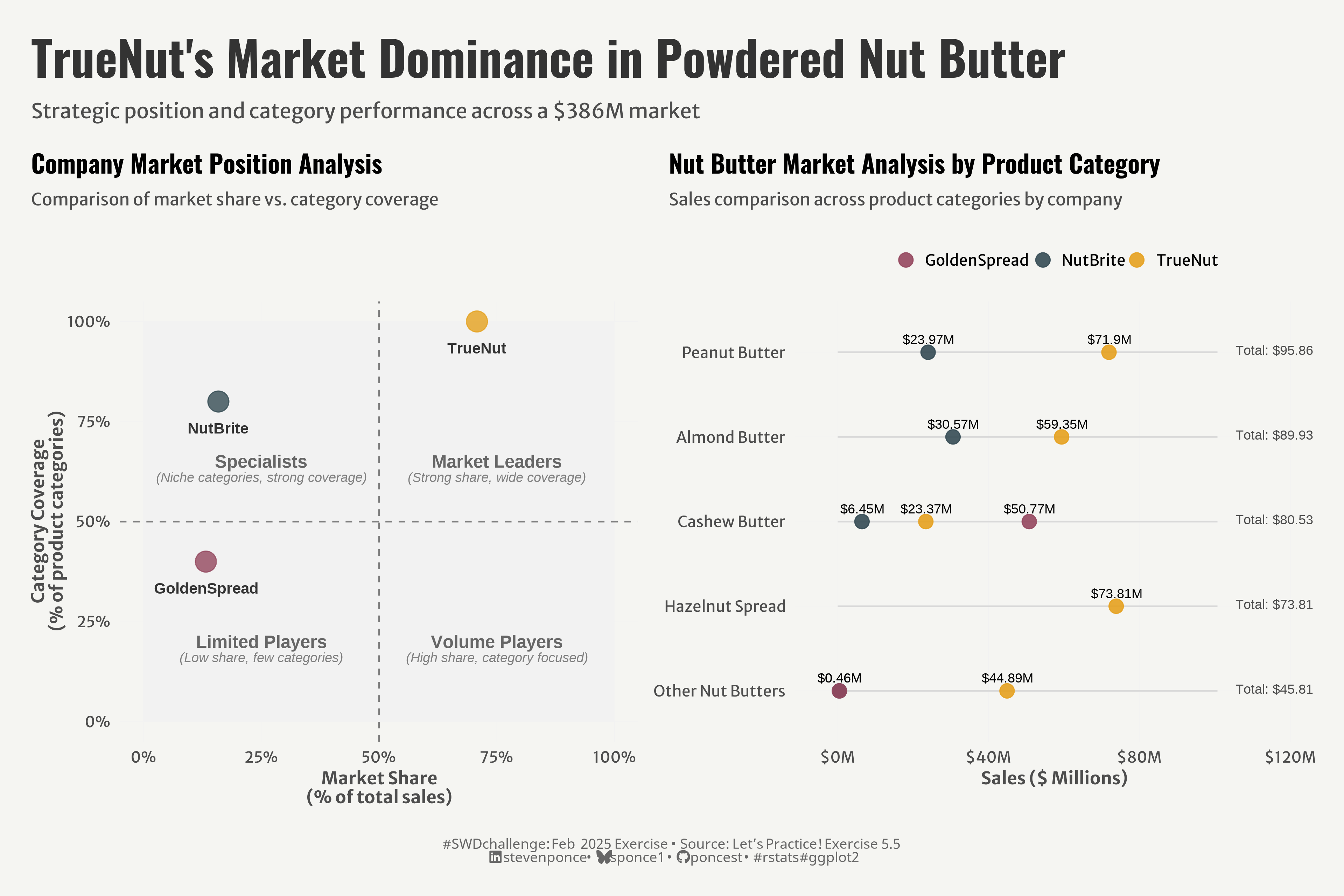
title: "TrueNut's Market Dominance in Powdered Nut Butter"
subtitle: "Strategic position and category performance across a $386M market"
description: "A strategic market analysis visualizing TrueNut's dominant position in the powdered nut butter market. Using complementary quadrant and dumbbell charts, this visualization reveals how TrueNut commands 70% market share with complete category coverage, while competitors NutBrite and GoldenSpread occupy specialist and limited player positions respectively."
author: "Steven Ponce"
date: "2025-02-27"
categories: ["SWDchallenge", "SWD Exercise", "2025"]
tags: [
"Market Analysis", "Strategic Positioning", "Dumbbell Chart", "Quadrant Chart", "ggplot2", "Competitive Analysis", "Market Share", "Category Coverage", "patchwork", "Business Intelligence", "Tidyverse", "Data Storytelling"
]
image: "thumbnails/swd_2025_02-Ex_0055.png"
format:
html:
toc: true
toc-depth: 5
code-link: true
code-fold: true
code-tools: true
code-summary: "Show code"
editor_options:
chunk_output_type: inline
execute:
freeze: true
cache: true
error: false
message: false
warning: false
eval: true
# share:
# permalink: "https://stevenponce.netlify.app/data_visualizations/SWD Challenge/2025/swd_2025_02-Ex_055.html"
# description: "Visualizing TrueNut's 70% market dominance in the $386M powdered nut butter market through quadrant and dumbbell charts #DataVisualization #MarketAnalysis #ggplot2"
# linkedin: true
# twitter: true
# email: true
---
### Original
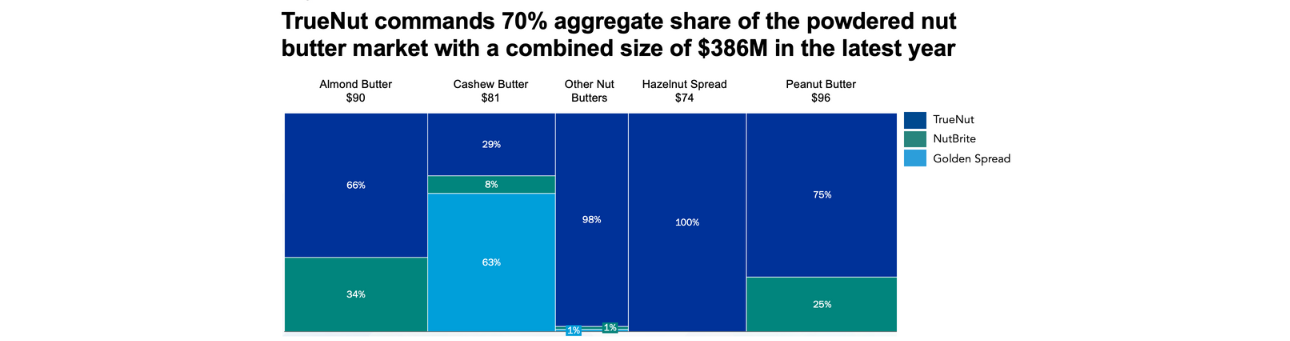
The goal of this month's Storytelling with Data exercise is to go crazy or keep it simple (marimekko chart).
{#fig-1}
Additional information can be found [HERE](https://community.storytellingwithdata.com/exercises/go-crazy-or-keep-it-simple)
### Makeover
{#fig-1}
### <mark> __Steps to Create this Graphic__ </mark>
#### 1. Load Packages & Setup
```{r}
#| label: load
if (!require("pacman")) install.packages("pacman")
pacman::p_load(
  tidyverse,         # Easily Install and Load the 'Tidyverse'
  ggtext,            # Improved Text Rendering Support for 'ggplot2'
  showtext,          # Using Fonts More Easily in R Graphs
  scales,            # Scale Functions for Visualization
  glue,              # Interpreted String Literals
  here,              # A Simpler Way to Find Your Files
  janitor,           # Simple Tools for Examining and Cleaning Dirty Data
  camcorder,         # Record Your Plot History,
  paletteer,         # Comprehensive Collection of Color Palettes
  patchwork          # The Composer of Plots # The Composer of Plots # The Composer of Plots
)

### |- figure size ----
gg_record(
  dir    = here::here("temp_plots"),
  device = "png",
  width  = 12,
  height = 8,
  units  = "in",
  dpi    = 320)
# Source utility functions
suppressMessages(source(here::here("R/utils/fonts.R")))
source(here::here("R/utils/social_icons.R"))
source(here::here("R/utils/image_utils.R"))
source(here::here("R/themes/base_theme.R"))
```
#### 2. Read in the Data
```{r}
#| label: read
raw_data <- read_csv(
  here::here("data/swdexercise055.csv")
  ) |>
  clean_names()
```
#### 3. Examine the Data
```{r}
#| label: examine
#| include: true
#| eval: true
#| results: 'hide'
#| warning: false
glimpse(raw_data)
```
#### 4. Tidy Data
```{r}
#| label: tidy
# P1. Market Share Data ----

# Transform raw data to long format with company identifiers
long_data <- raw_data |>
  # Remove the total market row
  filter(x1 != "Total Market") |>
  # Convert from wide to long format
  pivot_longer(
    cols = c(true_nut_sales, nut_brite_sales, golden_spread_sales),
    names_to = "company",
    values_to = "sales"
  ) |>
  # Clean company names and calculate percentages
  mutate(
    # Use case_when instead of recode for better readability
    company = case_when(
      company == "true_nut_sales" ~ "TrueNut",
      company == "nut_brite_sales" ~ "NutBrite",
      company == "golden_spread_sales" ~ "GoldenSpread",
      TRUE ~ company  # Fallback for unexpected values
    ),
    # Calculate percentage of category total
    percentage = sales / total_sales * 100
  )

# Calculate overall company totals
company_totals <- raw_data |>
  # Sum sales for each company
  summarise(
    TrueNut = sum(true_nut_sales),
    NutBrite = sum(nut_brite_sales),
    GoldenSpread = sum(golden_spread_sales)
  ) |>
  # Convert to long format
  pivot_longer(
    cols = everything(),
    names_to = "company",
    values_to = "sales"
  ) |>
  # Calculate market share percentages
  mutate(percentage = sales / sum(sales) * 100)

# Calculate category coverage for each company
coverage <- long_data |>
  # Only count categories where the company has sales
  filter(sales > 0) |>
  # Count unique categories per company
  group_by(company) |>
  summarise(
    categories_covered = n_distinct(x1),
    # Calculate as percentage of all categories
    coverage_percent = categories_covered / n_distinct(long_data$x1) * 100
  )

# Join company totals with coverage data
position_data <- left_join(company_totals, coverage, by = "company")

# Define quadrant labels with semantic positioning
quadrant_labels <- tibble(
  # Define quadrant centers
  quadrant = c("Specialists", "Limited Players", "Market Leaders", "Volume Players"),
  x = c(25, 25, 75, 75),
  y = c(65, 20, 65, 20),
  # Add clear descriptions
  description = c(
    "(Niche categories, strong coverage)",
    "(Low share, few categories)",
    "(Strong share, wide coverage)",
    "(High share, category focused)"
  )
) |>
  # Convert to label format expected by ggplot
  rename(label = quadrant)

# P2. Market by Product Category Data ----

# Calculate category statistics and establish ordering
category_stats <- long_data |>
  # Group by category
  group_by(x1) |>
  # Get key category metrics (just once per category)
  summarize(
    total_sales = first(total_sales),
    .groups = "drop"
  ) |>
  # Sort by total sales descending
  arrange(desc(total_sales))

# Create ordered factor for consistent category display
category_order <- category_stats |> pull(x1)

# Prepare the main plotting data with ordered categories
plot_data <- long_data |>
  # Create ordered factor with categories in descending sales order
  mutate(
    # Reverse for bottom-to-top ordering in the plot
    x1 = factor(x1, levels = rev(category_order))
  ) |>
  # Only include meaningful sales values
  filter(sales > 0.01)

# Create the label data from filtered plot data
label_data <- plot_data |>
  # Format sales values as currency with millions indicator
  mutate(
    label = paste0("$", round(sales, 2), "M")
  )

# Simplified category totals reference (using earlier calculation)
category_totals <- category_stats |>
  # Apply the same factor ordering
  mutate(x1 = factor(x1, levels = rev(category_order)))
```
#### 5. Visualization Parameters
```{r}
#| label: params
### |-  plot aesthetics ----
# Get base colors with custom palette
colors <- get_theme_colors(
  palette = paletteer:::paletteer_d("ltc::trio4")
)

### |-  titles and caption ----
title_text <- str_glue("TrueNut's Market Dominance in Powdered Nut Butter")

subtitle_text <- str_glue("Strategic position and category performance across a $386M market")

# Create caption
caption_text <- create_swd_exe_caption(
  year = 2025,
  month = "Feb",
  source_text =  "Let's Practice! Exercise 5.5"
)

### |-  fonts ----
setup_fonts()
fonts <- get_font_families()

### |-  plot theme ----

# Start with base theme
base_theme <- create_base_theme(colors)

# Add weekly-specific theme elements
weekly_theme <- extend_weekly_theme(
  base_theme,
  theme(
    # Text styling
    plot.title = element_text(face = "bold", family = fonts$title, size = rel(1.14), margin = margin(b = 10)),
    plot.subtitle = element_text(family = fonts$subtitle, color = colors$text, size = rel(0.78), margin = margin(b = 20)),

    # Axis elements
    axis.title = element_text(color = colors$text, size = rel(0.8)),
    axis.text = element_text(color = colors$text, size = rel(0.7)),

    # Grid elements
    panel.grid.minor = element_blank(),
    panel.grid.major = element_line(color = "grey95", linewidth = 0.1),

    # Legend elements
    legend.position = "plot",
    legend.title = element_text(family = fonts$text, size = rel(0.8)),
    legend.text = element_text(family = fonts$text, size = rel(0.7)),

    # Plot margins
    plot.margin = margin(t = 10, r = 10, b = 10, l = 10),
  )
)

# Set theme
theme_set(weekly_theme)
```
#### 6. Plot
```{r}
#| label: plot
# P1. Market Position Chart ----
p1 <- ggplot(position_data, aes(x = percentage, y = coverage_percent)) +
  # Geoms
  geom_rect(xmin = 0, xmax = 50, ymin = 0, ymax = 50, fill = "gray95", alpha = 0.5) +
  geom_rect(xmin = 50, xmax = 100, ymin = 0, ymax = 50, fill = "gray95", alpha = 0.5) +
  geom_rect(xmin = 0, xmax = 50, ymin = 50, ymax = 100, fill = "gray95", alpha = 0.5) +
  geom_rect(xmin = 50, xmax = 100, ymin = 50, ymax = 100, fill = "gray95", alpha = 0.5) +
  geom_hline(yintercept = 50, linetype = "dashed", color = "gray50") +
  geom_vline(xintercept = 50, linetype = "dashed", color = "gray50") +
  geom_point(aes(color = company), size = 6, alpha = 0.8) +
  geom_text(aes(label = company), color = "gray20",
            fontface = "bold", size = 3.5, vjust = 3) +
  geom_text(
    data = quadrant_labels,
    aes(x = x, y = y, label = label),
    size = 4,
    color = "gray40",
    fontface = "bold",
    hjust = 0.5,
    vjust = 0.5
  ) +
  geom_text(
    data = quadrant_labels,
    aes(x = x, y = y - 4, label = description),
    size = 3,
    color = "gray50",
    fontface = "italic",
    hjust = 0.5,
    vjust = 0.5
  ) +
  # Scales
  scale_x_continuous(
    labels = percent_format(scale = 1), limits = c(0, 100)
    ) +
  scale_y_continuous(
    labels = percent_format(scale = 1), limits = c(0, 100)
    ) +
  scale_color_manual(values = colors$palette) +
  coord_cartesian(clip = "off") +
  # Labs
  labs(
    title = "Company Market Position Analysis",
    subtitle = "Comparison of market share vs. category coverage",
    x = "Market Share\n(% of total sales)",
    y = "Category Coverage\n(% of product categories)"
  )

# P2. Market by Product Category Chart ----
p2 <- ggplot() +
  # Geoms
  geom_segment(
    data = category_totals,
    aes(y = x1, yend = x1, x = 0, xend = max(total_sales) * 1.05),
    color = "gray85", linewidth = 0.5
  ) +
  geom_point(
    data = plot_data,
    aes(x = sales, y = x1, color = company),
    size = 4, alpha = 0.9,
    show.legend = TRUE
  ) +
  geom_text(
    data = label_data,
    aes(x = sales, y = x1, label = label),
    vjust = -0.9,
    size = 3,
    show.legend = FALSE
  ) +
  geom_text(
    data = category_totals,
    aes(x = max(total_sales) * 1.1, y = x1, label = paste0("Total: $", total_sales, "M")),
    hjust = 0, vjust = 0.3, size = 3, color = "gray30",
    show.legend = FALSE
  ) +
  # Scales
  scale_x_continuous(
    labels = dollar_format(suffix = "M"),
    limits = c(-10, max(category_totals$total_sales) * 1.3),
    expand = c(0.01, 0)
  ) +
  scale_color_manual(values = colors$palette) +
  # Labs
  labs(
    title = "Nut Butter Market Analysis by Product Category",
    subtitle = "Sales comparison across product categories by company",
    x = "Sales ($ Millions)",
    y = NULL,
  ) +
  # Theme
  theme(
    legend.position = "top",
    legend.title = element_blank(),
    legend.key.size = unit(0.8, "lines"),
  )

# Combined Charts -----

# Combined Plot -----
combined_plot <- (p1 + p2) +
  plot_layout(widths = c(1, 1))

combined_plot <- combined_plot +
  plot_annotation(
    title = title_text,
    subtitle = subtitle_text,
    caption = caption_text,
    theme = theme(
      plot.title = element_text(
        size = rel(2.2),
        family = fonts$title,
        face = "bold",
        color = colors$title,
        lineheight = 1.1,
        margin = margin(t = 5, b = 5)
      ),
      plot.subtitle = element_text(
        size = rel(0.95),
        family = fonts$subtitle,
        color = colors$subtitle,
        lineheight = 1.2,
        margin = margin(t = 5, b = 10)
      ),
      plot.caption = element_markdown(
        size   = rel(0.65),
        family = fonts$caption,
        color  = colors$caption,
        hjust  = 0.5,
        margin = margin(t = 10)
      ),
      plot.margin = margin(t = 20, r = 10, b = 20, l = 10),
    ))
```
#### 7. Save
```{r}
#| label: save
### |-  plot image ----

source(here::here("R/image_utils.R"))
save_plot_patchwork(
  combined_plot, type = 'swd', year = 2025, month = 02, exercise = 055,
  width = 12, height = 8
  )
```
#### 8. Session Info
::: {.callout-tip collapse="true"}
##### Expand for Session Info
```{r, echo = FALSE}
#| eval: true
#| warning: false
sessionInfo()
```
:::
#### 9. GitHub Repository
::: {.callout-tip collapse="true"}
##### Expand for GitHub Repo
The complete code for this analysis is available in [`swd_2025_02-Ex_055.qmd`](https://github.com/poncest/personal-website/tree/master/data_visualizations/SWD%20Challenge/2025/swd_2025_02-Ex_055.qmd).
For the full repository, [click here](https://github.com/poncest/personal-website/).
:::
#### 10. References
::: {.callout-tip collapse="true"}
##### Expand for References
Data Sources:
1. Data Sources:
- Storytelling with Data Exercise | go crazy or keep it simple: [Download the data](https://community.storytellingwithdata.com/exercises/go-crazy-or-keep-it-simple)
:::

