---
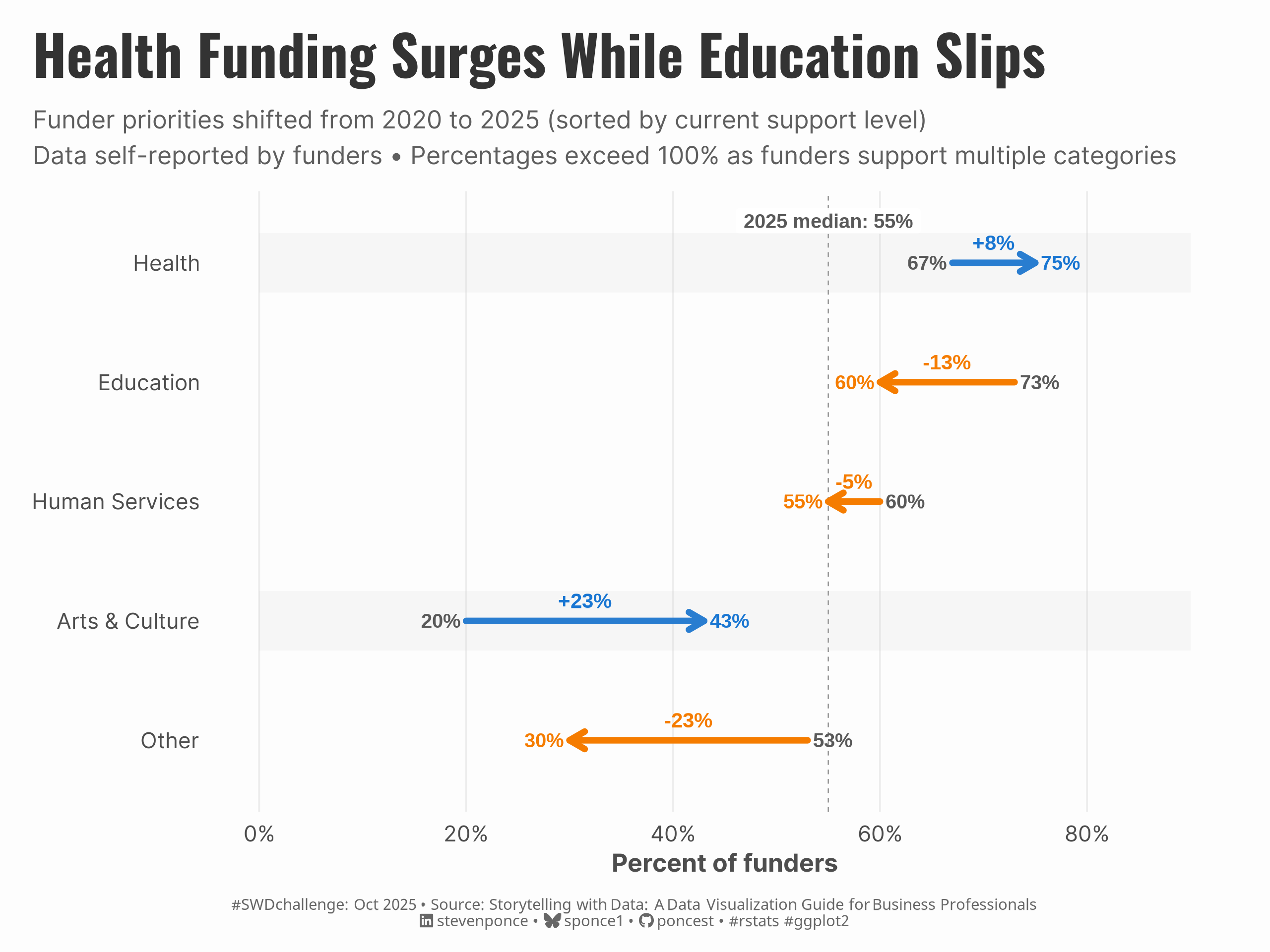
title: "Health Funding Surges While Education Slips"
subtitle: "Funder priorities, 2020 -> 2025"
description: "Arrow chart redesign that avoids spaghetti graphs by using directional arrows and strategic sorting to show non-profit funder priority shifts from 2020 to 2025."
author: "Steven Ponce"
date: "2025-10-03"
categories: ["SWDchallenge", "2025"]
tags: [
"arrow chart",
"dumbbell chart alternative",
"ggplot2",
"data storytelling",
"non-profit funding",
"chart redesign",
"avoiding spaghetti graphs",
"before and after comparison",
"change over time"
]
image: "thumbnails/swd_2025_10.png"
format:
html:
toc: true
toc-depth: 5
code-link: true
code-fold: true
code-tools: true
code-summary: "Show code"
editor_options:
chunk_output_type: inline
execute:
freeze: true
cache: true
error: false
message: false
warning: false
eval: true
---
### Original
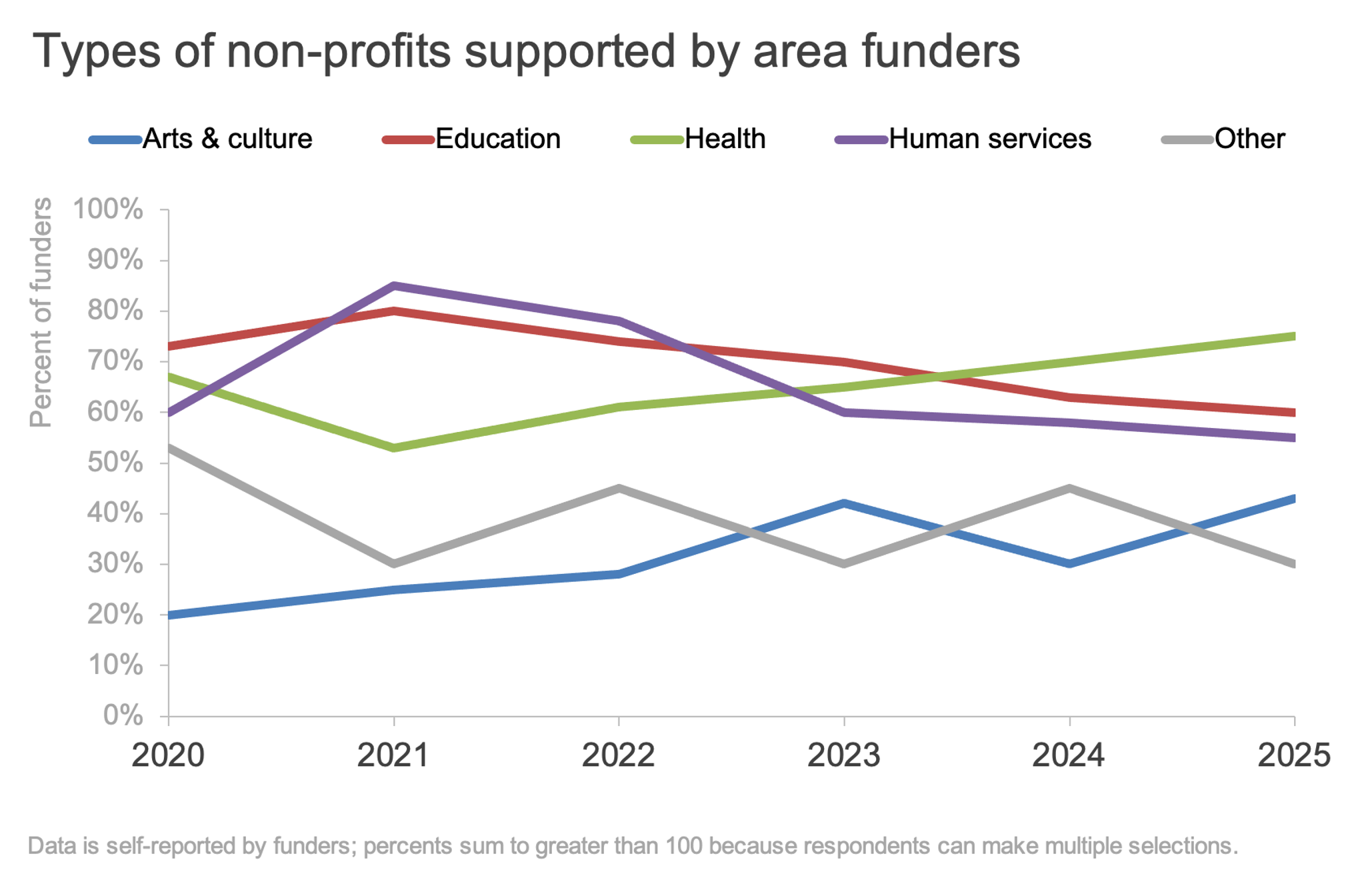
This month's Storytelling with Data challenge aims to avoid the spaghetti graph. Line graphs are generally a great way to show data over time. However, when there are too many series in a single chart, it can quickly become what I refer to as a “spaghetti graph”—a tangled mess of overlapping lines that’s hard to read. How would you redesign the following visual to avoid the spaghetti graph?
{#fig-1}
Additional information can be found [HERE](https://community.storytellingwithdata.com/challenges/aug-2025-avoid-the-spaghetti-graph)
### Makeover
{#fig-4}
### <mark> **Steps to Create this Graphic** </mark>
#### 1. Load Packages & Setup
```{r}
#| label: load

if (!require("pacman")) install.packages("pacman")
pacman::p_load(
  tidyverse,  # Easily Install and Load the 'Tidyverse'
  ggtext,     # Improved Text Rendering Support for 'ggplot2'
  showtext,   # Using Fonts More Easily in R Graphs
  janitor,    # Simple Tools for Examining and Cleaning Dirty Data
  scales,     # Scale Functions for Visualization
  glue        # Interpreted String Literals
)

### |- figure size ----
camcorder::gg_record(
  dir    = here::here("temp_plots"),
  device = "png",
  width  = 8,
  height = 6,
  units  = "in",
  dpi    = 320
)

# Source utility functions
suppressMessages(source(here::here("R/utils/fonts.R")))
source(here::here("R/utils/social_icons.R"))
source(here::here("R/utils/image_utils.R"))
source(here::here("R/themes/base_theme.R"))
```
#### 2. Read in the Data
```{r}
#| label: read

raw_data <- readxl::read_excel(
  here::here("data/SWDchallenge/2025/SWDchallenge OCT2025.xlsx"),
  range = "C7:I12") |>
  clean_names()
```
#### 3. Examine the Data
```{r}
#| label: examine
#| include: true
#| eval: true
#| results: 'hide'
#| warning: false

glimpse(raw_data)
```
#### 4. Tidy Data
```{r}
#| label: tidy

arrow_data <- raw_data |>
  rename(category = x1) |>
  select(category, y2020 = x2020, y2025 = x2025) |>
  mutate(
    category = str_to_title(category),
    change = y2025 - y2020,
    change_pct = change,
    direction = if_else(change > 0, "Growth", "Decline")
  ) |>
  arrange(desc(y2025))

arrow_data <- arrow_data |>
  mutate(
    category = factor(category, levels = rev(category)),
    lab_2020 = label_percent(accuracy = 1)(y2020),
    lab_2025 = label_percent(accuracy = 1)(y2025),
    lab_delta = if_else(change >= 0,
      paste0("+", label_percent(accuracy = 1)(change)),
      label_percent(accuracy = 1)(change)
    ),
    x_mid = (y2020 + y2025) / 2,
    hjust_2020 = if_else(y2020 <= y2025, 1.15, -0.15),
    hjust_2025 = if_else(y2020 <= y2025, -0.15, 1.15)
  )

median_2025 <- median(arrow_data$y2025, na.rm = TRUE)
n_cats <- nrow(arrow_data)
max_x <- max(arrow_data$y2020, arrow_data$y2025, na.rm = TRUE)
```
#### 5. Visualization Parameters
```{r}
#| label: params

### |-  plot aesthetics ----
colors <- get_theme_colors(
  palette = c(
    `TRUE` = "#1976D2",
    `FALSE` = "#F57C00"
  )
)

### |-  titles and caption ----
title_text <- str_glue("Health Funding Surges While Education Slips")

subtitle_text <- str_glue(
  "Funder priorities shifted from 2020 to 2025 (sorted by current support level)\n",
  "Data self-reported by funders • Percentages exceed 100% as funders support multiple categories"
)

# Create caption
caption_text <- create_swd_caption(
  year = 2025,
  month = "Oct",
  source_text =  "Storytelling with Data: A Data Visualization Guide for Business Professionals"
)

### |-  fonts ----
setup_fonts()
fonts <- get_font_families()

### |-  plot theme ----

# Start with base theme
base_theme <- create_base_theme(colors)

# Add weekly-specific theme elements
weekly_theme <- extend_weekly_theme(
  base_theme,
  theme(
    # Text styling
    plot.title = element_text(face = "bold", family = fonts$title, color = colors$title, size = rel(1.14), margin = margin(b = 10)),
    plot.subtitle = element_text(family = fonts$subtitle, color = colors$text, size = rel(0.78), margin = margin(b = 20)),

    # Axis elements
    axis.title = element_text(color = colors$text, size = rel(0.8)),
    axis.text = element_text(color = colors$text, size = rel(0.7)),

    # Grid elements
    panel.grid.minor = element_blank(),
    panel.grid.major = element_line(color = "grey95", linewidth = 0.1),


    # Legend elements
    legend.position = "plot",
    legend.title = element_text(family = fonts$text, size = rel(0.8)),
    legend.text = element_text(family = fonts$text, size = rel(0.7)),

    # Plot margins
    plot.margin = margin(t = 10, r = 15, b = 10, l = 15),
  )
)

# Set theme
theme_set(weekly_theme)
```
#### 6. Plot
```{r}
#| label: plot

p <- ggplot(arrow_data, aes(y = category)) +

  # Geoms
  geom_vline(
    xintercept = median_2025, linetype = "dashed",
    color = "gray55", linewidth = 0.25
  ) +

  # median tag
  annotate(
    "label",
    x = median_2025, y = n_cats + 0.35,
    label = paste0("2025 median: ", label_percent(accuracy = 1)(median_2025)),
    size = 3.2, fontface = "bold",
    label.size = 0, fill = "white", alpha = 0.95, color = "gray35"
  ) +

  # arrows
  geom_segment(
    aes(x = y2020, xend = y2025, yend = category, color = change > 0),
    linewidth = 1.4, lineend = "round",
    arrow = arrow(length = unit(0.28, "cm"), type = "open")
  ) +

  # subtle background
  geom_rect(data = filter(arrow_data, change > 0),
            aes(ymin = as.numeric(category) - 0.25,
                ymax = as.numeric(category) + 0.25),
            xmin = 0, xmax = 0.9,
            fill = "gray", alpha = 0.1) +

  # arrows labels
  geom_text(aes(x = y2020, label = lab_2020, hjust = hjust_2020),
    size = 3.2, color = "gray35", fontface = "bold"
  ) +
  geom_text(aes(x = y2025, label = lab_2025, hjust = hjust_2025, color = change > 0),
    size = 3.2, fontface = "bold", show.legend = FALSE
  ) +
  geom_text(aes(x = x_mid, label = lab_delta, color = change > 0),
    vjust = -0.9, size = 3.3, fontface = "bold", show.legend = FALSE
  ) +

  # Scales
  scale_x_continuous(
    labels = label_percent(accuracy = 1),
    limits = c(0, 0.9),
    breaks = seq(0, 1, by = 0.20)
  ) +
  scale_y_discrete() +
  scale_color_manual(values = colors$palette) +
  coord_cartesian(clip = "off") +

  # Labs
  labs(
    title = title_text,
    subtitle = subtitle_text,
    x = "Percent of funders", y = NULL,
    caption = caption_text
  ) +

  # Theme
  theme(
    panel.grid.major.y = element_blank(),
    panel.grid.minor = element_blank(),
    panel.grid.major.x = element_line(color = "gray93", linewidth = 0.4),
    plot.title = element_text(
      size = rel(1.8),
      family = fonts$title,
      face = "bold",
      color = colors$title,
      lineheight = 1.1,
      margin = margin(t = 5, b = 5)
    ),
    plot.subtitle = element_text(
      size = rel(0.80),
      family = fonts$subtitle,
      color = alpha(colors$subtitle, 0.9),
      lineheight = 1.2,
      margin = margin(t = 5, b = 10)
    ),
    plot.caption = element_markdown(
      size = rel(0.50),
      family = fonts$caption,
      color = colors$caption,
      hjust = 0.5,
      margin = margin(t = 10)
    )
  )
```
#### 7. Save
```{r}
#| label: save

### |-  plot image ----
save_plot(
  p,
  type = 'swd',
  year = 2025,
  month = 10,
  width  = 8,
  height = 6,
  )
```
#### 8. Session Info
::: {.callout-tip collapse="true"}
##### Expand for Session Info
```{r, echo = FALSE}
#| eval: true
#| warning: false
sessionInfo()
```
:::
#### 9. GitHub Repository
::: {.callout-tip collapse="true"}
##### Expand for GitHub Repo
The complete code for this analysis is available in [`swd_2025_10.qmd`](https://github.com/poncest/personal-website/tree/master/data_visualizations/SWD%20Challenge/2025/swd_2025_10.qmd). For the full repository, [click here](https://github.com/poncest/personal-website/).
:::
#### 10. References
::: {.callout-tip collapse="true"}
##### Expand for References
Data Sources:
- Storytelling with Data: A Data Visualization Guide for Business Professionals, 10th Anniversary Edition : [Storytelling with Data: A Data Visualization Guide for Business Professionals, 10th Anniversary Edition ](https://docs.google.com/spreadsheets/d/1Fpd8uL6gZc5d-svAZltXjU1QgxZA8Ocw/edit?rtpof=true&sd=true)
:::

