---
title: "Pokémon Speed by Type"
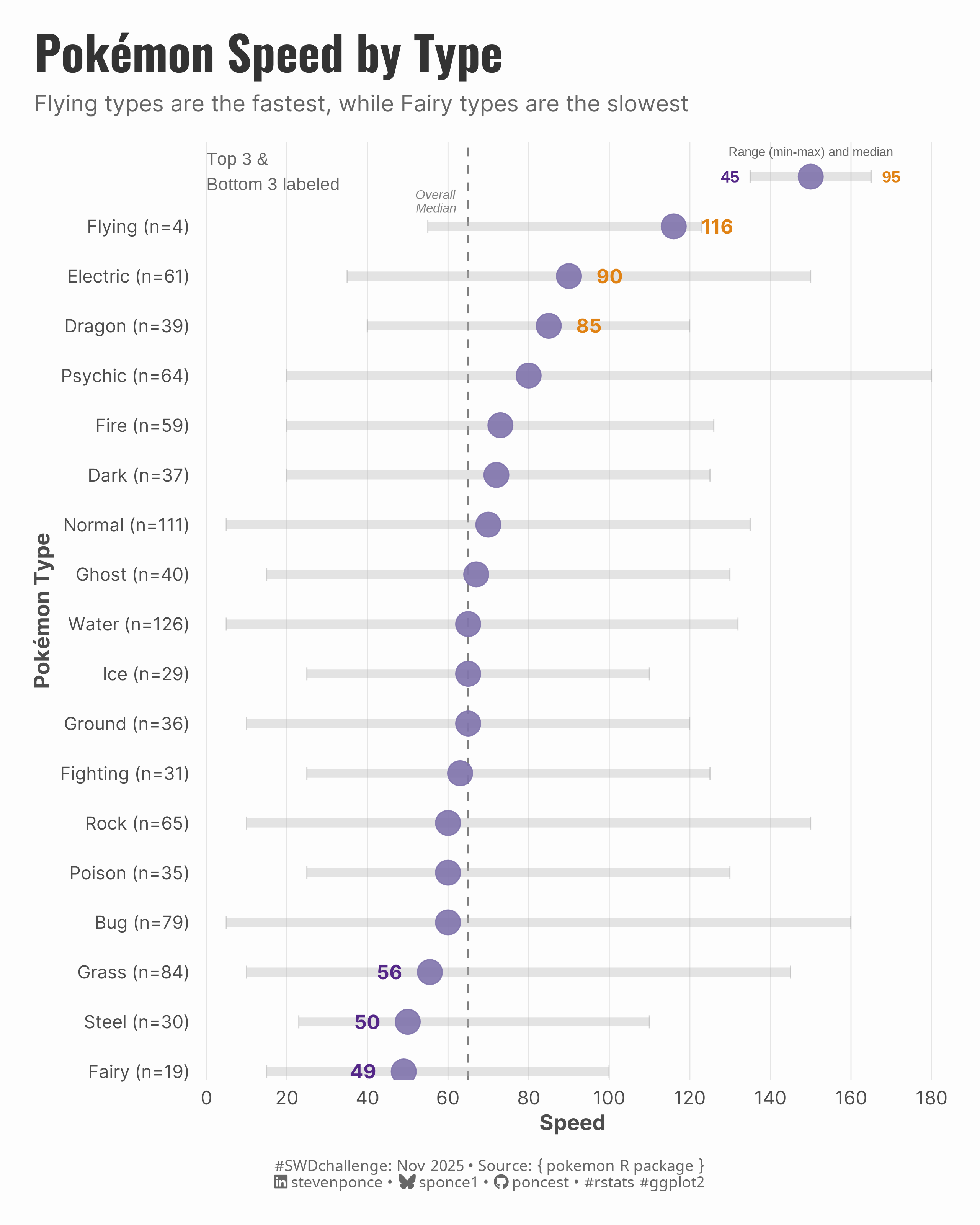
subtitle: "Flying types are the fastest, while Fairy types are the slowest"
description: "A focused dot plot exploring speed hierarchy across Pokémon types, showing median values and ranges for the November 2025 #SWDchallenge"
author: "Steven Ponce"
date: "2025-11-01"
categories: ["SWDchallenge", "2025"]
tags: [
"dot plot",
"categorical comparison",
"ggplot2",
"TidyTuesday",
"Pokémon",
"ranking visualization",
"data storytelling"
]
image: "thumbnails/swd_2025_11.png"
format:
html:
toc: true
toc-depth: 5
code-link: true
code-fold: true
code-tools: true
code-summary: "Show code"
editor_options:
chunk_output_type: inline
execute:
freeze: true
cache: true
error: false
message: false
warning: false
eval: true
---
### Challenge
This month’s challenge is to create a dot plot—a simple but powerful visual for comparing values across categories. Whether you build one from scratch or redesign an existing graph, focus on clarity, thoughtful design, and highlighting the key takeaway.
Additional information can be found [HERE](https://community.storytellingwithdata.com/challenges/nov-2025-discover-the-dot-plot)
### Makeover
{#fig-4}
### <mark> **Steps to Create this Graphic** </mark>
#### 1. Load Packages & Setup
```{r}
#| label: load

if (!require("pacman")) install.packages("pacman")
pacman::p_load(
  tidyverse,  # Easily Install and Load the 'Tidyverse'
  ggtext,     # Improved Text Rendering Support for 'ggplot2'
  showtext,   # Using Fonts More Easily in R Graphs
  janitor,    # Simple Tools for Examining and Cleaning Dirty Data
  scales,     # Scale Functions for Visualization
  glue        # Interpreted String Literals
)

### |- figure size ----
camcorder::gg_record(
  dir    = here::here("temp_plots"),
  device = "png",
  width  = 8,
  height = 6,
  units  = "in",
  dpi    = 320
)

# Source utility functions
suppressMessages(source(here::here("R/utils/fonts.R")))
source(here::here("R/utils/social_icons.R"))
source(here::here("R/utils/image_utils.R"))
source(here::here("R/themes/base_theme.R"))
```
#### 2. Read in the Data
```{r}
#| label: read

# The data comes from TidyTuesday 2025 week 13
pokemon_raw <- readr::read_csv(
  "https://raw.githubusercontent.com/rfordatascience/tidytuesday/main/data/2025/2025-04-01/pokemon_df.csv"
) |>
  clean_names()
```
#### 3. Examine the Data
```{r}
#| label: examine
#| include: true
#| eval: true
#| results: 'hide'
#| warning: false

glimpse(pokemon_raw)
skimr::skim(pokemon_raw)
```
#### 4. Tidy Data
```{r}
#| label: tidy

pokemon_summary <- pokemon_raw |>
  select(pokemon, type_1, speed) |>
  filter(!is.na(speed), !is.na(type_1)) |>
  group_by(type_1) |>
  summarize(
    median_speed = median(speed),
    min_speed = min(speed),
    max_speed = max(speed),
    count = n(),
    .groups = "drop"
  ) |>
  arrange(desc(median_speed)) |>
  mutate(
    type_1 = fct_reorder(type_1, median_speed),
    rank = row_number(desc(median_speed)),
    is_labeled = rank <= 3 | rank > n() - 3,
    label_position = if_else(rank <= 3, "right", "left")
  )

overall_median <- median(pokemon_raw$speed, na.rm = TRUE)
```
#### 5. Visualization Parameters
```{r}
#| label: params

### |-  plot aesthetics ----
colors <- get_theme_colors(
  palette = list(
    "dot" = "#8073AC",
    "range" = "gray70",
    "top" = "#E08214",
    "bottom" = "#542788"
  )
)

### |-  titles and caption ----
title_text <- "Pokémon Speed by Type"
subtitle_text <- "Flying types are the fastest, while Fairy types are the slowest"

# Create caption
caption_text <- create_swd_caption(
  year = 2025,
  month = "Nov",
  source_text = "{ pokemon R package }"
)

### |-  fonts ----
setup_fonts()
fonts <- get_font_families()

### |-  plot theme ----
# Start with base theme
base_theme <- create_base_theme(colors)

# Add weekly-specific theme elements
weekly_theme <- extend_weekly_theme(
  base_theme,
  theme(
    # Text styling
    plot.title = element_text(
      face = "bold", family = fonts$title, size = rel(1.4),
      color = colors$title, margin = margin(b = 10), hjust = 0
    ),
    plot.subtitle = element_text(
      face = "italic", family = fonts$subtitle, lineheight = 1.2,
      color = colors$subtitle, size = rel(0.9), margin = margin(b = 20), hjust = 0
    ),

    ## Grid
    panel.grid.major.y = element_blank(),
    panel.grid.minor = element_blank(),
    panel.grid.major.x = element_line(color = "gray90", linewidth = 0.3),

    # Axes
    axis.title = element_text(size = rel(0.9), color = "gray30"),
    axis.text = element_text(color = "gray30"),
    axis.text.y = element_text(size = rel(0.95)),
    axis.ticks = element_blank(),

    # Facets
    strip.background = element_rect(fill = "gray95", color = NA),
    strip.text = element_text(
      face = "bold",
      color = "gray20",
      size = rel(1),
      margin = margin(t = 8, b = 8)
    ),
    panel.spacing = unit(2, "lines"),

    # Legend elements
    legend.position = "plot",
    legend.title = element_text(
      family = fonts$tsubtitle,
      color = colors$text, size = rel(0.8), face = "bold"
    ),
    legend.text = element_text(
      family = fonts$tsubtitle,
      color = colors$text, size = rel(0.7)
    ),
    legend.margin = margin(t = 15),

    # Plot margin
    plot.margin = margin(20, 20, 20, 20)
  )
)

# Set theme
theme_set(weekly_theme)
```
#### 6. Plot
```{r}
#| label: plot

p <- ggplot(pokemon_summary, aes(y = type_1)) +
  # Geoms
  geom_vline(
    xintercept = overall_median,
    linetype = "dashed",
    color = "gray50",
    linewidth = 0.6
  ) +
  geom_segment(
    aes(x = min_speed, xend = max_speed, yend = type_1),
    color = colors$palette$range,
    linewidth = 2.5,
    alpha = 0.35
  ) +
  geom_point(
    aes(x = min_speed),
    color = colors$palette$range,
    size = 2.5,
    alpha = 0.6,
    shape = 124
  ) +
  geom_point(
    aes(x = max_speed),
    color = colors$palette$range,
    size = 2.5,
    alpha = 0.6,
    shape = 124
  ) +
  geom_point(
    aes(x = median_speed),
    color = colors$palette$dot,
    size = 6.5,
    alpha = 0.9
  ) +
  geom_text(
    data = pokemon_summary |> filter(rank <= 3),
    aes(x = median_speed + 7, label = round(median_speed)),
    hjust = 0,
    size = 4,
    fontface = "bold",
    family = fonts$text,
    color = colors$palette$top
  ) +
  geom_text(
    data = pokemon_summary |> filter(rank > n() - 3),
    aes(x = median_speed - 7, label = round(median_speed)),
    hjust = 1,
    size = 4,
    fontface = "bold",
    family = fonts$text,
    color = colors$palette$bottom
  ) +
  # Scales
  scale_x_continuous(
    breaks = seq(0, 180, 20),
    limits = c(0, 180),
    expand = expansion(mult = c(0.01, 0.02))
  ) +
  scale_y_discrete(
    labels = function(x) {
      counts <- pokemon_summary$count[match(x, pokemon_summary$type_1)]
      glue("{str_to_title(x)} (n={counts})")
    },
    expand = expansion(mult = c(0.01, 0.1))
  ) +
  # Labs
  labs(
    title = title_text,
    subtitle = subtitle_text,
    caption = caption_text,
    x = "Speed",
    y = "Pokémon Type"
  ) +
  # Annotations
  annotate(
    "text",
    x = overall_median - 3,
    y = 18.5,
    label = "Overall\nMedian",
    size = 2.6,
    color = "gray50",
    lineheight = 0.9,
    hjust = 1,
    fontface = "italic"
  ) +
  annotate(
    "segment",
    x = 135, xend = 165, y = 19, yend = 19,
    color = colors$palette$range,
    linewidth = 2.5,
    alpha = 0.35
  ) +
  annotate(
    "point",
    x = c(135, 165), y = c(19, 19),
    color = colors$palette$range,
    size = 2.5,
    alpha = 0.6,
    shape = 124
  ) +
  annotate(
    "point",
    x = 150, y = 19,
    color = colors$palette$dot,
    size = 6.5,
    alpha = 0.9
  ) +
  annotate(
    "text",
    x = 150, y = 19.5,
    label = "Range (min-max) and median",
    size = 2.6,
    color = "gray40",
    hjust = 0.5
  ) +
  annotate(
    "text",
    x = 0, y = 19.1,
    label = "Top 3 &\nBottom 3 labeled",
    size = 3.6,
    color = "gray40",
    hjust = 0
  ) +
  annotate(
    "text",
    x = 170, y = 19,
    label = "95",
    size = 3.5,
    color = colors$palette$top,
    fontface = "bold"
  ) +
  annotate(
    "text",
    x = 130, y = 19,
    label = "45",
    size = 3.5,
    color = colors$palette$bottom,
    fontface = "bold"
  ) +
  # Theme
  theme(
    plot.title = element_text(
      size = rel(2),
      family = fonts$title,
      face = "bold",
      color = colors$title,
      margin = margin(b = 8)
    ),
    plot.subtitle = element_text(
      size = rel(0.95),
      family = fonts$subtitle,
      color = "gray40",
      margin = margin(b = 15)
    ),
    plot.caption = element_markdown(
      size = rel(0.65),
      family = fonts$caption,
      color = colors$caption,
      hjust = 0.5,
      margin = margin(t = 15)
    )
  )
```
#### 7. Save
```{r}
#| label: save

### |-  plot image ----
save_plot(
  p,
  type = 'swd',
  year = 2025,
  month = 11,
  width  = 8,
  height = 10,
  )
```
#### 8. Session Info
::: {.callout-tip collapse="true"}
##### Expand for Session Info
```{r, echo = FALSE}
#| eval: true
#| warning: false
sessionInfo()
```
:::
#### 9. GitHub Repository
::: {.callout-tip collapse="true"}
##### Expand for GitHub Repo
The complete code for this analysis is available in [`swd_2025_11.qmd`](https://github.com/poncest/personal-website/tree/master/data_visualizations/SWD%20Challenge/2025/swd_2025_11.qmd). For the full repository, [click here](https://github.com/poncest/personal-website/).
:::
#### 10. References
::: {.callout-tip collapse="true"}
##### Expand for References
Data Sources:
- TidyTuesday 2025 week 13 : [Pokemon ](https://github.com/rfordatascience/tidytuesday/blob/main/data/2025/2025-04-01/readme.md)
:::
#### 11. Custom Functions Documentation
::: {.callout-note collapse="true"}
##### 📦 Custom Helper Functions
This analysis uses custom functions from my personal module library for efficiency and consistency across projects.
**Functions Used:**
- **`fonts.R`**: `setup_fonts()`, `get_font_families()` - Font management with showtext
- **`social_icons.R`**: `create_social_caption()` - Generates formatted social media captions
- **`image_utils.R`**: `save_plot()` - Consistent plot saving with naming conventions
- **`base_theme.R`**: `create_base_theme()`, `extend_weekly_theme()`, `get_theme_colors()` - Custom ggplot2 themes
**Why custom functions?**\
These utilities standardize theming, fonts, and output across all my data visualizations. The core analysis (data tidying and visualization logic) uses only standard tidyverse packages.
**Source Code:**\
View all custom functions → [GitHub: R/utils](https://github.com/poncest/personal-website/tree/master/R)
:::
