---
title: "Nearly Half of U.S. Counties Face Increased Water Insecurity"
subtitle: "46% of counties reported more households without basic plumbing, affecting over 800 counties (2022-2023)"
description: "Analysis of water insecurity trends across U.S. counties reveals concerning patterns: while 44% of counties showed improvement in household plumbing access, 46% experienced deteriorating conditions, highlighting growing infrastructure challenges in basic water access."
author: "Steven Ponce"
date: "2025-01-25"
categories: ["TidyTuesday", "2025"]
tags: [
tidytuesday,
ggplot2,
water-insecurity,
public-health,
infrastructure,
census-data,
data-analysis,
data-visualization,
r-programming,
data-journalism
]
image: "thumbnails/tt_2025_04.png"
format:
html:
toc: true
toc-depth: 5
code-link: true
code-fold: true
code-tools: true
code-summary: "Show code"
editor_options:
chunk_output_type: inline
execute:
freeze: true
cache: true
error: false
message: false
warning: false
eval: true
# filters:
# - social-share
# share:
# permalink: "https://stevenponce.netlify.app/data_visualizations/TidyTuesday/2025/tt_2025_04.html"
# description: "Analysis shows 46% of U.S. counties reported increased water insecurity, with more households lacking basic plumbing in 2023 compared to 2022. #TidyTuesday #DataViz"
#
# twitter: true
# linkedin: true
# email: true
# facebook: false
# reddit: false
# stumble: false
# tumblr: false
# mastodon: true
# bsky: true
---
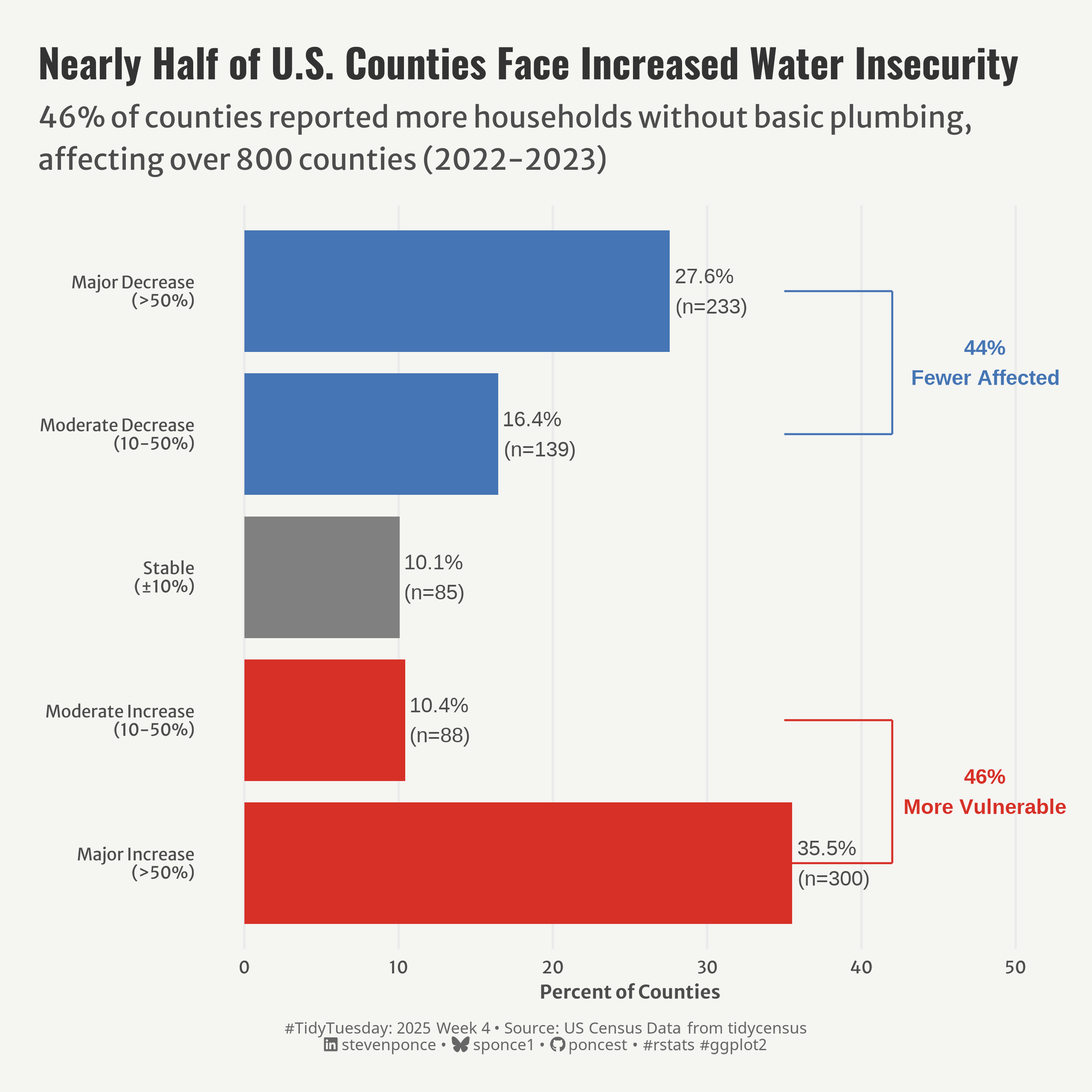{#fig-1}
### <mark> **Steps to Create this Graphic** </mark>
#### 1. Load Packages & Setup
```{r}
#| label: load
#| warning: false
#| message: false
#| results: "hide"
## 1. LOAD PACKAGES & SETUP ----
suppressPackageStartupMessages({
if (!require("pacman")) install.packages("pacman")
pacman::p_load(
    tidyverse,      # Easily Install and Load the 'Tidyverse'
    ggtext,         # Improved Text Rendering Support for 'ggplot2'
    showtext,       # Using Fonts More Easily in R Graphs
    janitor,        # Simple Tools for Examining and Cleaning Dirty Data
    skimr,          # Compact and Flexible Summaries of Data
    scales,         # Scale Functions for Visualization
    glue,           # Interpreted String Literals
    here            # A Simpler Way to Find Your Files
    )
})

# Source utility functions
suppressMessages(source(here::here("R/utils/fonts.R")))
source(here::here("R/utils/social_icons.R"))
source(here::here("R/utils/image_utils.R"))
source(here::here("R/themes/base_theme.R"))
```
#### 2. Read in the Data
```{r}
#| label: read
#| include: true
#| eval: true
#| warning: false
tt <- tidytuesdayR::tt_load(2025, week = 04)

water_insecurity_2022 <- tt$water_insecurity_2022 |> clean_names()
water_insecurity_2023 <- tt$water_insecurity_2023 |> clean_names()

tidytuesdayR::readme(tt)
rm(tt)
```
#### 3. Examine the Data
```{r}
#| label: examine
#| include: true
#| eval: true
#| results: 'hide'
#| warning: false
glimpse(water_insecurity_2022)
skim(water_insecurity_2022)

glimpse(water_insecurity_2023)
skim(water_insecurity_2023)
```
#### 4. Tidy Data
```{r}
#| label: tidy
#| warning: false
water_change_clean <- water_insecurity_2022 |>
    # Join both datasets
    inner_join(water_insecurity_2023, by = "geoid", suffix = c("_2022", "_2023")) |>

    # Remove rows with NA in plumbing for 2022 or 2023
    filter(!is.na(plumbing_2022), !is.na(plumbing_2023)) |>

    # Perform calculations and categorization in a single mutate
    mutate(
        # Calculate pct_change based on the percent_lacking_plumbing for 2022 and 2023
        pct_change = case_when(
            percent_lacking_plumbing_2022 == 0 & percent_lacking_plumbing_2023 > 0 ~ 100,
            percent_lacking_plumbing_2022 == 0 & percent_lacking_plumbing_2023 == 0 ~ 0,
            TRUE ~ ((percent_lacking_plumbing_2023 - percent_lacking_plumbing_2022) /
                        percent_lacking_plumbing_2022) * 100
        ),

        # Replace any NA values in pct_change with 0
        pct_change = replace_na(pct_change, 0),

        # Categorize the pct_change into different categories
        change_category = factor(case_when(
            pct_change < -50 ~ "Major Decrease (>50%)",
            pct_change < -10 ~ "Moderate Decrease (10-50%)",
            pct_change >= -10 & pct_change <= 10 ~ "Stable (±10%)",
            pct_change > 10 & pct_change <= 50 ~ "Moderate Increase (10-50%)",
            pct_change > 50 ~ "Major Increase (>50%)"
        ), levels = c(
            "Major Increase (>50%)",
            "Moderate Increase (10-50%)",
            "Stable (±10%)",
            "Moderate Decrease (10-50%)",
            "Major Decrease (>50%)"
        )),

        # Add the 'impact' category in the same mutate call
        impact = case_when(
            str_detect(change_category, "Increase") ~ "Worsening",
            str_detect(change_category, "Decrease") ~ "Improving",
            TRUE ~ "No Change"
        )
    )

# Housekeeping
rm(water_insecurity_2022, water_insecurity_2023)

### |-  plot data ----
data_plot <- water_change_clean |>
    count(change_category) |>
    mutate(
        pct = n / sum(n) * 100,
        category_label = recode(change_category,
                                "Major Increase (>50%)" = "Major Increase\n(>50%)",
                                "Moderate Increase (10-50%)" = "Moderate Increase\n(10-50%)",
                                "Stable (±10%)" = "Stable\n(±10%)",
                                "Moderate Decrease (10-50%)" = "Moderate Decrease\n(10-50%)",
                                "Major Decrease (>50%)" = "Major Decrease\n(>50%)"
        ),
        impact = case_when(
            str_detect(change_category, "Increase") ~ "Worsening",
            str_detect(change_category, "Decrease") ~ "Improving",
            TRUE ~ "No Change"
        )
    )
```
#### 5. Visualization Parameters
```{r}
#| label: params
#| include: true
#| warning: false
### |-  plot aesthetics ----
# Get base colors with custom palette
colors <- get_theme_colors(palette = c(
    "Improving" = "#4575b4",   # Blue for improving
    "No Change" = "#808080",   # Gray for no change
    "Worsening" = "#d73027"    # Red for worsening
    )
)

### |-  titles and caption ----
title_text <- str_glue("Nearly Half of U.S. Counties Face Increased Water Insecurity")

subtitle_text <- str_glue("46% of counties reported more households without basic plumbing,\naffecting over 800 counties (2022-2023)")

# Create caption
caption_text <- create_social_caption(
    tt_year = 2025,
    tt_week = 04,
    source_text = "US Census Data from tidycensus"
)

### |-  fonts ----
setup_fonts()
fonts <- get_font_families()

### |-  plot theme ----

# Start with base theme
base_theme <- create_base_theme(colors)

# Add weekly-specific theme elements
weekly_theme <- extend_weekly_theme(
    base_theme,
    theme(
        # Text styling
        plot.title = element_text(face = "bold", size = rel(1.14), margin = margin(b = 10)),
        plot.subtitle = element_text(color = colors$text, size = rel(0.78), margin = margin(b = 20)),

        # Axis formatting
        axis.title = element_text(color = colors$text, size = 10),
        axis.text = element_text(color = colors$text, size = 9),

        # Grid customization
        panel.grid.minor = element_blank(),
        panel.grid.major.y = element_blank(),

        # Plot margins
        plot.margin = margin(t = 20, r = 20, b = 20, l = 20),

    )
)

# Set theme
theme_set(weekly_theme)
```
#### 6. Plot
```{r}
#| label: plot
#| warning: false
### |-  Plot ----
p <- data_plot |>
    ggplot(aes(x = category_label, y = pct, fill = impact)) +

    # Geoms
    geom_col(width = 0.85) +
    geom_text(aes(label = sprintf("%.1f%%\n(n=%d)", pct, n)), hjust = -0.1, color = colors$text) +
    # Worsening bracket annotation
    annotate("segment", x = 1, xend = 2, y = 42, yend = 42, linewidth = 0.5, color = colors$palette[3]) +
    annotate("segment", x = 1, xend = 1, y = 35, yend = 42, linewidth = 0.5, color = colors$palette[3]) +
    annotate("segment", x = 2, xend = 2, y = 35, yend = 42, linewidth = 0.5, color = colors$palette[3]) +
    annotate("text", x = 1.5, y = 48, label = "46%\nMore Vulnerable", fontface = "bold", color = colors$palette[3]) +
    # Improving bracket annotation
    annotate("segment", x = 4, xend = 5, y = 42, yend = 42, linewidth = 0.5, color = colors$palette[1]) +
    annotate("segment", x = 4, xend = 4, y = 35, yend = 42, linewidth = 0.5, color = colors$palette[1]) +
    annotate("segment", x = 5, xend = 5, y = 35, yend = 42, linewidth = 0.5, color = colors$palette[1]) +
    annotate("text", x = 4.5, y = 48, label = "44%\nFewer Affected", fontface = "bold", color = colors$palette[1]) +

    # Scales
    scale_x_discrete() +
    scale_y_continuous(limits = c(0, 50)) +
    scale_fill_manual(values = colors$palette) +
    coord_flip(clip = 'off') +

    # Labs
    labs(
        x = NULL,
        y = "Percent of Counties",
        title    = title_text,
        subtitle = subtitle_text,
        caption  = caption_text,
    ) +

    # Theme
   theme(
       plot.title = element_text(
            size   = rel(1.5),
            family = fonts$title,
            face   = "bold",
            color  = colors$title,
            lineheight = 1.1,
            margin = margin(t = 5, b = 5)
        ),
        plot.subtitle = element_text(
            size   = rel(1.1),
            family = fonts$subtitle,
            color  = colors$subtitle,
            lineheight = 1.2,
            margin = margin(t = 5, b = 15)
        ),
        plot.caption = element_markdown(
            size   = rel(0.6),
            family = fonts$caption,
            color  = colors$caption,
            hjust  = 0.5,
            margin = margin(t = 10)
        )
    )
```
#### 7. Save
```{r}
#| label: save
#| warning: false
### |-  plot image ----

save_plot(p, type = "tidytuesday",
          year = 2025, week = 04, width = 8, height = 8)
```
#### 8. Session Info
::: {.callout-tip collapse="true"}
##### Expand for Session Info
```{r, echo = FALSE}
#| eval: true
#| warning: false
sessionInfo()
```
:::
#### 9. GitHub Repository
::: {.callout-tip collapse="true"}
##### Expand for GitHub Repo
The complete code for this analysis is available in [`tt_2025_04.qmd`](https://github.com/poncest/personal-website/blob/master/data_visualizations/TidyTuesday/2025/tt_2025_04.qmd).
For the full repository, [click here](https://github.com/poncest/personal-website/).
:::
#### 10. References
::: {.callout-tip collapse="true"}
##### Expand for References
1. Data Sources:
- TidyTuesday 2025 Week 04: [Water Insecurity](https://github.com/rfordatascience/tidytuesday/blob/main/data/2025/2025-01-28)
:::
