---
title: "Geographic Distribution of U.S. Law Enforcement Agencies"
subtitle: "Showing 17,157 agencies across seven categories. City and County agencies account for 83% of all agencies. "
description: "A detailed visualization examining the geographic distribution of U.S. law enforcement agencies across seven distinct categories, highlighting the dominance of City and County agencies while revealing unique regional patterns in the distribution of specialized law enforcement entities."
author: "Steven Ponce"
date: "2025-02-14"
categories: ["TidyTuesday", "2025"]
tags: [
"maps",
"law-enforcement",
"geographic-visualization",
"small-multiples",
"fbi-data",
"spatial-analysis",
"data-cleaning",
"tidyverse"
]
image: "thumbnails/tt_2025_07.png"
format:
html:
toc: true
toc-depth: 5
code-link: true
code-fold: true
code-tools: true
code-summary: "Show code"
editor_options:
chunk_output_type: inline
execute:
freeze: true
cache: true
error: false
message: false
warning: false
eval: true
# filters:
# - social-share
# share:
# permalink: "https://stevenponce.netlify.app/data_visualizations/TidyTuesday/2025/tt_2025_07.html"
# description: "Explore the geographic distribution of U.S. law enforcement agencies through a series of small multiples maps, revealing patterns in the placement of different agency types across the continental United States. #TidyTuesday #rstats #chart"
#
# twitter: true
# linkedin: true
# email: true
# facebook: false
# reddit: false
# stumble: false
# tumblr: false
# mastodon: true
# bsky: true
---
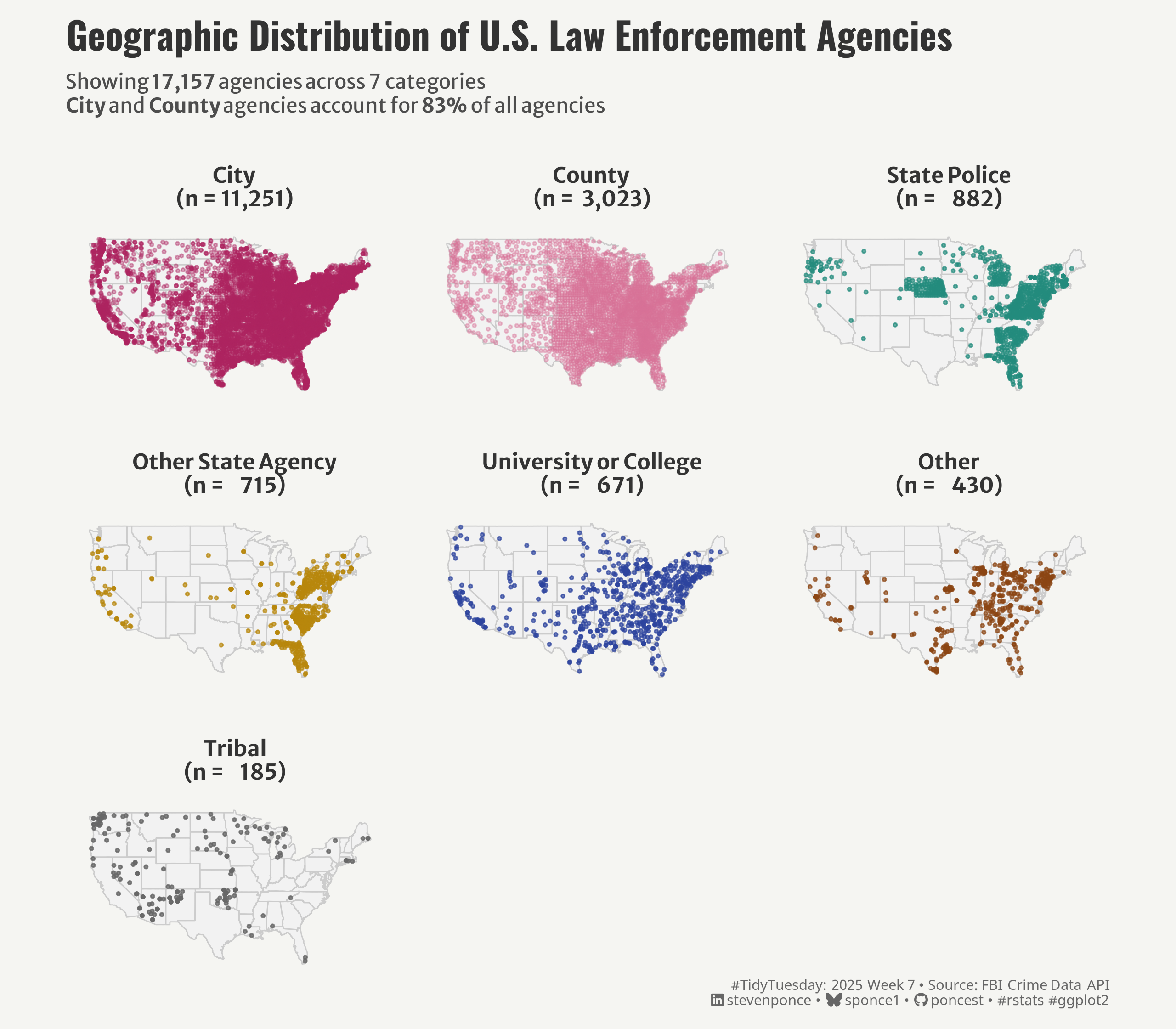{#fig-1}
### <mark> **Steps to Create this Graphic** </mark>
#### 1. Load Packages & Setup
```{r}
#| label: load
#| warning: false
#| message: false
#| results: "hide"
## 1. LOAD PACKAGES & SETUP ----
suppressPackageStartupMessages({
if (!require("pacman")) install.packages("pacman")
pacman::p_load(
    tidyverse,      # Easily Install and Load the 'Tidyverse'
    ggtext,         # Improved Text Rendering Support for 'ggplot2'
    showtext,       # Using Fonts More Easily in R Graphs
    janitor,        # Simple Tools for Examining and Cleaning Dirty Data
    skimr,          # Compact and Flexible Summaries of Data
    scales,         # Scale Functions for Visualization
    glue,           # Interpreted String Literals
    here,           # A Simpler Way to Find Your Files
    camcorder,      # Record Your Plot History
    maps            # Draw Geographical Maps
    )
})

### |- figure size ----
gg_record(
    dir    = here::here("temp_plots"),
    device = "png",
    width  =  8,
    height =  7,
    units  = "in",
    dpi    = 320
)

# Source utility functions
suppressMessages(source(here::here("R/utils/fonts.R")))
source(here::here("R/utils/social_icons.R"))
source(here::here("R/utils/image_utils.R"))
source(here::here("R/themes/base_theme.R"))
```
#### 2. Read in the Data
```{r}
#| label: read
#| include: true
#| eval: true
#| warning: false
tt <- tidytuesdayR::tt_load(2025, week = 07)

agencies <- tt$agencies |> clean_names()

tidytuesdayR::readme(tt)
rm(tt)
```
#### 3. Examine the Data
```{r}
#| label: examine
#| include: true
#| eval: true
#| results: 'hide'
#| warning: false
glimpse(agencies)
skim(agencies)
```
#### 4. Tidy Data
```{r}
#| label: tidy
#| warning: false
# Define constants
continental_bounds <- list(
    states_exclude = c("alaska", "hawaii"),
    long = c(-125, -65),
    lat = c(25, 50),
    outlier_thresh = -125
)

# Get continental US map data
continental_states <- map_data("state") |>
    filter(!region %in% continental_bounds$states_exclude)

# Function to check if point is within continental bounds
is_continental <- function(long, lat, bounds) {
    between(long, bounds$long[1], bounds$long[2]) &
        between(lat, bounds$lat[1], bounds$lat[2])
}

# Process agencies data
cleaned_agencies <- agencies |>
    # Initial filtering
    filter(
        !agency_type %in% c(NA, "Unknown", "NA"),
        !state %in% str_to_title(continental_bounds$states_exclude),
        !(agency_type == "Other" & longitude < continental_bounds$outlier_thresh)
    ) |>
    # Filter to continental bounds
    filter(is_continental(longitude, latitude, continental_bounds))

# Calculate agency counts and create labels
agency_counts <- cleaned_agencies |>
    count(agency_type) |>
    arrange(desc(n)) |>
    mutate(
        label = str_glue("{agency_type}\n(n = {format(n, big.mark=',')})"),
        pct_total = n/sum(n) * 100,
        agency_type = factor(agency_type, levels = agency_type)
    )

# Prepare final dataset for plotting
filtered_agencies <- cleaned_agencies |>
    left_join(agency_counts |> select(agency_type, label),
              by = "agency_type") |>
    mutate(
        # Set factor levels based on counts
        agency_type = factor(agency_type,
                             levels = levels(agency_counts$agency_type)),
        # Create labels for faceting
        agency_label = factor(agency_type,
                              levels = levels(agency_type),
                              labels = agency_counts$label)
    )

# Extract total for use in plot
total_agencies <- agency_counts$total_agencies[1]

# Calculate summary statistics
summary_stats <- list(
    total_agencies = sum(agency_counts$n),
    num_categories = n_distinct(filtered_agencies$agency_type),
    city_county_pct = round(100 * sum(agency_counts$n[1:2])/sum(agency_counts$n))
)
```
#### 5. Visualization Parameters
```{r}
#| label: params
#| include: true
#| warning: false
### |-  plot aesthetics ----
# Get base colors with custom palette
colors <- get_theme_colors(
    palette = c(
        "City"                  = "#AD225E",
        "County"                = "#D67195",
        "State Police"          = "#228B7D",
        "Other State Agency"    = "#B8860B",
        "University or College" = "#2D439E",
        "Other"                 = "#8B4513",
        "Tribal"                = "#666666"
    )
)

### |-  titles and caption ----
title_text <- str_glue("Geographic Distribution of U.S. Law Enforcement Agencies")

subtitle_text <-  str_glue(
    "Showing **{format(summary_stats$total_agencies, big.mark=',')}** agencies across {summary_stats$num_categories} categories<br>",
    "**City** and **County** agencies account for **{summary_stats$city_county_pct}%** of all agencies"
)

# Create caption
caption_text <- create_social_caption(
    tt_year = 2025,
    tt_week = 07,
    source_text = "FBI Crime Data API"
)

### |-  fonts ----
setup_fonts()
fonts <- get_font_families()

### |-  plot theme ----

# Start with base theme
base_theme <- create_base_theme(colors)

# Add weekly-specific theme elements
weekly_theme <- extend_weekly_theme(
    base_theme,
    theme(
        # Remove axes
        axis.text = element_blank(),
        axis.title = element_blank(),
        panel.grid = element_blank(),

        # Style facet labels
        strip.text = element_text(
            size = rel(0.75),
            face = "bold",
            family = fonts$text,
            color = colors$title,
            margin = margin(b = 8, t = 8)
        ),

        # Add spacing
        panel.spacing = unit(1.2, "lines"),

        # Plot margins
        plot.margin = margin(10, 10, 10, 10),
    )
)

# Set theme
theme_set(weekly_theme)
```
#### 6. Map
```{r}
#| label: plot
#| warning: false
### |-  Map  ----
p <- ggplot() +
    # Geoms
    geom_polygon(
        data = continental_states,
        aes(x = long, y = lat, group = group),
        fill = "gray95",
        color = "gray80",
        linewidth = 0.3
    ) +
    geom_point(
        data = filtered_agencies,
        aes(x = longitude,
            y = latitude,
            color = agency_type,
            alpha = agency_type),
        size = 0.5
    ) +

    # Scales
    scale_alpha_manual(
        values = c(
            "City" = 0.4,
            "County" = 0.4,
            "Other" = 0.7,
            "Other State Agency" = 0.7,
            "State Police" = 0.7,
            "Tribal" = 0.8,
            "University or College" = 0.7
        ),
        guide = "none"
    ) +
    scale_color_manual(
        values = colors$palette,
        guide = "none"
    ) +
    coord_fixed(
        1.3,
        xlim = continental_bounds$long,
        ylim = continental_bounds$lat
    ) +

    # Labs
    labs(
        x = NULL,
        y = NULL,
        title    = title_text,
        subtitle = subtitle_text,
        caption  = caption_text,
    ) +

    # Facets
    facet_wrap(
        ~agency_label,
        ncol = 3,
        scales = "fixed"
    ) +

    # Theme
    theme(
        plot.title = element_text(
            size = rel(1.3),
            family = fonts$title,
            face = "bold",
            color = colors$title,
            lineheight = 1.1,
            margin = margin(t = 0, b = 8)
        ),
        plot.subtitle = element_markdown(
            size = rel(0.7),
            lineheight = (1.2),
            family = fonts$subtitle,
            color = colors$subtitle,
            margin = margin(b = 15)
        ),
        plot.caption = element_markdown(
            size   = rel(0.5),
            family = fonts$caption,
            color  = colors$caption,
            hjust  = 1,
            margin = margin(t = 0, b = 0)
        )
    )
```
#### 7. Save
```{r}
#| label: save
#| warning: false
### |-  plot image ----
save_plot(
  plot = p,
  type = "tidytuesday",
  year = 2025,
  week = 7,
  width = 8,
  height = 7
)
```
#### 8. Session Info
::: {.callout-tip collapse="true"}
##### Expand for Session Info
```{r, echo = FALSE}
#| eval: true
#| warning: false
sessionInfo()
```
:::
#### 9. GitHub Repository
::: {.callout-tip collapse="true"}
##### Expand for GitHub Repo
The complete code for this analysis is available in [`tt_2025_07.qmd`](https://github.com/poncest/personal-website/blob/master/data_visualizations/TidyTuesday/2025/tt_2025_07.qmd).
For the full repository, [click here](https://github.com/poncest/personal-website/).
:::
#### 10. References
::: {.callout-tip collapse="true"}
##### Expand for References
1. Data Sources:
- TidyTuesday 2025 Week 07]: [Agencies from the FBI Crime Data API](https://github.com/rfordatascience/tidytuesday/blob/main/data/2025/2025-02-18)
:::
