---
title: "Long Beach Animal Shelter: Stay Duration and Outcomes"
subtitle: "Animals with shorter shelter stays correlate with improved adoption outcomes"
description: "Analysis of Long Beach Animal Shelter data reveals a striking correlation between length of stay and animal outcomes. This visualization explores how different animal types experience varying shelter durations and how outcome trends have evolved from 2017-2024, demonstrating a dramatic increase in adoption rates alongside decreased euthanasia. The data tells a success story of improving shelter practices while highlighting challenges for specific animal types."
author: "Steven Ponce"
date: "2025-02-27"
categories: ["TidyTuesday", "2025"]
tags: [
"tidytuesday", "animal shelter data", "ggplot2", "patchwork", "ggridges", "data storytelling", "animal welfare", "R visualization", "adoption trends", "length of stay analysis", "data science", "faceted visualization"
]
image: "thumbnails/tt_2025_09.png"
format:
html:
toc: true
toc-depth: 5
code-link: true
code-fold: true
code-tools: true
code-summary: "Show code"
editor_options:
chunk_output_type: inline
execute:
freeze: true
cache: true
error: false
message: false
warning: false
eval: true
# filters:
# - social-share
# share:
# permalink: "https://stevenponce.netlify.app/data_visualizations/TidyTuesday/2025/tt_2025_09.html"
# description: "Animal Shelter Analysis: Visualizing how shorter shelter stays at LongBeach correlate with improved adoption outcomes. See the dramatic 3x increase in #AdoptionRates from 2017-2024! #DataViz #TidyTuesday #RStats #AnimalWelfare #ShelterData"
#
# twitter: true
# linkedin: true
# email: true
# facebook: false
# reddit: false
# stumble: false
# tumblr: false
# mastodon: true
# bsky: true
---
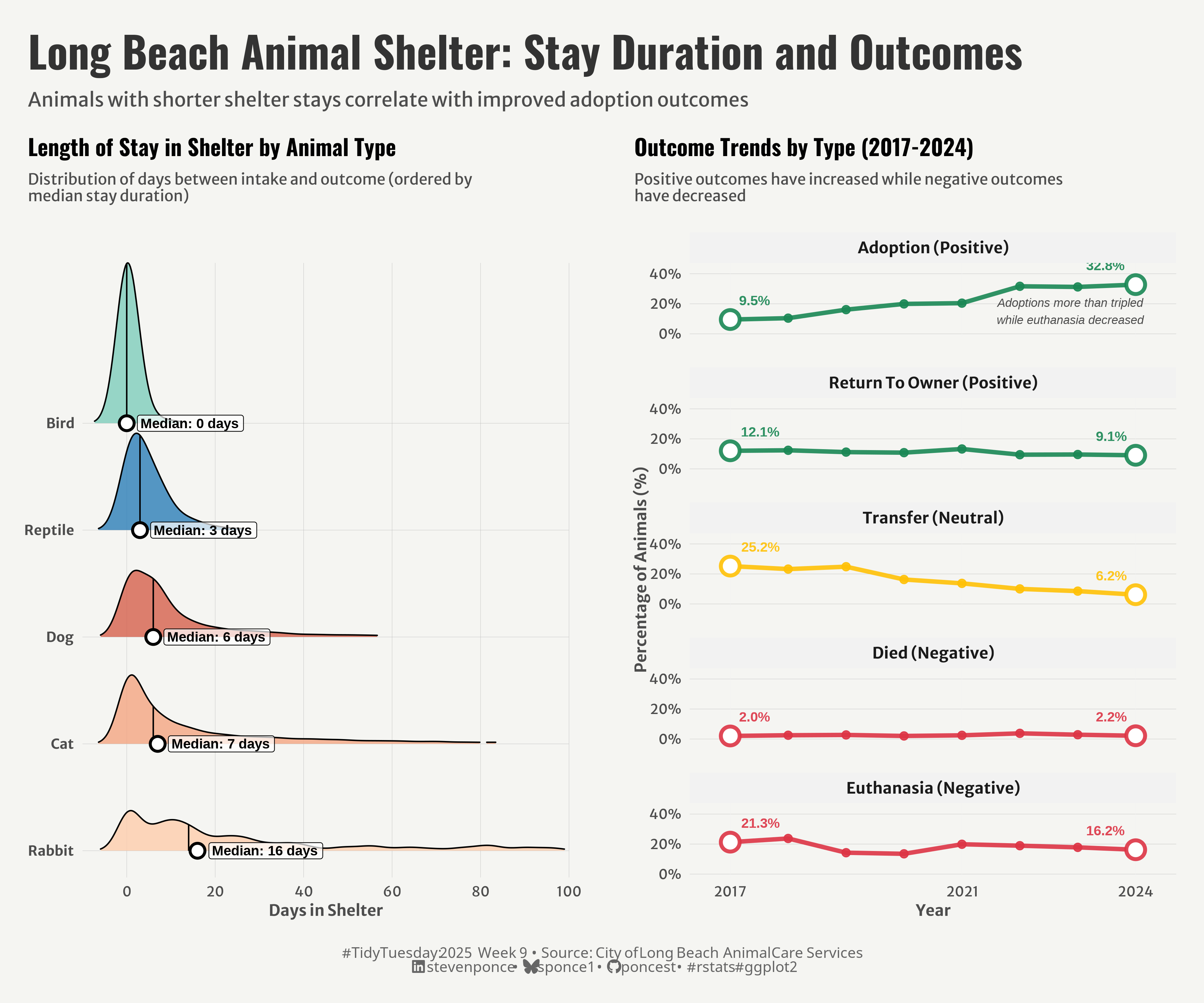{#fig-1}
### <mark> **Steps to Create this Graphic** </mark>
#### 1. Load Packages & Setup
```{r}
#| label: load
#| warning: false
#| message: false
#| results: "hide"
## 1. LOAD PACKAGES & SETUP ----
suppressPackageStartupMessages({
if (!require("pacman")) install.packages("pacman")
pacman::p_load(
   tidyverse,      # Easily Install and Load the 'Tidyverse'
    ggtext,         # Improved Text Rendering Support for 'ggplot2'
    showtext,       # Using Fonts More Easily in R Graphs
    janitor,        # Simple Tools for Examining and Cleaning Dirty Data
    skimr,          # Compact and Flexible Summaries of Data
    scales,         # Scale Functions for Visualization
    glue,           # Interpreted String Literals
    here,           # A Simpler Way to Find Your Files
    camcorder,      # Record Your Plot History
    patchwork,      # The Composer of Plots # The Composer of Plots # The Composer of Plots
    ggridges        # Ridgeline Plots in 'ggplot2'
    )
})

### |- figure size ----
gg_record(
    dir    = here::here("temp_plots"),
    device = "png",
    width  =  14,
    height =  12,
    units  = "in",
    dpi    = 320
)

# Source utility functions
suppressMessages(source(here::here("R/utils/fonts.R")))
source(here::here("R/utils/social_icons.R"))
source(here::here("R/utils/image_utils.R"))
source(here::here("R/themes/base_theme.R"))
```
#### 2. Read in the Data
```{r}
#| label: read
#| include: true
#| eval: true
#| warning: false
tt <- tidytuesdayR::tt_load(2025, week = 09)

longbeach <- tt$longbeach |> clean_names()

tidytuesdayR::readme(tt)
rm(tt)
```
#### 3. Examine the Data
```{r}
#| label: examine
#| include: true
#| eval: true
#| results: 'hide'
#| warning: false
glimpse(longbeach)
skim(longbeach)
```
#### 4. Tidy Data
```{r}
#| label: tidy
#| warning: false
### |-  tidy data ----
longbeach_clean <- longbeach |>
    mutate(
        # Time-based variables
        outcome_year = year(outcome_date),
        outcome_month = month(outcome_date),
        outcome_season = case_when(
            outcome_month %in% c(12, 1, 2) ~ "Winter",
            outcome_month %in% c(3, 4, 5) ~ "Spring",
            outcome_month %in% c(6, 7, 8) ~ "Summer",
            outcome_month %in% c(9, 10, 11) ~ "Fall",
            TRUE ~ NA_character_
        ),
        # Duration calculations
        days_in_shelter = as.numeric(difftime(outcome_date, intake_date, units = "days")),
        age_at_outcome = if_else(
            !is.na(dob),
            as.numeric(difftime(outcome_date, dob, units = "days")) / 365.25,
            NA_real_
        )
    )

# P1. Days in Shelter by Animal Type ----

# Filter data for the visualization with clear criteria
shelter_stay <- longbeach_clean |>
    filter(
        !is.na(days_in_shelter),
        days_in_shelter >= 0,
        days_in_shelter <= 365,
        animal_type %in% c("dog", "cat", "rabbit", "bird", "reptile")
    ) |>
    mutate(animal_type = str_to_title(animal_type))

# Calculate summary statistics with proper grouping
median_stays <- shelter_stay |>
    group_by(animal_type) |>
    summarize(
        median_stay = median(days_in_shelter, na.rm = TRUE),
        max_density = 0.02,
        .groups = 'drop'
    )

# Join and transform in a clear sequence
shelter_stay <- shelter_stay |>
    left_join(
        median_stays |> select(animal_type, median_stay),
        by = "animal_type"
    ) |>
    mutate(
        animal_type = fct_reorder(animal_type, median_stay, .desc = TRUE)
    )

# Ensure consistent factor levels across dataframes
median_stays <- median_stays |>
    mutate(
        animal_type = factor(animal_type, levels = levels(shelter_stay$animal_type))
    )

# P2. Outcome Trends by Type ----
outcome_by_year <- longbeach_clean |>
    filter(!is.na(outcome_year), !is.na(outcome_type)) |>
    count(outcome_year, outcome_type) |>
    group_by(outcome_year) |>
    mutate(pct = n / sum(n) * 100) |>
    ungroup() |>
    # Keep only main outcome types of interest
    filter(outcome_type %in% c("adoption", "euthanasia", "return to owner", "transfer", "died")) |>
    mutate(
        # Categorize outcomes
        outcome_category = case_when(
            outcome_type %in% c("adoption", "return to owner") ~ "Positive",
            outcome_type %in% c("euthanasia", "died") ~ "Negative",
            TRUE ~ "Neutral"
        ),
        outcome_type = str_to_title(outcome_type),
        # Create category factor with explicit ordering
        outcome_category = factor(
            outcome_category,
            levels = c("Positive", "Neutral", "Negative")
        ),
        # Create descriptive facet labels
        facet_label = paste0(outcome_type, " (", outcome_category, ")"),
        # Create ordered factor for outcome types
        outcome_type = factor(
            outcome_type,
            levels = c("Adoption", "Return To Owner", "Transfer", "Died", "Euthanasia"),
            ordered = TRUE
        )
    ) |>
    filter(!is.na(facet_label)) |>
    # Create ordered faceting variable
    mutate(
        # Prefix with numeric category for sorting
        facet_order = paste0(
            as.numeric(outcome_category), "_",
            outcome_type, " (", outcome_category, ")"
        ),
        # Convert to factor with proper ordering
        facet_order = factor(
            facet_order,
            levels = unique(facet_order[order(outcome_category, outcome_type)])
        )
    )

# Extract first and last points for each outcome type for highlighting
endpoints <- outcome_by_year |>
    group_by(outcome_type) |>
    slice(c(1, n())) |>
    ungroup()
```
#### 5. Visualization Parameters
```{r}
#| label: params
#| include: true
#| warning: false
### |-  plot aesthetics ----
# Color for P1
colors <- get_theme_colors(palette = c(
    "Rabbit" = "#FDCDAC",
    "Cat" = "#F4A582",
    "Dog" = "#D6604D",
    "Reptile" = "#2C7FB8",
    "Bird" = "#7FCDBB"
))

# Colors for P2
colors2 <- get_theme_colors(palette = c(
    "Positive" = alpha("#1A8754", 0.9),
    "Neutral" = alpha("#FFC107", 0.9),
    "Negative" = alpha("#DC3545", 0.9)
))

### |-  titles and caption ----
title_text <- str_glue("Long Beach Animal Shelter: Stay Duration and Outcomes")

subtitle_text <- str_glue("Animals with shorter shelter stays correlate with improved adoption outcomes")

# Create caption
caption_text <- create_social_caption(
    tt_year = 2025,
    tt_week = 09,
    source_text =  "City of Long Beach Animal Care Services"
)

### |-  fonts ----
setup_fonts()
fonts <- get_font_families()

### |-  plot theme ----

# Start with base theme
base_theme <- create_base_theme(colors)

# Add weekly-specific theme elements
weekly_theme <- extend_weekly_theme(
    base_theme,
    theme(
        # Text styling
        plot.title = element_text(face = "bold", family = fonts$title, size = rel(1.14), margin = margin(b = 10)),
        plot.subtitle = element_text(family = fonts$subtitle, color = colors$text, size = rel(0.78), margin = margin(b = 20)),

        # Axis elements
        axis.title = element_text(color = colors$text, size = rel(0.8)),
        axis.text = element_text(color = colors$text, size = rel(0.7)),

        # Grid elements
        panel.grid.minor = element_blank(),
        panel.grid.major = element_line(color = "grey95", linewidth = 0.1),

        # Legend elements
        legend.position = "plot",
        legend.title = element_text(family = fonts$text, size = rel(0.8)),
        legend.text = element_text(family = fonts$text, size = rel(0.7)),

        # Plot margins
        plot.margin = margin(t = 10, r = 10, b = 10, l = 10),
    )
)

# Set theme
theme_set(weekly_theme)
```
#### 6. Plot
```{r}
#| label: plot
#| warning: false
### |-  Plot  ----
# P1. Days in Shelter by Animal Type ----
p1 <- ggplot(shelter_stay, aes(x = days_in_shelter, y = animal_type, fill = animal_type)) +
    # Geoms
    geom_density_ridges(
        alpha = 0.8,
        scale = 1.5,
        rel_min_height = 0.01,
        bandwidth = 2.5,
        quantile_lines = TRUE,
        quantiles = 2  # median
    ) +
    geom_point(
        data = median_stays,
        aes(x = median_stay, y = animal_type),
        shape = 21,
        fill = "white",
        color = "black",
        size = 4,
        stroke = 1.5
    ) +
    geom_label(
        data = median_stays,
        aes(x = median_stay, y = animal_type,
            label = paste0("Median: ", round(median_stay, 1), " days")),
        hjust = -0.1,
        vjust = 0.5,
        size = 3.5,      # Slightly larger
        fontface = "bold",
        fill = alpha("white", 0.7),
        label.padding = unit(0.2, "lines"),
        label.r = unit(0.15, "lines")
    ) +
    # Scales
    scale_x_continuous(
        limits = c(-10, 100),
        breaks = seq(0, 100, by = 20),
        minor_breaks = seq(0, 100, by = 10),
        expand = c(0, 0)
    ) +
    scale_y_discrete(expand = c(0, 0.25)) +
    scale_fill_manual(values = colors$palette) +
    coord_cartesian(clip = 'off') +
    # Labs
    labs(
        title = "Length of Stay in Shelter by Animal Type",
        subtitle = str_wrap("Distribution of days between intake and outcome (ordered by median stay duration)", width = 60),
        x = "Days in Shelter",
        y = NULL,
    ) +
    # Theme
    theme(
        panel.grid.major = element_line(color = "gray", linewidth = 0.1),
        axis.text.y = element_text(face = "bold")
    )

# P2. Outcome Trends by Type ----
p2 <- ggplot(outcome_by_year, aes(x = outcome_year, y = pct, color = outcome_category)) +
    # Geoms
    geom_line(size = 1.5) +
    geom_point(size = 2.5) +
    geom_point(data = endpoints, size = 5, shape = 21, fill = "white", stroke = 2) +
    geom_text(
        data = endpoints,
        aes(label = sprintf("%.1f%%", pct)),
        hjust = ifelse(endpoints$outcome_year == min(endpoints$outcome_year), -0.3, 1.3),
        vjust = -1.5,
        size = 3.5,  # Larger text
        fontface = "bold",
        show.legend = FALSE
    ) +
    geom_text(
        data = tibble(
            outcome_year = 2021.6,
            pct = 15,
            facet_order = unique(outcome_by_year$facet_order)[1] # Only first panel
        ),
        label = "Adoptions more than tripled\nwhile euthanasia decreased",
        size = 3,
        fontface = "italic",
        color = "gray30",
        hjust = 0
    ) +
    # Scales
    scale_x_continuous(breaks = c(2017, 2021, 2024), expand = expansion(mult = c(0.1, 0.1))) +
    scale_y_continuous(
        limits = c(0, 45),
        breaks = seq(0, 40, by = 20),
        labels = function(x) paste0(x, "%"),
        minor_breaks = NULL
    ) +
    scale_color_manual(values = colors2$palette) +
    coord_cartesian(clip = 'off') +
    # Labs
    labs(
        title = "Outcome Trends by Type (2017-2024)",
        subtitle = str_wrap("Positive outcomes have increased while negative outcomes have decreased", width = 60),
        x = "Year",
        y = "Percentage of Animals (%)",
    ) +
    # Facets
    facet_wrap(~ facet_order, scales = "fixed", ncol = 1, drop = TRUE,
               labeller = labeller(facet_order = function(x) gsub("^\\d+_", "", x))) +
    # Theme
    theme(
        strip.text = element_text(face = "bold", family = fonts$text, size = rel(0.8)),
        strip.background = element_rect(fill = "gray95", color = NA),
        panel.grid.major.y = element_line(color = "gray", linewidth = 0.1),
        panel.spacing = unit(1.5, "lines")
    )

# Combined Plot -----
combined_plot <- (p1 | plot_spacer() | p2) +
    plot_layout(widths = c(1, 0.02, 1))

combined_plot <- combined_plot +
    plot_annotation(
        title = title_text,
        subtitle = subtitle_text,
        caption = caption_text,
        theme = theme(
            plot.title = element_text(
                size = rel(2.2),
                family = fonts$title,
                face = "bold",
                color = colors$title,
                lineheight = 1.1,
                margin = margin(t = 5, b = 5)
            ),
            plot.subtitle = element_text(
                size = rel(1),
                family = fonts$subtitle,
                color = colors$subtitle,
                lineheight = 1.2,
                margin = margin(t = 5, b = 10)
            ),
            plot.caption = element_markdown(
                size   = rel(0.75),
                family = fonts$caption,
                color  = colors$caption,
                hjust  = 0.5,
                margin = margin(t = 10)
            ),
            plot.margin = margin(t = 20, r = 10, b = 20, l = 10),
        ))
```
#### 7. Save
```{r}
#| label: save
#| warning: false
### |-  plot image ----
save_plot_patchwork(
  plot = combined_plot,
  type = "tidytuesday",
  year = 2025,
  week = 9,
  width = 12,
  height = 10
)
```
#### 8. Session Info
::: {.callout-tip collapse="true"}
##### Expand for Session Info
```{r, echo = FALSE}
#| eval: true
#| warning: false
sessionInfo()
```
:::
#### 9. GitHub Repository
::: {.callout-tip collapse="true"}
##### Expand for GitHub Repo
The complete code for this analysis is available in [`tt_2025_09.qmd`](https://github.com/poncest/personal-website/blob/master/data_visualizations/TidyTuesday/2025/tt_2025_09.qmd).
For the full repository, [click here](https://github.com/poncest/personal-website/).
:::
#### 10. References
::: {.callout-tip collapse="true"}
##### Expand for References
1. Data Sources:
- TidyTuesday 2025 Week 09: [Long Beach Animal Shelter](https://github.com/rfordatascience/tidytuesday/blob/main/data/2025/2025-03-04)
:::
