---
title: "Speed Distribution by Pokémon Type"
subtitle: "Electric and Flying types tend to be fastest, while Rock types are slowest"
description: "This visualization explores the speed distribution across different Pokémon types using data from the {pokemon} R package. The beeswarm plot reveals distinct patterns in how speed stats vary between types, with Electric and Flying Pokémon showcasing the highest average speeds while Rock types tend to be the slowest. Diamond markers indicate mean values for each type, providing insight into competitive gameplay advantages."
author: "Steven Ponce"
date: "2025-03-23"
categories: ["TidyTuesday", "2025"]
tags: [
"pokemon", "ggplot2", "ggbeeswarm", "MetBrewer", "data-visualization", "gaming-data", "speed-stats", "type-analysis", "beeswarm-plot"
]
image: "thumbnails/tt_2025_13.png"
format:
html:
toc: true
toc-depth: 5
code-link: true
code-fold: true
code-tools: true
code-summary: "Show code"
editor_options:
chunk_output_type: inline
execute:
freeze: true
cache: true
error: false
message: false
warning: false
eval: true
# filters:
# - social-share
# share:
# permalink: "https://stevenponce.netlify.app/data_visualizations/TidyTuesday/2025/tt_2025_13.html"
# description: "Exploring Pokémon speed stats across different types: which are fastest and which are slowest? A #TidyTuesday data visualization showing why Electric and Flying types have the competitive edge"
#
# twitter: true
# linkedin: true
# email: true
# facebook: false
# reddit: false
# stumble: false
# tumblr: false
# mastodon: true
# bsky: true
---
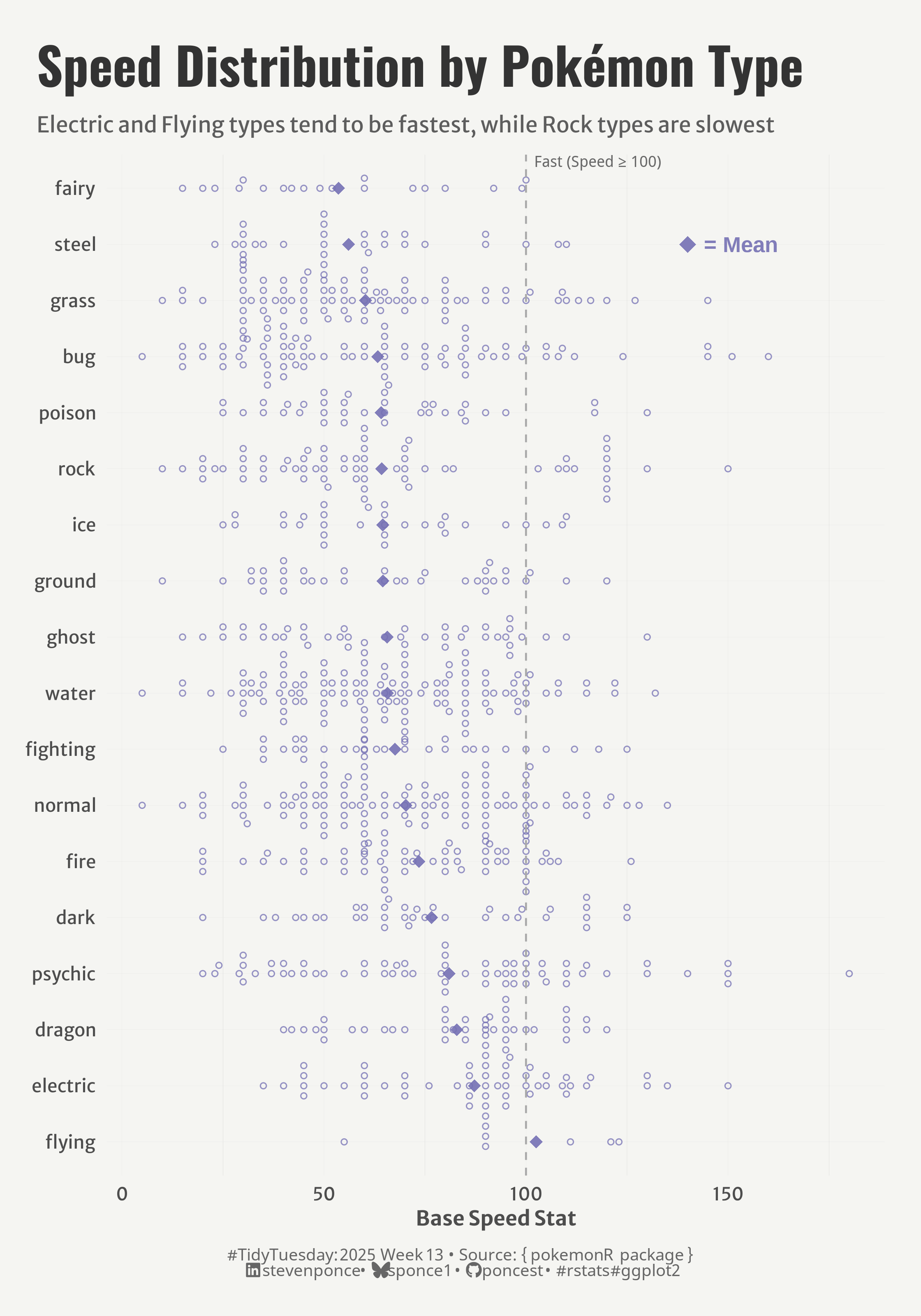{#fig-1}
### <mark> **Steps to Create this Graphic** </mark>
#### 1. Load Packages & Setup
```{r}
#| label: load
#| warning: false
#| message: false
#| results: "hide"
## 1. LOAD PACKAGES & SETUP ----
suppressPackageStartupMessages({
if (!require("pacman")) install.packages("pacman")
pacman::p_load(
    tidyverse,      # Easily Install and Load the 'Tidyverse'
    ggtext,         # Improved Text Rendering Support for 'ggplot2'
    showtext,       # Using Fonts More Easily in R Graphs
    janitor,        # Simple Tools for Examining and Cleaning Dirty Data
    skimr,          # Compact and Flexible Summaries of Data
    scales,         # Scale Functions for Visualization
    glue,           # Interpreted String Literals
    here,           # A Simpler Way to Find Your Files
    ggbeeswarm,     # Categorical Scatter (Violin Point) Plots
    camcorder       # Record Your Plot History
    )
})

### |- figure size ----
gg_record(
    dir    = here::here("temp_plots"),
    device = "png",
    width  =  7,
    height =  10,
    units  = "in",
    dpi    = 320
)

# Source utility functions
suppressMessages(source(here::here("R/utils/fonts.R")))
source(here::here("R/utils/social_icons.R"))
source(here::here("R/utils/image_utils.R"))
source(here::here("R/themes/base_theme.R"))
```
#### 2. Read in the Data
```{r}
#| label: read
#| include: true
#| eval: true
#| warning: false
tt <- tidytuesdayR::tt_load(2025, week = 13)

pokemon_raw <- tt$pokemon_df |> clean_names()

tidytuesdayR::readme(tt)
rm(tt)
```
#### 3. Examine the Data
```{r}
#| label: examine
#| include: true
#| eval: true
#| results: 'hide'
#| warning: false
glimpse(pokemon_raw)
skim(pokemon_raw)
```
#### 4. Tidy Data
```{r}
#| label: tidy
#| warning: false
### |-  tidy data ----
pokemon_clean <- pokemon_raw |>
    select(pokemon, type_1, speed, generation_id, color_1) |>
    filter(!is.na(speed), !is.na(type_1)) |>
    mutate(generation = as.factor(generation_id))

# Summarize speed stats
ordered_types <- pokemon_clean |>
    group_by(type_1) |>
    summarize(
        across(
            speed,
            list(
                mean = ~mean(.x, na.rm = TRUE),
                median = ~median(.x, na.rm = TRUE),
                min = ~min(.x, na.rm = TRUE),
                max = ~max(.x, na.rm = TRUE)
            ),
            .names = "{fn}_{.col}"
        ),
        count = n(),
        .groups = "drop"
    ) |>
    arrange(desc(mean_speed)) |>
    pull(type_1)

# plot data
pokemon_clean <- pokemon_clean |>
    mutate(type_1 = factor(type_1, levels = ordered_types))
```
#### 5. Visualization Parameters
```{r}
#| label: params
#| include: true
#| warning: false
### |-  plot aesthetics ----
colors <- get_theme_colors(
    palette = c(rep("#7570B3", 18))
)

### |-  titles and caption ----
title_text <- str_glue("Speed Distribution by Pokémon Type")
subtitle_text <- str_glue("Electric and Flying types tend to be fastest, while Rock types are slowest")

# Create caption
caption_text <- create_social_caption(
    tt_year = 2025,
    tt_week = 13,
    source_text =  "{ pokemon R package }"
)

### |-  fonts ----
setup_fonts()
fonts <- get_font_families()

### |-  plot theme ----

# Start with base theme
base_theme <- create_base_theme(colors)

# Add weekly-specific theme elements
weekly_theme <- extend_weekly_theme(
    base_theme,
    theme(
        # Text styling
        plot.title = element_text(face = "bold", family = fonts$title, size = rel(1.14), margin = margin(b = 10)),
        plot.subtitle = element_text(family = fonts$subtitle, color = colors$text, size = rel(0.78), margin = margin(b = 20)),

        # Axis elements
        axis.title = element_text(color = colors$text, face = "bold", size = rel(0.8)),
        axis.text = element_text(color = colors$text, size = rel(0.7)),

        # Grid elements
        panel.grid.minor = element_line(color = "gray80", linewidth = 0.05),
        panel.grid.major = element_line(color = "gray80", linewidth = 0.02),

        # Legend elements
        legend.position = "plot",
        legend.direction = "horizontal",
        legend.title = element_text(family = fonts$text, size = rel(0.8), face = "bold"),
        legend.text = element_text(family = fonts$text, size = rel(0.7)),

        # two-row legend
        legend.box.spacing = unit(0.4, "cm"),
        legend.key.width = unit(1.5, "cm"),
        legend.spacing.x = unit(0.2, "cm"),

        legend.box = "horizontal",
        legend.box.just = "left",

        # Plot margins
        plot.margin = margin(t = 20, r = 20, b = 20, l = 20),
    )
)

# Set theme
theme_set(weekly_theme)
```
#### 6. Plot
```{r}
#| label: plot
#| warning: false
### |-  Plot  ----
p <- pokemon_clean |>
    ggplot(aes(x = type_1, y = speed, color = type_1)) +
    # Geoms
    geom_beeswarm(cex = 1, size = 1.2, alpha = 0.75, shape = 21, na.rm = TRUE) +
    stat_summary(   # mean indicator
        fun = mean,
        geom = "point",
        shape = 18,
        size = 3,
        color =  alpha(colors$palette[1], 0.9),
    ) +
    geom_hline(
        yintercept = 100,
        linetype = "dashed",
        color = "darkgray",
        ) +
    # Annotate
    annotate(
        "text", x = length(ordered_types), y = 102,
        label = "Fast (Speed ≥ 100)", hjust = 0, vjust = -2,
        size = 3, color = "dimgray"
        ) +
    annotate(
        "point",
        x = "steel",
        y = 140,
        shape = 18,
        size = 4,
        color = alpha(colors$palette[1], 0.9)
    ) +
    annotate(
        "text",
        x = "steel", y = 141, label = "  = Mean",
        color =  alpha(colors$palette[1], 0.9),
        size = 4.2,
        angle = 0,
        hjust = 0,
        fontface = "bold"
    ) +

    # Scales
    scale_color_manual(values = colors$palette) +
    coord_flip() +
    # labs
    labs(
        title = title_text,
        subtitle = subtitle_text,
        caption = caption_text,
        x = NULL,
        y = "Base Speed Stat"
    ) +
    # Theme
    theme(
        plot.title = element_text(
            size = rel(2),
            family = fonts$title,
            face = "bold",
            color = colors$title,
            lineheight = 1.1,
            margin = margin(t = 5, b = 5)
        ),
        plot.subtitle = element_text(
            size = rel(0.85),
            family = fonts$subtitle,
            color = alpha(colors$subtitle, 0.9),
            lineheight = 1.2,
            margin = margin(t = 5, b = 10)
        ),
        plot.caption = element_markdown(
            size = rel(0.65),
            family = fonts$caption,
            color = colors$caption,
            hjust = 0.5,
            margin = margin(t = 10)
        )
    )
```
#### 7. Save
```{r}
#| label: save
#| warning: false
### |-  plot image ----
save_plot_patchwork(
  plot = p,
  type = "tidytuesday",
  year = 2025,
  week = 13,
  width = 7,
  height = 10
)
```
#### 8. Session Info
::: {.callout-tip collapse="true"}
##### Expand for Session Info
```{r, echo = FALSE}
#| eval: true
#| warning: false
sessionInfo()
```
:::
#### 9. GitHub Repository
::: {.callout-tip collapse="true"}
##### Expand for GitHub Repo
The complete code for this analysis is available in [`tt_2025_13.qmd`](https://github.com/poncest/personal-website/blob/master/data_visualizations/TidyTuesday/2025/tt_2025_13.qmd).
For the full repository, [click here](https://github.com/poncest/personal-website/).
:::
#### 10. References
::: {.callout-tip collapse="true"}
##### Expand for References
1. Data Sources:
- TidyTuesday 2025 Week 13: [Pokemon](https://github.com/rfordatascience/tidytuesday/blob/main/data/2025/2025-04-01)
:::
