---
title: "Morphological Separation in Bill Dimensions Across Penguin Species"
subtitle: "2D density contours with individual observations for the three species"
description: "Exploring morphological differences between Adelie, Chinstrap, and Gentoo penguin species through bill dimensions analysis. This visualization demonstrates how bill length and depth measurements create distinct clusters that allow for clear species differentiation in the Palmer Archipelago penguin dataset."
author: "Steven Ponce"
date: "2025-04-16"
categories: ["TidyTuesday", "2025"]
tags: [
"ggplot2", "palmerpenguins", "density contours", "morphology", "species classification", "bivariate analysis", "Antarctic wildlife", "ornithology", "multivariate visualization", "ecological data"
]
image: "thumbnails/tt_2025_15.png"
format:
html:
toc: true
toc-depth: 5
code-link: true
code-fold: true
code-tools: true
code-summary: "Show code"
editor_options:
chunk_output_type: inline
execute:
freeze: true
cache: true
error: false
message: false
warning: false
eval: true
# filters:
# - social-share
# share:
# permalink: "https://stevenponce.netlify.app/data_visualizations/TidyTuesday/2025/tt_2025_15.html"
# description: "See how Antarctic penguin species form distinct clusters based solely on bill dimensions. This visualization of the Palmer Penguins dataset reveals clear morphological separation between Adelie, Chinstrap, and Gentoo penguins using density contours and individual observations."
#
# twitter: true
# linkedin: true
# email: true
# facebook: false
# reddit: false
# stumble: false
# tumblr: false
# mastodon: true
# bsky: true
---
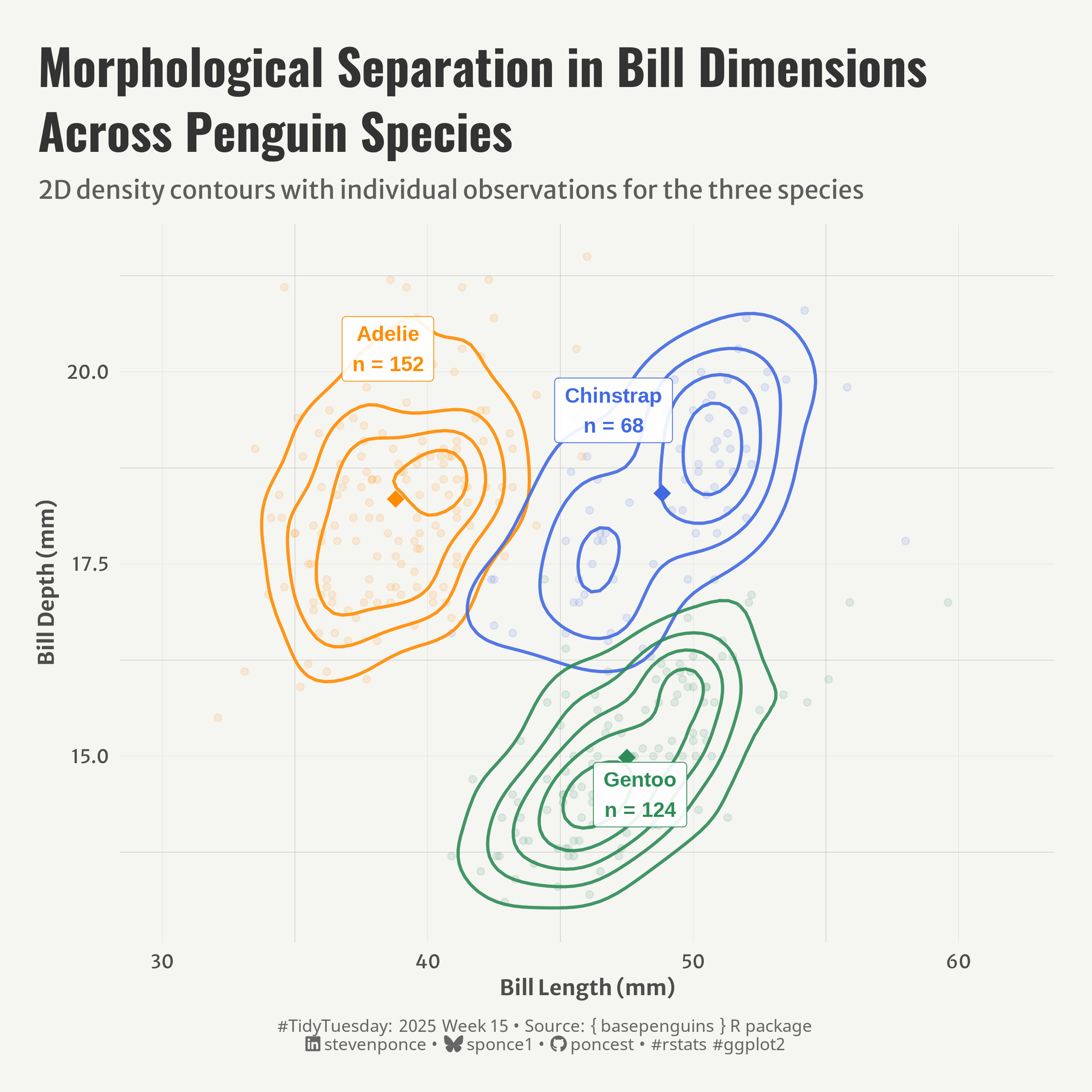{#fig-1}
### <mark> **Steps to Create this Graphic** </mark>
#### 1. Load Packages & Setup
```{r}
#| label: load
#| warning: false
#| message: false
#| results: "hide"
## 1. LOAD PACKAGES & SETUP ----
suppressPackageStartupMessages({
if (!require("pacman")) install.packages("pacman")
pacman::p_load(
    tidyverse,      # Easily Install and Load the 'Tidyverse'
    ggtext,         # Improved Text Rendering Support for 'ggplot2'
    showtext,       # Using Fonts More Easily in R Graphs
    janitor,        # Simple Tools for Examining and Cleaning Dirty Data
    skimr,          # Compact and Flexible Summaries of Data
    scales,         # Scale Functions for Visualization
    glue,           # Interpreted String Literals
    here,           # A Simpler Way to Find Your Files
    camcorder       # Record Your Plot History
    )
})

### |- figure size ----
gg_record(
    dir    = here::here("temp_plots"),
    device = "png",
    width  =  8,
    height =  8,
    units  = "in",
    dpi    = 320
)

# Source utility functions
suppressMessages(source(here::here("R/utils/fonts.R")))
source(here::here("R/utils/social_icons.R"))
source(here::here("R/utils/image_utils.R"))
source(here::here("R/themes/base_theme.R"))
```
#### 2. Read in the Data
```{r}
#| label: read
#| include: true
#| eval: true
#| warning: false
penguins <- readr::read_csv('https://raw.githubusercontent.com/rfordatascience/tidytuesday/main/data/2025/2025-04-15/penguins.csv') |>
    clean_names()
```
#### 3. Examine the Data
```{r}
#| label: examine
#| include: true
#| eval: true
#| results: 'hide'
#| warning: false
glimpse(penguins)
skim(penguins)
```
#### 4. Tidy Data
```{r}
#| label: tidy
#| warning: false
### |-  tidy data ----
species_stats <- penguins |>
    group_by(species) |>
    summarize(
        mean_bill_len = mean(bill_len, na.rm = TRUE),
        mean_bill_dep = mean(bill_dep, na.rm = TRUE),
        n = n(),
        .groups = 'drop'
    )
# label positions
label_positions <- data.frame(
    species = c("Adelie", "Chinstrap", "Gentoo"),
    x_pos = c(38.5, 47, 48),
    y_pos = c(20.3, 19.5, 14.5),
    n = c(152, 68, 124)
)
```
#### 5. Visualization Parameters
```{r}
#| label: params
#| include: true
#| warning: false
### |-  plot aesthetics ----
colors <- get_theme_colors(
    palette = c(
        "Adelie" = "#FF8C00",
        "Chinstrap" = "#4169E1",
        "Gentoo" = "#2E8B57"
    )
)

### |-  titles and caption ----
title_text <- str_wrap("Morphological Separation in Bill Dimensions Across Penguin Species",
                       width = 45)
subtitle_text <- str_glue("2D density contours with individual observations for the three species")

# Create caption
caption_text <- create_social_caption(
    tt_year = 2025,
    tt_week = 15,
    source_text =  "{ basepenguins } R package"
)

### |-  fonts ----
setup_fonts()
fonts <- get_font_families()

### |-  plot theme ----

# Start with base theme
base_theme <- create_base_theme(colors)

# Add weekly-specific theme elements
weekly_theme <- extend_weekly_theme(
    base_theme,
    theme(
        # Text styling
        plot.title = element_text(face = "bold", family = fonts$title, size = rel(1.14), margin = margin(b = 10)),
        plot.subtitle = element_text(family = fonts$subtitle, color = colors$text, size = rel(0.78), margin = margin(b = 20)),

        # Axis elements
        axis.title = element_text(color = colors$text, face = "bold", size = rel(0.8)),
        axis.text = element_text(color = colors$text, size = rel(0.7)),

        # Grid elements
        panel.grid.minor = element_line(color = "gray50", linewidth = 0.05),
        panel.grid.major = element_line(color = "gray50", linewidth = 0.02),

        # Legend elements
        legend.position = "plot",
        legend.direction = "horizontal",
        legend.title = element_text(family = fonts$text, size = rel(0.8), face = "bold"),
        legend.text = element_text(family = fonts$text, size = rel(0.7)),

        # two-row legend
        legend.box.spacing = unit(0.4, "cm"),
        legend.key.width = unit(1.5, "cm"),
        legend.spacing.x = unit(0.2, "cm"),

        legend.box = "horizontal",
        legend.box.just = "left",

        # Plot margins
        plot.margin = margin(t = 20, r = 20, b = 20, l = 20),
    )
)

# Set theme
theme_set(weekly_theme)
```
#### 6. Plot
```{r}
#| label: plot
#| warning: false
### |-  Plot  ----
p <- ggplot(penguins, aes(x = bill_len, y = bill_dep, color = species)) +
    # Geoms
    geom_point(
        alpha = 0.12, size = 1.5
        ) +
    geom_density_2d(
        size = 0.8,
        alpha = 0.9,
        bins = 6,
        lineend = "round",
        linejoin = "round"
    ) +
    geom_point(
        data = species_stats,
        aes(x = mean_bill_len, y = mean_bill_dep),
        size = 4,
        shape = 18
    ) +
    geom_label(
        data = label_positions,
        aes(x = x_pos, y = y_pos,
            label = paste0(species, "\nn = ", n),
            color = species),
        fill = "white",
        alpha = 0.9,
        fontface = "bold",
        label.size = 0.2,
        label.padding = unit(0.4, "lines"),
        label.r = unit(0.15, "lines")
    ) +
    # Scales
    scale_color_manual(values = colors$palette) +
    scale_x_continuous(limits = c(30, 62)) +
    scale_y_continuous(limits = c(13, 21.5)) +
    # Labs
    labs(
        title = title_text,
        subtitle = subtitle_text,
        caption = caption_text,
        x = "Bill Length (mm)",
        y = "Bill Depth (mm)"
        ) +
    # Theme
    theme(
        plot.title = element_text(
            size = rel(1.85),
            family = fonts$title,
            face = "bold",
            color = colors$title,
            lineheight = 1.1,
            margin = margin(t = 5, b = 5)
        ),
        plot.subtitle = element_text(
            size = rel(0.95),
            family = fonts$subtitle,
            color = alpha(colors$subtitle, 0.9),
            lineheight = 1.2,
            margin = margin(t = 5, b = 10)
        ),
        plot.caption = element_markdown(
            size = rel(0.65),
            family = fonts$caption,
            color = colors$caption,
            hjust = 0.5,
            margin = margin(t = 10)
        )
    )
```
#### 7. Save
```{r}
#| label: save
#| warning: false
### |-  plot image ----
save_plot(
  plot = p,
  type = "tidytuesday",
  year = 2025,
  week = 15,
  width = 8,
  height = 8
)
```
#### 8. Session Info
::: {.callout-tip collapse="true"}
##### Expand for Session Info
```{r, echo = FALSE}
#| eval: true
#| warning: false
sessionInfo()
```
:::
#### 9. GitHub Repository
::: {.callout-tip collapse="true"}
##### Expand for GitHub Repo
The complete code for this analysis is available in [`tt_2025_15.qmd`](https://github.com/poncest/personal-website/blob/master/data_visualizations/TidyTuesday/2025/tt_2025_15.qmd).
For the full repository, [click here](https://github.com/poncest/personal-website/).
:::
#### 10. References
::: {.callout-tip collapse="true"}
##### Expand for References
1. Data Sources:
- TidyTuesday 2025 Week 15: [Base R Penguins](https://github.com/rfordatascience/tidytuesday/blob/main/data/2025/2025-04-01)
:::
