---
title: "The Statistical Performance Gap: High vs. Low Income Countries"
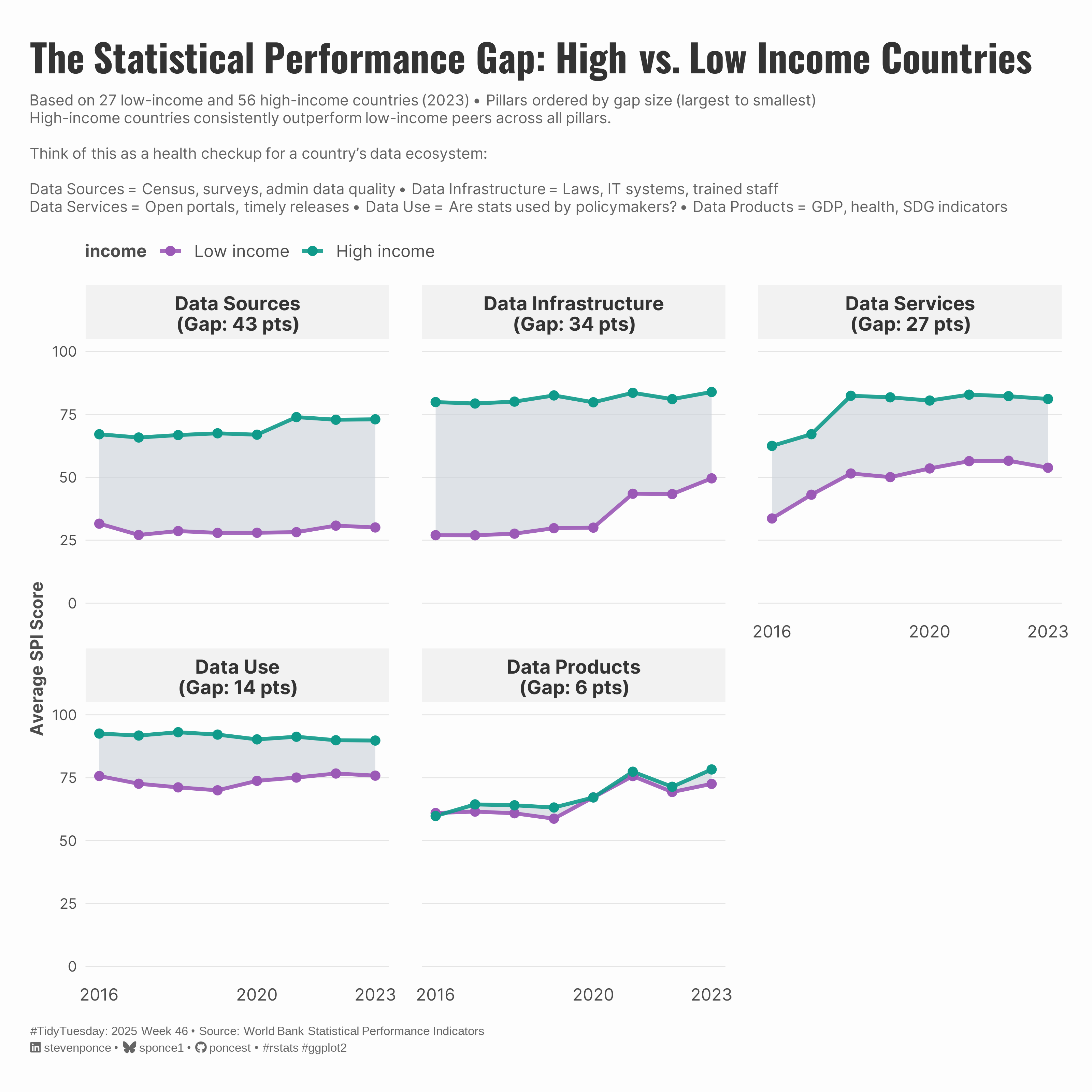
subtitle: "Based on 27 low-income and 56 high-income countries (2023) • Pillars ordered by gap size (largest to smallest)"
description: "Analyzing inequality in statistical capacity using World Bank's Statistical Performance Indicators. High-income countries outperform low-income peers across all five pillars, with the largest gaps in data sources and infrastructure."
date: "2025-11-23"
categories: ["TidyTuesday", "2025"]
tags: [
"World Bank",
"Statistical Capacity",
"Income Inequality",
"Development Indicators",
"Faceted Plots",
"Gap Analysis",
"ggplot2",
"Data Literacy",
"Global Development",
"Statistical Systems",
"Data Infrastructure",
"Public Policy"
]
image: "thumbnails/tt_2025_47.png"
format:
html:
toc: true
toc-depth: 5
code-link: true
code-fold: true
code-tools: true
code-summary: "Show code"
editor_options:
chunk_output_type: inline
execute:
freeze: true
cache: true
error: false
message: false
warning: false
eval: true
---
{#fig-1}
### <mark> **Steps to Create this Graphic** </mark>
#### 1. Load Packages & Setup
```{r}
#| label: load
#| warning: false
#| message: false
#| results: "hide"

## 1. LOAD PACKAGES & SETUP ----
suppressPackageStartupMessages({
if (!require("pacman")) install.packages("pacman")
pacman::p_load(
    tidyverse,     # Easily Install and Load the 'Tidyverse'
    ggtext,        # Improved Text Rendering Support for 'ggplot2'
    showtext,      # Using Fonts More Easily in R Graphs
    janitor,       # Simple Tools for Examining and Cleaning Dirty Data
    scales,        # Scale Functions for Visualization
    ggrepel,       # Automatically Position Non-Overlapping Text Labels with 'ggplot2'
    glue           # Interpreted String Literals
)
})

### |- figure size ----
camcorder::gg_record(
  dir    = here::here("temp_plots"),
  device = "png",
  width  = 10,
  height = 10,
  units  = "in",
  dpi    = 320
)

# Source utility functions
suppressMessages(source(here::here("R/utils/fonts.R")))
source(here::here("R/utils/social_icons.R"))
source(here::here("R/utils/image_utils.R"))
source(here::here("R/themes/base_theme.R"))
```
#### 2. Read in the Data
```{r}
#| label: read
#| include: true
#| eval: true
#| warning: false

tt <- tidytuesdayR::tt_load(2025, week = 47)

spi_indicators <- tt$spi_indicators |> clean_names()

tidytuesdayR::readme(tt)
rm(tt)
```
#### 3. Examine the Data
```{r}
#| label: examine
#| include: true
#| eval: true
#| results: 'hide'
#| warning: false

glimpse(spi_indicators)
skimr::skim(spi_indicators) |> summary()
```
#### 4. Tidy Data
```{r}
#| label: tidy-fixed
#| warning: false

# clean base data
spi_tidy <- spi_indicators |>
  mutate(
    year = as.integer(year),
    income = factor(
      income,
      levels = c(
        "Low income", "Lower middle income",
        "Upper middle income", "High income"
      )
    )
  ) |>
  filter(!is.na(overall_score))

# reshape to long format for pillar analysis
pillar_long <- spi_tidy |>
  pivot_longer(
    cols = ends_with("_score") & !contains("overall"),
    names_to = "pillar",
    values_to = "score"
  ) |>
  mutate(
    pillar = str_remove(pillar, "_score") |>
      str_replace_all("_", " ") |>
      str_to_title()
  )

# Focus on High and Low income, calculate averages
pillar_gap_data <- pillar_long |>
  filter(income %in% c("Low income", "High income")) |>
  group_by(year, income, pillar) |>
  summarize(
    avg_score = mean(score, na.rm = TRUE),
    n_countries = n(),
    .groups = "drop"
  )

# Calculate gaps and create ordering
pillar_gaps <- pillar_gap_data |>
  select(year, income, pillar, avg_score) |>
  pivot_wider(names_from = income, values_from = avg_score) |>
  mutate(gap = `High income` - `Low income`)

# Get pillar order and apply to both datasets
pillar_order <- pillar_gaps |>
  filter(year == 2023) |>
  arrange(desc(gap)) |>
  pull(pillar)

# Apply ordering to both datasets
pillar_gap_data <- pillar_gap_data |>
  mutate(pillar = factor(pillar, levels = pillar_order))

ribbon_data <- pillar_gaps |>
  mutate(pillar = factor(pillar, levels = pillar_order))

# create facet labels with gap sizes
facet_labels_vec <- pillar_gaps |>
  filter(year == 2023) |>
  mutate(
    gap_rounded = round(gap, 0),
    facet_label = glue("{pillar}\n(Gap: {gap_rounded} pts)")
  ) |>
  select(pillar, facet_label) |>
  deframe()
```
#### 5. Visualization Parameters
```{r}
#| label: params
#| include: true
#| warning: false

### |-  plot aesthetics ----
colors <- get_theme_colors(
    palette = list(
        low_income = "#9b59b6"  ,
        high_income = "#0f9a8a",
        gap_fill = "#c9d0d8"
    )
)

### |- titles and caption ----
title_text <- "The Statistical Performance Gap: High vs. Low Income Countries"

subtitle_text <- str_glue(
    "Based on 27 low-income and 56 high-income countries (2023) • Pillars ordered by gap size (largest to smallest)<br>",
    "High-income countries consistently outperform low-income peers across all pillars.<br><br>",
    "Think of this as a **health checkup for a country's data ecosystem:**<br><br>",
    "**Data Sources** = Census, surveys, admin data quality • **Data Infrastructure** = Laws, IT systems, trained staff<br>",
    "**Data Services** = Open portals, timely releases • **Data Use** = Are stats used by policymakers? • **Data Products** = GDP, health, SDG indicators"
)

caption_text <- create_social_caption(
    tt_year = 2025,
    tt_week = 46,
    source_text = "World Bank Statistical Performance Indicators"
)

### |-  fonts ----
setup_fonts()
fonts <- get_font_families()

### |-  plot theme ----
# Start with base theme
base_theme <- create_base_theme(colors)

# Add weekly-specific theme elements
weekly_theme <- extend_weekly_theme(
  base_theme,
  theme(
    # Text styling
    plot.title = element_markdown(
      face = "bold", family = fonts$title, size = rel(1.4),
      color = colors$title, margin = margin(b = 10), hjust = 0
    ),
    plot.subtitle = element_text(
      face = "italic", family = fonts$subtitle, lineheight = 1.2,
      color = colors$subtitle, size = rel(0.9), margin = margin(b = 20), hjust = 0
    ),

    # Grid
    panel.grid.minor = element_blank(),
    panel.grid.major.x = element_blank(),
    panel.grid.major.y = element_line(color = "gray90", linewidth = 0.3),

    # Axes
    axis.title = element_text(size = rel(0.8), color = "gray30"),
    axis.text = element_text(color = "gray30"),
    axis.text.y = element_text(size = rel(0.85)),
    axis.ticks = element_blank(),

    # Facets
    strip.background = element_rect(fill = "gray95", color = NA),
    strip.text = element_text(
      face = "bold",
      color = "gray20",
      size = rel(0.9),
      margin = margin(t = 6, b = 4)
    ),
    panel.spacing = unit(1.5, "lines"),

    # Legend elements
    legend.position = "plot",
    legend.title = element_text(
      family = fonts$tsubtitle,
      color = colors$text, size = rel(0.8), face = "bold"
    ),
    legend.text = element_text(
      family = fonts$tsubtitle,
      color = colors$text, size = rel(0.7)
    ),
    legend.margin = margin(t = 15),

    # Plot margin
    plot.margin = margin(20, 20, 20, 20)
  )
)

# Set theme
theme_set(weekly_theme)
```
#### 6. Plot
```{r}
#| label: plot
#| warning: false

### |-  main plot ----
p <-
  ggplot() +
  # Geoms
  geom_ribbon(
    data = ribbon_data,
    aes(x = year, ymin = `Low income`, ymax = `High income`),
    fill = colors$palette$gap_fill,
    alpha = 0.6
  ) +
  geom_line(
    data = pillar_gap_data,
    aes(x = year, y = avg_score, color = income, group = income),
    linewidth = 1.2,
    alpha = 0.9
  ) +
  geom_point(
    data = pillar_gap_data,
    aes(x = year, y = avg_score, color = income),
    size = 2.5
  ) +
  # Facets
  facet_wrap(
    ~pillar,
    ncol = 3,
    labeller = labeller(pillar = facet_labels_vec)
  ) +
  # Scales
  scale_x_continuous(breaks = c(2016, 2020, 2023)) +
  scale_y_continuous(
    limits = c(0, 100),
    breaks = seq(0, 100, 25),
    labels = label_number()
  ) +
  scale_color_manual(
    values = c(
      "Low income" = colors$palette$low_income,
      "High income" = colors$palette$high_income
    )
  ) +
  # Labs
  labs(
    title = title_text,
    subtitle = subtitle_text,
    caption = caption_text,
    x = NULL,
    y = "Average SPI Score",
    # color = NULL,
  ) +
  # Theme
  theme(
    plot.title = element_markdown(
      size = rel(1.8),
      family = fonts$title,
      face = "bold",
      color = colors$title,
      lineheight = 1.15,
      margin = margin(t = 8, b = 5)
    ),
    plot.subtitle = element_markdown(
      size = rel(0.7),
      family = fonts$subtitle,
      color = alpha(colors$subtitle, 0.88),
      lineheight = 1.2,
      margin = margin(t = 4, b = 0)
    ),
    plot.caption = element_markdown(
      size = rel(0.56),
      family = "Arial",
      color = colors$caption,
      hjust = 0,
      lineheight = 1.4,
      margin = margin(t = 15, b = 5)
    ),
    # Legend
    legend.position = "top",
    legend.justification = "left",
    legend.text = element_text(size = 11),
  )
```
#### 7. Save
```{r}
#| label: save
#| warning: false

### |-  plot image ----
save_plot(
  plot = p,
  type = "tidytuesday",
  year = 2025,
  week = 47,
  width  = 10,
  height = 10,
  )
```
#### 8. Session Info
::: {.callout-tip collapse="true"}
##### Expand for Session Info
```{r, echo = FALSE}
#| eval: true
#| warning: false
sessionInfo()
```
:::
#### 9. GitHub Repository
::: {.callout-tip collapse="true"}
##### Expand for GitHub Repo
The complete code for this analysis is available in [`tt_2025_47.qmd`](https://github.com/poncest/personal-website/blob/master/data_visualizations/TidyTuesday/2025/tt_2025_47.qmd).
For the full repository, [click here](https://github.com/poncest/personal-website/).
:::
#### 10. References
::: {.callout-tip collapse="true"}
##### Expand for References
1. **Data Source:**
- TidyTuesday 2025 Week 47: [Statistical Performance Indicators](https://github.com/rfordatascience/tidytuesday/blob/main/data/2025/2025-11-25/readme.md)
:::
#### 11. Custom Functions Documentation
::: {.callout-note collapse="true"}
##### 📦 Custom Helper Functions
This analysis uses custom functions from my personal module library for efficiency and consistency across projects.
**Functions Used:**
- **`fonts.R`**: `setup_fonts()`, `get_font_families()` - Font management with showtext
- **`social_icons.R`**: `create_social_caption()` - Generates formatted social media captions
- **`image_utils.R`**: `save_plot()` - Consistent plot saving with naming conventions
- **`base_theme.R`**: `create_base_theme()`, `extend_weekly_theme()`, `get_theme_colors()` - Custom ggplot2 themes
**Why custom functions?**\
These utilities standardize theming, fonts, and output across all my data visualizations. The core analysis (data tidying and visualization logic) uses only standard tidyverse packages.
**Source Code:**\
View all custom functions → [GitHub: R/utils](https://github.com/poncest/personal-website/tree/master/R)
:::
