---
freeze: true
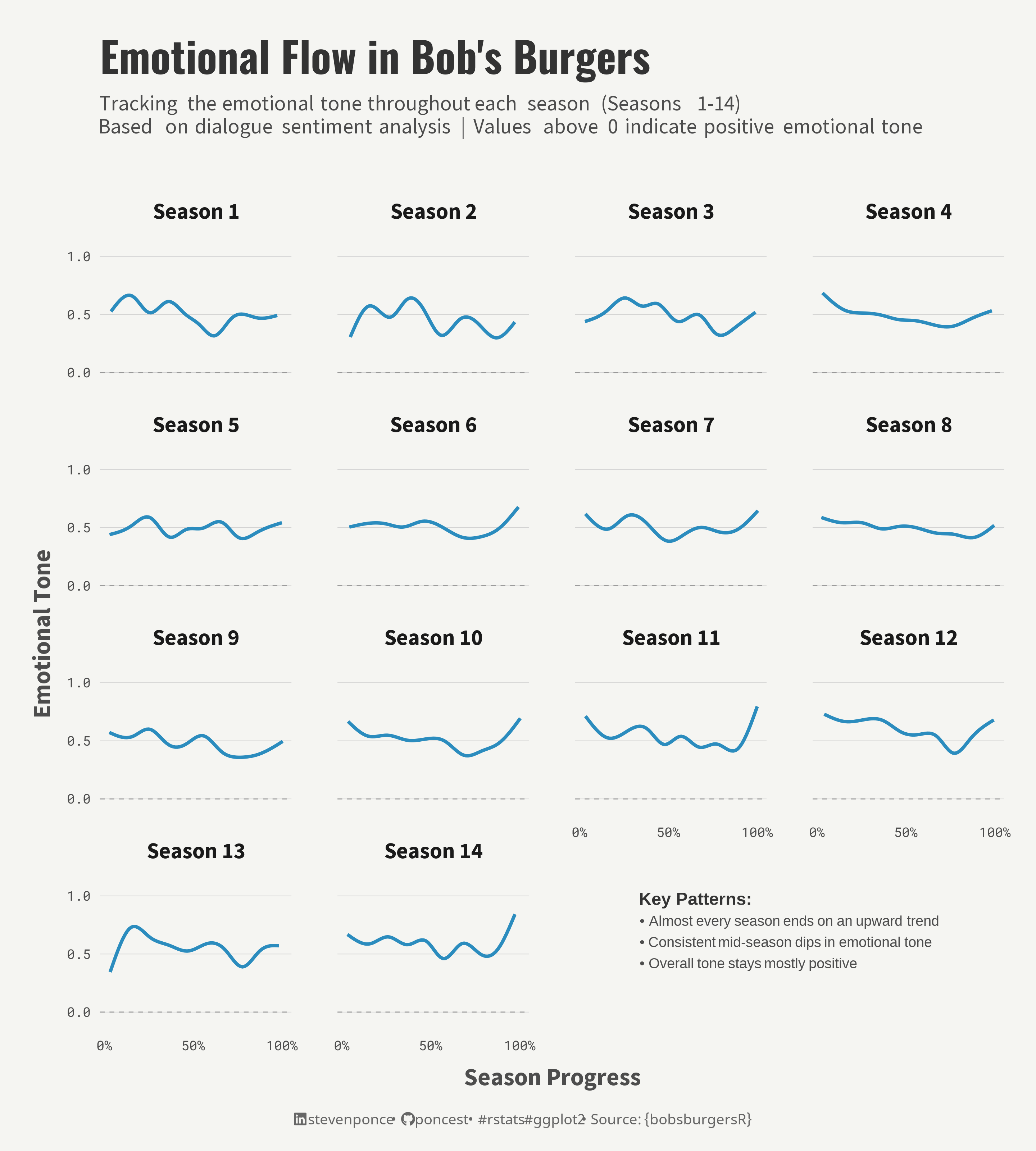
title: "Emotional Flow in Bob's Burgers"
subtitle: "Tracking the emotional tone throughout each season (Seasons 1-14)
Based on dialogue sentiment analysis | Values above 0 indicate positive emotional tone"
author: "Steven Ponce"
description: "The emotional tone of Bob's Burgers throughout each season, seasons 1 to 14. Built in R."
date: "2024-11-13"
categories: ["Standalone Visualization", "Bob's Burgers", "2024"]
image: "thumbnails/sa_2024-11-13.png"
format:
html:
toc: true
toc-depth: 5
code-link: true
code-fold: true
code-tools: true
code-summary: "Show code"
fig-width: 9
fig-height: 10
fig-dpi: 320
fig-format: "png"
editor_options:
chunk_output_type: inline
execute:
error: false
message: false
warning: false
eval: true
# share:
# permalink: "https://stevenponce.netlify.app/projects.html"
# linkedin: true
# twitter: true
# email: true
---
```{r setup}
#| label: setup
#| include: false
knitr::opts_chunk$set(
dev = "png",
fig.width = 9,
fig.height = 10,
dpi = 320
)
```
{#fig-1}
### <mark> __Steps to Create this Graphic__ </mark>
#### 1. Load Packages & Setup
```{r}
#| label: load
#| warning: false

## 1. LOAD PACKAGES & SETUP ----
if (!require("pacman")) install.packages("pacman")
pacman::p_load(
  tidyverse,         # Easily Install and Load the 'Tidyverse'
  ggtext,            # Improved Text Rendering Support for 'ggplot2'
  showtext,          # Using Fonts More Easily in R Graphs
  janitor,           # Simple Tools for Examining and Cleaning Dirty Data
  skimr,             # Compact and Flexible Summaries of Data
  scales,            # Scale Functions for Visualization
  glue,              # Interpreted String Literals
  bobsburgersR,      # Bob's Burgers Datasets for Data Visualization
  tidytext,          # Text Mining using 'dplyr', 'ggplot2', and Other Tidy Tools
  patchwork,         # The Composer of Plots
  zoo                # S3 Infrastructure for Regular and Irregular Time Series
)

### |- figure size ----
camcorder::gg_record(
  dir    = here::here("temp_plots"),
  device = "png",
  width  =  9,
  height =  10,
  units  = "in",
  dpi    = 320
)

### |- resolution ----
showtext_opts(dpi = 320, regular.wt = 300, bold.wt = 800)
```
#### 2. Read in the Data
```{r}
#| label: read
#| include: true
#| eval: true
#| results: 'hide'
#| warning: false

bobsburgersR::transcript_data
```
#### 3. Examine the Data
```{r}
#| label: examine
#| include: true
#| eval: true
#| results: 'hide'
#| warning: false

glimpse(transcript_data)
skim(transcript_data)
```
#### 4. Tidy Data
```{r}
#| label: tidy
#| warning: false

# Sentiment analysis - AFINN Sentiment Lexicon
sentiment_data <- transcript_data |>
  filter(!is.na(dialogue)) |>
  unnest_tokens(word, dialogue) |>
  inner_join(get_sentiments("afinn")) |>
  group_by(season, episode) |>
  mutate(
    position = line / max(line),
    rolling_sentiment = zoo::rollmean(value, k = 30, fill = NA)
  ) |>
  ungroup()
```
#### 5. Visualization Parameters
```{r}
#| label: params
#| include: true
#| warning: false
### |- plot aesthetics ----
bkg_col <- "#f5f5f2"
title_col <- "gray20"
subtitle_col <- "gray30"
text_col <- "gray30"
caption_col <- "gray40"
main_color <- "#2b8cbe"
### |- titles and caption ----
# icons
tt <- str_glue("Source: {{bobsburgersR}}")
li <- str_glue("<span style='font-family:fa6-brands'></span>")
gh <- str_glue("<span style='font-family:fa6-brands'></span>")
bs <- str_glue("<span style='font-family:fa6-brands'> </span>")
# text
title_text <- str_glue("Emotional Flow in Bob's Burgers")
subtitle_text <- str_glue("Tracking the emotional tone throughout each season (Seasons 1-14)<br>
Based on dialogue sentiment analysis | Values above 0 indicate positive emotional tone")
caption_text <- str_glue("{li} stevenponce • {gh} poncest • #rstats #ggplot2 • {tt}")
### |- fonts ----
font_add("fa6-brands", here::here("fonts/6.4.2/Font Awesome 6 Brands-Regular-400.otf"))
font_add_google("Oswald", regular.wt = 400, family = "title")
font_add_google("Source Sans Pro", family = "subtitle")
font_add_google("Source Sans Pro", family = "text")
font_add_google("Roboto Mono", family = "numbers")
font_add_google("Noto Sans", regular.wt = 400, family = "caption")
showtext_auto(enable = TRUE)
### |- plot theme ----
theme_set(theme_minimal(base_size = 14, base_family = "text"))
theme_update(
plot.title.position = "plot",
plot.caption.position = "plot",
legend.position = "plot",
plot.background = element_rect(fill = bkg_col, color = bkg_col),
panel.background = element_rect(fill = bkg_col, color = bkg_col),
plot.margin = margin(t = 10, r = 10, b = 10, l = 10),
axis.title.x = element_text(margin = margin(10, 0, 0, 0), size = rel(1.1),
color = text_col, family = "text", face = "bold", hjust = 0.5),
axis.title.y = element_text(margin = margin(0, 10, 0, 0), size = rel(1.1),
color = text_col, family = "text", face = "bold", hjust = 0.5),
axis.text = element_text(size = rel(0.6), color = text_col, family = "numbers"),
strip.text = element_text(size = rel(1), face = "bold", margin = margin(b = 10), family = "text"),
panel.grid.major.y = element_line(color = "#d3d3d3", linewidth = 0.2),
panel.grid.major.x = element_blank(),
panel.grid.minor = element_blank(),
panel.spacing.x = unit(2, "lines"),
panel.spacing.y = unit(1, "lines"),
)
```
#### 6. Plot
```{r}
### |- title & subtitle plot ----
title_plot <- ggplot() +
  labs(
    title = title_text,
    subtitle = subtitle_text
  ) +
  theme_void() +
  theme(
    plot.title      = element_text(
      size          = rel(2.4),
      family        = "title",
      face          = "bold",
      color         = title_col,
      lineheight    = 1.1,
      margin        = margin(t = 5, b = 5)
    ),
    plot.subtitle   = element_markdown(
      size          = rel(1.2),
      family        = "subtitle",
      color         = subtitle_col,
      lineheight    = 1.1,
      margin        = margin(t = 5, b = 15)
    ),
    plot.background = element_rect(fill = bkg_col, color = bkg_col),
    plot.margin     = margin(10, 10, 0, 10)
  )

### |- main plot ----
main_plot <- sentiment_data |>
  ggplot(aes(x = position, y = rolling_sentiment)) +

  # Geoms
  geom_hline(yintercept = 0, linetype = "dashed", color = "gray60", linewidth = 0.3) +
  geom_smooth(
    color = main_color,
    se = FALSE,
    size = 1,
    span = 0.3
  ) +

  # Scales
  scale_x_continuous(
    labels = scales::percent,
    breaks = seq(0, 1, 0.5)
  ) +
  scale_y_continuous(
    breaks = seq(-1, 1, 0.5),
    limits = c(-0.1, 1.1)
  ) +
  coord_cartesian(clip = "off") +

  # Labs
  labs(
    x = "Season Progress",
    y = "Emotional Tone"
  ) +

  # Facet
  facet_wrap(~season,
    ncol = 4,
    labeller = labeller(season = function(x) paste("Season", x))
  ) +

  # Theme
  theme(
    plot.margin = margin(0, 0, 0, 0)
  )


### |- key pattern plot ----
key_patterns_plot <- ggplot() +
  annotate(
    "richtext",
    x = 0.5,
    y = 0.5,
    label = glue::glue(
      "<span style='font-family:sans;font-size:11pt;color:{title_col}'>**Key Patterns:**</span><br>
        <span style='font-family:sans;font-size:9pt;color:{text_col}'>
        • Almost every season ends on an upward trend<br>
        • Consistent mid-season dips in emotional tone<br>
        • Overall tone stays mostly positive
        </span>"
    ),
    fill = NA,
    label.color = NA,
    hjust = 0,
    vjust = 1.2
  ) +
  theme_void() +
  theme(
    plot.margin = margin(5, 10, 5, 10)
  )


### |- combined plot ----

# Define layout design with adjusted areas

  # Define layout
design <- c(
  area(1, 1, 1, 6),      # title area
  area(2, 1, 5, 6),      # main plot area
  area(4, 2, 6, 6)       # key patterns area
)

  # Combine plots
combined_plot <- title_plot + main_plot + key_patterns_plot +
  plot_layout(
    design = design,
    heights = c(0.8, 4, 4, 4, 4, .1),
    widths = c(1, 1, 1, 1)
  ) +
  plot_annotation(
    caption = caption_text,
    theme = theme(
      plot.background = element_rect(fill = bkg_col, color = bkg_col),
      plot.margin     = margin(10, 10, 10, 10),
      plot.caption    = element_markdown(
        size          = rel(0.65),
        family        = "caption",
        color         = caption_col,
        lineheight    = 1.1,
        hjust         = 0.5,
        margin        = margin(t = 5, b = 5)
      )
    )
  )
```
#### 7. Save
```{r}
#| label: save
#| warning: false

# There was some issues between patchwork and ggsave

# Make sure these pkgs are installed
if (!require("ggplotify")) install.packages("ggplotify")
if (!require("grid")) install.packages("grid")

# Use Arial (Windows system font)
windowsFonts(Arial = windowsFont("Arial"))

font_add("fa6-brands", here::here("fonts/6.4.2/Font Awesome 6 Brands-Regular-400.otf"))

# Convert patchwork plot to grob
plot_grob <- as.grob(combined_plot)

# Set up the PNG device with proper font handling
png(
  filename = here::here("projects/standalone_visualizations/sa_2024-11-13.png"),
  width = 9,
  height = 10,
  units = "in",
  res = 320,
  type = "cairo"
)

# Enable showtext with specific settings
showtext::showtext_begin()
showtext::showtext_opts(dpi = 320, regular.wt = 300, bold.wt = 800)

# Draw the plot
grid::grid.draw(plot_grob)

# Clean up
showtext::showtext_end()
invisible(dev.off())

# Create thumbnail
magick::image_read(here::here("projects/standalone_visualizations/sa_2024-11-13.png")) |>
  magick::image_resize(geometry = "400") |>
  magick::image_write(here::here("projects/standalone_visualizations/thumbnails/sa_2024-11-13.png"))
```
#### 8. Session Info
::: {.callout-tip collapse="true"}
##### Expand for Session Info
```{r, echo = FALSE}
#| eval: true
#| warning: false
sessionInfo()
```
:::
#### 9. GitHub Repository
::: {.callout-tip collapse="true"}
##### Expand for GitHub Repo
[Access the GitHub repository here](https://github.com/poncest/personal-website/)
:::