---
title: "America's Most In-Demand Jobs: Beyond the Headlines"
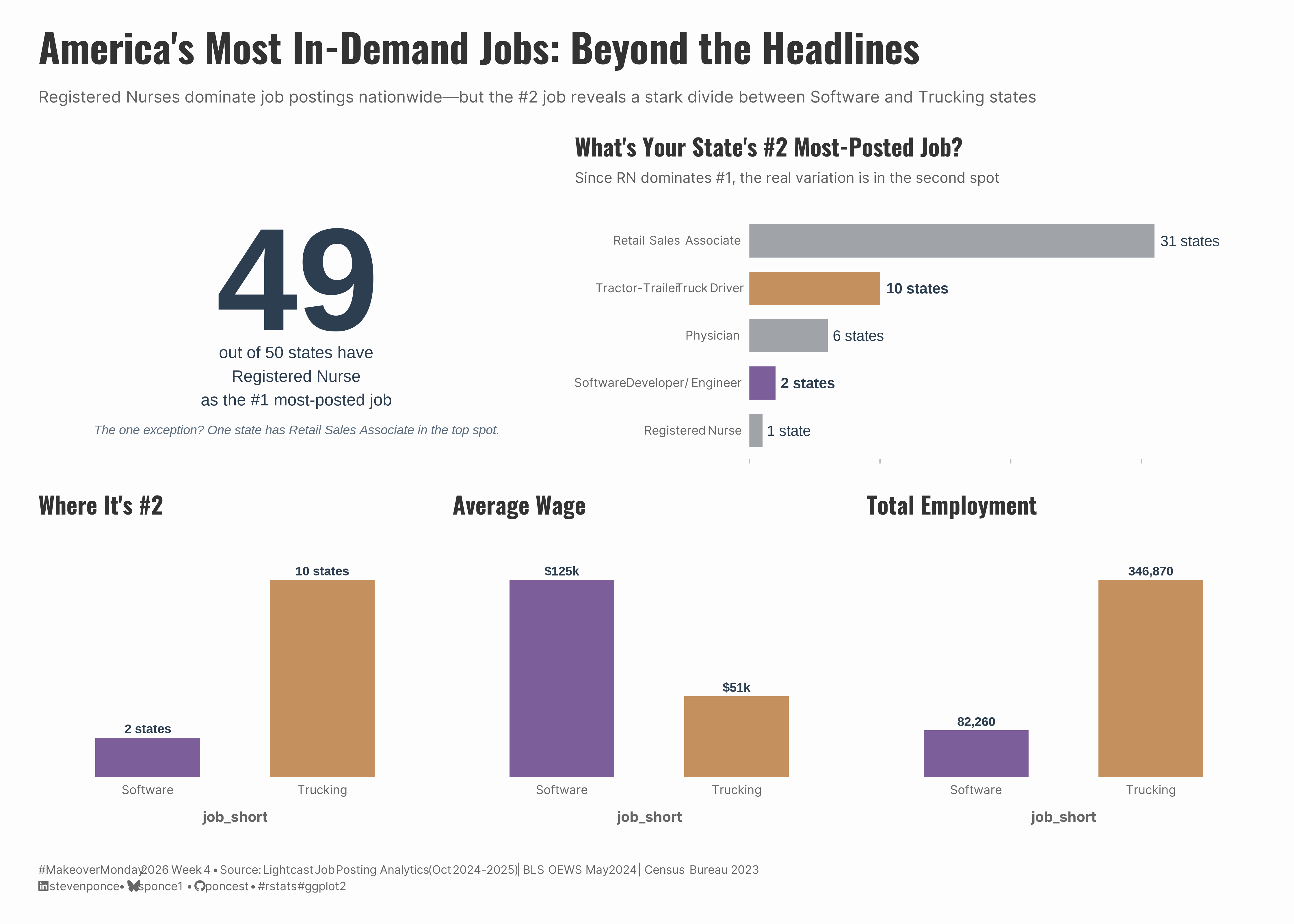
subtitle: "Registered Nurses dominate job postings nationwide—but the #2 job reveals a stark divide between Software and Trucking states."
description: "A makeover of Lightcast's job posting rankings, enhanced with BLS employment data and Census population figures. This three-panel dashboard reveals that while RNs are #1 in 49 of 50 states, the #2 job exposes a regional economic divide—Software states average $125k wages versus $51k for Trucking states. Built with R, ggplot2, and patchwork using a highlight-and-gray color strategy."
date: "2026-01-26"
author:
- name: "Steven Ponce"
url: "https://stevenponce.netlify.app"
citation:
url: "https://stevenponce.netlify.app/data_visualizations/MakeoverMonday/2026/mm_2026_04.html"
categories: ["MakeoverMonday", "2026"]
tags: [
"makeover-monday",
"data-visualization",
"ggplot2",
"patchwork",
"multi-panel-dashboard",
"labor-market",
"job-postings",
"employment-data",
"BLS-OEWS",
"registered-nurses",
"regional-economics",
"wage-analysis",
"highlight-and-gray",
"data-enhancement"
]
image: "thumbnails/mm_2026_04.png"
format:
html:
toc: true
toc-depth: 5
code-link: true
code-fold: true
code-tools: true
code-summary: "Show code"
editor_options:
chunk_output_type: inline
execute:
freeze: true
cache: true
error: false
message: false
warning: false
eval: true
---
```{r}
#| label: setup-links
#| include: false
# CENTRALIZED LINK MANAGEMENT
## Project-specific info
current_year <- 2026
current_week <- 04
project_file <- "mm_2026_04.qmd"
project_image <- "mm_2026_04.png"
## Data Sources
data_main <- "https://data.world/makeovermonday/2025w4-most-posted-us-jobs-by-state"
data_secondary <- "https://data.world/makeovermonday/2025w4-most-posted-us-jobs-by-state"
## Repository Links
repo_main <- "https://github.com/poncest/personal-website/"
repo_file <- paste0("https://github.com/poncest/personal-website/blob/master/data_visualizations/MakeoverMonday/", current_year, "/", project_file)
## External Resources/Images
chart_original <- "https://raw.githubusercontent.com/poncest/MakeoverMonday/refs/heads/master/2026/Week_04/original_chart.png"
## Organization/Platform Links
org_primary <- "https://lightcast.io/resources/blog/most-posted-for-jobs-in-each-us-state"
org_secondary <- "https://lightcast.io/resources/blog/most-posted-for-jobs-in-each-us-state"
# Enhancement data links
bls_oews <- "https://www.bls.gov/oes/current/oessrcst.htm"
census_pop <- "https://www.census.gov/data/tables/time-series/demo/popest/2020s-state-total.html"
# Helper function to create markdown links
create_link <- function(text, url) {
paste0("[", text, "](", url, ")")
}
# Helper function for citation-style links
create_citation_link <- function(text, url, title = NULL) {
if (is.null(title)) {
paste0("[", text, "](", url, ")")
} else {
paste0("[", text, "](", url, ' "', title, '")')
}
}
```
### Original
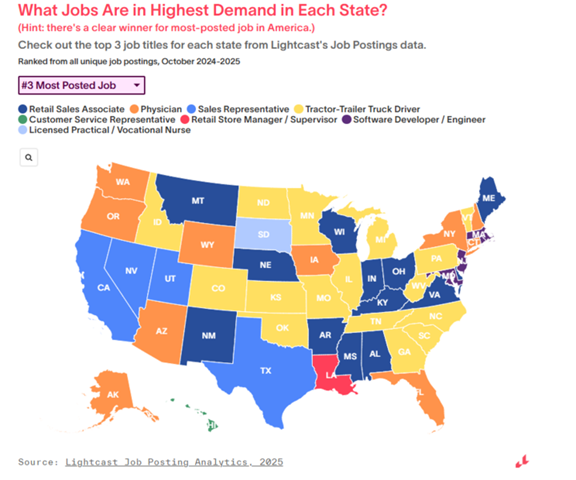
The original visualization comes from `r create_link("Most Posted US Jobs by State", data_secondary)`
### Makeover
{#fig-1}
### [**Steps to Create this Graphic**]{.mark}
#### [1. Load Packages & Setup]{.smallcaps}
```{r}
#| label: load
#| warning: false
#| message: false
#| results: "hide"

## 1. LOAD PACKAGES & SETUP ----
suppressPackageStartupMessages({
  if (!require("pacman")) install.packages("pacman")
  pacman::p_load(
  tidyverse, ggtext, showtext, scales, glue, patchwork, janitor
)
})

### |- figure size ----
camcorder::gg_record(
    dir    = here::here("temp_plots"),
    device = "png",
    width  = 14,
    height = 10,
    units  = "in",
    dpi    = 320
)

# Source utility functions
suppressMessages(source(here::here("R/utils/fonts.R")))
source(here::here("R/utils/social_icons.R"))
source(here::here("R/utils/image_utils.R"))
source(here::here("R/themes/base_theme.R"))
```
#### [2. Read in the Data]{.smallcaps}
```{r}
#| label: read
#| include: true
#| eval: true
#| warning: false
#|

### |- Current data (2025) ----
state_summary  <- read_csv(
   here::here("data/MakeoverMonday/2026/mm_wk04_state_summary.csv"))

job_summary  <- read_csv(
   here::here("data/MakeoverMonday/2026/mm_wk04_job_summary.csv"))
```
#### [3. Examine the Data]{.smallcaps}
```{r}
#| label: examine
#| include: true
#| eval: true
#| results: 'hide'
#| warning: false

glimpse(state_summary)
glimpse(job_summary)
```
#### [4. Tidy Data]{.smallcaps}
```{r}
#| label: tidy
#| warning: false

# Note: Primary data wrangling was performed in data preparation scripts:
#   - mm_wk04_bls_data_pull.R (BLS OEWS extraction)
#   - mm_wk04_data_merge.R (merge all sources)
#
# This script reads the processed summary files and performs
# visualization-specific transformations only.

### |- P2 data: #2 job distribution ----
p2_data <- state_summary |>
  count(second_job, name = "n_states") |>
  mutate(
    second_job = fct_reorder(second_job, n_states),
    label = ifelse(n_states == 1, "1 state", paste0(n_states, " states")),
    is_hero = second_job %in% c(
      "Software Developer / Engineer",
      "Tractor-Trailer Truck Driver"
    )
  )

### |- P3 data: Software vs Trucking comparison ----
p3_data <- state_summary |>
  filter(second_job %in% c(
    "Tractor-Trailer Truck Driver",
    "Software Developer / Engineer"
  )) |>
  group_by(second_job) |>
  summarise(
    n_states = n(),
    total_emp = sum(second_job_emp, na.rm = TRUE),
    avg_wage = mean(second_job_wage, na.rm = TRUE),
    .groups = "drop"
  ) |>
  mutate(
    job_short = case_when(
      str_detect(second_job, "Truck") ~ "Trucking",
      str_detect(second_job, "Software") ~ "Software"
    ),
    job_short = factor(job_short, levels = c("Software", "Trucking"))
  )
```
#### [5. Visualization Parameters]{.smallcaps}
```{r}
#| label: params
#| include: true
#| warning: false

### |-  plot aesthetics ----
colors <- get_theme_colors(
  palette = list(
    software      = "#7B5E9A",
    trucking      = "#C4915E",
    neutral       = "#A0A4A8",
    text_headline = "#2C3E50",
    text_dark     = "#2C3E50",
    text_mid      = "#5D6D7E",
    text_light    = "#95A5A6"
  )
)

### |-  job color mapping ----
job_colors <- c(
  "Software Developer / Engineer"   = colors$palette$software,
  "Tractor-Trailer Truck Driver"    = colors$palette$trucking,
  "Retail Sales Associate"          = colors$palette$neutral,
  "Physician"                       = colors$palette$neutral,
  "Registered Nurse"                = colors$palette$neutral
)

### |-  Main titles ----
title_text <- "America's Most In-Demand Jobs: Beyond the Headlines"

subtitle_text <- str_glue(
  "Registered Nurses dominate job postings nationwide—but the #2 job reveals a stark divide between Software and Trucking states"
)

caption_text <- create_mm_caption(
  mm_year = 2026, mm_week = 04,
  source_text = str_glue(
    "Lightcast Job Posting Analytics (Oct 2024-2025) | BLS OEWS May 2024 | Census Bureau 2023"
  )
)

### |-  fonts ----
setup_fonts()
fonts <- get_font_families()

### |-  plot theme ----

# Start with base theme
base_theme <- create_base_theme(colors)

# Add weekly-specific theme elements
weekly_theme <- extend_weekly_theme(
  base_theme,
  theme(
    # # Text styling
    plot.title = element_text(
      size = rel(1.3), family = fonts$title, face = "bold",
      color = colors$title, lineheight = 1.1, hjust = 0,
      margin = margin(t = 5, b = 10)
    ),
    plot.subtitle = element_text(
      size = rel(0.8), family = fonts$subtitle, face = "italic",
      color = alpha(colors$subtitle, 0.9), lineheight = 1.1,
      margin = margin(t = 0, b = 20)
    ),

    # Legend formatting
    legend.position = "plot",
    legend.justification = "right",
    legend.margin = margin(l = 12, b = 5),
    legend.key.size = unit(0.8, "cm"),
    legend.box.margin = margin(b = 10),

    # Axis formatting
    # axis.line.x = element_line(color = "#252525", linewidth = .1),
    # axis.ticks.y = element_blank(),
    axis.ticks.x = element_line(color = "gray", linewidth = 0.5),
    axis.title.x = element_text(
      face = "bold", size = rel(0.85),
      margin = margin(t = 10), family = fonts$subtitle,
      color = "gray40"
    ),
    axis.title.y = element_text(
      face = "bold", size = rel(0.85),
      margin = margin(r = 10), family = fonts$subtitle,
      color = "gray40"
    ),
    axis.text.x = element_text(
      size = rel(0.85), family = fonts$subtitle,
      color = "gray40"
    ),
    axis.text.y = element_markdown(
      size = rel(0.85), family = fonts$subtitle,
      color = "gray40"
    ),

    # Grid lines
    panel.grid.minor = element_line(color = "#ecf0f1", linewidth = 0.2),
    panel.grid.major = element_line(color = "#ecf0f1", linewidth = 0.4),

    # Margin
    plot.margin = margin(20, 20, 20, 20)
  )
)

# Set theme
theme_set(weekly_theme)
```
#### [6. Plot]{.smallcaps}
```{r}
#| label: plot
#| warning: false

### |-  P1 - THE BIG NUMBER ----
p1 <- ggplot() +
  # Annotate
  annotate(
    "text",
    x = 0.5, y = 0.75,
    label = "49",
    size = 40,
    fontface = "bold",
    color = colors$palette$text_headline
  ) +
  annotate(
    "text",
    x = 0.5, y = 0.32,
    label = "out of 50 states have\nRegistered Nurse\nas the #1 most-posted job",
    size = 4.5,
    color = colors$palette$text_dark,
    lineheight = 1.2
  ) +
  annotate(
    "text",
    x = 0.5, y = 0.08,
    label = "The one exception? One state has Retail Sales Associate in the top spot.",
    size = 3.5,
    color = colors$palette$text_mid,
    fontface = "italic"
  ) +
  # Limits
  xlim(0, 1) +
  ylim(0, 1) +
  # Theme
  theme_void() +
  theme(
    plot.background = element_rect(fill = colors$background, color = colors$background),
    panel.background = element_rect(fill = colors$background, color = colors$background),
    plot.margin = margin(10, 10, 10, 10)
  )

### |-  P2 - #2 JOB DISTRIBUTION ----
p2 <- p2_data |>
  ggplot(aes(x = n_states, y = second_job, fill = second_job)) +
  # Geoms
  geom_col(width = 0.7) +
  geom_text(
    aes(
      label = label,
      fontface = ifelse(is_hero, "bold", "plain")
    ),
    hjust = -0.1,
    size = 4,
    color = colors$palette$text_dark
  ) +
  # Scales
  scale_fill_manual(values = job_colors, guide = "none") +
  scale_x_continuous(expand = expansion(mult = c(0, 0.25))) +
  # Labs
  labs(
    title = "What's Your State's #2 Most-Posted Job?",
    subtitle = "Since RN dominates #1, the real variation is in the second spot",
    x = NULL,
    y = NULL
  ) +
  # Theme
  theme(
    panel.grid.major = element_blank(),
    panel.grid.minor = element_blank(),
    axis.text.x = element_blank(),
    plot.margin = margin(10, 10, 10, 10)
  )

### |-  P3 - THE OPPORTUNITY GAP ---

# Sub-panel A: Number of states
p3a <- p3_data |>
  ggplot(aes(x = job_short, y = n_states, fill = second_job)) +
  # Geoms
  geom_col(width = 0.6) +
  geom_text(
    aes(label = paste0(n_states, " states")),
    vjust = -0.5,
    fontface = "bold",
    size = 3.5,
    color = colors$palette$text_dark
  ) +
  # Scales
  scale_fill_manual(values = job_colors, guide = "none") +
  scale_y_continuous(expand = expansion(mult = c(0, 0.25))) +
  # Labs
  labs(title = "Where It's #2") +
  # Theme
  theme(
    panel.grid.major = element_blank(),
    panel.grid.minor = element_blank(),
    axis.title.y = element_blank(),
    axis.text.y = element_blank(),
    axis.ticks.y = element_blank(),
    axis.ticks.x = element_blank(),
    plot.margin = margin(10, 10, 10, 10)
  )

# Sub-panel B: Average wage
p3b <- p3_data |>
  ggplot(aes(x = job_short, y = avg_wage, fill = second_job)) +
  # Geoms
  geom_col(width = 0.6) +
  geom_text(
    aes(label = scales::dollar(avg_wage, accuracy = 1, scale = 0.001, suffix = "k")),
    vjust = -0.5,
    fontface = "bold",
    size = 3.5,
    color = colors$palette$text_dark
  ) +
  # Scales
  scale_fill_manual(values = job_colors, guide = "none") +
  scale_y_continuous(expand = expansion(mult = c(0, 0.25))) +
  # Labs
  labs(title = "Average Wage") +
  # Theme
  theme(
    panel.grid.major = element_blank(),
    panel.grid.minor = element_blank(),
    axis.title.y = element_blank(),
    axis.text.y = element_blank(),
    axis.ticks.y = element_blank(),
    axis.ticks.x = element_blank(),
    plot.margin = margin(10, 10, 10, 10)
  )

# Sub-panel C: Total employment
p3c <- p3_data |>
  ggplot(aes(x = job_short, y = total_emp, fill = second_job)) +
  # Geoms
  geom_col(width = 0.6) +
  geom_text(
    aes(label = scales::comma(total_emp)),
    vjust = -0.5,
    fontface = "bold",
    size = 3.5,
    color = colors$palette$text_dark
  ) +
  # Scales
  scale_fill_manual(values = job_colors, guide = "none") +
  scale_y_continuous(expand = expansion(mult = c(0, 0.25))) +
  # Labs
  labs(title = "Total Employment") +
  # Theme
  theme(
    panel.grid.major = element_blank(),
    panel.grid.minor = element_blank(),
    axis.title.y = element_blank(),
    axis.text.y = element_blank(),
    axis.ticks.y = element_blank(),
    axis.ticks.x = element_blank(),
    plot.margin = margin(10, 10, 10, 10)
  )

# Combine P3
p3 <- (p3a | p3b | p3c)

### |-  combined plot ----
combined_plot <- (p1 | p2) / p3 +
  plot_annotation(
    title = title_text,
    subtitle = subtitle_text,
    caption = caption_text,
    theme = theme(
      plot.title = element_text(
        size = rel(2.2),
        family = fonts$title,
        face = "bold",
        color = colors$title,
        lineheight = 1.15,
        margin = margin(t = 5, b = 10)
      ),
      plot.subtitle = element_text(
        size = rel(0.9),
        family = fonts$subtitle,
        color = alpha(colors$subtitle, 0.88),
        lineheight = 1.5,
        margin = margin(t = 5, b = 10)
      ),
      plot.caption = element_markdown(
        size = rel(0.65),
        family = fonts$subtitle,
        color = colors$caption,
        hjust = 0,
        lineheight = 1.4,
        margin = margin(t = 20, b = 5)
      ),
    )
  )
```
#### [7. Save]{.smallcaps}
```{r}
#| label: save
#| warning: false

### |-  plot image ----
save_plot_patchwork(
  plot = combined_plot,
  type = "makeovermonday",
  year = current_year,
  week = current_week,
  width = 14,
  height = 10
  )
```
#### [8. Session Info]{.smallcaps}
::: {.callout-tip collapse="true"}
##### Expand for Session Info
```{r, echo = FALSE}
#| eval: true
#| warning: false
sessionInfo()
```
:::
#### [9. GitHub Repository]{.smallcaps}
::: {.callout-tip collapse="true"}
##### Expand for GitHub Repo
The complete code for this analysis is available in `r create_link(project_file, repo_file)`.
For the full repository, `r create_link("click here", repo_main)`.
:::
#### [10. References]{.smallcaps}
::: {.callout-tip collapse="true"}
##### Expand for References
**Primary Data (Makeover Monday):**
1. Makeover Monday `r current_year` Week `r current_week`: `r create_link("Most Posted US Jobs by State", data_main)`
2. Original Article: `r create_link("Job titles in highest-demand, state by state", data_secondary)`
- Source: Lightcast Job Posting Analytics
- Coverage: Top 3 job postings by state (Oct 2024 - Oct 2025)
**Enhancement Data:**
3. Employment & Wage Data: `r create_link("BLS Occupational Employment and Wage Statistics (OEWS)", "https://www.bls.gov/oes/current/oessrcst.htm")`
- Release: May 2024 State Estimates
- Variables: Employment counts, mean annual wages by occupation × state
- Citation: U.S. Bureau of Labor Statistics. (2025). *Occupational Employment and Wage Statistics, May 2024*.
4. Population Data: `r create_link("Census Bureau Population Estimates", "https://www.census.gov/data/tables/time-series/demo/popest/2020s-state-total.html")`
- Year: 2023 State Population Estimates
- Citation: U.S. Census Bureau. (2023). *Annual Estimates of the Resident Population for the United States, Regions, States, District of Columbia, and Puerto Rico: April 1, 2020 to July 1, 2023* (NST-EST2023-POP).
**SOC Codes Used (BLS OEWS):**
- 29-1141: Registered Nurses
- 53-3032: Heavy and Tractor-Trailer Truck Drivers
- 41-2031: Retail Salespersons
- 15-1252: Software Developers
- 43-4051: Customer Service Representatives
- 29-2061: Licensed Practical and Licensed Vocational Nurses
:::
#### [11. Custom Functions Documentation]{.smallcaps}
::: {.callout-note collapse="true"}
##### 📦 Custom Helper Functions
This analysis uses custom functions from my personal module library for efficiency and consistency across projects.
**Functions Used:**
- **`fonts.R`**: `setup_fonts()`, `get_font_families()` - Font management with showtext
- **`social_icons.R`**: `create_social_caption()` - Generates formatted social media captions
- **`image_utils.R`**: `save_plot()` - Consistent plot saving with naming conventions
- **`base_theme.R`**: `create_base_theme()`, `extend_weekly_theme()`, `get_theme_colors()` - Custom ggplot2 themes
**Why custom functions?**\
These utilities standardize theming, fonts, and output across all my data visualizations. The core analysis (data tidying and visualization logic) uses only standard tidyverse packages.
**Source Code:**\
View all custom functions → [GitHub: R/utils](https://github.com/poncest/personal-website/tree/master/R)
:::

