• Steven Ponce
  • About
  • Data Visualizations
  • Projects
  • Resume
  • Email

On this page

  • Original
  • Makeover
  • Steps to Create this Graphic
    • 1. Load Packages & Setup
    • 2. Read in the Data
    • 3. Examine the Data
    • 4. Tidy Data
    • 5. Visualization Parameters
    • 6. Plot
    • 7. Save
    • 8. Session Info
    • 9. GitHub Repository
    • 10. References
    • 11. Custom Functions Documentation

Jan and Feb Drove Most of 2025’s Refer-A-Friend Growth

  • Show All Code
  • Hide All Code

  • View Source

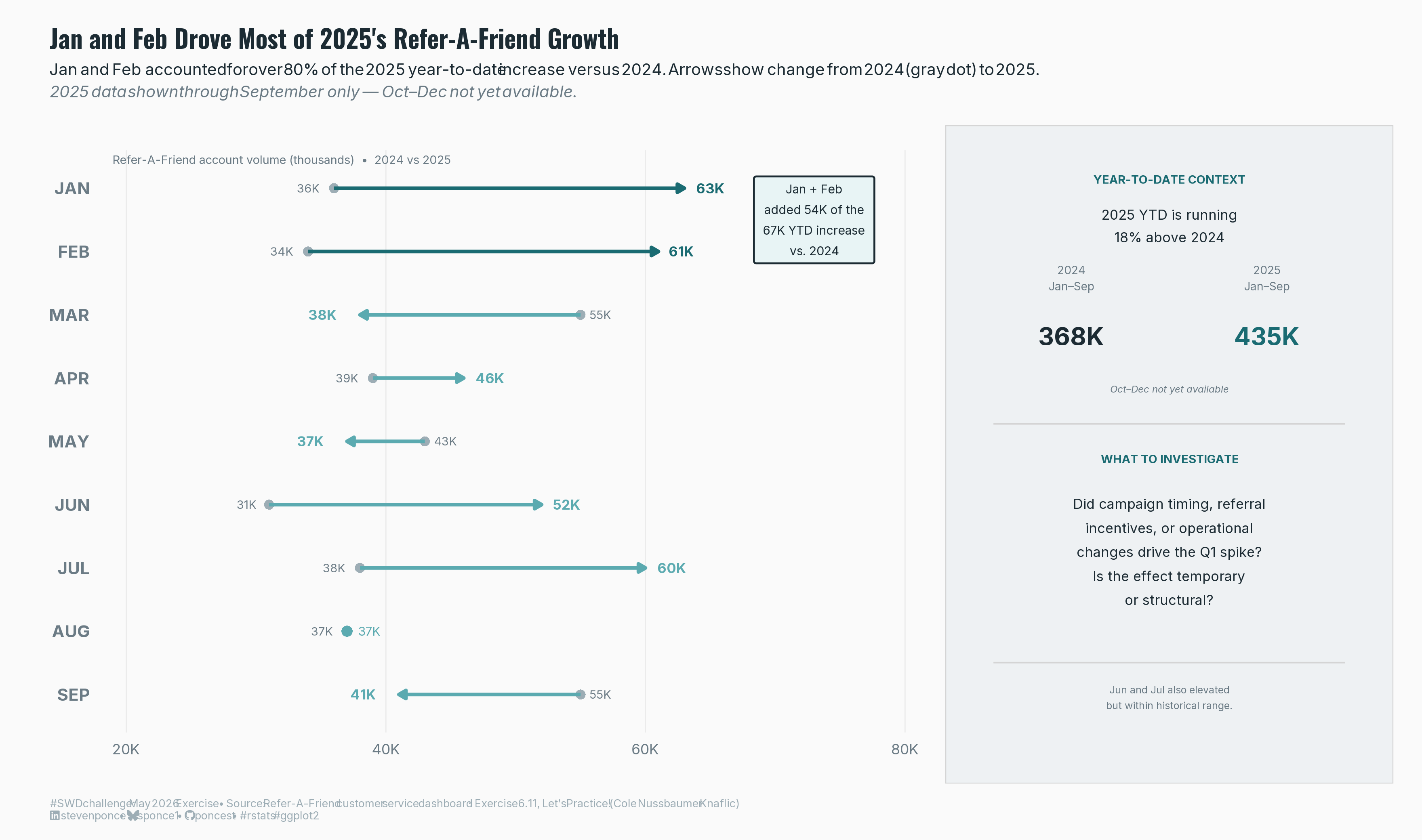
Jan and Feb accounted for over 80% of the 2025 year-to-date increase versus 2024. Arrows show change from 2024 (gray dot) to 2025.

SWDchallenge
Exercise
Data Visualization
R Programming
2026
A practice exercise from Let’s Practice! (Exercise 6.11) by Cole Nussbaumer Knaflic. Starting from a multi-panel customer service dashboard, this submission identifies the key insight — an unusual concentration of Refer-A-Friend volume growth in January and February 2025 — and translates it into a single, decision-ready slide using a horizontal arrow chart.
Author

Steven Ponce

Published

May 12, 2026

Original

Identify what matters most in a typical report and translate it into a clear, focused communication. In this exercise, you’ll move beyond exploration, extracting the key insights and explaining them in a way that is meaningful for your audience.
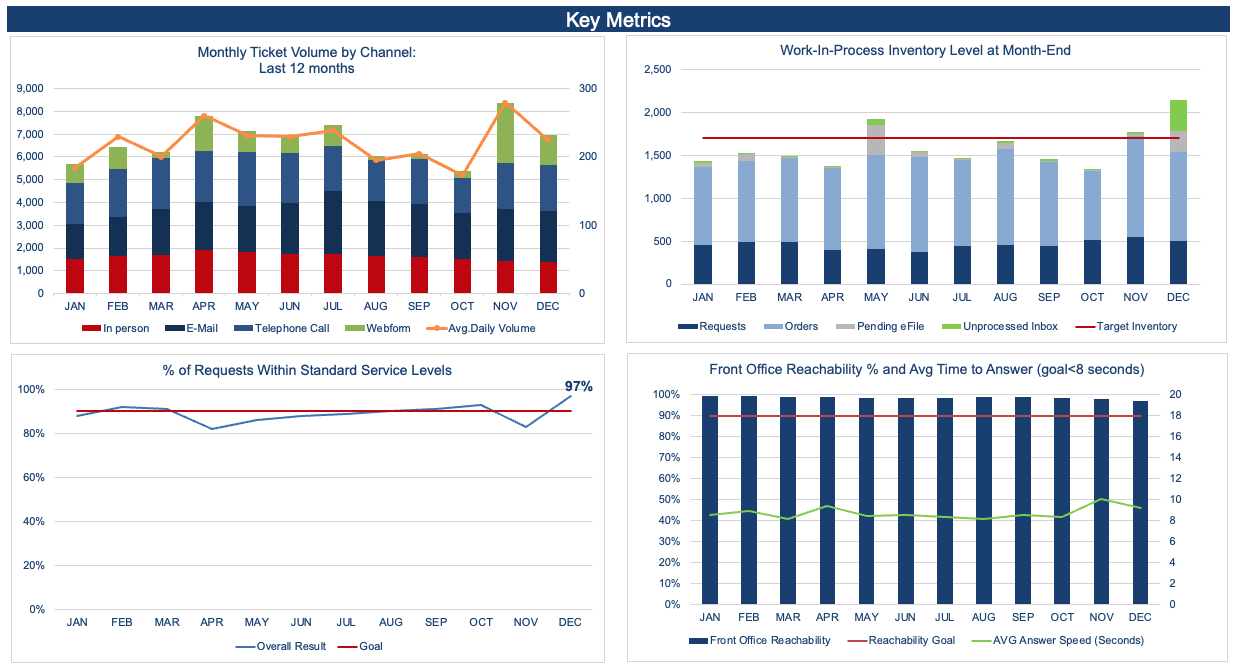
Figure 1: Original chart

Additional information can be found HERE

Makeover

Figure 2: A horizontal arrow chart comparing monthly Refer-A-Friend account volume (in thousands) between 2024 and 2025, January through September. Each row shows a gray reference dot for the 2024 value and a teal arrow pointing to the 2025 value — right for increases, left for declines. January and February show the largest increases, from 36K to 63K and 34K to 61K, respectively, and are highlighted in dark teal. A callout box reads “Jan + Feb added 54K of the 67K YTD increase vs. 2024.” The remaining months show smaller changes in mid teal. A right panel provides year-to-date context: 2025 Jan–Sep totals 435K versus 368K in 2024, an 18% increase, with a note that October through December data is not yet available. A “What to Investigate” section asks whether campaign timing, referral incentives, or operational changes drove the Q1 spike

Steps to Create this Graphic

1. Load Packages & Setup

Show code
```{r}
#| label: load

if (!require("pacman")) install.packages("pacman")
pacman::p_load(
  tidyverse, ggtext, showtext, janitor,     
  scales, glue, patchwork      
) 

### |- figure size ---- 
camcorder::gg_record( 
  dir    = here::here("temp_plots"), 
  device = "png",
  width  = 11,
  height = 6.5,
  units  = "in",
  dpi    = 320)

# Source utility functions
suppressMessages(source(here::here("R/utils/fonts.R")))
source(here::here("R/utils/social_icons.R"))
source(here::here("R/utils/image_utils.R"))
source(here::here("R/themes/base_theme.R"))
```

2. Read in the Data

Show code
```{r}
#| label: read

## Data: Refer-A-Friend account volume (thousands), 2024 vs. 2025 YTD (Jan–Sep)
## Exercise 6.11, Let's Practice! — storytellingwithdata.com
raw_data <- tibble(
  month    = c("JAN","FEB","MAR","APR","MAY","JUN","JUL","AUG","SEP"),
  val_2024 = c(36, 34, 55, 39, 43, 31, 38, 37, 55),
  val_2025 = c(63, 61, 38, 46, 37, 52, 60, 37, 41)
)
```

3. Examine the Data

Show code
```{r}
#| label: examine
#| include: true
#| eval: true
#| results: 'hide'
#| warning: false

glimpse(raw_data)
```

4. Tidy Data

Show code
```{r}
#| label: tidy

df <- raw_data |>
  mutate(
    delta = val_2025 - val_2024,
    arrow_color = if_else(
      month %in% c("JAN", "FEB"),
      "hero",    # dark teal
      "other"    # mid teal
    ),
    hjust_2025 = if_else(delta >= 0, -0.45, 1.5),
    month = fct_inorder(month)
  )

# Verified KPI values
total_delta   <- sum(df$delta)       # +67K net (Jan–Sep)

jan_feb_delta <- df |>
  filter(month %in% c("JAN","FEB")) |>
  pull(delta) |> sum()               # +54K

# Selective 2025 endpoint labels: hero + JUL + notable declines
df_labeled <- df |> filter(month %in% c("JAN","FEB","JUL","MAR","SEP"))
```

5. Visualization Parameters

Show code
```{r}
#| label: params

### |-  plot aesthetics ----
colors <- get_theme_colors(
  palette = list(
    hero      = "#1A6B72",  
    other     = "#5BAAB0",  
    ref_dot   = "#9DADB5",   
    text_main = "#1C2B33",
    text_sub  = "#6B7B85",
    text_hero = "#1A6B72",
    bg        = "#FAFAFA"
  )
)

col_hero      <- colors$palette$hero
col_other     <- colors$palette$other
col_ref_dot   <- colors$palette$ref_dot
col_text_main <- colors$palette$text_main
col_text_sub  <- colors$palette$text_sub
col_text_hero <- colors$palette$text_hero
col_bg        <- colors$palette$bg

arrow_colors  <- c(hero = col_hero, other = col_other)

### |-  titles and caption ----
title_text <- "Jan and Feb Drove Most of 2025's Refer-A-Friend Growth"

subtitle_text <- glue(
  "Jan and Feb accounted for over 80% of the 2025 year-to-date increase versus 2024. ",
  "Arrows show change from 2024 (gray dot) to 2025.<br>",
  "<span style='color:{col_text_sub}'>",
  "*2025 data shown through September only \u2014 Oct\u2013Dec not yet available.*",
  "</span>"
)

caption_text <- create_swd_exe_caption(
  year        = 2026,
  month       = "May",
  source_text = "Refer-A-Friend customer service dashboard · Exercise 6.11, Let's Practice! (Cole Nussbaumer Knaflic)"
)

### |-  fonts ----
setup_fonts()
fonts <- get_font_families()

### |-  plot theme ----
base_theme <- create_base_theme(colors)

weekly_theme <- extend_weekly_theme(
  base_theme,
  theme(
    plot.background = element_rect(fill = col_bg, color = NA),
    panel.background = element_rect(fill = col_bg, color = NA),
    panel.grid.major.x = element_line(color = "gray92", linewidth = 0.3),
    panel.grid.major.y = element_blank(),
    panel.grid.minor = element_blank(),
    axis.ticks = element_blank(),
    axis.text.y = element_text(
      size = 9.5, color = col_text_sub, family = fonts$text, face = "bold"
    ),
    axis.text.x = element_text(
      size = 8, color = col_text_sub, family = fonts$text
    ),
    axis.title = element_blank(),
    plot.margin = margin(8, 8, 12, 12)
  )
)

theme_set(weekly_theme)
```

6. Plot

Show code
```{r}
#| label: plot

### |-  arrow chart ----

df_segments <- df |> filter(delta != 0)
df_flat     <- df |> filter(delta == 0)

p_arrow <- ggplot() +
  geom_point(
    data  = df,
    aes(x = val_2024, y = month),
    color = col_ref_dot,
    size  = 2.2,
    shape = 16
  ) +
  geom_segment(
    data = df_segments,
    aes(
      x     = val_2024,
      xend  = val_2025,
      y     = month,
      yend  = month,
      color = arrow_color
    ),
    arrow = arrow(length = unit(0.16, "cm"), type = "closed"),
    linewidth = 0.95,
    lineend = "butt"
  ) +
  geom_point(
    data  = df_flat,
    aes(x = val_2025, y = month),
    color = col_other,
    size  = 2.5,
    shape = 16
  ) +
  geom_text(
    data = df |> filter(delta >= 0),
    aes(x = val_2024, y = month, label = glue("{val_2024}K")),
    color = col_text_sub,
    hjust = 1.65,
    size = 2.3,
    family = fonts$text
  ) +
  geom_text(
    data = df |> filter(delta < 0),
    aes(x = val_2024, y = month, label = glue("{val_2024}K")),
    color = col_text_sub,
    hjust = -0.45,
    size = 2.3,
    family = fonts$text
  ) +
  geom_text(
    data = df |> filter(delta > 0),
    aes(
      x     = val_2025,
      y     = month,
      label = glue("{val_2025}K"),
      color = arrow_color
    ),
    hjust = -0.45,
    size = 2.7,
    fontface = "bold",
    family = fonts$text
  ) +
  geom_text(
    data = df |> filter(delta < 0),
    aes(
      x     = val_2025,
      y     = month,
      label = glue("{val_2025}K"),
      color = arrow_color
    ),
    hjust = 1.0,
    nudge_x = -1.8,
    size = 2.7,
    fontface = "bold",
    family = fonts$text
  ) +
  geom_text(
    data = df_flat,
    aes(x = val_2025, y = month, label = glue("{val_2025}K")),
    color = col_other,
    hjust = -0.55,
    size = 2.4,
    family = fonts$text
  ) +
  geom_label(
    data = tibble(
      x = 73, y = 8.5,
      label = "Jan + Feb\nadded 54K of the\n67K YTD increase\nvs. 2024"
    ),
    aes(x = x, y = y, label = label),
    color = col_text_main,
    fill = "#E8F4F5",
    label.color = col_hero,
    label.size = 0.5,
    label.padding = unit(0.55, "lines"),
    size = 2.4,
    hjust = 0.5,
    lineheight = 1.4,
    family = fonts$text,
    inherit.aes = FALSE
  ) +
  annotate(
    "text",
    x = 19, y = 9.45,
    label = "Refer-A-Friend account volume (thousands)  \u2022  2024 vs 2025",
    color = col_text_sub, size = 2.3, hjust = 0,
    family = fonts$text
  ) +
  scale_color_manual(values = arrow_colors, guide = "none") +
  scale_x_continuous(
    limits = c(18, 82),
    breaks = c(20, 40, 60, 80),
    expand = c(0, 0),
    labels = function(x) paste0(x, "K")
  ) +
  scale_y_discrete(limits = rev) +
  coord_cartesian(clip = "off")


### |-  right editorial panel ----

right_df <- tibble(x = 0.5, y = 0.5)

p_right <- ggplot(right_df, aes(x, y)) +

  # YEAR-TO-DATE CONTEXT
  geom_text(aes(x = 0.5, y = 0.95),
    label = "YEAR-TO-DATE CONTEXT", color = col_text_hero,
    size = 2.3, hjust = 0.5, fontface = "bold",
    family = fonts$text, inherit.aes = FALSE
  ) +
  geom_text(aes(x = 0.5, y = 0.87),
    label = "2025 YTD is running\n18% above 2024",
    color = col_text_main, size = 2.7, hjust = 0.5,
    lineheight = 1.35, family = fonts$text, inherit.aes = FALSE
  ) +
  geom_text(aes(x = 0.25, y = 0.78),
    label = "2024\nJan\u2013Sep", color = col_text_sub,
    size = 2.2, hjust = 0.5, lineheight = 1.2,
    family = fonts$text, inherit.aes = FALSE
  ) +
  geom_text(aes(x = 0.75, y = 0.78),
    label = "2025\nJan\u2013Sep", color = col_text_sub,
    size = 2.2, hjust = 0.5, lineheight = 1.2,
    family = fonts$text, inherit.aes = FALSE
  ) +
  geom_text(aes(x = 0.25, y = 0.68),
    label = "368K", color = col_text_main,
    size = 4.8, hjust = 0.5, fontface = "bold",
    family = fonts$text, inherit.aes = FALSE
  ) +
  geom_text(aes(x = 0.75, y = 0.68),
    label = "435K", color = col_hero,
    size = 4.8, hjust = 0.5, fontface = "bold",
    family = fonts$text, inherit.aes = FALSE
  ) +
  geom_text(aes(x = 0.5, y = 0.59),
    label = "Oct\u2013Dec not yet available",
    color = col_text_sub, size = 1.9, hjust = 0.5,
    fontface = "italic", family = fonts$text, inherit.aes = FALSE
  ) +
  annotate("segment",
    x = 0.05, xend = 0.95, y = 0.53, yend = 0.53,
    color = "gray83", linewidth = 0.4
  ) +

  # WHAT TO INVESTIGATE ────
  geom_text(aes(x = 0.5, y = 0.47),
    label = "WHAT TO INVESTIGATE", color = col_text_hero,
    size = 2.3, hjust = 0.5, fontface = "bold",
    family = fonts$text, inherit.aes = FALSE
  ) +
  geom_text(aes(x = 0.5, y = 0.31),
    label = "Did campaign timing, referral\nincentives, or operational\nchanges drive the Q1 spike?\nIs the effect temporary\nor structural?",
    color = col_text_main, size = 2.7, hjust = 0.5,
    lineheight = 1.45, family = fonts$text, inherit.aes = FALSE
  ) +
  annotate("segment",
    x = 0.05, xend = 0.95, y = 0.12, yend = 0.12,
    color = "gray83", linewidth = 0.4
  ) +
  geom_text(aes(x = 0.5, y = 0.06),
    label = "Jun and Jul also elevated\nbut within historical range.",
    color = col_text_sub, size = 2.0, hjust = 0.5,
    lineheight = 1.3, family = fonts$text, inherit.aes = FALSE
  ) +
  scale_x_continuous(limits = c(0, 1), expand = c(0, 0)) +
  scale_y_continuous(limits = c(0, 1), expand = c(0, 0)) +
  theme_bw() +
  theme(
    plot.background  = element_rect(fill = "#EEF1F3", color = "gray83", linewidth = 0.5),
    panel.background = element_rect(fill = "#EEF1F3", color = NA),
    panel.border     = element_blank(),
    panel.grid       = element_blank(),
    axis.text        = element_blank(),
    axis.ticks       = element_blank(),
    axis.title       = element_blank(),
    plot.margin      = margin(14, 16, 14, 16)
  )


### |-  combined plots ----
p_slide <- p_arrow + p_right +
  plot_layout(widths = c(0.68, 0.32)) +
  plot_annotation(
    title = title_text,
    subtitle = subtitle_text,
    caption = caption_text,
    theme = theme(
      plot.title = element_text(
        size = 14, face = "bold", color = col_text_main,
        family = fonts$title, margin = margin(b = 4)
      ),
      plot.subtitle = element_markdown(
        size = 9, color = col_text_main, family = fonts$text,
        lineheight = 1.4, margin = margin(b = 14)
      ),
      plot.caption = element_markdown(
        size = 6, color = "#9DADB5", family = fonts$text,
        hjust = 0, margin = margin(t = 8)
      ),
      plot.background = element_rect(fill = col_bg, color = NA),
      plot.margin = margin(16, 16, 10, 16)
    )
  )
```

7. Save

Show code
```{r}
#| label: save

### |-  plot image ----  
save_plot_patchwork(
  p_slide, 
  type = 'swd', 
  year = 2026, 
  month = 05, 
  exercise = 061,
  width = 11, 
  height = 6.5
  )
```

8. Session Info

TipExpand for Session Info
R version 4.5.3 (2026-03-11 ucrt)
Platform: x86_64-w64-mingw32/x64
Running under: Windows 11 x64 (build 26100)

Matrix products: default
  LAPACK version 3.12.1

locale:
[1] LC_COLLATE=English_United States.utf8 
[2] LC_CTYPE=English_United States.utf8   
[3] LC_MONETARY=English_United States.utf8
[4] LC_NUMERIC=C                          
[5] LC_TIME=English_United States.utf8    

time zone: America/New_York
tzcode source: internal

attached base packages:
[1] stats     graphics  grDevices utils     datasets  methods   base     

other attached packages:
 [1] here_1.0.2      patchwork_1.3.2 glue_1.8.0      scales_1.4.0   
 [5] janitor_2.2.1   showtext_0.9-8  showtextdb_3.0  sysfonts_0.8.9 
 [9] ggtext_0.1.2    lubridate_1.9.5 forcats_1.0.1   stringr_1.6.0  
[13] dplyr_1.2.1     purrr_1.2.2     readr_2.2.0     tidyr_1.3.2    
[17] tibble_3.3.1    ggplot2_4.0.3   tidyverse_2.0.0 pacman_0.5.1   

loaded via a namespace (and not attached):
 [1] gtable_0.3.6       xfun_0.57          htmlwidgets_1.6.4  tzdb_0.5.0        
 [5] vctrs_0.7.3        tools_4.5.3        generics_0.1.4     yulab.utils_0.2.4 
 [9] curl_7.0.0         gifski_1.32.0-2    pkgconfig_2.0.3    ggplotify_0.1.3   
[13] RColorBrewer_1.1-3 S7_0.2.1           lifecycle_1.0.5    compiler_4.5.3    
[17] farver_2.1.2       textshaping_1.0.5  codetools_0.2-20   snakecase_0.11.1  
[21] litedown_0.9       htmltools_0.5.9    yaml_2.3.12        pillar_1.11.1     
[25] camcorder_0.1.0    magick_2.9.1       commonmark_2.0.0   tidyselect_1.2.1  
[29] digest_0.6.39      stringi_1.8.7      labeling_0.4.3     rsvg_2.7.0        
[33] rprojroot_2.1.1    fastmap_1.2.0      grid_4.5.3         cli_3.6.6         
[37] magrittr_2.0.5     withr_3.0.2        rappdirs_0.3.4     timechange_0.4.0  
[41] rmarkdown_2.31     otel_0.2.0         hms_1.1.4          evaluate_1.0.5    
[45] knitr_1.51         markdown_2.0       gridGraphics_0.5-1 rlang_1.2.0       
[49] gridtext_0.1.6     Rcpp_1.1.1         xml2_1.5.2         svglite_2.2.2     
[53] rstudioapi_0.18.0  jsonlite_2.0.0     R6_2.6.1           systemfonts_1.3.2 
[57] fs_2.0.1          

9. GitHub Repository

TipExpand for GitHub Repo

The complete code for this analysis is available in swd_2025_05 - Ex_058.qmd. For the full repository, click here.

10. References

TipExpand for References
  1. Data Sources:
    • Storytelling with Data Exercise | Move from Dashboard to Decision: Download the data
  2. Exercise Reference:
    • Knaflic, Cole Nussbaumer. Let’s Practice! Exercise 6.11. storytellingwithdata.com

11. Custom Functions Documentation

Note📦 Custom Helper Functions

This analysis uses custom functions from my personal module library for efficiency and consistency across projects.

Functions Used:

  • fonts.R: setup_fonts(), get_font_families() - Font management with showtext
  • social_icons.R: create_social_caption() - Generates formatted social media captions
  • image_utils.R: save_plot() - Consistent plot saving with naming conventions
  • base_theme.R: create_base_theme(), extend_weekly_theme(), get_theme_colors() - Custom ggplot2 themes

Why custom functions?
These utilities standardize theming, fonts, and output across all my data visualizations. The core analysis (data tidying and visualization logic) uses only standard tidyverse packages.

Source Code:
View all custom functions → GitHub: R/utils

Back to top

Citation

BibTeX citation:
@online{ponce2026,
  author = {Ponce, Steven},
  title = {Jan and {Feb} {Drove} {Most} of 2025’s {Refer-A-Friend}
    {Growth}},
  date = {2026-05-12},
  url = {https://stevenponce.netlify.app/data_visualizations/SWD%20Challenge/2026/swd_2026_05%20-%20Ex_061.html},
  langid = {en}
}
For attribution, please cite this work as:
Ponce, Steven. 2026. “Jan and Feb Drove Most of 2025’s Refer-A-Friend Growth.” May 12. https://stevenponce.netlify.app/data_visualizations/SWD%20Challenge/2026/swd_2026_05%20-%20Ex_061.html.
Source Code
---
title: "Jan and Feb Drove Most of 2025's Refer-A-Friend Growth"
subtitle: "Jan and Feb accounted for over 80% of the 2025 year-to-date increase versus 2024. Arrows show change from 2024 (gray dot) to 2025."
description: "A practice exercise from Let's Practice! (Exercise 6.11) by Cole Nussbaumer Knaflic. Starting from a multi-panel customer service dashboard, this submission identifies the key insight — an unusual concentration of Refer-A-Friend volume growth in January and February 2025 — and translates it into a single, decision-ready slide using a horizontal arrow chart."
date: "2026-05-12"
author:
  - name: "Steven Ponce"
    url: "https://stevenponce.netlify.app"
citation:
  url: "https://stevenponce.netlify.app/data_visualizations/SWD%20Challenge/2026/swd_2026_05%20-%20Ex_061.html"
categories: ["SWDchallenge", "Exercise", "Data Visualization", "R Programming", "2026"]
tags: [
  "arrow-chart",
  "dashboard-to-decision",
  "storytelling",
  "annotation",
  "customer-service",
  "year-over-year",
  "teal-palette",
  "patchwork",
  "ggplot2",
  "exercise"
]
image: "thumbnails/swd_2026_05-Ex_0061.png"
format:
  html:
    toc: true
    toc-depth: 5
    code-link: true
    code-fold: true
    code-tools: true
    code-summary: "Show code"
    self-contained: true
editor_options: 
  chunk_output_type: inline
execute: 
  freeze: true                                          
  cache: true                                                   
  error: false
  message: false
  warning: false
  eval: true
---

### Original

Identify what matters most in a typical report and translate it into a clear, focused communication. In this exercise, you’ll move beyond exploration, extracting the key insights and explaining them in a way that is meaningful for your audience.

![Original chart](https://stwd-prod-static-back.s3.amazonaws.com/media/Original_Dashboard.png){#fig-1}

Additional information can be found [HERE](https://community.storytellingwithdata.com/exercises/move-from-dashboard-to-decision)

### Makeover
![A horizontal arrow chart comparing monthly Refer-A-Friend account volume (in thousands) between 2024 and 2025, January through September. Each row shows a gray reference dot for the 2024 value and a teal arrow pointing to the 2025 value — right for increases, left for declines. January and February show the largest increases, from 36K to 63K and 34K to 61K, respectively, and are highlighted in dark teal. A callout box reads "Jan + Feb added 54K of the 67K YTD increase vs. 2024." The remaining months show smaller changes in mid teal. A right panel provides year-to-date context: 2025 Jan–Sep totals 435K versus 368K in 2024, an 18% increase, with a note that October through December data is not yet available. A "What to Investigate" section asks whether campaign timing, referral incentives, or operational changes drove the Q1 spike](swd_2026_05-Ex_0061.png){#fig-2}

### [**Steps to Create this Graphic**]{.mark}

#### [1. Load Packages & Setup]{.smallcaps}

```{r}
#| label: load

if (!require("pacman")) install.packages("pacman")
pacman::p_load(
  tidyverse, ggtext, showtext, janitor,     
  scales, glue, patchwork      
) 

### |- figure size ---- 
camcorder::gg_record( 
  dir    = here::here("temp_plots"), 
  device = "png",
  width  = 11,
  height = 6.5,
  units  = "in",
  dpi    = 320)

# Source utility functions
suppressMessages(source(here::here("R/utils/fonts.R")))
source(here::here("R/utils/social_icons.R"))
source(here::here("R/utils/image_utils.R"))
source(here::here("R/themes/base_theme.R"))
```

#### [2. Read in the Data]{.smallcaps}

```{r}
#| label: read

## Data: Refer-A-Friend account volume (thousands), 2024 vs. 2025 YTD (Jan–Sep)
## Exercise 6.11, Let's Practice! — storytellingwithdata.com
raw_data <- tibble(
  month    = c("JAN","FEB","MAR","APR","MAY","JUN","JUL","AUG","SEP"),
  val_2024 = c(36, 34, 55, 39, 43, 31, 38, 37, 55),
  val_2025 = c(63, 61, 38, 46, 37, 52, 60, 37, 41)
)
```

#### [3. Examine the Data]{.smallcaps}

```{r}
#| label: examine
#| include: true
#| eval: true
#| results: 'hide'
#| warning: false

glimpse(raw_data)
```

#### [4. Tidy Data]{.smallcaps}

```{r}
#| label: tidy

df <- raw_data |>
  mutate(
    delta = val_2025 - val_2024,
    arrow_color = if_else(
      month %in% c("JAN", "FEB"),
      "hero",    # dark teal
      "other"    # mid teal
    ),
    hjust_2025 = if_else(delta >= 0, -0.45, 1.5),
    month = fct_inorder(month)
  )

# Verified KPI values
total_delta   <- sum(df$delta)       # +67K net (Jan–Sep)

jan_feb_delta <- df |>
  filter(month %in% c("JAN","FEB")) |>
  pull(delta) |> sum()               # +54K

# Selective 2025 endpoint labels: hero + JUL + notable declines
df_labeled <- df |> filter(month %in% c("JAN","FEB","JUL","MAR","SEP"))
```

#### [5. Visualization Parameters]{.smallcaps}

```{r}
#| label: params

### |-  plot aesthetics ----
colors <- get_theme_colors(
  palette = list(
    hero      = "#1A6B72",  
    other     = "#5BAAB0",  
    ref_dot   = "#9DADB5",   
    text_main = "#1C2B33",
    text_sub  = "#6B7B85",
    text_hero = "#1A6B72",
    bg        = "#FAFAFA"
  )
)

col_hero      <- colors$palette$hero
col_other     <- colors$palette$other
col_ref_dot   <- colors$palette$ref_dot
col_text_main <- colors$palette$text_main
col_text_sub  <- colors$palette$text_sub
col_text_hero <- colors$palette$text_hero
col_bg        <- colors$palette$bg

arrow_colors  <- c(hero = col_hero, other = col_other)

### |-  titles and caption ----
title_text <- "Jan and Feb Drove Most of 2025's Refer-A-Friend Growth"

subtitle_text <- glue(
  "Jan and Feb accounted for over 80% of the 2025 year-to-date increase versus 2024. ",
  "Arrows show change from 2024 (gray dot) to 2025.<br>",
  "<span style='color:{col_text_sub}'>",
  "*2025 data shown through September only \u2014 Oct\u2013Dec not yet available.*",
  "</span>"
)

caption_text <- create_swd_exe_caption(
  year        = 2026,
  month       = "May",
  source_text = "Refer-A-Friend customer service dashboard · Exercise 6.11, Let's Practice! (Cole Nussbaumer Knaflic)"
)

### |-  fonts ----
setup_fonts()
fonts <- get_font_families()

### |-  plot theme ----
base_theme <- create_base_theme(colors)

weekly_theme <- extend_weekly_theme(
  base_theme,
  theme(
    plot.background = element_rect(fill = col_bg, color = NA),
    panel.background = element_rect(fill = col_bg, color = NA),
    panel.grid.major.x = element_line(color = "gray92", linewidth = 0.3),
    panel.grid.major.y = element_blank(),
    panel.grid.minor = element_blank(),
    axis.ticks = element_blank(),
    axis.text.y = element_text(
      size = 9.5, color = col_text_sub, family = fonts$text, face = "bold"
    ),
    axis.text.x = element_text(
      size = 8, color = col_text_sub, family = fonts$text
    ),
    axis.title = element_blank(),
    plot.margin = margin(8, 8, 12, 12)
  )
)

theme_set(weekly_theme)
```

#### [6. Plot]{.smallcaps}

```{r}
#| label: plot

### |-  arrow chart ----

df_segments <- df |> filter(delta != 0)
df_flat     <- df |> filter(delta == 0)

p_arrow <- ggplot() +
  geom_point(
    data  = df,
    aes(x = val_2024, y = month),
    color = col_ref_dot,
    size  = 2.2,
    shape = 16
  ) +
  geom_segment(
    data = df_segments,
    aes(
      x     = val_2024,
      xend  = val_2025,
      y     = month,
      yend  = month,
      color = arrow_color
    ),
    arrow = arrow(length = unit(0.16, "cm"), type = "closed"),
    linewidth = 0.95,
    lineend = "butt"
  ) +
  geom_point(
    data  = df_flat,
    aes(x = val_2025, y = month),
    color = col_other,
    size  = 2.5,
    shape = 16
  ) +
  geom_text(
    data = df |> filter(delta >= 0),
    aes(x = val_2024, y = month, label = glue("{val_2024}K")),
    color = col_text_sub,
    hjust = 1.65,
    size = 2.3,
    family = fonts$text
  ) +
  geom_text(
    data = df |> filter(delta < 0),
    aes(x = val_2024, y = month, label = glue("{val_2024}K")),
    color = col_text_sub,
    hjust = -0.45,
    size = 2.3,
    family = fonts$text
  ) +
  geom_text(
    data = df |> filter(delta > 0),
    aes(
      x     = val_2025,
      y     = month,
      label = glue("{val_2025}K"),
      color = arrow_color
    ),
    hjust = -0.45,
    size = 2.7,
    fontface = "bold",
    family = fonts$text
  ) +
  geom_text(
    data = df |> filter(delta < 0),
    aes(
      x     = val_2025,
      y     = month,
      label = glue("{val_2025}K"),
      color = arrow_color
    ),
    hjust = 1.0,
    nudge_x = -1.8,
    size = 2.7,
    fontface = "bold",
    family = fonts$text
  ) +
  geom_text(
    data = df_flat,
    aes(x = val_2025, y = month, label = glue("{val_2025}K")),
    color = col_other,
    hjust = -0.55,
    size = 2.4,
    family = fonts$text
  ) +
  geom_label(
    data = tibble(
      x = 73, y = 8.5,
      label = "Jan + Feb\nadded 54K of the\n67K YTD increase\nvs. 2024"
    ),
    aes(x = x, y = y, label = label),
    color = col_text_main,
    fill = "#E8F4F5",
    label.color = col_hero,
    label.size = 0.5,
    label.padding = unit(0.55, "lines"),
    size = 2.4,
    hjust = 0.5,
    lineheight = 1.4,
    family = fonts$text,
    inherit.aes = FALSE
  ) +
  annotate(
    "text",
    x = 19, y = 9.45,
    label = "Refer-A-Friend account volume (thousands)  \u2022  2024 vs 2025",
    color = col_text_sub, size = 2.3, hjust = 0,
    family = fonts$text
  ) +
  scale_color_manual(values = arrow_colors, guide = "none") +
  scale_x_continuous(
    limits = c(18, 82),
    breaks = c(20, 40, 60, 80),
    expand = c(0, 0),
    labels = function(x) paste0(x, "K")
  ) +
  scale_y_discrete(limits = rev) +
  coord_cartesian(clip = "off")


### |-  right editorial panel ----

right_df <- tibble(x = 0.5, y = 0.5)

p_right <- ggplot(right_df, aes(x, y)) +

  # YEAR-TO-DATE CONTEXT
  geom_text(aes(x = 0.5, y = 0.95),
    label = "YEAR-TO-DATE CONTEXT", color = col_text_hero,
    size = 2.3, hjust = 0.5, fontface = "bold",
    family = fonts$text, inherit.aes = FALSE
  ) +
  geom_text(aes(x = 0.5, y = 0.87),
    label = "2025 YTD is running\n18% above 2024",
    color = col_text_main, size = 2.7, hjust = 0.5,
    lineheight = 1.35, family = fonts$text, inherit.aes = FALSE
  ) +
  geom_text(aes(x = 0.25, y = 0.78),
    label = "2024\nJan\u2013Sep", color = col_text_sub,
    size = 2.2, hjust = 0.5, lineheight = 1.2,
    family = fonts$text, inherit.aes = FALSE
  ) +
  geom_text(aes(x = 0.75, y = 0.78),
    label = "2025\nJan\u2013Sep", color = col_text_sub,
    size = 2.2, hjust = 0.5, lineheight = 1.2,
    family = fonts$text, inherit.aes = FALSE
  ) +
  geom_text(aes(x = 0.25, y = 0.68),
    label = "368K", color = col_text_main,
    size = 4.8, hjust = 0.5, fontface = "bold",
    family = fonts$text, inherit.aes = FALSE
  ) +
  geom_text(aes(x = 0.75, y = 0.68),
    label = "435K", color = col_hero,
    size = 4.8, hjust = 0.5, fontface = "bold",
    family = fonts$text, inherit.aes = FALSE
  ) +
  geom_text(aes(x = 0.5, y = 0.59),
    label = "Oct\u2013Dec not yet available",
    color = col_text_sub, size = 1.9, hjust = 0.5,
    fontface = "italic", family = fonts$text, inherit.aes = FALSE
  ) +
  annotate("segment",
    x = 0.05, xend = 0.95, y = 0.53, yend = 0.53,
    color = "gray83", linewidth = 0.4
  ) +

  # WHAT TO INVESTIGATE ────
  geom_text(aes(x = 0.5, y = 0.47),
    label = "WHAT TO INVESTIGATE", color = col_text_hero,
    size = 2.3, hjust = 0.5, fontface = "bold",
    family = fonts$text, inherit.aes = FALSE
  ) +
  geom_text(aes(x = 0.5, y = 0.31),
    label = "Did campaign timing, referral\nincentives, or operational\nchanges drive the Q1 spike?\nIs the effect temporary\nor structural?",
    color = col_text_main, size = 2.7, hjust = 0.5,
    lineheight = 1.45, family = fonts$text, inherit.aes = FALSE
  ) +
  annotate("segment",
    x = 0.05, xend = 0.95, y = 0.12, yend = 0.12,
    color = "gray83", linewidth = 0.4
  ) +
  geom_text(aes(x = 0.5, y = 0.06),
    label = "Jun and Jul also elevated\nbut within historical range.",
    color = col_text_sub, size = 2.0, hjust = 0.5,
    lineheight = 1.3, family = fonts$text, inherit.aes = FALSE
  ) +
  scale_x_continuous(limits = c(0, 1), expand = c(0, 0)) +
  scale_y_continuous(limits = c(0, 1), expand = c(0, 0)) +
  theme_bw() +
  theme(
    plot.background  = element_rect(fill = "#EEF1F3", color = "gray83", linewidth = 0.5),
    panel.background = element_rect(fill = "#EEF1F3", color = NA),
    panel.border     = element_blank(),
    panel.grid       = element_blank(),
    axis.text        = element_blank(),
    axis.ticks       = element_blank(),
    axis.title       = element_blank(),
    plot.margin      = margin(14, 16, 14, 16)
  )


### |-  combined plots ----
p_slide <- p_arrow + p_right +
  plot_layout(widths = c(0.68, 0.32)) +
  plot_annotation(
    title = title_text,
    subtitle = subtitle_text,
    caption = caption_text,
    theme = theme(
      plot.title = element_text(
        size = 14, face = "bold", color = col_text_main,
        family = fonts$title, margin = margin(b = 4)
      ),
      plot.subtitle = element_markdown(
        size = 9, color = col_text_main, family = fonts$text,
        lineheight = 1.4, margin = margin(b = 14)
      ),
      plot.caption = element_markdown(
        size = 6, color = "#9DADB5", family = fonts$text,
        hjust = 0, margin = margin(t = 8)
      ),
      plot.background = element_rect(fill = col_bg, color = NA),
      plot.margin = margin(16, 16, 10, 16)
    )
  )
```

#### [7. Save]{.smallcaps}

```{r}
#| label: save

### |-  plot image ----  
save_plot_patchwork(
  p_slide, 
  type = 'swd', 
  year = 2026, 
  month = 05, 
  exercise = 061,
  width = 11, 
  height = 6.5
  )
```

#### [8. Session Info]{.smallcaps}

::: {.callout-tip collapse="true"}
##### Expand for Session Info

```{r, echo = FALSE}
#| eval: true
#| warning: false

sessionInfo()
```
:::

#### [9. GitHub Repository]{.smallcaps}

::: {.callout-tip collapse="true"}
##### Expand for GitHub Repo

The complete code for this analysis is available in [`swd_2025_05 - Ex_058.qmd`](https://github.com/poncest/personal-website/tree/master/data_visualizations/SWD%20Challenge/2025/swd_2025_05-Ex_058.qmd). For the full repository, [click here](https://github.com/poncest/personal-website/).
:::

#### [10. References]{.smallcaps}
::: {.callout-tip collapse="true"}
##### Expand for References

1.  Data Sources:
    -   Storytelling with Data Exercise | Move from Dashboard to Decision: [Download the data](https://docs.google.com/spreadsheets/d/1ZX2MMENdwiwHvJsj34pr_6_FFBqz1KYc/edit?usp=sharing&ouid=101369070286981421257&rtpof=true&sd=true)

2.  Exercise Reference:
    -   Knaflic, Cole Nussbaumer. *Let's Practice!* Exercise 6.11. [storytellingwithdata.com](https://community.storytellingwithdata.com/exercises/move-from-dashboard-to-decision)

:::


#### [11. Custom Functions Documentation]{.smallcaps}

::: {.callout-note collapse="true"}
##### 📦 Custom Helper Functions

This analysis uses custom functions from my personal module library for efficiency and consistency across projects.

**Functions Used:**

-   **`fonts.R`**: `setup_fonts()`, `get_font_families()` - Font management with showtext
-   **`social_icons.R`**: `create_social_caption()` - Generates formatted social media captions
-   **`image_utils.R`**: `save_plot()` - Consistent plot saving with naming conventions
-   **`base_theme.R`**: `create_base_theme()`, `extend_weekly_theme()`, `get_theme_colors()` - Custom ggplot2 themes

**Why custom functions?**\
These utilities standardize theming, fonts, and output across all my data visualizations. The core analysis (data tidying and visualization logic) uses only standard tidyverse packages.

**Source Code:**\
View all custom functions → [GitHub: R/utils](https://github.com/poncest/personal-website/tree/master/R)
:::


© 2024 Steven Ponce

Source Issues