---
title: "Pharmaceutical Giants Stock Performance (2018-2025)"
subtitle: "Log scale reveals growth patterns during pre-pandemic, pandemic, and recovery periods"
description: "A time series visualization examining pharmaceutical giants' stock performance from 2018-2025 using a logarithmic scale to highlight relative growth patterns. This visualization reveals how major pharma companies navigated market volatility through the pre-pandemic period, COVID-19 disruption, and subsequent recovery years."
date: "2025-04-23"
categories: ["30DayChartChallenge", "2025"]
tags: [
"tidyquant", "ggplot2", "financial-data", "log-scale", "time-series", "pharmaceutical-industry", "stock-performance", "pandemic-impact", "market-trends", "directlabels", "data-storytelling"
]
image: "thumbnails/30dcc_2025_23.png"
format:
html:
toc: true
toc-depth: 5
code-link: true
code-fold: true
code-tools: true
code-summary: "Show code"
editor_options:
chunk_output_type: inline
execute:
freeze: true
cache: true
error: false
message: false
warning: false
eval: true
# filters:
# - social-share
# share:
# permalink: "https://stevenponce.netlify.app/data_visualizations/30DayChartChallenge/2025/30dcc_2025_23.html"
# description: "Day 23 of #30DayChartChallenge: Exploring pharmaceutical giants' stock performance using logarithmic scaling to reveal growth patterns across pandemic and recovery periods"
# twitter: true
# linkedin: true
# email: true
# facebook: false
# reddit: false
# stumble: false
# tumblr: false
# mastodon: true
# bsky: true
---
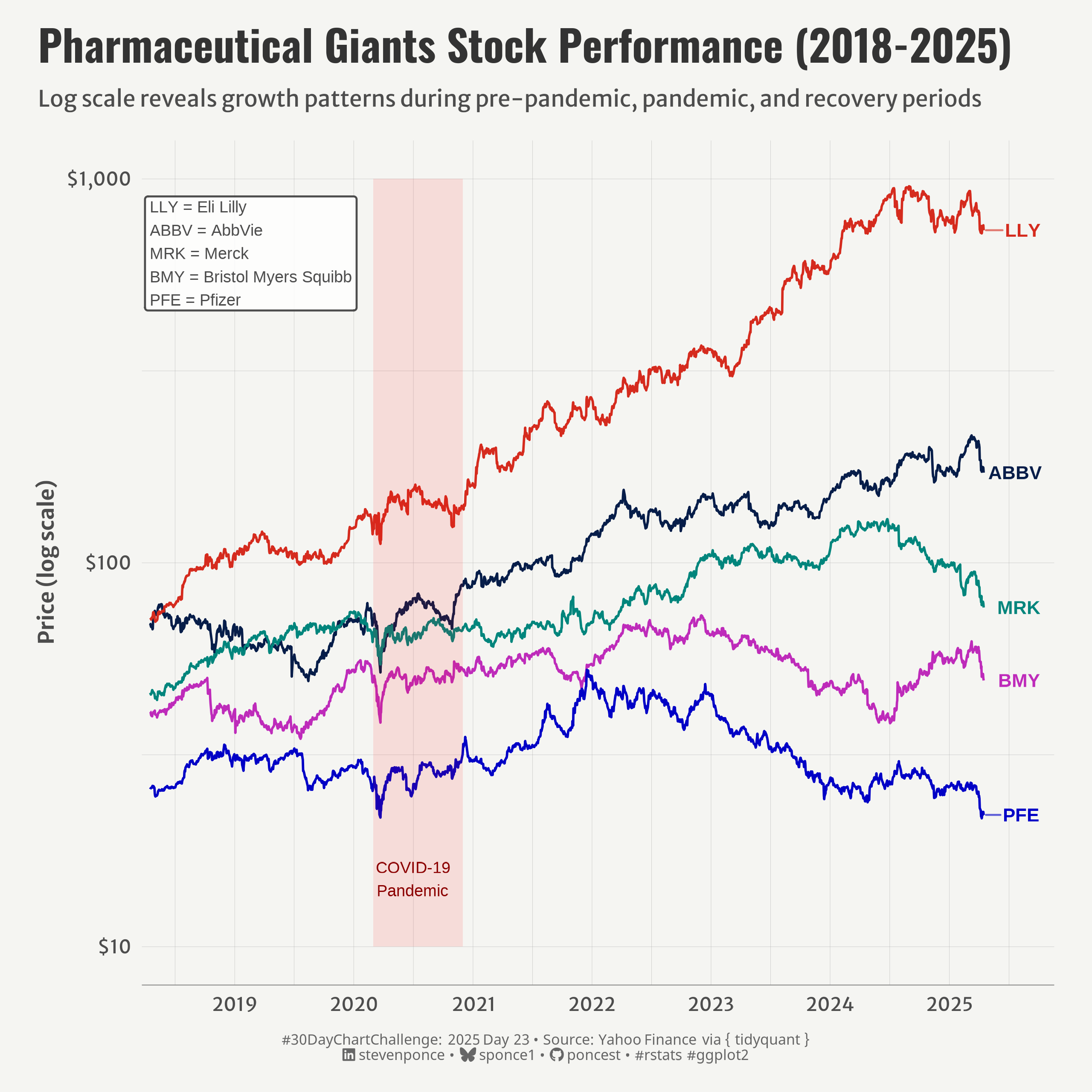{#fig-1}
### <mark> **Steps to Create this Graphic** </mark>
#### 1. Load Packages & Setup
```{r}
#| label: load
#| warning: false
#| message: false
#| results: "hide"
## 1. LOAD PACKAGES & SETUP ----
suppressPackageStartupMessages({
pacman::p_load(
  tidyverse,      # Easily Install and Load the 'Tidyverse'
  ggtext,         # Improved Text Rendering Support for 'ggplot2'
  showtext,       # Using Fonts More Easily in R Graphs
  janitor,        # Simple Tools for Examining and Cleaning Dirty Data
  skimr,          # Compact and Flexible Summaries of Data
  scales,         # Scale Functions for Visualization
  lubridate,      # Make Dealing with Dates a Little Easier
  tidyquant,      # Tidy Quantitative Financial Analysis # Tidy Quantitative Financial Analysis # Tidy Quantitative Financial Analysis # Tidy Quantitative Financial Analysis # Tidy Quantitative Financial Analysis
  ggrepel,        # Automatically Position Non-Overlapping Text Labels with 'ggplot2'
  camcorder       # Record Your Plot History
  )
})

### |- figure size ----
gg_record(
    dir    = here::here("temp_plots"),
    device = "png",
    width  = 8,
    height = 8,
    units  = "in",
    dpi    = 320
)

# Source utility functions
suppressMessages(source(here::here("R/utils/fonts.R")))
source(here::here("R/utils/social_icons.R"))
source(here::here("R/utils/image_utils.R"))
source(here::here("R/themes/base_theme.R"))
```
#### 2. Read in the Data
```{r}
#| label: read
#| include: true
#| eval: true
#| warning: false
# Define timeframe
end_date <- Sys.Date()
start_date <- end_date - years(7)

# Pharmaceutical companies
pharma_symbols <- c("PFE", "MRK", "ABBV", "LLY", "BMY")

# Get the stock data
pharma_data <- tq_get(
  pharma_symbols,
  from = start_date,
  to = end_date,
  get = "stock.prices"
  )
```
#### 3. Examine the Data
```{r}
#| label: examine
#| include: true
#| eval: true
#| results: 'hide'
#| warning: false
glimpse(pharma_data)
skim(pharma_data)
```
#### 4. Tidy Data
```{r}
#| label: tidy
#| warning: false
### |- Tidy ----
# Get the last data point for each company for labeling
label_data <- pharma_data |>
  group_by(symbol) |>
  filter(date == max(date)) |>
  ungroup()
```
#### 5. Visualization Parameters
```{r}
#| label: params
#| include: true
#| warning: false
### |-  plot aesthetics ----
colors <- get_theme_colors(
  palette = c(
    "PFE" = "#0000c6",
    "MRK" = "#00857c",
    "ABBV" = "#061d49",
    "LLY" = "#d52b1e",
    "BMY" = "#be2bba"
  )
)

### |-  titles and caption ----
# text
title_text    <- str_wrap("Pharmaceutical Giants Stock Performance (2018-2025)",
                          width = 55)

subtitle_text <- str_wrap("Log scale reveals growth patterns during pre-pandemic, pandemic, and recovery periods",
                          width = 85)

caption_text <- create_dcc_caption(
  dcc_year = 2025,
  dcc_day = 23,
  source_text =  "Yahoo Finance via { tidyquant }"
)

### |-  fonts ----
setup_fonts()
fonts <- get_font_families()

### |-  plot theme ----

# Start with base theme
base_theme <- create_base_theme(colors)

# Add weekly-specific theme elements
weekly_theme <- extend_weekly_theme(
  base_theme,
  theme(
    # Text styling
    plot.title = element_text(face = "bold", family = fonts$title, size = rel(1.14), margin = margin(b = 10)),
    plot.subtitle = element_text(family = fonts$subtitle, color = colors$text, size = rel(0.78), margin = margin(b = 20)),

    # Axis elements
    axis.title = element_text(color = colors$text, size = rel(0.8)),
    axis.text = element_text(color = colors$text, size = rel(0.7)),

    axis.line.x = element_line(color = "gray50", linewidth = .2),

    # Grid elements
    panel.grid.minor = element_line(color = "gray65", linewidth = 0.05),
    panel.grid.major = element_line(color = "gray65", linewidth = 0.05),

    # Plot margins
    plot.margin = margin(t = 10, r = 20, b = 10, l = 20),
  )
)

# Set theme
theme_set(weekly_theme)
```
#### 6. Plot
```{r}
#| label: plot
#| warning: false
### |-  Plot ----
p <- ggplot() +
  # Geoms
  geom_line(
    data = pharma_data,
    aes(x = date, y = adjusted, color = symbol),
    linewidth = 0.6
  ) +
  geom_text_repel(
    data = label_data,
    aes(x = date, y = adjusted, label = symbol, color = symbol),
    nudge_x = 70,
    hjust = 0,
    segment.size = 0.5,
    direction = "y",
    box.padding = 0.5,
    segment.alpha = 0.6,
    fontface = "bold",
    size = 3.5
  ) +
  # Annotate
  annotate(
    "rect",
    xmin = as.Date("2020-03-01"),
    xmax = as.Date("2020-12-01"),
    ymin = 10,
    ymax = 1000,
    alpha = 0.1,
    fill = "red"
  ) +
  annotate(
    "text",
    x = as.Date("2020-07-01"),
    y = 15,
    label = "COVID-19\nPandemic",
    color = "darkred",
    size = 3
  ) +
  annotate(
    "label",
    x = as.Date("2018-04-01"),
    y = 900,
    label = "LLY = Eli Lilly\nABBV = AbbVie\nMRK = Merck\nBMY = Bristol Myers Squibb\nPFE = Pfizer",
    hjust = 0,
    vjust = 1,
    size = 3,
    color = "gray30",
    fill = "white",
    alpha = 0.8,
    label.size = 0.5
  ) +
  # Scale
  scale_x_date(
    date_breaks = "1 year",
    date_labels = "%Y",
    expand = expansion(mult = c(0.01, 0.08))
  ) +
  scale_y_log10(
    labels = scales::dollar_format(accuracy = 1)
  ) +
  scale_color_manual(values = colors$palette) +
  coord_cartesian(
    xlim = c(start_date, end_date + days(10))
  ) +
  # Labs
  labs(
    title = title_text,
    subtitle = subtitle_text,
    caption = caption_text,
    x = NULL,
    y = "Price (log scale)",
  ) +
  # Theme
  theme(
    plot.title = element_text(
      size = rel(1.6),
      family = fonts$title,
      face = "bold",
      color = colors$title,
      margin = margin(t = 5, b = 5)
    ),
    plot.subtitle = element_text(
      size = rel(0.85),
      family = fonts$subtitle,
      color = colors$subtitle,
      lineheight = 1.2,
      margin = margin(t = 5, b = 15)
    ),
    plot.caption = element_markdown(
      size = rel(0.55),
      family = fonts$caption,
      color = colors$caption,
      lineheight = 0.65,
      hjust = 0.5,
      halign = 0.5,
      margin = margin(t = 10, b = 5)
    ),
  )
```
#### 7. Save
```{r}
#| label: save
#| warning: false
### |-  plot image ----
save_plot(
  p,
  type = "30daychartchallenge",
  year = 2025,
  day = 23,
  width = 8,
  height = 8
  )
```
#### 8. Session Info
::: {.callout-tip collapse="true"}
##### Expand for Session Info
```{r, echo = FALSE}
#| eval: true
#| warning: false
sessionInfo()
```
:::
#### 9. GitHub Repository
::: {.callout-tip collapse="true"}
##### Expand for GitHub Repo
The complete code for this analysis is available in [`30dcc_2025_23.qmd`](https://github.com/poncest/personal-website/blob/master/data_visualizations/TidyTuesday/2025/30dcc_2025_23.qmd).
For the full repository, [click here](https://github.com/poncest/personal-website/).
:::
#### 10. References
::: {.callout-tip collapse="true"}
##### Expand for References
1. Data Sources:
- Yahoo Finance via { tidyquant } [{ tidyquant }](https://business-science.github.io/tidyquant/)
:::
