• Steven Ponce
  • About
  • Data Visualizations
  • Projects
  • Resume
  • Email

On this page

  • Steps to Create this Graphic
    • 1. Load Packages & Setup
    • 2. Read in the Data
    • 3. Examine the Data
    • 4. Tidy Data
    • 5. Visualization Parameters
    • 6. Plot
    • 7. Save
    • 8. Session Info
    • 9. GitHub Repository
    • 10. References
    • 11. Custom Functions Documentation

Horror Films Are Lottery Tickets

  • Show All Code
  • Hide All Code

  • View Source

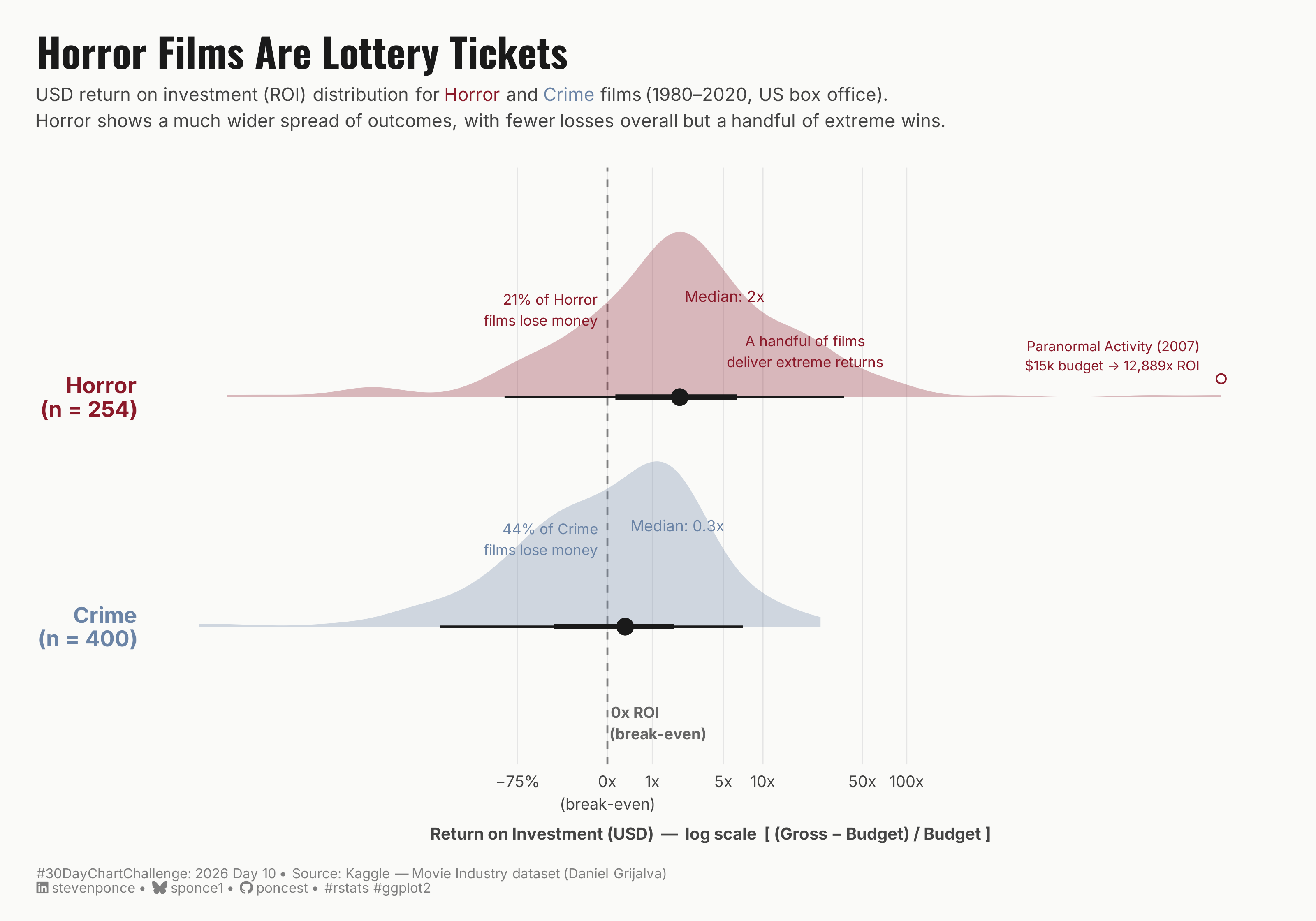
USD return on investment (ROI) distribution for Horror and Crime films (1980–2020, US box office). Horror shows a much wider spread of outcomes, with fewer losses overall but a handful of extreme wins.

30DayChartChallenge
Data Visualization
R Programming
2026
A half-eye distribution chart comparing return on investment (ROI) for Horror and Crime films (1980–2020). Plotted on a log scale, the chart reveals Horror as Hollywood’s highest-variance genre — most films lose money, but a few deliver extraordinary returns. Crime films cluster near break-even, making them the most predictable bet in the dataset.
Author

Steven Ponce

Published

April 10, 2026

Figure 1: Half-eye distribution chart comparing return on investment (ROI) for Horror and Crime films (1980–2020, US box office, log scale). Horror films (n=254) show a wide, right-skewed distribution with a median ROI of 2x and a long tail of extreme outliers — including Paranormal Activity (2007), which returned 12,889x on a $15,000 budget. Crime films (n=400) cluster tightly near break-even with a median ROI of 0.3x and few breakout returns. The chart shows that Horror is Hollywood’s highest-variance genre, while Crime is its least volatile.

Steps to Create this Graphic

1. Load Packages & Setup

Show code
```{r}
#| label: load
#| warning: false
#| message: false      
#| results: "hide"     

## 1. LOAD PACKAGES & SETUP ----
suppressPackageStartupMessages({
pacman::p_load(
  tidyverse, ggtext, showtext,  
  janitor, scales, glue, ggdist
  )
})

### |- figure size ----
camcorder::gg_record(
  dir    = here::here("temp_plots"),
  device = "png",
  width  = 10,
  height = 7,
  units  = "in",
  dpi    = 320
)

# Source utility functions
suppressMessages(source(here::here("R/utils/fonts.R")))
source(here::here("R/utils/social_icons.R"))
source(here::here("R/utils/image_utils.R"))
source(here::here("R/themes/base_theme.R"))
```

2. Read in the Data

Show code
```{r}
#| label: read
#| include: true
#| eval: true
#| warning: false

movies_raw<- read_csv(
  here::here("data/30DayChartChallenge/2026/movies.csv"),
  show_col_types = FALSE
  ) |>
  clean_names() 
```

3. Examine the Data

Show code
```{r}
#| label: examine
#| include: true
#| eval: true
#| results: 'hide'
#| warning: false

glimpse(movies_raw)
```

4. Tidy Data

Show code
```{r}
#| label: tidy
#| warning: false

### |- filter and compute ROI ----
movies_clean <- movies_raw |>
  filter(
    genre %in% c("Horror", "Crime"),
    budget > 0,
    gross > 0
  ) |>
  mutate(
    roi       = (gross - budget) / budget,
    roi_log1p = log1p(roi),
    genre     = factor(genre, levels = c("Crime", "Horror"))
  )

### |- summary stats ----
summary_stats <- movies_clean |>
  group_by(genre) |>
  summarise(
    n          = n(),
    median_roi = median(roi),
    p25        = quantile(roi, 0.25),
    p75        = quantile(roi, 0.75),
    pct_loss   = mean(roi < 0) * 100,
    .groups    = "drop"
  )

### |- axis labels with counts ----
genre_labels <- summary_stats |>
  mutate(
    genre = as.character(genre),
    label = glue("{genre}\n(n = {scales::comma(n)})")
  ) |>
  select(genre, label) |>
  tibble::deframe()

### |- top Horror outlier ----
top_horror <- movies_clean |>
  filter(genre == "Horror") |>
  slice_max(roi, n = 1, with_ties = FALSE)

### |- pre-compute positions ----
break_even_log  <- log1p(0)
median_hor_log  <- log1p(summary_stats$median_roi[summary_stats$genre == "Horror"])
median_cri_log  <- log1p(summary_stats$median_roi[summary_stats$genre == "Crime"])
pct_loss_horror <- summary_stats$pct_loss[summary_stats$genre == "Horror"]
pct_loss_crime  <- summary_stats$pct_loss[summary_stats$genre == "Crime"]

### |- x-axis breaks and labels ----
roi_breaks  <- c(-0.75, 0, 1, 5, 10, 50, 100)
log_breaks  <- log1p(roi_breaks)
axis_labels <- c("−75%", "0x\n(break-even)", "1x", "5x", "10x", "50x", "100x")
```

5. Visualization Parameters

Show code
```{r}
#| label: params
#| include: true
#| warning: false

### |- plot aesthetics ----
colors <- get_theme_colors(
  palette = list(
    horror     = "#8B1A2A",
    crime      = "#6B84A6",   
    median_pt  = "#1A1A1A",
    annotation = "#444444",
    bg         = "#FAFAF8" 
  )
)

### |- titles and caption ----
title_text <- "Horror Films Are Lottery Tickets"

subtitle_text <- glue(
  "USD return on investment (ROI) distribution for ",
  "<span style='color:{colors$palette$horror};font-weight:700'>Horror</span> and ",
  "<span style='color:{colors$palette$crime};font-weight:700'>Crime</span> films ",
  "(1980–2020, US box office).<br>",
  "Horror shows a much wider spread of outcomes, with fewer losses overall but a handful of extreme wins."
)

caption_text <- create_dcc_caption(
  dcc_year    = 2026,
  dcc_day     = 10,
  source_text = "Kaggle — Movie Industry dataset (Daniel Grijalva)"
)

### |- fonts ----
setup_fonts()
fonts <- get_font_families()

font_body    <- fonts$text    %||% ""
font_title   <- fonts$title   %||% ""
font_caption <- fonts$caption %||% ""

### |- theme ----
base_theme <- create_base_theme(colors)

weekly_theme <- extend_weekly_theme(
  base_theme,
  theme(
    plot.background = element_rect(fill = colors$palette$bg, color = NA),
    panel.background = element_rect(fill = colors$palette$bg, color = NA),
    panel.grid.major.x = element_line(color = "gray90", linewidth = 0.3),
    panel.grid.major.y = element_blank(),
    panel.grid.minor = element_blank(),
    axis.title.x = element_text(
      size = 9, color = colors$palette$annotation, margin = margin(t = 8)
    ),
    axis.title.y = element_blank(),
    axis.text.y = element_text(
      size = 12, face = "bold",
      color = c(colors$palette$crime, colors$palette$horror)
    ),
    axis.text.x = element_text(
      size = 8.5,
      color = colors$palette$annotation,
      lineheight = 1.2
    ),
    axis.ticks = element_blank(),
    plot.title = element_text(
      family = fonts$title,
      face   = "bold",
      size   = 22,
      color  = "#1A1A1A",
      margin = margin(b = 6)
    ),
    plot.subtitle = element_markdown(
      family     = fonts$text,
      size       = 10,
      color      = "#444444",
      lineheight = 1.45,
      margin     = margin(b = 20)
    ),
    plot.caption = element_markdown(
      family = fonts$text,
      size   = 7.5,
      color  = "gray50",
      hjust  = 0,
      margin = margin(t = 14)
    ),
    plot.margin = margin(20, 24, 14, 20)
  )
)

theme_set(weekly_theme)
```

6. Plot

Show code
```{r}
#| label: plot
#| warning: false

### |- main plot ----
p <- movies_clean |>
  ggplot(aes(x = roi_log1p, y = genre, fill = genre, color = genre)) +
  geom_vline(
    xintercept = break_even_log,
    color = "gray50",
    linewidth = 0.5,
    linetype = "dashed"
  ) +
  stat_halfeye(
    .width = c(0.50, 0.90),
    point_size = 3.5,
    point_color = colors$palette$median_pt,
    interval_color = colors$palette$median_pt,
    slab_alpha = 0.3,
    normalize = "groups",
    scale = 0.72,
    adjust = 1.2
  ) +
  annotate(
    "text",
    x = break_even_log + 0.05,
    y = 0.58,
    label = "0x ROI\n(break-even)",
    size = 2.9,
    color = "gray40",
    hjust = 0,
    fontface = "bold",
    lineheight = 1.2,
    family = fonts$text
  ) +
  annotate(
    "text",
    x = break_even_log - 0.15,
    y = 2.38,
    label = glue("{round(pct_loss_horror, 0)}% of Horror\nfilms lose money"),
    size = 2.8,
    color = colors$palette$horror,
    hjust = 1,
    lineheight = 1.2,
    family = fonts$text
  ) +
  annotate(
    "text",
    x = break_even_log - 0.15,
    y = 1.38,
    label = glue("{round(pct_loss_crime, 0)}% of Crime\nfilms lose money"),
    size = 2.8,
    color = colors$palette$crime,
    hjust = 1,
    lineheight = 1.2,
    family = fonts$text
  ) +
  annotate(
    "text",
    x = median_hor_log + 0.08,
    y = 2.44,
    label = glue("Median: {round(summary_stats$median_roi[summary_stats$genre == 'Horror'], 1)}x"),
    size = 2.9,
    color = colors$palette$horror,
    hjust = 0,
    family = fonts$text
  ) +
  annotate(
    "text",
    x = median_cri_log + 0.08,
    y = 1.44,
    label = glue("Median: {round(summary_stats$median_roi[summary_stats$genre == 'Crime'], 1)}x"),
    size = 2.9,
    color = colors$palette$crime,
    hjust = 0,
    family = fonts$text
  ) +
  annotate(
    "text",
    x = log1p(20),
    y = 2.20,
    label = "A handful of films\ndeliver extreme returns",
    size = 2.8,
    color = colors$palette$horror,
    hjust = 0.5,
    lineheight = 1.2,
    family = fonts$text
  ) +
  annotate(
    "text",
    x = log1p(top_horror$roi) - 0.35,
    y = 2.18,
    label = glue("{top_horror$name} ({top_horror$year})\n$15k budget → 12,889x ROI"),
    size = 2.6,
    color = colors$palette$horror,
    hjust = 1,
    lineheight = 1.2,
    family = fonts$text
  ) +
  annotate(
    "point",
    x = log1p(top_horror$roi),
    y = 2.08,
    size = 2,
    color = colors$palette$horror,
    shape = 21,
    fill = "white"
  ) +
  scale_fill_manual(values = c(
    "Horror" = colors$palette$horror,
    "Crime"  = colors$palette$crime
  )) +
  scale_color_manual(values = c(
    "Horror" = colors$palette$horror,
    "Crime"  = colors$palette$crime
  )) +
  scale_x_continuous(
    name = "Return on Investment (USD)  —  log scale  [ (Gross − Budget) / Budget ]",
    breaks = log_breaks,
    labels = axis_labels
  ) +
  scale_y_discrete(labels = genre_labels) +
  labs(
    title = title_text,
    subtitle = subtitle_text,
    caption = caption_text
  )
```

7. Save

Show code
```{r}
#| label: save
#| warning: false

### |-  plot image ----  
save_plot(
  p, 
  type = "30daychartchallenge", 
  year = 2026, 
  day = 10, 
  width = 10, 
  height = 7
  )
```

8. Session Info

TipExpand for Session Info
R version 4.3.1 (2023-06-16 ucrt)
Platform: x86_64-w64-mingw32/x64 (64-bit)
Running under: Windows 11 x64 (build 26100)

Matrix products: default


locale:
[1] LC_COLLATE=English_United States.utf8 
[2] LC_CTYPE=English_United States.utf8   
[3] LC_MONETARY=English_United States.utf8
[4] LC_NUMERIC=C                          
[5] LC_TIME=English_United States.utf8    

time zone: America/New_York
tzcode source: internal

attached base packages:
[1] stats     graphics  grDevices utils     datasets  methods   base     

other attached packages:
 [1] here_1.0.2      ggdist_3.3.3    glue_1.8.0      scales_1.4.0   
 [5] janitor_2.2.1   showtext_0.9-7  showtextdb_3.0  sysfonts_0.8.9 
 [9] ggtext_0.1.2    lubridate_1.9.5 forcats_1.0.1   stringr_1.6.0  
[13] dplyr_1.2.0     purrr_1.2.1     readr_2.2.0     tidyr_1.3.2    
[17] tibble_3.2.1    ggplot2_4.0.2   tidyverse_2.0.0

loaded via a namespace (and not attached):
 [1] gtable_0.3.6         xfun_0.56            htmlwidgets_1.6.4   
 [4] tzdb_0.5.0           vctrs_0.7.1          tools_4.3.1         
 [7] generics_0.1.4       curl_7.0.0           parallel_4.3.1      
[10] gifski_1.32.0-2      pacman_0.5.1         pkgconfig_2.0.3     
[13] RColorBrewer_1.1-3   S7_0.2.0             distributional_0.7.0
[16] lifecycle_1.0.5      compiler_4.3.1       farver_2.1.2        
[19] textshaping_1.0.4    codetools_0.2-19     snakecase_0.11.1    
[22] litedown_0.9         htmltools_0.5.9      yaml_2.3.12         
[25] pillar_1.11.1        crayon_1.5.3         camcorder_0.1.0     
[28] magick_2.8.6         commonmark_2.0.0     tidyselect_1.2.1    
[31] digest_0.6.39        stringi_1.8.7        labeling_0.4.3      
[34] rsvg_2.6.2           rprojroot_2.1.1      fastmap_1.2.0       
[37] grid_4.3.1           cli_3.6.5            magrittr_2.0.3      
[40] withr_3.0.2          bit64_4.6.0-1        timechange_0.4.0    
[43] rmarkdown_2.30       bit_4.6.0            otel_0.2.0          
[46] ragg_1.5.0           hms_1.1.4            evaluate_1.0.5      
[49] knitr_1.51           markdown_2.0         rlang_1.1.7         
[52] gridtext_0.1.6       Rcpp_1.1.1           xml2_1.5.2          
[55] svglite_2.1.3        rstudioapi_0.18.0    vroom_1.7.0         
[58] jsonlite_2.0.0       R6_2.6.1             systemfonts_1.3.2   

9. GitHub Repository

TipExpand for GitHub Repo

The complete code for this analysis is available in 30dcc_2026_10.qmd.

For the full repository, click here.

10. References

TipExpand for References
  1. Data Sources:
    • Grijalva, D. (2021). Movie Industry [Dataset]. Kaggle. Retrieved April 10, 2026 from https://www.kaggle.com/datasets/danielgrijalvas/movies

11. Custom Functions Documentation

Note📦 Custom Helper Functions

This analysis uses custom functions from my personal module library for efficiency and consistency across projects.

Functions Used:

  • fonts.R: setup_fonts(), get_font_families() - Font management with showtext
  • social_icons.R: create_social_caption() - Generates formatted social media captions
  • image_utils.R: save_plot() - Consistent plot saving with naming conventions
  • base_theme.R: create_base_theme(), extend_weekly_theme(), get_theme_colors() - Custom ggplot2 themes

Why custom functions?
These utilities standardize theming, fonts, and output across all my data visualizations. The core analysis (data tidying and visualization logic) uses only standard tidyverse packages.

Source Code:
View all custom functions → GitHub: R/utils

Back to top

Citation

BibTeX citation:
@online{ponce2026,
  author = {Ponce, Steven},
  title = {Horror {Films} {Are} {Lottery} {Tickets}},
  date = {2026-04-10},
  url = {https://stevenponce.netlify.app/data_visualizations/30DayChartChallenge/2026/30dcc_2026_10.html},
  langid = {en}
}
For attribution, please cite this work as:
Ponce, Steven. 2026. “Horror Films Are Lottery Tickets.” April 10, 2026. https://stevenponce.netlify.app/data_visualizations/30DayChartChallenge/2026/30dcc_2026_10.html.
Source Code
---
title: "Horror Films Are Lottery Tickets"
subtitle: "USD return on investment (ROI) distribution for Horror and Crime films (1980–2020, US box office). Horror shows a much wider spread of outcomes, with fewer losses overall but a handful of extreme wins."
description: "A half-eye distribution chart comparing return on investment (ROI) for Horror and Crime films (1980–2020). Plotted on a log scale, the chart reveals Horror as Hollywood's highest-variance genre — most films lose money, but a few deliver extraordinary returns. Crime films cluster near break-even, making them the most predictable bet in the dataset."
date: "2026-04-10" 
author:
  - name: "Steven Ponce"
    url: "https://stevenponce.netlify.app"
citation:
  url: "https://stevenponce.netlify.app/data_visualizations/30DayChartChallenge/2026/30dcc_2026_10.html"
categories: ["30DayChartChallenge", "Data Visualization", "R Programming", "2026"]
tags: [
  "30DayChartChallenge",
  "Distributions",
  "Pop Culture",
  "Horror",
  "Film Industry",
  "Box Office",
  "ROI",
  "Half-Eye Plot",
  "ggdist",
  "Log Scale",
  "Genre Analysis",
  "Risk and Return"
]
image: "thumbnails/30dcc_2026_10.png"
format:
  html:
    toc: true
    toc-depth: 5
    code-link: true
    code-fold: true
    code-tools: true
    code-summary: "Show code"
    self-contained: true
    theme: 
      light: [flatly, assets/styling/custom_styles.scss]
      dark: [darkly, assets/styling/custom_styles_dark.scss]
editor_options: 
  chunk_output_type: inline
execute: 
  freeze: true                                                  
  cache: true                                                   
  error: false
  message: false
  warning: false
  eval: true
---
![Half-eye distribution chart comparing return on investment (ROI) for Horror and Crime films (1980–2020, US box office, log scale). Horror films (n=254) show a wide, right-skewed distribution with a median ROI of 2x and a long tail of extreme outliers — including Paranormal Activity (2007), which returned 12,889x on a $15,000 budget. Crime films (n=400) cluster tightly near break-even with a median ROI of 0.3x and few breakout returns. The chart shows that Horror is Hollywood's highest-variance genre, while Crime is its least volatile.](30dcc_2026_10.png){#fig-1}

### [**Steps to Create this Graphic**]{.mark}

#### [1. Load Packages & Setup]{.smallcaps}

```{r}
#| label: load
#| warning: false
#| message: false      
#| results: "hide"     

## 1. LOAD PACKAGES & SETUP ----
suppressPackageStartupMessages({
pacman::p_load(
  tidyverse, ggtext, showtext,  
  janitor, scales, glue, ggdist
  )
})

### |- figure size ----
camcorder::gg_record(
  dir    = here::here("temp_plots"),
  device = "png",
  width  = 10,
  height = 7,
  units  = "in",
  dpi    = 320
)

# Source utility functions
suppressMessages(source(here::here("R/utils/fonts.R")))
source(here::here("R/utils/social_icons.R"))
source(here::here("R/utils/image_utils.R"))
source(here::here("R/themes/base_theme.R"))
```

#### [2. Read in the Data]{.smallcaps}

```{r}
#| label: read
#| include: true
#| eval: true
#| warning: false

movies_raw<- read_csv(
  here::here("data/30DayChartChallenge/2026/movies.csv"),
  show_col_types = FALSE
  ) |>
  clean_names() 
```

#### [3. Examine the Data]{.smallcaps}

```{r}
#| label: examine
#| include: true
#| eval: true
#| results: 'hide'
#| warning: false

glimpse(movies_raw)
```

#### [4. Tidy Data]{.smallcaps}

```{r}
#| label: tidy
#| warning: false

### |- filter and compute ROI ----
movies_clean <- movies_raw |>
  filter(
    genre %in% c("Horror", "Crime"),
    budget > 0,
    gross > 0
  ) |>
  mutate(
    roi       = (gross - budget) / budget,
    roi_log1p = log1p(roi),
    genre     = factor(genre, levels = c("Crime", "Horror"))
  )

### |- summary stats ----
summary_stats <- movies_clean |>
  group_by(genre) |>
  summarise(
    n          = n(),
    median_roi = median(roi),
    p25        = quantile(roi, 0.25),
    p75        = quantile(roi, 0.75),
    pct_loss   = mean(roi < 0) * 100,
    .groups    = "drop"
  )

### |- axis labels with counts ----
genre_labels <- summary_stats |>
  mutate(
    genre = as.character(genre),
    label = glue("{genre}\n(n = {scales::comma(n)})")
  ) |>
  select(genre, label) |>
  tibble::deframe()

### |- top Horror outlier ----
top_horror <- movies_clean |>
  filter(genre == "Horror") |>
  slice_max(roi, n = 1, with_ties = FALSE)

### |- pre-compute positions ----
break_even_log  <- log1p(0)
median_hor_log  <- log1p(summary_stats$median_roi[summary_stats$genre == "Horror"])
median_cri_log  <- log1p(summary_stats$median_roi[summary_stats$genre == "Crime"])
pct_loss_horror <- summary_stats$pct_loss[summary_stats$genre == "Horror"]
pct_loss_crime  <- summary_stats$pct_loss[summary_stats$genre == "Crime"]

### |- x-axis breaks and labels ----
roi_breaks  <- c(-0.75, 0, 1, 5, 10, 50, 100)
log_breaks  <- log1p(roi_breaks)
axis_labels <- c("−75%", "0x\n(break-even)", "1x", "5x", "10x", "50x", "100x")
```


#### [5. Visualization Parameters]{.smallcaps}

```{r}
#| label: params
#| include: true
#| warning: false

### |- plot aesthetics ----
colors <- get_theme_colors(
  palette = list(
    horror     = "#8B1A2A",
    crime      = "#6B84A6",   
    median_pt  = "#1A1A1A",
    annotation = "#444444",
    bg         = "#FAFAF8" 
  )
)

### |- titles and caption ----
title_text <- "Horror Films Are Lottery Tickets"

subtitle_text <- glue(
  "USD return on investment (ROI) distribution for ",
  "<span style='color:{colors$palette$horror};font-weight:700'>Horror</span> and ",
  "<span style='color:{colors$palette$crime};font-weight:700'>Crime</span> films ",
  "(1980–2020, US box office).<br>",
  "Horror shows a much wider spread of outcomes, with fewer losses overall but a handful of extreme wins."
)

caption_text <- create_dcc_caption(
  dcc_year    = 2026,
  dcc_day     = 10,
  source_text = "Kaggle — Movie Industry dataset (Daniel Grijalva)"
)

### |- fonts ----
setup_fonts()
fonts <- get_font_families()

font_body    <- fonts$text    %||% ""
font_title   <- fonts$title   %||% ""
font_caption <- fonts$caption %||% ""

### |- theme ----
base_theme <- create_base_theme(colors)

weekly_theme <- extend_weekly_theme(
  base_theme,
  theme(
    plot.background = element_rect(fill = colors$palette$bg, color = NA),
    panel.background = element_rect(fill = colors$palette$bg, color = NA),
    panel.grid.major.x = element_line(color = "gray90", linewidth = 0.3),
    panel.grid.major.y = element_blank(),
    panel.grid.minor = element_blank(),
    axis.title.x = element_text(
      size = 9, color = colors$palette$annotation, margin = margin(t = 8)
    ),
    axis.title.y = element_blank(),
    axis.text.y = element_text(
      size = 12, face = "bold",
      color = c(colors$palette$crime, colors$palette$horror)
    ),
    axis.text.x = element_text(
      size = 8.5,
      color = colors$palette$annotation,
      lineheight = 1.2
    ),
    axis.ticks = element_blank(),
    plot.title = element_text(
      family = fonts$title,
      face   = "bold",
      size   = 22,
      color  = "#1A1A1A",
      margin = margin(b = 6)
    ),
    plot.subtitle = element_markdown(
      family     = fonts$text,
      size       = 10,
      color      = "#444444",
      lineheight = 1.45,
      margin     = margin(b = 20)
    ),
    plot.caption = element_markdown(
      family = fonts$text,
      size   = 7.5,
      color  = "gray50",
      hjust  = 0,
      margin = margin(t = 14)
    ),
    plot.margin = margin(20, 24, 14, 20)
  )
)

theme_set(weekly_theme)
```

#### [6. Plot]{.smallcaps}

```{r}
#| label: plot
#| warning: false

### |- main plot ----
p <- movies_clean |>
  ggplot(aes(x = roi_log1p, y = genre, fill = genre, color = genre)) +
  geom_vline(
    xintercept = break_even_log,
    color = "gray50",
    linewidth = 0.5,
    linetype = "dashed"
  ) +
  stat_halfeye(
    .width = c(0.50, 0.90),
    point_size = 3.5,
    point_color = colors$palette$median_pt,
    interval_color = colors$palette$median_pt,
    slab_alpha = 0.3,
    normalize = "groups",
    scale = 0.72,
    adjust = 1.2
  ) +
  annotate(
    "text",
    x = break_even_log + 0.05,
    y = 0.58,
    label = "0x ROI\n(break-even)",
    size = 2.9,
    color = "gray40",
    hjust = 0,
    fontface = "bold",
    lineheight = 1.2,
    family = fonts$text
  ) +
  annotate(
    "text",
    x = break_even_log - 0.15,
    y = 2.38,
    label = glue("{round(pct_loss_horror, 0)}% of Horror\nfilms lose money"),
    size = 2.8,
    color = colors$palette$horror,
    hjust = 1,
    lineheight = 1.2,
    family = fonts$text
  ) +
  annotate(
    "text",
    x = break_even_log - 0.15,
    y = 1.38,
    label = glue("{round(pct_loss_crime, 0)}% of Crime\nfilms lose money"),
    size = 2.8,
    color = colors$palette$crime,
    hjust = 1,
    lineheight = 1.2,
    family = fonts$text
  ) +
  annotate(
    "text",
    x = median_hor_log + 0.08,
    y = 2.44,
    label = glue("Median: {round(summary_stats$median_roi[summary_stats$genre == 'Horror'], 1)}x"),
    size = 2.9,
    color = colors$palette$horror,
    hjust = 0,
    family = fonts$text
  ) +
  annotate(
    "text",
    x = median_cri_log + 0.08,
    y = 1.44,
    label = glue("Median: {round(summary_stats$median_roi[summary_stats$genre == 'Crime'], 1)}x"),
    size = 2.9,
    color = colors$palette$crime,
    hjust = 0,
    family = fonts$text
  ) +
  annotate(
    "text",
    x = log1p(20),
    y = 2.20,
    label = "A handful of films\ndeliver extreme returns",
    size = 2.8,
    color = colors$palette$horror,
    hjust = 0.5,
    lineheight = 1.2,
    family = fonts$text
  ) +
  annotate(
    "text",
    x = log1p(top_horror$roi) - 0.35,
    y = 2.18,
    label = glue("{top_horror$name} ({top_horror$year})\n$15k budget → 12,889x ROI"),
    size = 2.6,
    color = colors$palette$horror,
    hjust = 1,
    lineheight = 1.2,
    family = fonts$text
  ) +
  annotate(
    "point",
    x = log1p(top_horror$roi),
    y = 2.08,
    size = 2,
    color = colors$palette$horror,
    shape = 21,
    fill = "white"
  ) +
  scale_fill_manual(values = c(
    "Horror" = colors$palette$horror,
    "Crime"  = colors$palette$crime
  )) +
  scale_color_manual(values = c(
    "Horror" = colors$palette$horror,
    "Crime"  = colors$palette$crime
  )) +
  scale_x_continuous(
    name = "Return on Investment (USD)  —  log scale  [ (Gross − Budget) / Budget ]",
    breaks = log_breaks,
    labels = axis_labels
  ) +
  scale_y_discrete(labels = genre_labels) +
  labs(
    title = title_text,
    subtitle = subtitle_text,
    caption = caption_text
  )

```

#### [7. Save]{.smallcaps}

```{r}
#| label: save
#| warning: false

### |-  plot image ----  
save_plot(
  p, 
  type = "30daychartchallenge", 
  year = 2026, 
  day = 10, 
  width = 10, 
  height = 7
  )
```

#### [8. Session Info]{.smallcaps}

::: {.callout-tip collapse="true"}
##### Expand for Session Info

```{r, echo = FALSE}
#| eval: true
#| warning: false

sessionInfo()
```
:::

#### [9. GitHub Repository]{.smallcaps} 

::: {.callout-tip collapse="true"}
##### Expand for GitHub Repo

The complete code for this analysis is available in [`30dcc_2026_10.qmd`](https://github.com/poncest/personal-website/blob/master/data_visualizations/TidyTuesday/2026/30dcc_2026_10.qmd).

For the full repository, [click here](https://github.com/poncest/personal-website/).
:::


#### [10. References]{.smallcaps}
::: {.callout-tip collapse="true"}
##### Expand for References
1. Data Sources:
   - Grijalva, D. (2021). *Movie Industry* [Dataset]. Kaggle.
     Retrieved April 10, 2026 from
     https://www.kaggle.com/datasets/danielgrijalvas/movies
:::


#### [11. Custom Functions Documentation]{.smallcaps}

::: {.callout-note collapse="true"}
##### 📦 Custom Helper Functions

This analysis uses custom functions from my personal module library for efficiency and consistency across projects.

**Functions Used:**

-   **`fonts.R`**: `setup_fonts()`, `get_font_families()` - Font management with showtext
-   **`social_icons.R`**: `create_social_caption()` - Generates formatted social media captions
-   **`image_utils.R`**: `save_plot()` - Consistent plot saving with naming conventions
-   **`base_theme.R`**: `create_base_theme()`, `extend_weekly_theme()`, `get_theme_colors()` - Custom ggplot2 themes

**Why custom functions?**\
These utilities standardize theming, fonts, and output across all my data visualizations. The core analysis (data tidying and visualization logic) uses only standard tidyverse packages.

**Source Code:**\
View all custom functions → [GitHub: R/utils](https://github.com/poncest/personal-website/tree/master/R)
:::

© 2024 Steven Ponce

Source Issues