• Steven Ponce
  • About
  • Data Visualizations
  • Projects
  • Resume
  • Email

On this page

  • Steps to Create this Graphic
    • 1. Load Packages & Setup
    • 2. Read in the Data
    • 3. Examine the Data
    • 4. Tidy Data
    • 5. Visualization Parameters
    • 6. Plot
    • 7. Save
    • 8. Session Info
    • 9. GitHub Repository
    • 10. References
    • 11. Custom Functions Documentation

Different Failure Modes, Different Timelines

  • Show All Code
  • Hide All Code

  • View Source

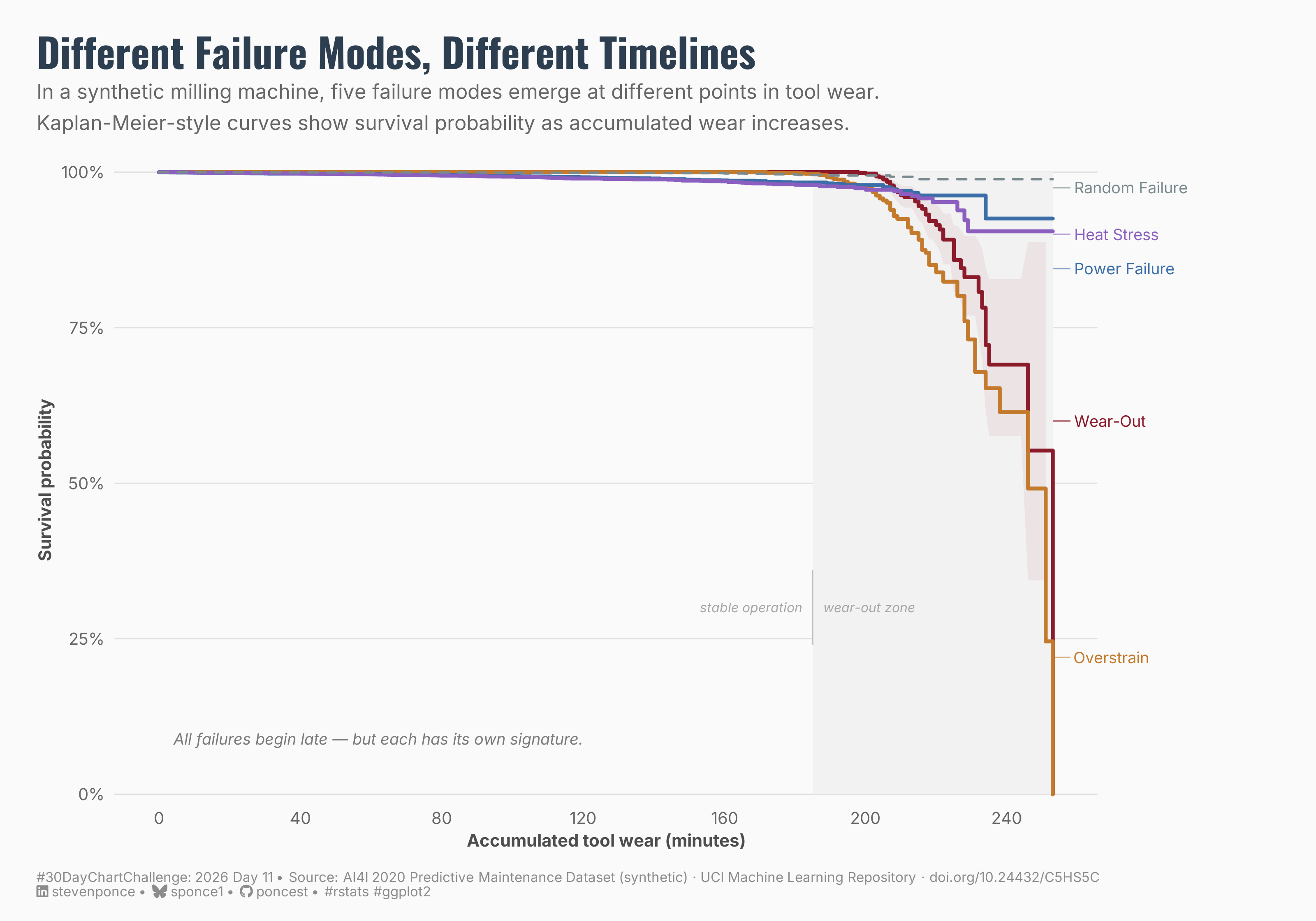
In a synthetic milling machine, five failure modes emerge at different points in tool wear. Kaplan-Meier-style curves show survival probability as accumulated wear increases.

30DayChartChallenge
Data Visualization
R Programming
2026
Survival curves for five machine failure modes — Wear-Out, Overstrain, Power Failure, Heat Stress, and Random Failure — plotted against accumulated tool wear in a synthetic milling machine. Using Kaplan-Meier-style curves, the chart reveals that while all failures concentrate late in the tool’s life, each mode follows a distinct degradation signature. Built with R and ggplot2 using the AI4I 2020 Predictive Maintenance Dataset from the UCI Machine Learning Repository.
Author

Steven Ponce

Published

April 11, 2026

Figure 1: A survival curve chart titled “Different Failure Modes, Different Timelines.” Five Kaplan-Meier-style curves show how five machine failure modes — Random Failure, Heat Stress, Power Failure, Wear-Out, and Overstrain — behave differently as accumulated tool wear increases in a synthetic milling machine. All curves remain near 100% survival probability through approximately 185 minutes of tool wear, then diverge sharply in the wear-out zone. Random Failure stays closest to 100%, while Overstrain drops most steeply, reaching near 0% by 250 minutes. A shaded region marks the wear-out zone where failures concentrate.

Steps to Create this Graphic

1. Load Packages & Setup

Show code
```{r}
#| label: load
#| warning: false
#| message: false      
#| results: "hide"     

## 1. LOAD PACKAGES & SETUP ----
suppressPackageStartupMessages({
pacman::p_load(
  tidyverse, ggtext, showtext,  
  janitor, scales, glue, survival,
  broom
  )
})

### |- figure size ----
camcorder::gg_record(
  dir    = here::here("temp_plots"),
  device = "png",
  width  = 10,
  height = 7,
  units  = "in",
  dpi    = 320
)

# Source utility functions
suppressMessages(source(here::here("R/utils/fonts.R")))
source(here::here("R/utils/social_icons.R"))
source(here::here("R/utils/image_utils.R"))
source(here::here("R/themes/base_theme.R"))
```

2. Read in the Data

Show code
```{r}
#| label: read
#| include: true
#| eval: true
#| warning: false

raw_data <- read_csv(
  here::here("data/30DayChartChallenge/2026/ai4i2020.csv"),
  show_col_types = FALSE
  ) |>
  clean_names() 
```

3. Examine the Data

Show code
```{r}
#| label: examine
#| include: true
#| eval: true
#| results: 'hide'
#| warning: false

glimpse(raw_data)
```

4. Tidy Data

Show code
```{r}
#| label: tidy
#| warning: false

# Method note:
# AI4I is a synthetic snapshot dataset, not a longitudinal history of machines.
# tool_wear_min is used as a physical exposure proxy. KM-style curves show at
# what point in accumulated wear each failure type begins to appear.
# These are best interpreted as failure-signature curves, not literal machine
# life histories.

### |- Reshape: one row per failure mode per observation ----
failure_modes <- raw_data |>
  select(udi, tool_wear_min, twf, hdf, pwf, osf, rnf) |>
  pivot_longer(
    cols      = c(twf, hdf, pwf, osf, rnf),
    names_to  = "failure_mode",
    values_to = "event"
  ) |>
  mutate(
    failure_label = case_when(
      failure_mode == "twf" ~ "Wear-Out",
      failure_mode == "hdf" ~ "Heat Stress",
      failure_mode == "pwf" ~ "Power Failure",
      failure_mode == "osf" ~ "Overstrain",
      failure_mode == "rnf" ~ "Random Failure"
    ),
    failure_label = factor(
      failure_label,
      levels = c("Wear-Out", "Overstrain", "Power Failure", "Heat Stress", "Random Failure")
    )
  )

### |- Fit Kaplan-Meier curves ----
surv_fit <- survfit(
  Surv(time = tool_wear_min, event = event) ~ failure_label,
  data = failure_modes
)

### |- Tidy to ggplot-ready format ----
surv_tidy <- tidy(surv_fit) |>
  mutate(
    failure_label = str_remove(strata, "failure_label="),
    failure_label = factor(
      failure_label,
      levels = c("Wear-Out", "Overstrain", "Power Failure", "Heat Stress", "Random Failure")
    )
  )

### |- End-line label positions ----
# Get the last observed y (estimate) per curve at the terminal time point.
label_ends <- surv_tidy |>
  group_by(failure_label) |>
  slice_tail(n = 1) |>
  ungroup() |>
  mutate(
    label_y = case_when(
      failure_label == "Random Failure" ~ 0.975,
      failure_label == "Heat Stress" ~ 0.900,
      failure_label == "Power Failure" ~ 0.845,
      failure_label == "Wear-Out" ~ 0.600,
      failure_label == "Overstrain" ~ 0.220
    )
  )
```

5. Visualization Parameters

Show code
```{r}
#| label: params
#| include: true
#| warning: false

### |- plot aesthetics ----
colors <- get_theme_colors(
  palette = c(
    "Wear-Out"       = "#8B1A2A",
    "Overstrain"     = "#C47A2C",
    "Power Failure"  = "#3B6EA8",
    "Heat Stress"    = "#8B5FBF",
    "Random Failure" = "#7A8A8F",
    "background"     = "#FAFAFA"
  )
)

### |- titles and caption ----
title_text <- "Different Failure Modes, Different Timelines"

subtitle_text <- paste0(
  "In a synthetic milling machine, five failure modes emerge at different points in tool wear.\n",
  "Kaplan-Meier-style curves show survival probability as accumulated wear increases."
)

caption_text <- create_dcc_caption(
  dcc_year    = 2026,
  dcc_day     = 11,
  source_text = "AI4I 2020 Predictive Maintenance Dataset (synthetic) · UCI Machine Learning Repository · doi.org/10.24432/C5HS5C"
)

### |- fonts ----
setup_fonts()
fonts <- get_font_families()

font_body    <- fonts$text    %||% ""
font_title   <- fonts$title   %||% ""
font_caption <- fonts$caption %||% ""

### |- Base + weekly theme ----
base_theme <- create_base_theme(colors)

weekly_theme <- extend_weekly_theme(
  base_theme,
  theme(
    plot.background  = element_rect(fill = "#FAFAFA", color = NA),
    panel.background = element_rect(fill = "#FAFAFA", color = NA),
    
    panel.grid.major.y = element_line(color = "gray88", linewidth = 0.3),
    panel.grid.major.x = element_blank(),
    panel.grid.minor   = element_blank(),
    
    axis.ticks   = element_blank(),
    axis.text    = element_text(family = fonts$text, size = 9, color = "gray40"),
    axis.title   = element_text(family = fonts$text, size = 9.5, color = "gray30"),
    axis.title.y = element_text(angle = 90, vjust = 0.5),
    
    plot.title = element_text(
      family = fonts$title, face = "bold", size = 22,
      color  = "#2C3E50", margin = margin(b = 4)
    ),
    plot.subtitle = element_text(
      family = fonts$text, size = 11, color = "gray40",
      lineheight = 1.3, margin = margin(b = 14)
    ),
    plot.caption = element_markdown(
      family = fonts$text, size = 7.5, color = "gray55",
      hjust  = 0, margin = margin(t = 12)
    ),
    
    # Wide right margin — labels render here via clip = "off"
    plot.margin = margin(t = 20, r = 120, b = 12, l = 20)
  )
)

theme_set(weekly_theme)
```

6. Plot

Show code
```{r}
#| label: plot
#| warning: false

### |- main plot ----
p <- ggplot(
  data = surv_tidy,
  aes(x = time, y = estimate, color = failure_label, group = failure_label)
) +

  # Geoms
  annotate("rect",
    xmin = 185, xmax = 253, ymin = 0, ymax = 1,
    fill = "gray95", color = NA
  ) +
  annotate("text",
    x = 182, y = 0.30,
    label = "stable operation",
    hjust = 1,
    family = fonts$text,
    size = 2.5,
    color = "gray65",
    fontface = "italic"
  ) +
  annotate("text",
    x = 188, y = 0.30,
    label = "wear-out zone",
    hjust = 0,
    family = fonts$text,
    size = 2.5,
    color = "gray65",
    fontface = "italic"
  ) +
  annotate("segment",
    x = 185, xend = 185, y = 0.24, yend = 0.36,
    color = "gray75",
    linewidth = 0.4,
    linetype = "solid"
  ) +
  geom_ribbon(
    data = surv_tidy |> filter(failure_label == "Wear-Out"),
    aes(x = time, ymin = conf.low, ymax = conf.high, group = 1),
    inherit.aes = FALSE,
    fill = colors$palette["Wear-Out"],
    alpha = 0.07
  ) +
  geom_step(
    data = surv_tidy |> filter(failure_label != "Random Failure"),
    linewidth = 1.0,
    lineend = "round"
  ) +
  geom_step(
    data = surv_tidy |> filter(failure_label == "Random Failure"),
    linewidth = 0.6,
    linetype = "dashed",
    lineend = "round"
  ) +
  geom_segment(
    data = label_ends,
    aes(x = 253, xend = 258, y = label_y, yend = label_y, color = failure_label),
    inherit.aes = FALSE,
    linewidth = 0.4,
    alpha = 0.6
  ) +
  geom_text(
    data = label_ends,
    aes(x = 259, y = label_y, label = failure_label, color = failure_label),
    inherit.aes = FALSE,
    hjust = 0,
    family = fonts$text,
    size = 3.0,
    show.legend = FALSE
  ) +
  annotate("text",
    x = 4,
    y = 0.08,
    label = "All failures begin late — but each has its own signature.",
    hjust = 0,
    vjust = 0,
    family = fonts$text,
    size = 3.0,
    color = "gray48",
    fontface = "italic"
  ) +

  # Scales
  scale_color_manual(values = colors$palette) +
  scale_x_continuous(
    name   = "Accumulated tool wear (minutes)",
    breaks = seq(0, 240, by = 40)
  ) +
  scale_y_continuous(
    name   = "Survival probability",
    breaks = seq(0, 1, 0.25),
    labels = label_percent(accuracy = 1),
    limits = c(0, 1),
    expand = expansion(mult = c(0.01, 0.02))
  ) +
  coord_cartesian(xlim = c(0, 253), clip = "off") +

  # Labs
  labs(
    title    = title_text,
    subtitle = subtitle_text,
    caption  = caption_text
  ) +
  guides(color = "none")
```

7. Save

Show code
```{r}
#| label: save
#| warning: false

### |-  plot image ----  
save_plot(
  p, 
  type = "30daychartchallenge", 
  year = 2026, 
  day = 11, 
  width = 10, 
  height = 7
  )
```

8. Session Info

TipExpand for Session Info
R version 4.3.1 (2023-06-16 ucrt)
Platform: x86_64-w64-mingw32/x64 (64-bit)
Running under: Windows 11 x64 (build 26100)

Matrix products: default


locale:
[1] LC_COLLATE=English_United States.utf8 
[2] LC_CTYPE=English_United States.utf8   
[3] LC_MONETARY=English_United States.utf8
[4] LC_NUMERIC=C                          
[5] LC_TIME=English_United States.utf8    

time zone: America/New_York
tzcode source: internal

attached base packages:
[1] stats     graphics  grDevices utils     datasets  methods   base     

other attached packages:
 [1] here_1.0.2      broom_1.0.12    survival_3.5-5  glue_1.8.0     
 [5] scales_1.4.0    janitor_2.2.1   showtext_0.9-7  showtextdb_3.0 
 [9] sysfonts_0.8.9  ggtext_0.1.2    lubridate_1.9.5 forcats_1.0.1  
[13] stringr_1.6.0   dplyr_1.2.0     purrr_1.2.1     readr_2.2.0    
[17] tidyr_1.3.2     tibble_3.2.1    ggplot2_4.0.2   tidyverse_2.0.0

loaded via a namespace (and not attached):
 [1] gtable_0.3.6       xfun_0.56          htmlwidgets_1.6.4  lattice_0.21-8    
 [5] tzdb_0.5.0         vctrs_0.7.1        tools_4.3.1        generics_0.1.4    
 [9] curl_7.0.0         parallel_4.3.1     gifski_1.32.0-2    pacman_0.5.1      
[13] pkgconfig_2.0.3    Matrix_1.5-4.1     RColorBrewer_1.1-3 S7_0.2.0          
[17] lifecycle_1.0.5    compiler_4.3.1     farver_2.1.2       textshaping_1.0.4 
[21] codetools_0.2-19   snakecase_0.11.1   litedown_0.9       htmltools_0.5.9   
[25] yaml_2.3.12        crayon_1.5.3       pillar_1.11.1      camcorder_0.1.0   
[29] magick_2.8.6       commonmark_2.0.0   tidyselect_1.2.1   digest_0.6.39     
[33] stringi_1.8.7      rsvg_2.6.2         splines_4.3.1      rprojroot_2.1.1   
[37] fastmap_1.2.0      grid_4.3.1         cli_3.6.5          magrittr_2.0.3    
[41] utf8_1.2.6         withr_3.0.2        backports_1.5.0    bit64_4.6.0-1     
[45] timechange_0.4.0   rmarkdown_2.30     bit_4.6.0          otel_0.2.0        
[49] ragg_1.5.0         hms_1.1.4          evaluate_1.0.5     knitr_1.51        
[53] markdown_2.0       rlang_1.1.7        gridtext_0.1.6     Rcpp_1.1.1        
[57] xml2_1.5.2         vroom_1.7.0        svglite_2.1.3      rstudioapi_0.18.0 
[61] jsonlite_2.0.0     R6_2.6.1           systemfonts_1.3.2 

9. GitHub Repository

TipExpand for GitHub Repo

The complete code for this analysis is available in 30dcc_2026_11.qmd.

For the full repository, click here.

10. References

TipExpand for References
  1. Data Sources:
    • Matzka, S. (2020). AI4I 2020 Predictive Maintenance Dataset (synthetic) [Dataset]. UCI Machine Learning Repository. https://doi.org/10.24432/C5HS5C

11. Custom Functions Documentation

Note📦 Custom Helper Functions

This analysis uses custom functions from my personal module library for efficiency and consistency across projects.

Functions Used:

  • fonts.R: setup_fonts(), get_font_families() - Font management with showtext
  • social_icons.R: create_social_caption() - Generates formatted social media captions
  • image_utils.R: save_plot() - Consistent plot saving with naming conventions
  • base_theme.R: create_base_theme(), extend_weekly_theme(), get_theme_colors() - Custom ggplot2 themes

Why custom functions?
These utilities standardize theming, fonts, and output across all my data visualizations. The core analysis (data tidying and visualization logic) uses only standard tidyverse packages.

Source Code:
View all custom functions → GitHub: R/utils

Back to top

Citation

BibTeX citation:
@online{ponce2026,
  author = {Ponce, Steven},
  title = {Different {Failure} {Modes,} {Different} {Timelines}},
  date = {2026-04-11},
  url = {https://stevenponce.netlify.app/data_visualizations/30DayChartChallenge/2026/30dcc_2026_11.html},
  langid = {en}
}
For attribution, please cite this work as:
Ponce, Steven. 2026. “Different Failure Modes, Different Timelines.” April 11, 2026. https://stevenponce.netlify.app/data_visualizations/30DayChartChallenge/2026/30dcc_2026_11.html.
Source Code
---
title: "Different Failure Modes, Different Timelines"
subtitle: "In a synthetic milling machine, five failure modes emerge at different points in tool wear. Kaplan-Meier-style curves show survival probability as accumulated wear increases."
description: "Survival curves for five machine failure modes — Wear-Out, Overstrain, Power Failure, Heat Stress, and Random Failure — plotted against accumulated tool wear in a synthetic milling machine. Using Kaplan-Meier-style curves, the chart reveals that while all failures concentrate late in the tool's life, each mode follows a distinct degradation signature. Built with R and ggplot2 using the AI4I 2020 Predictive Maintenance Dataset from the UCI Machine Learning Repository."
date: "2026-04-11" 
author:
  - name: "Steven Ponce"
    url: "https://stevenponce.netlify.app"
citation:
  url: "https://stevenponce.netlify.app/data_visualizations/30DayChartChallenge/2026/30dcc_2026_11.html"
categories: ["30DayChartChallenge", "Data Visualization", "R Programming", "2026"]
tags: [
  "30DayChartChallenge",
  "Distributions",
  "Physical",
  "Survival Analysis",
  "Kaplan-Meier",
  "Predictive Maintenance",
  "Reliability Engineering",
  "Time-to-Event",
  "Failure Analysis",
  "Machine Learning",
  "ggplot2",
  "UCI Repository",
  "Synthetic Data",
  "Line Chart",
  "Industrial Data"
]
image: "thumbnails/30dcc_2026_11.png"
format:
  html:
    toc: true
    toc-depth: 5
    code-link: true
    code-fold: true
    code-tools: true
    code-summary: "Show code"
    self-contained: true
    theme: 
      light: [flatly, assets/styling/custom_styles.scss]
      dark: [darkly, assets/styling/custom_styles_dark.scss]
editor_options: 
  chunk_output_type: inline
execute: 
  freeze: true                                                  
  cache: true                                                   
  error: false
  message: false
  warning: false
  eval: true
---
![A survival curve chart titled "Different Failure Modes, Different Timelines." Five Kaplan-Meier-style curves show how five machine failure modes — Random Failure, Heat Stress, Power Failure, Wear-Out, and Overstrain — behave differently as accumulated tool wear increases in a synthetic milling machine. All curves remain near 100% survival probability through approximately 185 minutes of tool wear, then diverge sharply in the wear-out zone. Random Failure stays closest to 100%, while Overstrain drops most steeply, reaching near 0% by 250 minutes. A shaded region marks the wear-out zone where failures concentrate.](30dcc_2026_11.png){#fig-1}

### [**Steps to Create this Graphic**]{.mark}

#### [1. Load Packages & Setup]{.smallcaps}

```{r}
#| label: load
#| warning: false
#| message: false      
#| results: "hide"     

## 1. LOAD PACKAGES & SETUP ----
suppressPackageStartupMessages({
pacman::p_load(
  tidyverse, ggtext, showtext,  
  janitor, scales, glue, survival,
  broom
  )
})

### |- figure size ----
camcorder::gg_record(
  dir    = here::here("temp_plots"),
  device = "png",
  width  = 10,
  height = 7,
  units  = "in",
  dpi    = 320
)

# Source utility functions
suppressMessages(source(here::here("R/utils/fonts.R")))
source(here::here("R/utils/social_icons.R"))
source(here::here("R/utils/image_utils.R"))
source(here::here("R/themes/base_theme.R"))
```

#### [2. Read in the Data]{.smallcaps}

```{r}
#| label: read
#| include: true
#| eval: true
#| warning: false

raw_data <- read_csv(
  here::here("data/30DayChartChallenge/2026/ai4i2020.csv"),
  show_col_types = FALSE
  ) |>
  clean_names() 
```

#### [3. Examine the Data]{.smallcaps}

```{r}
#| label: examine
#| include: true
#| eval: true
#| results: 'hide'
#| warning: false

glimpse(raw_data)
```

#### [4. Tidy Data]{.smallcaps}

```{r}
#| label: tidy
#| warning: false

# Method note:
# AI4I is a synthetic snapshot dataset, not a longitudinal history of machines.
# tool_wear_min is used as a physical exposure proxy. KM-style curves show at
# what point in accumulated wear each failure type begins to appear.
# These are best interpreted as failure-signature curves, not literal machine
# life histories.

### |- Reshape: one row per failure mode per observation ----
failure_modes <- raw_data |>
  select(udi, tool_wear_min, twf, hdf, pwf, osf, rnf) |>
  pivot_longer(
    cols      = c(twf, hdf, pwf, osf, rnf),
    names_to  = "failure_mode",
    values_to = "event"
  ) |>
  mutate(
    failure_label = case_when(
      failure_mode == "twf" ~ "Wear-Out",
      failure_mode == "hdf" ~ "Heat Stress",
      failure_mode == "pwf" ~ "Power Failure",
      failure_mode == "osf" ~ "Overstrain",
      failure_mode == "rnf" ~ "Random Failure"
    ),
    failure_label = factor(
      failure_label,
      levels = c("Wear-Out", "Overstrain", "Power Failure", "Heat Stress", "Random Failure")
    )
  )

### |- Fit Kaplan-Meier curves ----
surv_fit <- survfit(
  Surv(time = tool_wear_min, event = event) ~ failure_label,
  data = failure_modes
)

### |- Tidy to ggplot-ready format ----
surv_tidy <- tidy(surv_fit) |>
  mutate(
    failure_label = str_remove(strata, "failure_label="),
    failure_label = factor(
      failure_label,
      levels = c("Wear-Out", "Overstrain", "Power Failure", "Heat Stress", "Random Failure")
    )
  )

### |- End-line label positions ----
# Get the last observed y (estimate) per curve at the terminal time point.
label_ends <- surv_tidy |>
  group_by(failure_label) |>
  slice_tail(n = 1) |>
  ungroup() |>
  mutate(
    label_y = case_when(
      failure_label == "Random Failure" ~ 0.975,
      failure_label == "Heat Stress" ~ 0.900,
      failure_label == "Power Failure" ~ 0.845,
      failure_label == "Wear-Out" ~ 0.600,
      failure_label == "Overstrain" ~ 0.220
    )
  )
```


#### [5. Visualization Parameters]{.smallcaps}

```{r}
#| label: params
#| include: true
#| warning: false

### |- plot aesthetics ----
colors <- get_theme_colors(
  palette = c(
    "Wear-Out"       = "#8B1A2A",
    "Overstrain"     = "#C47A2C",
    "Power Failure"  = "#3B6EA8",
    "Heat Stress"    = "#8B5FBF",
    "Random Failure" = "#7A8A8F",
    "background"     = "#FAFAFA"
  )
)

### |- titles and caption ----
title_text <- "Different Failure Modes, Different Timelines"

subtitle_text <- paste0(
  "In a synthetic milling machine, five failure modes emerge at different points in tool wear.\n",
  "Kaplan-Meier-style curves show survival probability as accumulated wear increases."
)

caption_text <- create_dcc_caption(
  dcc_year    = 2026,
  dcc_day     = 11,
  source_text = "AI4I 2020 Predictive Maintenance Dataset (synthetic) · UCI Machine Learning Repository · doi.org/10.24432/C5HS5C"
)

### |- fonts ----
setup_fonts()
fonts <- get_font_families()

font_body    <- fonts$text    %||% ""
font_title   <- fonts$title   %||% ""
font_caption <- fonts$caption %||% ""

### |- Base + weekly theme ----
base_theme <- create_base_theme(colors)

weekly_theme <- extend_weekly_theme(
  base_theme,
  theme(
    plot.background  = element_rect(fill = "#FAFAFA", color = NA),
    panel.background = element_rect(fill = "#FAFAFA", color = NA),
    
    panel.grid.major.y = element_line(color = "gray88", linewidth = 0.3),
    panel.grid.major.x = element_blank(),
    panel.grid.minor   = element_blank(),
    
    axis.ticks   = element_blank(),
    axis.text    = element_text(family = fonts$text, size = 9, color = "gray40"),
    axis.title   = element_text(family = fonts$text, size = 9.5, color = "gray30"),
    axis.title.y = element_text(angle = 90, vjust = 0.5),
    
    plot.title = element_text(
      family = fonts$title, face = "bold", size = 22,
      color  = "#2C3E50", margin = margin(b = 4)
    ),
    plot.subtitle = element_text(
      family = fonts$text, size = 11, color = "gray40",
      lineheight = 1.3, margin = margin(b = 14)
    ),
    plot.caption = element_markdown(
      family = fonts$text, size = 7.5, color = "gray55",
      hjust  = 0, margin = margin(t = 12)
    ),
    
    # Wide right margin — labels render here via clip = "off"
    plot.margin = margin(t = 20, r = 120, b = 12, l = 20)
  )
)

theme_set(weekly_theme)
```

#### [6. Plot]{.smallcaps}

```{r}
#| label: plot
#| warning: false

### |- main plot ----
p <- ggplot(
  data = surv_tidy,
  aes(x = time, y = estimate, color = failure_label, group = failure_label)
) +

  # Geoms
  annotate("rect",
    xmin = 185, xmax = 253, ymin = 0, ymax = 1,
    fill = "gray95", color = NA
  ) +
  annotate("text",
    x = 182, y = 0.30,
    label = "stable operation",
    hjust = 1,
    family = fonts$text,
    size = 2.5,
    color = "gray65",
    fontface = "italic"
  ) +
  annotate("text",
    x = 188, y = 0.30,
    label = "wear-out zone",
    hjust = 0,
    family = fonts$text,
    size = 2.5,
    color = "gray65",
    fontface = "italic"
  ) +
  annotate("segment",
    x = 185, xend = 185, y = 0.24, yend = 0.36,
    color = "gray75",
    linewidth = 0.4,
    linetype = "solid"
  ) +
  geom_ribbon(
    data = surv_tidy |> filter(failure_label == "Wear-Out"),
    aes(x = time, ymin = conf.low, ymax = conf.high, group = 1),
    inherit.aes = FALSE,
    fill = colors$palette["Wear-Out"],
    alpha = 0.07
  ) +
  geom_step(
    data = surv_tidy |> filter(failure_label != "Random Failure"),
    linewidth = 1.0,
    lineend = "round"
  ) +
  geom_step(
    data = surv_tidy |> filter(failure_label == "Random Failure"),
    linewidth = 0.6,
    linetype = "dashed",
    lineend = "round"
  ) +
  geom_segment(
    data = label_ends,
    aes(x = 253, xend = 258, y = label_y, yend = label_y, color = failure_label),
    inherit.aes = FALSE,
    linewidth = 0.4,
    alpha = 0.6
  ) +
  geom_text(
    data = label_ends,
    aes(x = 259, y = label_y, label = failure_label, color = failure_label),
    inherit.aes = FALSE,
    hjust = 0,
    family = fonts$text,
    size = 3.0,
    show.legend = FALSE
  ) +
  annotate("text",
    x = 4,
    y = 0.08,
    label = "All failures begin late — but each has its own signature.",
    hjust = 0,
    vjust = 0,
    family = fonts$text,
    size = 3.0,
    color = "gray48",
    fontface = "italic"
  ) +

  # Scales
  scale_color_manual(values = colors$palette) +
  scale_x_continuous(
    name   = "Accumulated tool wear (minutes)",
    breaks = seq(0, 240, by = 40)
  ) +
  scale_y_continuous(
    name   = "Survival probability",
    breaks = seq(0, 1, 0.25),
    labels = label_percent(accuracy = 1),
    limits = c(0, 1),
    expand = expansion(mult = c(0.01, 0.02))
  ) +
  coord_cartesian(xlim = c(0, 253), clip = "off") +

  # Labs
  labs(
    title    = title_text,
    subtitle = subtitle_text,
    caption  = caption_text
  ) +
  guides(color = "none")

```

#### [7. Save]{.smallcaps}

```{r}
#| label: save
#| warning: false

### |-  plot image ----  
save_plot(
  p, 
  type = "30daychartchallenge", 
  year = 2026, 
  day = 11, 
  width = 10, 
  height = 7
  )
```

#### [8. Session Info]{.smallcaps}

::: {.callout-tip collapse="true"}
##### Expand for Session Info

```{r, echo = FALSE}
#| eval: true
#| warning: false

sessionInfo()
```
:::

#### [9. GitHub Repository]{.smallcaps} 

::: {.callout-tip collapse="true"}
##### Expand for GitHub Repo

The complete code for this analysis is available in [`30dcc_2026_11.qmd`](https://github.com/poncest/personal-website/blob/master/data_visualizations/TidyTuesday/2026/30dcc_2026_11.qmd).

For the full repository, [click here](https://github.com/poncest/personal-website/).
:::


#### [10. References]{.smallcaps}
::: {.callout-tip collapse="true"}
##### Expand for References
1. Data Sources:
   - Matzka, S. (2020). *AI4I 2020 Predictive Maintenance Dataset* (synthetic) [Dataset]. 
     UCI Machine Learning Repository.
     https://doi.org/10.24432/C5HS5C

:::


#### [11. Custom Functions Documentation]{.smallcaps}

::: {.callout-note collapse="true"}
##### 📦 Custom Helper Functions

This analysis uses custom functions from my personal module library for efficiency and consistency across projects.

**Functions Used:**

-   **`fonts.R`**: `setup_fonts()`, `get_font_families()` - Font management with showtext
-   **`social_icons.R`**: `create_social_caption()` - Generates formatted social media captions
-   **`image_utils.R`**: `save_plot()` - Consistent plot saving with naming conventions
-   **`base_theme.R`**: `create_base_theme()`, `extend_weekly_theme()`, `get_theme_colors()` - Custom ggplot2 themes

**Why custom functions?**\
These utilities standardize theming, fonts, and output across all my data visualizations. The core analysis (data tidying and visualization logic) uses only standard tidyverse packages.

**Source Code:**\
View all custom functions → [GitHub: R/utils](https://github.com/poncest/personal-website/tree/master/R)
:::

© 2024 Steven Ponce

Source Issues