• Steven Ponce
  • About
  • Data Visualizations
  • Projects
  • Resume
  • Email

On this page

  • Steps to Create this Graphic
    • 1. Load Packages & Setup
    • 2. Read in the Data
    • 3. Examine the Data
    • 4. Tidy Data
    • 5. Visualization Parameters
    • 6. Plot
    • 7. Save
    • 8. Session Info
    • 9. GitHub Repository
    • 10. References
    • 11. Custom Functions Documentation

One future does not exist

  • Show All Code
  • Hide All Code

  • View Source

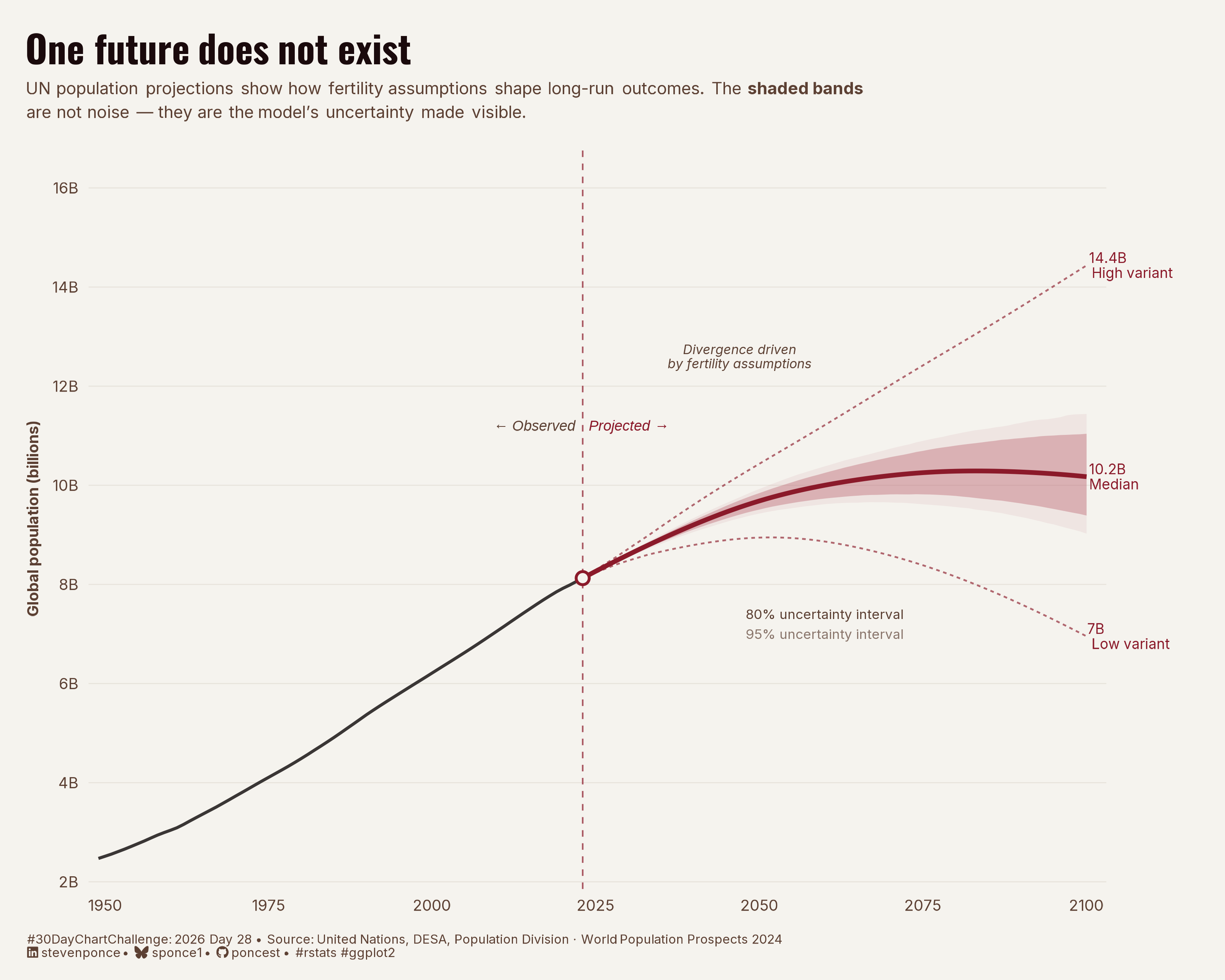
UN population projections show how fertility assumptions shape long-run outcomes. The shaded bands are not noise — they are the model’s uncertainty made visible.

30DayChartChallenge
Data Visualization
R Programming
2026
Fan chart showing UN World Population Prospects 2024 low, medium, and high fertility variants from 1950 to 2100. Built with ggplot2 in R, the chart layers 80% and 95% uncertainty intervals over a median projection to show how fertility assumptions compound into vastly different population futures.
Author

Steven Ponce

Published

April 28, 2026

Figure 1: Line chart showing global population from 1950 to 2100. A solid black line traces observed population growth from 2.5 billion in 1950 to 8 billion in 2023. In 2024, the line transitions to UN model projections shown in burgundy: a solid median line reaching 10.2 billion by 2100, flanked by shaded 80% and 95% uncertainty intervals, and dashed high- and low-fertility variant lines ending at 14.4 billion and 7 billion, respectively. The widening fan of uncertainty illustrates how small differences in fertility assumptions compound into vastly different population futures over the course of the century.

Steps to Create this Graphic

1. Load Packages & Setup

Show code
```{r}
#| label: load
#| warning: false
#| message: false      
#| results: "hide"     

## 1. LOAD PACKAGES & SETUP ----
suppressPackageStartupMessages({
pacman::p_load(
  tidyverse, ggtext, showtext, 
  janitor, scales, glue, here
  )
})

### |- figure size ----
camcorder::gg_record(
  dir    = here::here("temp_plots"),
  device = "png",
  width  = 10,
  height = 8,
  units  = "in",
  dpi    = 320
)

# Source utility functions
suppressMessages(source(here::here("R/utils/fonts.R")))
source(here::here("R/utils/social_icons.R"))
source(here::here("R/utils/image_utils.R"))
source(here::here("R/themes/base_theme.R"))
```

2. Read in the Data

Show code
```{r}
#| label: read
#| include: true
#| eval: true
#| warning: false

# Uncomment to install (large package — ~200MB; set timeout first):
# options(timeout = 600)
# devtools::install_github("PPgp/wpp2024")
#library(wpp2024)

### |- load datasets from wpp2024 package and cache (first run only) ----
# data("popproj1dt")    # annual projections 2024–2100 with uncertainty bands
# data("pop1dt")        # historical annual estimates 1950–2023
#
# pop_hist_cache <- here::here("2026/data/wpp2024_pop_historical.csv")
# pop_proj_cache <- here::here("2026/data/wpp2024_pop_projections.csv")
#
# if (!file.exists(pop_hist_cache)) {
#   write_csv(as_tibble(pop1dt),      pop_hist_cache)
#   write_csv(as_tibble(popproj1dt),  pop_proj_cache)
# }

### |- read from cache ----
pop_hist_raw <- read_csv(
  here::here("data/30DayChartChallenge/2026/wpp2024_pop_historical.csv"),
  show_col_types = FALSE
)
pop_proj_raw <- read_csv(
  here::here("data/30DayChartChallenge/2026/wpp2024_pop_projections.csv"),
  show_col_types = FALSE
)
```

3. Examine the Data

Show code
```{r}
#| label: examine
#| include: true
#| eval: true
#| results: 'hide'
#| warning: false

glimpse(pop_hist_raw)
glimpse(pop_proj_raw)
pop_hist_raw |> filter(name == "World") |> slice_tail(n = 5)
pop_proj_raw |> filter(name == "World") |> slice_head(n = 5)
pop_proj_raw |> names()
```

4. Tidy Data

Show code
```{r}
#| label: tidy
#| warning: false

### |- historical series (global, 1950–2023) ----
pop_hist <- pop_hist_raw |>
  filter(name == "World") |>
  select(year, pop_total = pop) |>
  mutate(
    pop_total = as.numeric(pop_total),
    pop_bn = pop_total / 1e6, # thousands to billions
    series_type = "historical"
  )

### |- projection series (global, 2024–2100) ----
pop_proj <- pop_proj_raw |>
  filter(name == "World") |>
  select(
    year,
    pop_med = pop,
    pop_80l, pop_80u,
    pop_95l, pop_95u,
    pop_low, pop_high
  ) |>
  mutate(across(where(is.character), as.numeric)) |>
  mutate(across(c(
    pop_med, pop_80l, pop_80u, pop_95l, pop_95u,
    pop_low, pop_high
  ), \(x) x / 1e6))

### |- anchor point: last historical observation spliced to projection ----
anchor_year <- 2024L
anchor_val <- pop_hist |>
  filter(year == max(year)) |>
  pull(pop_bn)

### |- splice: add the 2023 anchor as first row of projection for clean joins ----
anchor_row <- tibble(
  year = max(pop_hist$year),
  pop_med  = anchor_val,
  pop_80l = anchor_val,
  pop_80u = anchor_val,
  pop_95l = anchor_val,
  pop_95u = anchor_val,
  pop_low = anchor_val,
  pop_high = anchor_val
)

pop_proj <- bind_rows(anchor_row, pop_proj)

### |- end-label data: values at 2100 ----
labels_2100 <- pop_proj |>
  filter(year == 2100) |>
  select(year, pop_med, pop_low, pop_high, pop_95l, pop_95u) |>
  pivot_longer(
    cols = c(pop_med, pop_low, pop_high, pop_95l, pop_95u),
    names_to = "variant",
    values_to = "pop_bn"
  ) |>
  mutate(
    label = case_when(
      variant == "pop_high" ~ glue("{round(pop_bn, 1)}B\nHigh variant"),
      variant == "pop_med" ~ glue("{round(pop_bn, 1)}B\nMedian"),
      variant == "pop_low" ~ glue("{round(pop_bn, 1)}B\nLow variant"),
      TRUE ~ NA_character_
    )
  ) |>
  filter(!is.na(label))

### |- seam annotation position ----
seam_year <- max(pop_hist$year)
seam_pop <- anchor_val
```

5. Visualization Parameters

Show code
```{r}
#| label: params
#| include: true
#| warning: false

### |- plot aesthetics ----
colors <- get_theme_colors(
  palette = list(
    "bg"          = "#F5F3EE",
    "hero"        = "#8B1A2A",        
    "band_95"     = "#D4A4AC",       
    "band_80"     = "#B85C6A",       
    "variant_lo"  = "#8B1A2A",       
    "variant_hi"  = "#8B1A2A",       
    "hist"        = "#3A3635",        
    "seam"        = "#8B1A2A",        
    "annotation"  = "#5C4033",         
    "grid"        = "#E8E4DC"          
  )
)

### |- pre-extract scalar color values  ----
col_bg         <- colors$palette$bg
col_hero       <- colors$palette$hero
col_band_95    <- colors$palette$band_95
col_band_80    <- colors$palette$band_80
col_hist       <- colors$palette$hist
col_seam       <- colors$palette$seam
col_annotation <- colors$palette$annotation
col_grid       <- colors$palette$grid

### |- titles and caption ----
title_text <- str_glue("One future does not exist")

subtitle_text <- str_glue(
  "UN population projections show how fertility assumptions shape long-run outcomes. ",
  "The **shaded bands**<br>",
  "are not noise — they are the model's uncertainty made visible."
)

caption_text <- create_dcc_caption(
  dcc_year    = 2026,
  dcc_day     = 28,
  source_text = "United Nations, DESA, Population Division · World Population Prospects 2024"
)

### |- fonts ----
setup_fonts()
fonts <- get_font_families()

### |- plot theme ----
base_theme  <- create_base_theme(colors)

weekly_theme <- extend_weekly_theme(
  base_theme,
  theme(
    # canvas
    plot.background = element_rect(fill = col_bg, color = NA),
    panel.background = element_rect(fill = col_bg, color = NA),

    # grid 
    panel.grid.major.y = element_line(color = col_grid, linewidth = 0.3),
    panel.grid.major.x = element_blank(),
    panel.grid.minor = element_blank(),

    # axes
    axis.ticks = element_blank(),
    axis.text = element_text(
      family = fonts$text, size = 9,
      color = col_annotation
    ),
    axis.title.x = element_blank(),
    axis.title.y = element_text(
      family = fonts$text, size = 9,
      color = col_annotation, angle = 90,
      margin = margin(r = 6)
    ),

    # text
    plot.title = element_markdown(
      family = fonts$title, size = 22,
      face = "bold", color = "#1A0A0C",
      margin = margin(b = 6)
    ),
    plot.subtitle = element_markdown(
      family = fonts$text, size = 10,
      color = col_annotation, lineheight = 1.4,
      margin = margin(b = 16)
    ),
    plot.caption = element_markdown(
      family = fonts$text, size = 7.5,
      color = col_annotation, hjust = 0,
      margin = margin(t = 12)
    ),
    plot.margin = margin(t = 20, r = 70, b = 12, l = 16),
    legend.position = "none"
  )
)

theme_set(weekly_theme)
```

6. Plot

Show code
```{r}
#| label: plot
#| warning: false

### |- main plot ----
p <- ggplot() +
  
  # Geoms
  geom_ribbon(
    data = pop_proj,
    aes(x = year, ymin = pop_95l, ymax = pop_95u),
    fill = col_band_95,
    alpha = 0.18
  ) +
  geom_ribbon(
    data = pop_proj,
    aes(x = year, ymin = pop_80l, ymax = pop_80u),
    fill = col_band_80,
    alpha = 0.38
  ) +
  geom_line(
    data = pop_proj,
    aes(x = year, y = pop_high),
    color = col_hero,
    linetype  = "22",
    linewidth = 0.5,
    alpha = 0.65
  ) +
  geom_line(
    data = pop_proj,
    aes(x = year, y = pop_low),
    color = col_hero,
    linetype = "22",
    linewidth = 0.5,
    alpha = 0.65
  ) +
  geom_line(
    data = pop_proj,
    aes(x = year, y = pop_med),
    color = col_hero,
    linewidth = 1.3
  ) +
  geom_line(
    data = pop_hist,
    aes(x = year, y = pop_bn),
    color     = col_hist,
    linewidth = 0.85
  ) +
  geom_vline(
    xintercept = seam_year,
    color = col_seam,
    linetype = "dashed",
    linewidth  = 0.45,
    alpha = 0.7
  ) +
  geom_point(
    data = tibble(year = seam_year, pop_bn = seam_pop),
    aes(x = year, y = pop_bn),
    color = col_seam,
    fill = col_bg,
    shape = 21,
    size = 2.8,
    stroke = 1.2
  ) +
  
  # Annote
  annotate(
    "text",
    x = seam_year - 1,
    y = 11.2,
    label = "← Observed",
    hjust = 1,
    size = 3.0,
    family = 'sans',
    color = col_annotation,
    fontface = "italic"
  ) +
  annotate(
    "text",
    x = seam_year + 1,
    y = 11.2,
    label = "Projected →",
    hjust = 0,
    size = 3.0,
    family = 'sans',
    color = col_hero,
    fontface = "italic"
  ) +
  annotate(
    "text",
    x = 2060,
    y = 7.4,
    label = "80% uncertainty interval",
    hjust = 0.5,
    size = 2.8,
    family = fonts$text,
    color = col_annotation
  ) +
  annotate(
    "text",
    x = 2060,
    y = 7.0,
    label = "95% uncertainty interval",
    hjust = 0.5,
    size = 2.8,
    family = fonts$text,
    color = col_annotation,
    alpha = 0.7
  ) +
  annotate(
    "text",
    x = 2047,
    y = 12.6,
    label = "Divergence driven\nby fertility assumptions",
    hjust = 0.5,
    size = 2.7,
    family = fonts$text,
    color = col_annotation,
    fontface = "italic",
    lineheight = 0.9
  ) +
  geom_text(
    data = labels_2100,
    aes(x = 2100, y = pop_bn, label = label),
    hjust = -0.08,
    size = 2.9,
    family = fonts$text,
    color = col_hero,
    lineheight = 0.9
  ) +
  
  # Scales
  scale_x_continuous(
    breaks = seq(1950, 2100, by = 25),
    expand = expansion(mult = c(0.01, 0.02))
  ) +
  scale_y_continuous(
    name = "Global population (billions)",
    breaks = seq(2, 16, by = 2),
    labels = \(x) paste0(x, "B"),
    limits = c(2, 16.5),
    expand = expansion(mult = c(0.01, 0.02))
  ) +
  coord_cartesian(clip = "off") +
  
  # Labs
  labs(
    title = title_text,
    subtitle = subtitle_text,
    caption = caption_text
  )
```

7. Save

Show code
```{r}
#| label: save
#| warning: false

### |- plot image ----  
save_plot(
  p,
  type = "30daychartchallenge",
  year = 2026,
  day = 28,
  width = 10,
  height = 8
  )
```

8. Session Info

TipExpand for Session Info
R version 4.5.3 (2026-03-11 ucrt)
Platform: x86_64-w64-mingw32/x64
Running under: Windows 11 x64 (build 26100)

Matrix products: default
  LAPACK version 3.12.1

locale:
[1] LC_COLLATE=English_United States.utf8 
[2] LC_CTYPE=English_United States.utf8   
[3] LC_MONETARY=English_United States.utf8
[4] LC_NUMERIC=C                          
[5] LC_TIME=English_United States.utf8    

time zone: America/New_York
tzcode source: internal

attached base packages:
[1] stats     graphics  grDevices utils     datasets  methods   base     

other attached packages:
 [1] here_1.0.2      glue_1.8.0      scales_1.4.0    janitor_2.2.1  
 [5] showtext_0.9-8  showtextdb_3.0  sysfonts_0.8.9  ggtext_0.1.2   
 [9] lubridate_1.9.5 forcats_1.0.1   stringr_1.6.0   dplyr_1.2.1    
[13] purrr_1.2.2     readr_2.2.0     tidyr_1.3.2     tibble_3.3.1   
[17] ggplot2_4.0.3   tidyverse_2.0.0

loaded via a namespace (and not attached):
 [1] gtable_0.3.6       xfun_0.57          htmlwidgets_1.6.4  tzdb_0.5.0        
 [5] vctrs_0.7.3        tools_4.5.3        generics_0.1.4     curl_7.0.0        
 [9] parallel_4.5.3     gifski_1.32.0-2    pacman_0.5.1       pkgconfig_2.0.3   
[13] RColorBrewer_1.1-3 S7_0.2.1           lifecycle_1.0.5    compiler_4.5.3    
[17] farver_2.1.2       textshaping_1.0.5  codetools_0.2-20   snakecase_0.11.1  
[21] litedown_0.9       htmltools_0.5.9    yaml_2.3.12        pillar_1.11.1     
[25] crayon_1.5.3       camcorder_0.1.0    magick_2.9.1       commonmark_2.0.0  
[29] tidyselect_1.2.1   digest_0.6.39      stringi_1.8.7      rsvg_2.7.0        
[33] rprojroot_2.1.1    fastmap_1.2.0      grid_4.5.3         cli_3.6.6         
[37] magrittr_2.0.5     utf8_1.2.6         withr_3.0.2        bit64_4.6.0-1     
[41] timechange_0.4.0   rmarkdown_2.31     bit_4.6.0          otel_0.2.0        
[45] ragg_1.5.2         hms_1.1.4          evaluate_1.0.5     knitr_1.51        
[49] markdown_2.0       rlang_1.2.0        gridtext_0.1.6     Rcpp_1.1.1        
[53] xml2_1.5.2         svglite_2.2.2      rstudioapi_0.18.0  vroom_1.7.1       
[57] jsonlite_2.0.0     R6_2.6.1           systemfonts_1.3.2 

9. GitHub Repository

TipExpand for GitHub Repo

The complete code for this analysis is available in 30dcc_2026_28.qmd.

For the full repository, click here.

10. References

TipExpand for References
  1. Data Sources:
    • United Nations, Department of Economic and Social Affairs, Population Division (2024). World Population Prospects 2024. Retrieved from: https://population.un.org/wpp/
    • Sevcikova, H., & Raftery, A. (2024). wpp2024: World Population Prospects 2024. R package. Retrieved from: https://github.com/PPgp/wpp2024 License: CC BY 3.0 IGO
  2. Key Datasets:
    • pop1dt — Annual population estimates, both sexes, 1950–2023 (thousands)
    • popproj1dt — Annual population projections, 2024–2100, with median, 80% and 95% uncertainty intervals, and low/high fertility variants (thousands)

11. Custom Functions Documentation

Note📦 Custom Helper Functions

This analysis uses custom functions from my personal module library for efficiency and consistency across projects.

Functions Used:

  • fonts.R: setup_fonts(), get_font_families() - Font management with showtext
  • social_icons.R: create_social_caption() - Generates formatted social media captions
  • image_utils.R: save_plot() - Consistent plot saving with naming conventions
  • base_theme.R: create_base_theme(), extend_weekly_theme(), get_theme_colors() - Custom ggplot2 themes

Why custom functions?
These utilities standardize theming, fonts, and output across all my data visualizations. The core analysis (data tidying and visualization logic) uses only standard tidyverse packages.

Source Code:
View all custom functions → GitHub: R/utils

Back to top

Citation

BibTeX citation:
@online{ponce2026,
  author = {Ponce, Steven},
  title = {One Future Does Not Exist},
  date = {2026-04-28},
  url = {https://stevenponce.netlify.app/data_visualizations/30DayChartChallenge/2026/30dcc_2026_28.html},
  langid = {en}
}
For attribution, please cite this work as:
Ponce, Steven. 2026. “One Future Does Not Exist.” April 28, 2026. https://stevenponce.netlify.app/data_visualizations/30DayChartChallenge/2026/30dcc_2026_28.html.
Source Code
---
title: "One future does not exist"
subtitle: "UN population projections show how fertility assumptions shape long-run outcomes. The shaded bands are not noise — they are the model's uncertainty made visible."
description: "Fan chart showing UN World Population Prospects 2024 low, medium, and high fertility variants from 1950 to 2100. Built with ggplot2 in R, the chart layers 80% and 95% uncertainty intervals over a median projection to show how fertility assumptions compound into vastly different population futures."
date: "2026-04-28" 
author:
  - name: "Steven Ponce"
    url: "https://stevenponce.netlify.app"
citation:
  url: "https://stevenponce.netlify.app/data_visualizations/30DayChartChallenge/2026/30dcc_2026_28.html"
categories: ["30DayChartChallenge", "Data Visualization", "R Programming", "2026"]
tags: [
  "30DayChartChallenge",
  "Uncertainties",
  "Modeling",
  "Fan Chart",
  "Population",
  "Uncertainty Intervals",
  "UN WPP",
  "Demography",
  "Forecasting",
  "Scenario Analysis",
  "ggplot2",
  "wpp2024"
]
image: "thumbnails/30dcc_2026_28.png"
format:
  html:
    toc: true
    toc-depth: 5
    code-link: true
    code-fold: true
    code-tools: true
    code-summary: "Show code"
    self-contained: true
    theme: 
      light: [flatly, assets/styling/custom_styles.scss]
      dark: [darkly, assets/styling/custom_styles_dark.scss]
editor_options: 
  chunk_output_type: inline
execute: 
  freeze: true                                                  
  cache: true                                                   
  error: false
  message: false
  warning: false
  eval: true
---
![Line chart showing global population from 1950 to 2100. A solid black line traces observed population growth from 2.5 billion in 1950 to 8 billion in 2023. In 2024, the line transitions to UN model projections shown in burgundy: a solid median line reaching 10.2 billion by 2100, flanked by shaded 80% and 95% uncertainty intervals, and dashed high- and low-fertility variant lines ending at 14.4 billion and 7 billion, respectively. The widening fan of uncertainty illustrates how small differences in fertility assumptions compound into vastly different population futures over the course of the century.](30dcc_2026_28.png){#fig-1}

### [**Steps to Create this Graphic**]{.mark}

#### [1. Load Packages & Setup]{.smallcaps}

```{r}
#| label: load
#| warning: false
#| message: false      
#| results: "hide"     

## 1. LOAD PACKAGES & SETUP ----
suppressPackageStartupMessages({
pacman::p_load(
  tidyverse, ggtext, showtext, 
  janitor, scales, glue, here
  )
})

### |- figure size ----
camcorder::gg_record(
  dir    = here::here("temp_plots"),
  device = "png",
  width  = 10,
  height = 8,
  units  = "in",
  dpi    = 320
)

# Source utility functions
suppressMessages(source(here::here("R/utils/fonts.R")))
source(here::here("R/utils/social_icons.R"))
source(here::here("R/utils/image_utils.R"))
source(here::here("R/themes/base_theme.R"))
```

#### [2. Read in the Data]{.smallcaps}

```{r}
#| label: read
#| include: true
#| eval: true
#| warning: false

# Uncomment to install (large package — ~200MB; set timeout first):
# options(timeout = 600)
# devtools::install_github("PPgp/wpp2024")
#library(wpp2024)

### |- load datasets from wpp2024 package and cache (first run only) ----
# data("popproj1dt")    # annual projections 2024–2100 with uncertainty bands
# data("pop1dt")        # historical annual estimates 1950–2023
#
# pop_hist_cache <- here::here("2026/data/wpp2024_pop_historical.csv")
# pop_proj_cache <- here::here("2026/data/wpp2024_pop_projections.csv")
#
# if (!file.exists(pop_hist_cache)) {
#   write_csv(as_tibble(pop1dt),      pop_hist_cache)
#   write_csv(as_tibble(popproj1dt),  pop_proj_cache)
# }

### |- read from cache ----
pop_hist_raw <- read_csv(
  here::here("data/30DayChartChallenge/2026/wpp2024_pop_historical.csv"),
  show_col_types = FALSE
)
pop_proj_raw <- read_csv(
  here::here("data/30DayChartChallenge/2026/wpp2024_pop_projections.csv"),
  show_col_types = FALSE
)

```

#### [3. Examine the Data]{.smallcaps}

```{r}
#| label: examine
#| include: true
#| eval: true
#| results: 'hide'
#| warning: false

glimpse(pop_hist_raw)
glimpse(pop_proj_raw)
pop_hist_raw |> filter(name == "World") |> slice_tail(n = 5)
pop_proj_raw |> filter(name == "World") |> slice_head(n = 5)
pop_proj_raw |> names()
```

#### [4. Tidy Data]{.smallcaps}

```{r}
#| label: tidy
#| warning: false

### |- historical series (global, 1950–2023) ----
pop_hist <- pop_hist_raw |>
  filter(name == "World") |>
  select(year, pop_total = pop) |>
  mutate(
    pop_total = as.numeric(pop_total),
    pop_bn = pop_total / 1e6, # thousands to billions
    series_type = "historical"
  )

### |- projection series (global, 2024–2100) ----
pop_proj <- pop_proj_raw |>
  filter(name == "World") |>
  select(
    year,
    pop_med = pop,
    pop_80l, pop_80u,
    pop_95l, pop_95u,
    pop_low, pop_high
  ) |>
  mutate(across(where(is.character), as.numeric)) |>
  mutate(across(c(
    pop_med, pop_80l, pop_80u, pop_95l, pop_95u,
    pop_low, pop_high
  ), \(x) x / 1e6))

### |- anchor point: last historical observation spliced to projection ----
anchor_year <- 2024L
anchor_val <- pop_hist |>
  filter(year == max(year)) |>
  pull(pop_bn)

### |- splice: add the 2023 anchor as first row of projection for clean joins ----
anchor_row <- tibble(
  year = max(pop_hist$year),
  pop_med  = anchor_val,
  pop_80l = anchor_val,
  pop_80u = anchor_val,
  pop_95l = anchor_val,
  pop_95u = anchor_val,
  pop_low = anchor_val,
  pop_high = anchor_val
)

pop_proj <- bind_rows(anchor_row, pop_proj)

### |- end-label data: values at 2100 ----
labels_2100 <- pop_proj |>
  filter(year == 2100) |>
  select(year, pop_med, pop_low, pop_high, pop_95l, pop_95u) |>
  pivot_longer(
    cols = c(pop_med, pop_low, pop_high, pop_95l, pop_95u),
    names_to = "variant",
    values_to = "pop_bn"
  ) |>
  mutate(
    label = case_when(
      variant == "pop_high" ~ glue("{round(pop_bn, 1)}B\nHigh variant"),
      variant == "pop_med" ~ glue("{round(pop_bn, 1)}B\nMedian"),
      variant == "pop_low" ~ glue("{round(pop_bn, 1)}B\nLow variant"),
      TRUE ~ NA_character_
    )
  ) |>
  filter(!is.na(label))

### |- seam annotation position ----
seam_year <- max(pop_hist$year)
seam_pop <- anchor_val
```


#### [5. Visualization Parameters]{.smallcaps}

```{r}
#| label: params
#| include: true
#| warning: false

### |- plot aesthetics ----
colors <- get_theme_colors(
  palette = list(
    "bg"          = "#F5F3EE",
    "hero"        = "#8B1A2A",        
    "band_95"     = "#D4A4AC",       
    "band_80"     = "#B85C6A",       
    "variant_lo"  = "#8B1A2A",       
    "variant_hi"  = "#8B1A2A",       
    "hist"        = "#3A3635",        
    "seam"        = "#8B1A2A",        
    "annotation"  = "#5C4033",         
    "grid"        = "#E8E4DC"          
  )
)

### |- pre-extract scalar color values  ----
col_bg         <- colors$palette$bg
col_hero       <- colors$palette$hero
col_band_95    <- colors$palette$band_95
col_band_80    <- colors$palette$band_80
col_hist       <- colors$palette$hist
col_seam       <- colors$palette$seam
col_annotation <- colors$palette$annotation
col_grid       <- colors$palette$grid

### |- titles and caption ----
title_text <- str_glue("One future does not exist")

subtitle_text <- str_glue(
  "UN population projections show how fertility assumptions shape long-run outcomes. ",
  "The **shaded bands**<br>",
  "are not noise — they are the model's uncertainty made visible."
)

caption_text <- create_dcc_caption(
  dcc_year    = 2026,
  dcc_day     = 28,
  source_text = "United Nations, DESA, Population Division · World Population Prospects 2024"
)

### |- fonts ----
setup_fonts()
fonts <- get_font_families()

### |- plot theme ----
base_theme  <- create_base_theme(colors)

weekly_theme <- extend_weekly_theme(
  base_theme,
  theme(
    # canvas
    plot.background = element_rect(fill = col_bg, color = NA),
    panel.background = element_rect(fill = col_bg, color = NA),

    # grid 
    panel.grid.major.y = element_line(color = col_grid, linewidth = 0.3),
    panel.grid.major.x = element_blank(),
    panel.grid.minor = element_blank(),

    # axes
    axis.ticks = element_blank(),
    axis.text = element_text(
      family = fonts$text, size = 9,
      color = col_annotation
    ),
    axis.title.x = element_blank(),
    axis.title.y = element_text(
      family = fonts$text, size = 9,
      color = col_annotation, angle = 90,
      margin = margin(r = 6)
    ),

    # text
    plot.title = element_markdown(
      family = fonts$title, size = 22,
      face = "bold", color = "#1A0A0C",
      margin = margin(b = 6)
    ),
    plot.subtitle = element_markdown(
      family = fonts$text, size = 10,
      color = col_annotation, lineheight = 1.4,
      margin = margin(b = 16)
    ),
    plot.caption = element_markdown(
      family = fonts$text, size = 7.5,
      color = col_annotation, hjust = 0,
      margin = margin(t = 12)
    ),
    plot.margin = margin(t = 20, r = 70, b = 12, l = 16),
    legend.position = "none"
  )
)

theme_set(weekly_theme)
```

#### [6. Plot]{.smallcaps}

```{r}
#| label: plot
#| warning: false

### |- main plot ----
p <- ggplot() +
  
  # Geoms
  geom_ribbon(
    data = pop_proj,
    aes(x = year, ymin = pop_95l, ymax = pop_95u),
    fill = col_band_95,
    alpha = 0.18
  ) +
  geom_ribbon(
    data = pop_proj,
    aes(x = year, ymin = pop_80l, ymax = pop_80u),
    fill = col_band_80,
    alpha = 0.38
  ) +
  geom_line(
    data = pop_proj,
    aes(x = year, y = pop_high),
    color = col_hero,
    linetype  = "22",
    linewidth = 0.5,
    alpha = 0.65
  ) +
  geom_line(
    data = pop_proj,
    aes(x = year, y = pop_low),
    color = col_hero,
    linetype = "22",
    linewidth = 0.5,
    alpha = 0.65
  ) +
  geom_line(
    data = pop_proj,
    aes(x = year, y = pop_med),
    color = col_hero,
    linewidth = 1.3
  ) +
  geom_line(
    data = pop_hist,
    aes(x = year, y = pop_bn),
    color     = col_hist,
    linewidth = 0.85
  ) +
  geom_vline(
    xintercept = seam_year,
    color = col_seam,
    linetype = "dashed",
    linewidth  = 0.45,
    alpha = 0.7
  ) +
  geom_point(
    data = tibble(year = seam_year, pop_bn = seam_pop),
    aes(x = year, y = pop_bn),
    color = col_seam,
    fill = col_bg,
    shape = 21,
    size = 2.8,
    stroke = 1.2
  ) +
  
  # Annote
  annotate(
    "text",
    x = seam_year - 1,
    y = 11.2,
    label = "← Observed",
    hjust = 1,
    size = 3.0,
    family = 'sans',
    color = col_annotation,
    fontface = "italic"
  ) +
  annotate(
    "text",
    x = seam_year + 1,
    y = 11.2,
    label = "Projected →",
    hjust = 0,
    size = 3.0,
    family = 'sans',
    color = col_hero,
    fontface = "italic"
  ) +
  annotate(
    "text",
    x = 2060,
    y = 7.4,
    label = "80% uncertainty interval",
    hjust = 0.5,
    size = 2.8,
    family = fonts$text,
    color = col_annotation
  ) +
  annotate(
    "text",
    x = 2060,
    y = 7.0,
    label = "95% uncertainty interval",
    hjust = 0.5,
    size = 2.8,
    family = fonts$text,
    color = col_annotation,
    alpha = 0.7
  ) +
  annotate(
    "text",
    x = 2047,
    y = 12.6,
    label = "Divergence driven\nby fertility assumptions",
    hjust = 0.5,
    size = 2.7,
    family = fonts$text,
    color = col_annotation,
    fontface = "italic",
    lineheight = 0.9
  ) +
  geom_text(
    data = labels_2100,
    aes(x = 2100, y = pop_bn, label = label),
    hjust = -0.08,
    size = 2.9,
    family = fonts$text,
    color = col_hero,
    lineheight = 0.9
  ) +
  
  # Scales
  scale_x_continuous(
    breaks = seq(1950, 2100, by = 25),
    expand = expansion(mult = c(0.01, 0.02))
  ) +
  scale_y_continuous(
    name = "Global population (billions)",
    breaks = seq(2, 16, by = 2),
    labels = \(x) paste0(x, "B"),
    limits = c(2, 16.5),
    expand = expansion(mult = c(0.01, 0.02))
  ) +
  coord_cartesian(clip = "off") +
  
  # Labs
  labs(
    title = title_text,
    subtitle = subtitle_text,
    caption = caption_text
  )
```

#### [7. Save]{.smallcaps}

```{r}
#| label: save
#| warning: false

### |- plot image ----  
save_plot(
  p,
  type = "30daychartchallenge",
  year = 2026,
  day = 28,
  width = 10,
  height = 8
  )
```

#### [8. Session Info]{.smallcaps}

::: {.callout-tip collapse="true"}
##### Expand for Session Info

```{r, echo = FALSE}
#| eval: true
#| warning: false

sessionInfo()
```
:::

#### [9. GitHub Repository]{.smallcaps} 

::: {.callout-tip collapse="true"}
##### Expand for GitHub Repo

The complete code for this analysis is available in [`30dcc_2026_28.qmd`](https://github.com/poncest/personal-website/blob/master/data_visualizations/TidyTuesday/2026/30dcc_2026_28.qmd).

For the full repository, [click here](https://github.com/poncest/personal-website/).
:::


#### [10. References]{.smallcaps}
::: {.callout-tip collapse="true"}
##### Expand for References
1. **Data Sources:**
   - United Nations, Department of Economic and Social Affairs, Population Division (2024).
     *World Population Prospects 2024.* Retrieved from: https://population.un.org/wpp/
   - Sevcikova, H., & Raftery, A. (2024). *wpp2024: World Population Prospects 2024.*
     R package. Retrieved from: https://github.com/PPgp/wpp2024
     License: CC BY 3.0 IGO

2. **Key Datasets:**
   - `pop1dt` — Annual population estimates, both sexes, 1950–2023 (thousands)
   - `popproj1dt` — Annual population projections, 2024–2100, with median, 80% and 95%
     uncertainty intervals, and low/high fertility variants (thousands)
:::


#### [11. Custom Functions Documentation]{.smallcaps}

::: {.callout-note collapse="true"}
##### 📦 Custom Helper Functions

This analysis uses custom functions from my personal module library for efficiency and consistency across projects.

**Functions Used:**

-   **`fonts.R`**: `setup_fonts()`, `get_font_families()` - Font management with showtext
-   **`social_icons.R`**: `create_social_caption()` - Generates formatted social media captions
-   **`image_utils.R`**: `save_plot()` - Consistent plot saving with naming conventions
-   **`base_theme.R`**: `create_base_theme()`, `extend_weekly_theme()`, `get_theme_colors()` - Custom ggplot2 themes

**Why custom functions?**\
These utilities standardize theming, fonts, and output across all my data visualizations. The core analysis (data tidying and visualization logic) uses only standard tidyverse packages.

**Source Code:**\
View all custom functions → [GitHub: R/utils](https://github.com/poncest/personal-website/tree/master/R)
:::

© 2024 Steven Ponce

Source Issues