---
title: "Population Growth Patterns Across Regions"
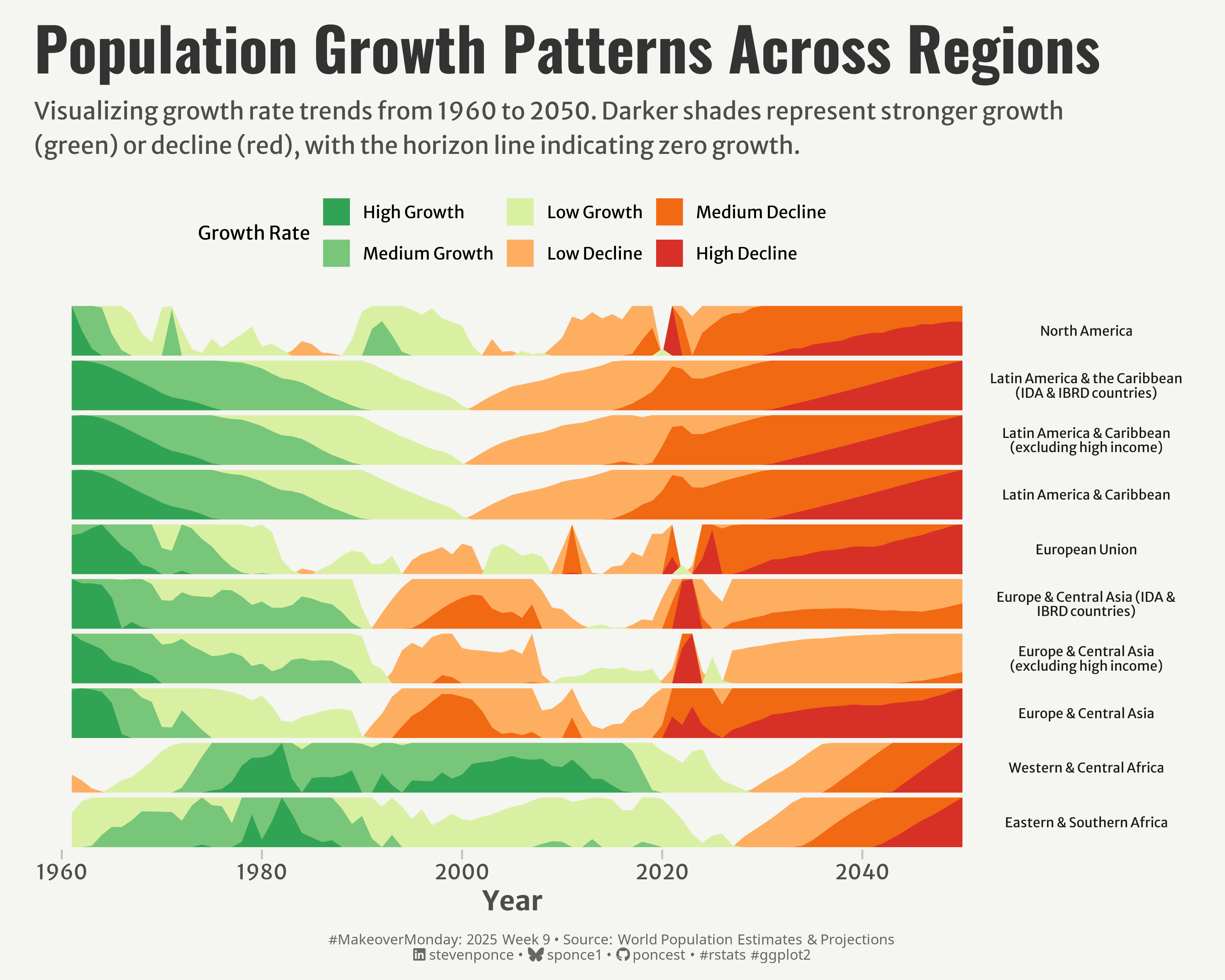
subtitle: "Visualizing growth rate trends from 1960 to 2050. Darker shades represent stronger growth (green) or decline (red), with the horizon line indicating zero growth."
description: "An exploration of global population growth patterns using horizon plots to visualize regional trends from 1960 to 2050. The visualization reveals striking contrasts between high-growth regions like Africa and declining populations in developed regions, highlighting demographic transitions across different parts of the world."
author: "Steven Ponce"
date: "2025-02-23"
categories: ["MakeoverMonday", "2025"]
tags: [
"ggplot2",
"horizon-plot",
"population-growth",
"demographic-trends",
"ggHoriPlot",
"time-series",
"regional-analysis",
"data-visualization",
"R",
"tidyverse"
]
image: "thumbnails/mm_2025_09.png"
format:
html:
toc: true
toc-depth: 5
code-link: true
code-fold: true
code-tools: true
code-summary: "Show code"
editor_options:
chunk_output_type: inline
execute:
freeze: true
cache: true
error: false
message: false
warning: false
eval: true
# filters:
# - social-share
# share:
# permalink: "https://stevenponce.netlify.app/data_visualizations/MakeoverMonday/2025/mm_2025_09.html"
# description: "Explore global population growth patterns from 1960-2050 through an innovative horizon plot visualization. See how different regions transition from growth to decline across nearly a century of demographic change. #MakeoverMonday #DataViz #rstats"
# twitter: true
# linkedin: true
# email: true
# facebook: false
# reddit: false
# stumble: false
# tumblr: false
# mastodon: true
# bsky: true
---
### Original
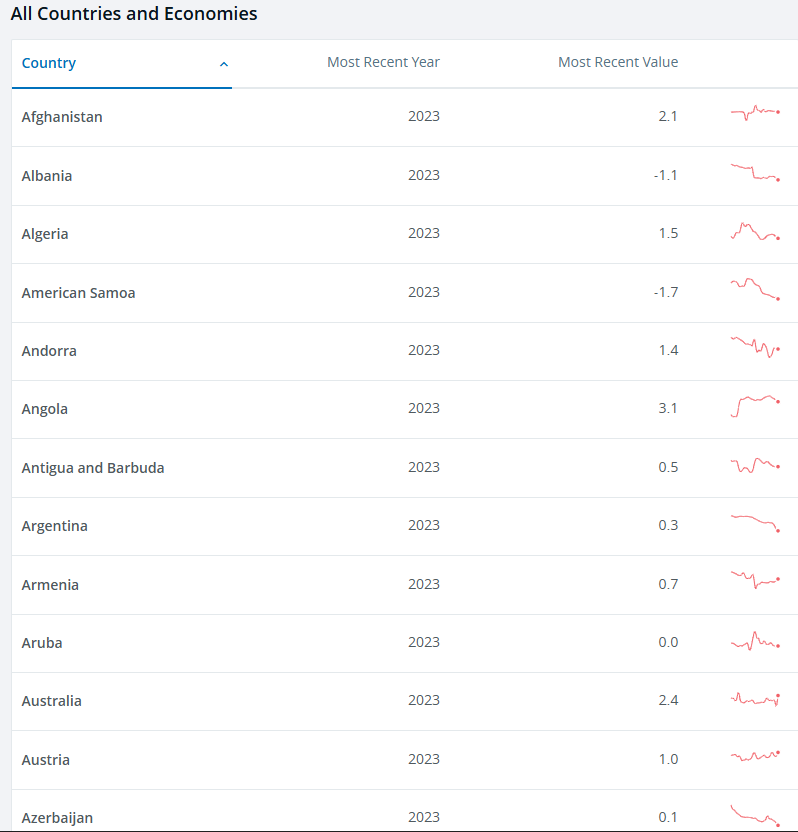
The original visualization __All Countries and Economies__ comes from [data.world.org](https://data.worldbank.org/indicator/SP.POP.GROW?name_desc=false)
### Makeover
{#fig-1}
### <mark> **Steps to Create this Graphic** </mark>
#### 1. Load Packages & Setup
```{r}
#| label: load
#| warning: false
#| message: false
#| results: "hide"
## 1. LOAD PACKAGES & SETUP ----
suppressPackageStartupMessages({
pacman::p_load(
    tidyverse,      # Easily Install and Load the 'Tidyverse'
    ggtext,         # Improved Text Rendering Support for 'ggplot2'
    showtext,       # Using Fonts More Easily in R Graphs
    janitor,        # Simple Tools for Examining and Cleaning Dirty Data
    skimr,          # Compact and Flexible Summaries of Data
    scales,         # Scale Functions for Visualization
    glue,           # Interpreted String Literals
    here,           # A Simpler Way to Find Your Files
    lubridate,      # Make Dealing with Dates a Little Easier
    readxl,         # Read Excel Files
    ggHoriPlot,     # Horizon Plots for 'ggplot2'
    camcorder       # Record Your Plot History
)
})

### |- figure size ----
gg_record(
    dir    = here::here("temp_plots"),
    device = "png",
    width  =  10,
    height =  8,
    units  = "in",
    dpi    = 320
)

# Source utility functions
suppressMessages(source(here::here("R/utils/fonts.R")))
source(here::here("R/utils/social_icons.R"))
source(here::here("R/utils/image_utils.R"))
source(here::here("R/themes/base_theme.R"))
```
#### 2. Read in the Data
```{r}
#| label: read
#| include: true
#| eval: true
#| warning: false
#' The raw data for the week MakeoverMonday challenge can be downloaded
#' here: https://data.world/makeovermonday/2025w9-world-population-estimates-projections
#'
#' Due to GitHub file size limitation, filter the initial dataset for
#' the `Population growth (annual %)` indicator only.
#' The working csv file was saved as `population_growth_raw.csv`

# Initial raw data
# population_estimates_raw <- read_excel(
#   'data/2025/Population Estimates.xlsx') |>
#   clean_names()

# Subset for population_growth only
# population_estimates_raw$indicator_name |> unique() |> sort()

# populatio_growth_raw <- population_estimates_raw |>
#   filter(indicator_name == "Population growth (annual %)")

# write_csv(x = population_growth_raw, file = 'data/population_growth_raw.csv')

population_growth_raw <- read_csv(
  here::here('data/population_growth_raw.csv')) |>
  clean_names()
```
#### 3. Examine the Data
```{r}
#| label: examine
#| include: true
#| eval: true
#| results: 'hide'
#| warning: false
glimpse(population_growth_raw)
skim(population_growth_raw)
```
#### 4. Tidy Data
```{r}
#| label: tidy
#| warning: false
### |-  tidy data ----
population_growth_tidy <- population_growth_raw |>
  pivot_longer(
    cols = starts_with("x"),     # Select all columns starting with "x"
    names_to = "year",           # Create a new column called "year"
    names_prefix = "x",          # Remove the "x" from the column names
    values_to = "growth_rate"
    ) |>
  filter(str_detect(country_name, "^(Africa|Asia|Europe|Latin America|North America)")) |>
  mutate(
    year = as.numeric(year),
    country_name = case_when(
      country_name == "Africa Eastern and Southern" ~ "Eastern & Southern Africa",
      country_name == "Africa Western and Central" ~ "Western & Central Africa",
      country_name == "Latin America & Caribbean" ~ "Latin America & Caribbean",
      TRUE ~ country_name
    ),
    country_name = str_wrap(country_name, width = 30),
    # Order regions for better visual flow
    country_name = factor(country_name, levels = rev(unique(country_name)))
  )
```
#### 5. Visualization Parameters
```{r}
#| label: params
#| include: true
#| warning: false
### |-  plot aesthetics ----
# Get base colors with custom palette
colors <- get_theme_colors(palette = c(
  "#31a354",  # High Growth
  "#78c679",  # Medium Growth
  "#d9f0a3",  # Low Growth
  "#fdae61",  # Low Decline
  "#f16913",  # Medium Decline
  "#d73027"   # High Decline
  )
)

### |-  titles and caption ----
title_text <- str_glue("Population Growth Patterns Across Regions")
subtitle_text <- str_wrap("Visualizing growth rate trends from 1960 to 2050. Darker shades represent stronger growth (green) or decline (red), with the horizon line indicating zero growth.", width = 90)

# Create caption
caption_text <- create_mm_caption(
    mm_year = 2025,
    mm_week = 09,
    source_text = "World Population Estimates & Projections"
)

### |-  fonts ----
setup_fonts()
fonts <- get_font_families()

### |-  plot theme ----

# Start with base theme
base_theme <- create_base_theme(colors)

# Add weekly-specific theme elements
weekly_theme <- extend_weekly_theme(
  base_theme,
  theme(
    # Weekly-specific modifications
    legend.position = "top",
    legend.title = element_text(size = rel(0.79)),
    legend.text = element_text(size = rel(0.71)),

    axis.title = element_text(size = rel(1.14)),
    axis.text = element_text(size = rel(0.86)),
    axis.text.y = element_blank(),
    axis.title.y = element_blank(),
    axis.ticks.y = element_blank(),
    axis.ticks.x = element_line(color = "gray", size = 0.5),
    axis.ticks.length = unit(0.2, "cm"),

    strip.text.y = element_text(size = rel(0.7), angle = 0),

    panel.border = element_blank(),
    panel.grid = element_blank(),
    panel.spacing = unit(1, "lines"),
    panel.spacing.y = unit(0, "lines"),

  )
)

# Set theme
theme_set(weekly_theme)
```
#### 6. Plot
```{r}
#| label: plot
#| warning: false
### |-  Plot  ----
p <- ggplot(data = population_growth_tidy) +

  # Geoms
  geom_horizon(
    aes(x = year, y = growth_rate),
    origin = "midpoint",
    horizonscale = 6,
    show.legend = TRUE
  ) +

  # Scales
  scale_x_continuous(
    breaks = seq(1960, 2050, by = 20),
    expand = c(0.02, 0.02)
  ) +
  scale_y_continuous() +
  scale_fill_manual(
    values = colors$palette,
    name = "Growth Rate",
    labels = c("High Growth", "Medium Growth", "Low Growth",
               "Low Decline", "Medium Decline", "High Decline")
  ) +

  # Labs
  labs(
    x = "Year",
    y = NULL,
    title = title_text,
    subtitle = subtitle_text,
    caption = caption_text
  ) +

  # Facet
  facet_grid(country_name ~ ., scales = "free_y", space = "free_y") +

  # Theme
  theme(
    plot.title = element_text(
      size   = rel(2.5),
      family = fonts$title,
      face   = "bold",
      color  = colors$title,
      lineheight = 1.1,
      margin = margin(t = 5, b = 5)
    ),
    plot.subtitle = element_text(
      size   = rel(1.0),
      family = fonts$subtitle,
      color  = colors$subtitle,
      lineheight = 1.2,
      margin = margin(t = 5, b = 15)
    ),
    plot.caption = element_markdown(
      size   = rel(0.6),
      family = fonts$caption,
      color  = colors$caption,
      hjust  = 0.5,
      margin = margin(t = 10)
    )
  )
```
#### 7. Save
```{r}
#| label: save
#| warning: false
### |-  plot image ----
save_plot(
  p,
  type = "makeovermonday",
  year = 2025,
  week = 09,
  width = 10,
  height = 8
  )
```
#### 8. Session Info
::: {.callout-tip collapse="true"}
##### Expand for Session Info
```{r, echo = FALSE}
#| eval: true
#| warning: false
sessionInfo()
```
:::
#### 9. GitHub Repository
::: {.callout-tip collapse="true"}
##### Expand for GitHub Repo
The complete code for this analysis is available in [`mm_2025_09.qmd`](https://github.com/poncest/personal-website/blob/master/data_visualizations/MakeoverMonday/2025/mm_2025_09.qmd).
For the full repository, [click here](https://github.com/poncest/personal-website/).
:::
#### 10. References
::: {.callout-tip collapse="true"}
##### Expand for References
1. Article:
- World Population Estimates & Projections: [All Countries and Economies](https://data.worldbank.org/indicator/SP.POP.GROW?name_desc=false)
2. Data:
- Makeover Monday 2025 Week 09: [World Population Estimates & Projections](https://data.world/makeovermonday/2025w9-world-population-estimates-projections)
:::

