---
title: "AI's Job Market Impact: Transformation with Net Growth"
subtitle: "Analysis of synthetic job market data modeling AI adoption scenarios (2024-2030)"
description: "Visualizing AI's impact on job markets using synthetic data. While some industries face disruption, the analysis reveals net job creation through strategic slope and waterfall charts built with R and ggplot2."
date: "2025-09-09"
categories: ["MakeoverMonday", "2025"]
tags: [
"artificial-intelligence",
"job-market-analysis",
"employment-trends",
"data-storytelling",
"ggplot2",
"slope-charts",
"waterfall-charts",
"economic-visualization",
"synthetic-data",
"kaggle-dataset",
"patchwork",
"professional-charts",
"automation-impact",
"workforce-transformation"
]
image: "thumbnails/mm_2025_37.png"
format:
html:
toc: true
toc-depth: 5
code-link: true
code-fold: true
code-tools: true
code-summary: "Show code"
editor_options:
chunk_output_type: inline
execute:
freeze: true
cache: true
error: false
message: false
warning: false
eval: true
---
```{r}
#| label: setup-links
#| include: false
# CENTRALIZED LINK MANAGEMENT
## Project-specific info
current_year <- 2025
current_week <- 37
project_file <- "mm_2025_37.qmd"
project_image <- "mm_2025_37.png"
## Data Sources
data_main <- "https://data.world/makeovermonday/2025week-37"
data_secondary <- "https://data.world/makeovermonday/2025week-37"
## Repository Links
repo_main <- "https://github.com/poncest/personal-website/"
repo_file <- paste0("https://github.com/poncest/personal-website/blob/master/data_visualizations/MakeoverMonday/", current_year, "/", project_file)
## External Resources/Images
# chart_original <- "https://raw.githubusercontent.com/poncest/MakeoverMonday/refs/heads/master/2025/Week_37/original_chart.png"
## Organization/Platform Links
org_primary <- "https://www.kaggle.com/datasets/sahilislam007/ai-impact-on-job-market-20242030?"
org_secondary <- "https://www.kaggle.com/"
# Helper function to create markdown links
create_link <- function(text, url) {
paste0("[", text, "](", url, ")")
}
# Helper function for citation-style links
create_citation_link <- function(text, url, title = NULL) {
if (is.null(title)) {
paste0("[", text, "](", url, ")")
} else {
paste0("[", text, "](", url, ' "', title, '")')
}
}
```
### Makeover
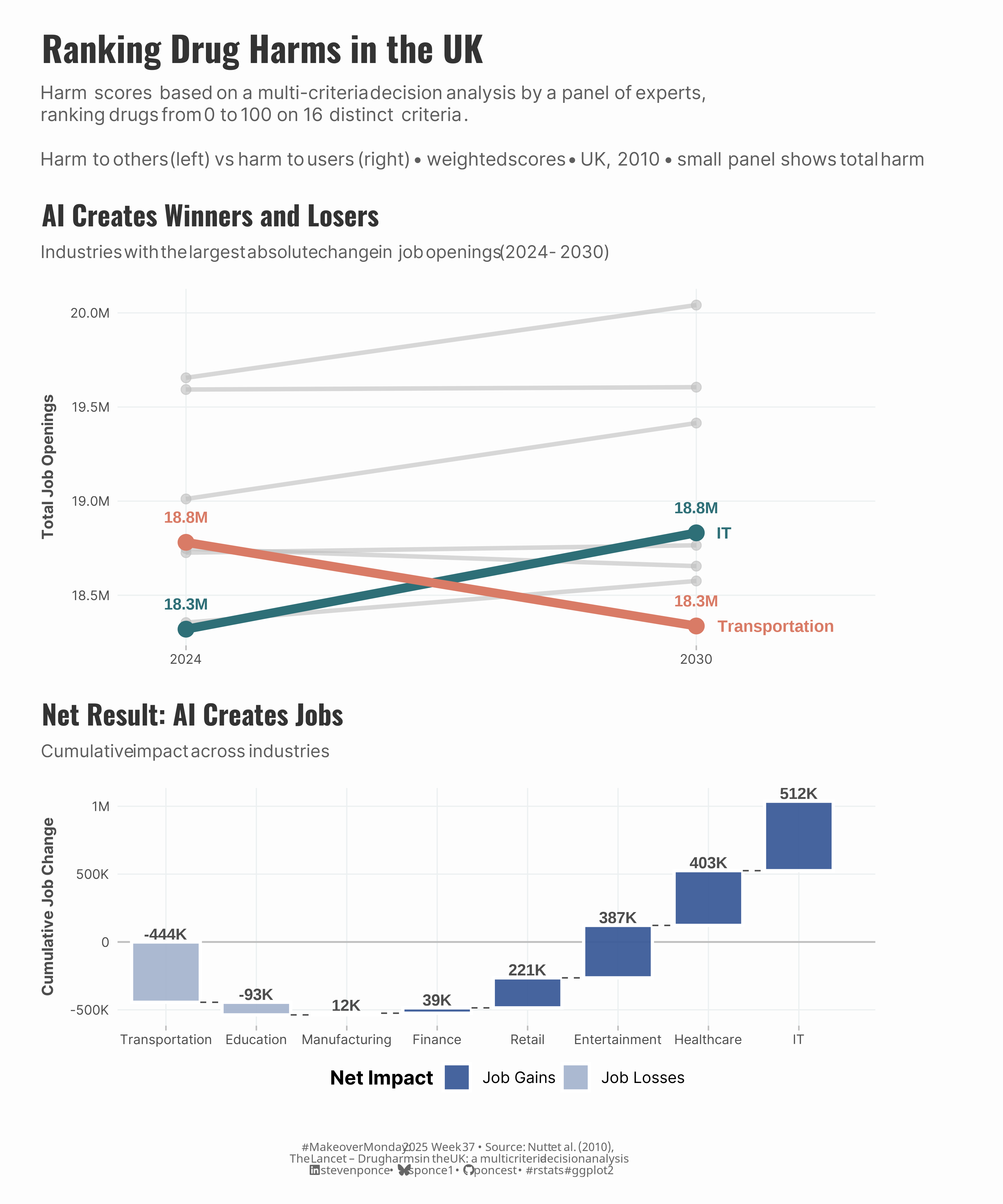{#fig-1}
### <mark> **Steps to Create this Graphic** </mark>
#### 1. Load Packages & Setup
```{r}
#| label: load
#| warning: false
#| message: false
#| results: "hide"

## 1. LOAD PACKAGES & SETUP ----
suppressPackageStartupMessages({
  if (!require("pacman")) install.packages("pacman")
  pacman::p_load(
  tidyverse,  # Easily Install and Load the 'Tidyverse'
  ggtext,     # Improved Text Rendering Support for 'ggplot2'
  showtext,   # Using Fonts More Easily in R Graphs
  scales,     # Scale Functions for Visualization
  glue,       # Interpreted String Literals
  patchwork   # The Composer of Plots
  )
})

### |- figure size ----
camcorder::gg_record(
    dir    = here::here("temp_plots"),
    device = "png",
    width  = 10,
    height = 12,
    units  = "in",
    dpi    = 320
)

# Source utility functions
suppressMessages(source(here::here("R/utils/fonts.R")))
source(here::here("R/utils/social_icons.R"))
source(here::here("R/utils/image_utils.R"))
source(here::here("R/themes/base_theme.R"))
```
#### 2. Read in the Data
```{r}
#| label: read
#| include: true
#| eval: true
#| warning: false
#|
ai_job_trends <- read_csv(
  here::here('data/MakeoverMonday/2025/ai_job_trends_dataset.csv')) |>
  janitor::clean_names()
```
#### 3. Examine the Data
```{r}
#| label: examine
#| include: true
#| eval: true
#| results: 'hide'
#| warning: false

glimpse(ai_job_trends)
skimr::skim_without_charts(ai_job_trends)
```
#### 4. Tidy Data
```{r}
#| label: tidy
#| warning: false
# Helpers
fmt_km <- function(x) {
  case_when(
    abs(x) >= 1e6 ~ paste0(number(x / 1e6, accuracy = 0.1), "M"),
    abs(x) >= 1e3 ~ paste0(number(x / 1e3, accuracy = 1), "K"),
    TRUE ~ number(x, accuracy = 1)
  )
}

ai_data_clean <- ai_job_trends |>
  filter(!is.na(job_openings_2024), !is.na(projected_openings_2030)) |>
  mutate(job_change = projected_openings_2030 - job_openings_2024)

### |- P1: Slope chart data ----
slope_data <- ai_data_clean |>
  group_by(industry) |>
  summarise(
    openings_2024 = sum(job_openings_2024),
    openings_2030 = sum(projected_openings_2030),
    net_change = sum(job_change),
    abs_change = abs(sum(job_change)),
    .groups = "drop"
  ) |>
  arrange(desc(abs_change)) |>
  mutate(
    rank_by_change = row_number(),
    is_top_change = rank_by_change <= 2,
    story_type = case_when(
      is_top_change & net_change > 0 ~ "biggest_growth",
      is_top_change & net_change < 0 ~ "biggest_decline",
      TRUE ~ "background"
    )
  ) |>
  pivot_longer(c(openings_2024, openings_2030), names_to = "year", values_to = "openings") |>
  mutate(year_clean = if_else(year == "openings_2024", 2024, 2030))

# labels for P1
labels_2030 <- slope_data |>
  filter(story_type != "background", year_clean == 2030) |>
  mutate(x_lab = year_clean + 0.25)

### |- P2: Waterfall chart data ----
wf_core <- ai_data_clean |>
  group_by(industry) |>
  summarise(change = sum(job_change), .groups = "drop") |>
  arrange(change) |>
  mutate(idx = row_number())

waterfall_data <- wf_core |>
  arrange(idx) |>
  mutate(
    step_start = lag(cumsum(change), default = 0),
    step_end = cumsum(change),
    type = case_when(
      industry == "Total" ~ "Total",
      change >= 0 ~ "Job Gains",
      TRUE ~ "Job Losses"
    ),
    label_y = pmax(step_start, step_end) + max(abs(change)) * 0.035,
    lbl = if_else(industry == "Total",
      paste0(if_else(change >= 0, "+", ""), fmt_km(change)),
      fmt_km(change)
    ),
    lab_wrapped = str_wrap(industry, width = 10)
  )
```
#### 5. Visualization Parameters
```{r}
#| label: params
#| include: true
#| warning: false

### |-  plot aesthetics ----
# Get base colors with custom palette
colors <- get_theme_colors(
  palette = c(

  "biggest_growth"  = "#2E6F77",
  "biggest_decline" = "#D97B66",

  "Job Gains" = "#3F5E9A",
  "Job Losses" = "#A7B6CF",
  "Total"     = "#2C4476"
))

### |-  titles and caption ----
title_text <- str_glue("Ranking Drug Harms in the UK")

subtitle_text <- str_glue(
  "**Harm scores** based on a multi-criteria decision analysis by a panel of experts,<br>",
  "ranking drugs from 0 to 100 on **16 distinct criteria**.<br><br>",
  "Harm to others (left) vs harm to users (right) • weighted scores • UK, 2010 • small panel shows total harm"
)

# Create caption
caption_text <- create_mm_caption(
  mm_year = current_year,
  mm_week = current_week,
  source_text = paste0("Nutt et al. (2010),<br>The Lancet – Drug harms in the UK: a multicriteria decision analysis")
)

### |-  fonts ----
setup_fonts()
fonts <- get_font_families()

### |-  plot theme ----

# Start with base theme
base_theme <- create_base_theme(colors)

# Add weekly-specific theme elements
weekly_theme <- extend_weekly_theme(
  base_theme,
  theme(
    plot.title = element_text(
      size = rel(1.4), family = fonts$title, face = "bold",
      color = colors$title, lineheight = 1.1, hjust = 0,
      margin = margin(t = 5, b = 10)
    ),
    plot.subtitle = element_markdown(
      size = rel(0.9), family = fonts$subtitle, face = "italic",
      color = alpha(colors$subtitle, 0.9), lineheight = 1.1,
      margin = margin(t = 0, b = 20)
    ),

    # Legend formatting
    legend.position = "plot",
    legend.justification = "top",
    legend.margin = margin(l = 12, b = 5),
    legend.key.size = unit(0.8, "cm"),
    legend.box.margin = margin(b = 10),
    legend.title = element_text(face = "bold"),

    # Axis formatting
    axis.ticks.y = element_blank(),
    axis.ticks.x = element_line(color = "gray", linewidth = 0.5),
    # axis.ticks.length = unit(0.2, "cm"),
    axis.title.x = element_text(
      face = "bold", size = rel(0.85),
      margin = margin(t = 10)
    ),
    axis.title.y = element_text(
      face = "bold", size = rel(0.85),
      margin = margin(r = 10)
    ),
    axis.text.x = element_text(
      size = rel(0.85), family = fonts$subtitle,
      color = colors$text
    ),
    axis.text.y = element_text(
      size = rel(0.85), family = fonts$subtitle,
      color = colors$text
    ),

    # Grid lines
    panel.grid.minor = element_blank(), #element_line(color = "#ecf0f1", linewidth = 0.2),
    panel.grid.major = element_line(color = "#ecf0f1", linewidth = 0.4),

    # Margin
    plot.margin = margin(20, 20, 20, 20)
  )
)

# Set theme
theme_set(weekly_theme)
```
#### 6. Plot
```{r}
#| label: plot
#| warning: false

### |- P1: Slope chart ----
p1 <- slope_data |>
  ggplot(aes(x = year_clean, y = openings, group = industry)) +
  # Geoms
  geom_line(
    data = slope_data |> filter(story_type == "background"), # background lines
    color = "gray", linewidth = 1.5, alpha = 0.6
  ) +
  geom_line(
    data = slope_data |> filter(story_type != "background"), # highlights lines
    aes(color = story_type), linewidth = 3
  ) +
  geom_point(
    data = slope_data |> filter(story_type == "background"), # background points
    color = "gray", size = 3, alpha = 0.6
  ) +
  geom_point(
    data = slope_data |> filter(story_type != "background"), # highlights points
    aes(color = story_type), size = 5
  ) +
  geom_text(
    data = slope_data |> filter(story_type != "background"),
    aes(label = fmt_km(openings), colour = story_type),
    vjust = -1.8, fontface = "bold", size = 4.0, show.legend = FALSE
  ) +
  geom_text(
    data = labels_2030,
    aes(x = x_lab, y = openings, label = industry, color = story_type),
    hjust = 0, fontface = "bold", size = 4.2, show.legend = FALSE
  ) +
  # Scales
  scale_x_continuous(breaks = c(2024, 2030), limits = c(2023.6, 2031.7)) +
  scale_y_continuous(labels = function(x) fmt_km(x)) +
  scale_colour_manual(values = colors$palette) +
  # Labs
  labs(
    title = "AI Creates Winners and Losers",
    subtitle = "Industries with the largest absolute change in job openings (2024 - 2030)",
    x = NULL, y = "Total Job Openings"
  ) +
  # Theme
  theme(
    plot.margin = margin(t = 10, r = 72, b = 10, l = 10),
    legend.position = "none"
  )

### |- P2: Waterfall chart ----
p2 <- ggplot(waterfall_data) +
  # Geoms
  geom_hline(yintercept = 0, linewidth = 0.6, colour = "gray") +
  geom_rect(
    aes(
      xmin = idx - 0.38, xmax = idx + 0.38,
      ymin = step_start, ymax = step_end,
      fill = type
    ),
    colour = "white", linewidth = 1.1, alpha = 0.96
  ) +
  geom_segment(
    data = filter(waterfall_data, idx < max(idx)),
    aes(
      x = idx + 0.38, xend = (idx + 1) - 0.38,
      y = step_end, yend = step_end
    ),
    linetype = "dashed", colour = "black", alpha = 0.7
  ) +
  geom_text(aes(x = idx, y = label_y, label = lbl),
    fontface = "bold", size = 4.0, color = colors$text,
    vjust = 0
  ) +
  # Scales
  scale_fill_manual(values = colors$palette, name = "Net Impact", drop = FALSE) +
  scale_x_continuous(
    breaks = waterfall_data$idx,
    labels = waterfall_data$lab_wrapped,
    expand = expansion(mult = c(0.02, 0.06))
  ) +
  scale_y_continuous(labels = label_number(accuracy = 1, scale_cut = cut_short_scale())) +
  # Labs
  labs(
    title = "Net Result: AI Creates Jobs",
    subtitle = "Cumulative impact across industries",
    x = NULL, y = "Cumulative Job Change"
  ) +
  # Theme +
  theme(
    axis.text.x = element_text(angle = 0, hjust = 0.5),
    legend.position = "bottom",
    legend.title = element_text(face = "bold"),
    plot.margin = margin(10, 10, 10, 10)
  )

### |- final combined plot ----
combined_plots <- p1 / p2 +
  plot_layout(heights = c(1.5, 1))

combined_plots <- combined_plots +
  plot_annotation(
    title = title_text,
    subtitle = subtitle_text,
    caption = caption_text,
    theme = theme(
      plot.title = element_text(
        size = rel(1.8),
        family = fonts$title,
        face = "bold",
        color = colors$title,
        lineheight = 1.1,
        margin = margin(t = 5, b = 5)
      ),
      plot.subtitle = element_markdown(
        size = rel(0.95),
        family = fonts$subtitle,
        color = alpha(colors$subtitle, 0.9),
        lineheight = 1.2,
        margin = margin(t = 5, b = 10)
      ),
      plot.caption = element_markdown(
        size = rel(0.6),
        family = fonts$caption,
        color = colors$caption,
        hjust = 0.5,
        margin = margin(t = 05)
      )
    )
  )
```
#### 7. Save
```{r}
#| label: save
#| warning: false

### |-  plot image ----
save_plot_patchwork(
  plot = combined_plots,
  type = "makeovermonday",
  year = current_year,
  week = current_week,
  width = 10,
  height = 12
  )
```
#### 8. Session Info
::: {.callout-tip collapse="true"}
##### Expand for Session Info
```{r, echo = FALSE}
#| eval: true
#| warning: false
sessionInfo()
```
:::
#### 9. GitHub Repository
::: {.callout-tip collapse="true"}
##### Expand for GitHub Repo
The complete code for this analysis is available in `r create_link(project_file, repo_file)`.
For the full repository, `r create_link("click here", repo_main)`.
:::
#### 10. References
::: {.callout-tip collapse="true"}
##### Expand for References
1. Data:
- Makeover Monday `r current_year` Week `r current_week`: `r create_link("AI Impact on Job Market: (2024–2030)", data_main)`
2. Article
- `r create_link("AI Impact on Job Market: (2024–2030)", data_secondary)`
:::
