• Steven Ponce
  • About
  • Data Visualizations
  • Projects
  • Resume
  • Email

On this page

  • Original
  • Makeover
  • Steps to Create this Graphic
    • 1. Load Packages & Setup
    • 2. Read in the Data
    • 3. Examine the Data
    • 4. Tidy Data
    • 5. Visualization Parameters
    • 6. Plot
    • 7. Save
    • 8. Session Info
    • 9. GitHub Repository
    • 10. References
    • 11. Custom Functions Documentation

Trump’s Approval Ratings: Declines and Current Standing

  • Show All Code
  • Hide All Code

  • View Source

Left: net change with MoE (±8.6 pp) — significant vs. within MoE | Right: Feb 2026 approval (Independents, All Adults highlighted)

MakeoverMonday
Data Visualization
R Programming
2026
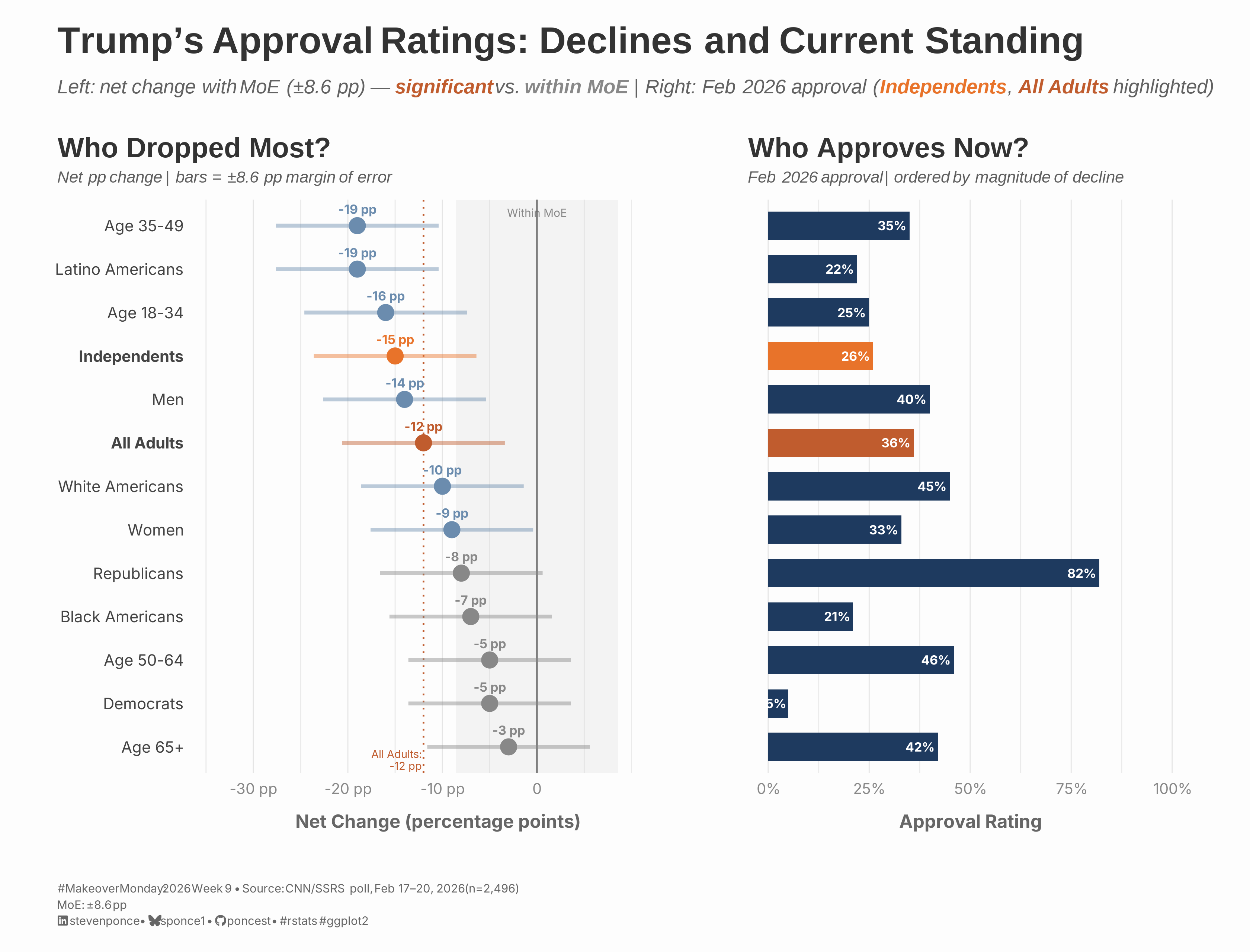
A redesign of CNN’s Trump approval rating chart using a two-panel layout. The left panel shows the net change in percentage points, with error bars (±8.6 pp) indicating whether declines are statistically significant. The right panel shows February 2026 approval, ordered by magnitude of decline to enable direct cross-panel comparison.
Author

Steven Ponce

Published

March 2, 2026

Original

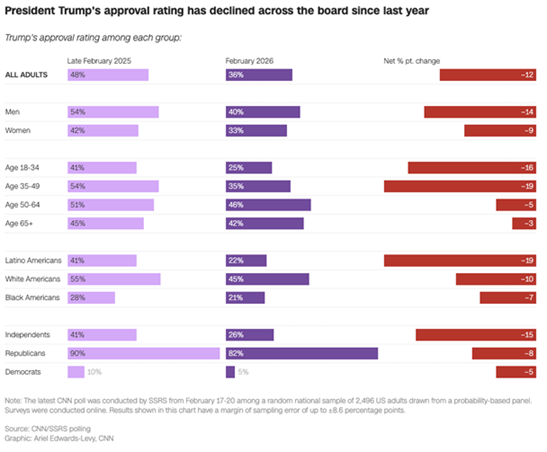
The original visualization comes from Trump’s Approval Ratings

Original visualization

Makeover

Figure 1: A two-panel horizontal chart showing Trump’s approval ratings across 13 demographic groups. The left panel displays the net change in percentage points from Late February 2025 to February 2026, with margin of error bars (±8.6 pp). Groups with statistically significant declines are shown in blue; those within the margin of error — Age 65+, Democrats, Age 50-64, and Republicans — are shown in gray. The largest declines occurred among Age 35-49 and Latino Americans (−19 pp each), followed by Independents (−15 pp, highlighted in orange). The right panel shows February 2026 approval ratings in the same row order, revealing that steep declines do not always correspond to low current approval: Republicans dropped only −8 pp but retain 82% approval, while Independents fell sharply to just 26%. Both panels use the same row ordering — steepest decline at top — enabling direct cross-panel comparison. Source: CNN/SSRS poll, February 17–20, 2026 (n=2,496; MoE ±8.6 pp).

Steps to Create this Graphic

1. Load Packages & Setup

Show code
```{r}
#| label: load
#| warning: false
#| message: false
#| results: "hide"

## 1. LOAD PACKAGES & SETUP ----
suppressPackageStartupMessages({
  if (!require("pacman")) install.packages("pacman")
  pacman::p_load(
    tidyverse, ggtext, showtext, scales, glue,       
  janitor, patchwork 
)
})

### |- figure size ----
camcorder::gg_record(
  dir    = here::here("temp_plots"),
  device = "png",
  width  = 10.5,
  height = 8,
  units  = "in",
  dpi    = 320
)

# Source utility functions
suppressMessages(source(here::here("R/utils/fonts.R")))
source(here::here("R/utils/social_icons.R"))
source(here::here("R/utils/image_utils.R"))
source(here::here("R/themes/base_theme.R"))
```

2. Read in the Data

Show code
```{r}
#| label: read
#| include: true
#| eval: true
#| warning: false
#|

df_raw <- readxl::read_xlsx(
  here::here("data/MakeoverMonday/2026/MM 2026 W09 Trump Approval Ratings.xlsx")) |>
  clean_names() |>
  rename(
    late_feb_2025 = x45689_0,   # Excel serial 45689 = Late February 2025
    feb_2026      = x46054_0    # Excel serial 46054 = February 2026
  )
```

3. Examine the Data

Show code
```{r}
#| label: examine
#| include: true
#| eval: true
#| results: 'hide'
#| warning: false

glimpse(df_raw)
```

4. Tidy Data

Show code
```{r}
#| label: tidy
#| warning: false

# Margin of error from CNN/SSRS poll footnote
MOE <- 0.086

df <- df_raw |>
  mutate(
    category = case_when(
      group == "All Adults" ~ "Overall",
      group %in% c("Men", "Women") ~ "Gender",
      str_starts(group, "Age") ~ "Age",
      group %in% c("Latino Americans", "White Americans", "Black Americans") ~ "Race/Ethnicity",
      group %in% c("Independents", "Republicans", "Democrats") ~ "Party"
    ),
    category = factor(category,
      levels = c(
        "Overall", "Gender", "Age",
        "Race/Ethnicity", "Party"
      )
    ),
    sig_change = abs(net_percent_pt_change) >= MOE,
    is_independents = group == "Independents",
    is_all_adults = group == "All Adults"
  )
```

5. Visualization Parameters

Show code
```{r}
#| label: params
#| include: true
#| warning: false

### |-  plot aesthetics ----
colors <- get_theme_colors(
  palette = list(
    primary       = "#1E3A5F",   
    accent        = "#C05C2E",  
    highlight     = "#E8732A",  
    neutral       = "#6B8CAE",  
    neutral_light = "#B8CCE0",   
    gray_dark     = "#444444",   
    gray_mid      = "#888888",
    gray_light    = "#CCCCCC"
  )
)

### |- titles and caption ----
title_text <- str_glue("Trump's Approval Ratings: Declines and Current Standing")

subtitle_text <- str_glue(
  "Left: net change with MoE (\u00b18.6 pp) \u2014 ",
  "<span style='color:{colors$palette$accent}'>**significant**</span> vs. ",
  "<span style='color:{colors$palette$gray_mid}'>**within MoE**</span> | ",
  "Right: Feb 2026 approval ",
  "(<span style='color:{colors$palette$highlight}'>**Independents**</span>, ",
  "<span style='color:{colors$palette$accent}'>**All Adults**</span> highlighted)"
)

caption_text <- create_mm_caption(
  mm_year     = 2026,
  mm_week     = 9,
  source_text = "CNN/SSRS poll, Feb 17\u201320, 2026 (n=2,496)<br>MoE: \u00b18.6 pp"
)

### |-  fonts ----
setup_fonts()
fonts <- get_font_families()

### |-  plot theme ----

### |- fonts ----
setup_fonts()
fonts <- get_font_families()

### |- plot theme ----
base_theme <- create_base_theme(colors)

weekly_theme <- extend_weekly_theme(
  base_theme,
  theme(
    panel.grid.major.x = element_line(color = "gray90", linewidth = 0.3),
    panel.grid.major.y = element_blank(),
    axis.ticks         = element_blank(),
    # axis.text.y handled per-panel (p_left uses selective bold; p_right hides it)
    axis.text.x        = element_text(size = 9,   color = colors$palette$gray_mid),
    axis.title.x = element_text(
      face = "bold", size = rel(0.85),
      margin = margin(t = 10), family = fonts$subtitle,
      color = "gray40"
    ),
    plot.title = element_text(
      size = rel(1.2), family = 'sans', face = "bold",
      color = colors$title, lineheight = 1.1, hjust = 0,
      margin = margin(t = 5, b = 3)
    ),
    plot.subtitle = element_markdown(
      size = rel(0.7), family = 'sans', face = "italic",
      color = alpha(colors$subtitle, 0.9), lineheight = 1.1,
      margin = margin(t = 0, b = 8)
    ),
  )
)

theme_set(weekly_theme)
```

6. Plot

Show code
```{r}
#| label: plot
#| warning: false

### |- LEFT PANEL: Who Dropped Most? ----

# All Adults change value for reference line annotation
all_adults_change <- df |>
  filter(is_all_adults) |>
  pull(net_percent_pt_change)

# Selective bold for Independents and All Adults y-axis labels
group_order <- df |>
  arrange(net_percent_pt_change) |>
  pull(group)

y_label_faces <- if_else(
  group_order %in% c("Independents", "All Adults"), "bold", "plain"
)

names(y_label_faces) <- group_order

df_left <- df |>
  mutate(
    group = fct_reorder(group, net_percent_pt_change),
    moe_lo = net_percent_pt_change - MOE,
    moe_hi = net_percent_pt_change + MOE,
    pt_color = case_when(
      is_independents ~ colors$palette$highlight,
      is_all_adults ~ colors$palette$accent,
      sig_change ~ colors$palette$neutral,
      TRUE ~ colors$palette$gray_mid # within MoE
    )
  )

p_left <- ggplot(df_left, aes(x = net_percent_pt_change, y = group)) +
  # Annotate
  annotate(
    "rect",
    xmin = -MOE, xmax = MOE,
    ymin = 0.4, ymax = 13.6,
    fill = colors$palette$gray_light, alpha = 0.18
  ) +
  annotate(
    "text",
    x = 0,
    y = 13.3,
    label = "Within MoE",
    size = 2.4, color = colors$palette$gray_mid,
    hjust = 0.5
  ) +
  # Geoms
  geom_vline(
    xintercept = 0,
    color = "#666666", linewidth = 0.4
  ) +
  geom_vline(
    xintercept = all_adults_change,
    linetype   = "dotted",
    color      = colors$palette$accent,
    linewidth  = 0.5
  ) +
  annotate(
    "text",
    x = all_adults_change - 0.002,
    y = 0.7,
    label = glue("All Adults:\n{round(all_adults_change * 100)} pp"),
    size = 2.3, color = colors$palette$accent,
    hjust = 1, lineheight = 0.9
  ) +
  geom_linerange(
    aes(xmin = moe_lo, xmax = moe_hi, color = pt_color),
    linewidth = 1.1, alpha = 0.45
  ) +
  geom_point(
    aes(color = pt_color),
    size = 4
  ) +
  geom_text(
    aes(
      label = glue("{round(net_percent_pt_change * 100)} pp"),
      color = pt_color
    ),
    nudge_y = 0.38,
    size = 2.7,
    fontface = "bold"
  ) +
  # Scales
  scale_color_identity() +
  scale_x_continuous(
    breaks = c(-0.30, -0.20, -0.10, 0),
    labels = c("-30 pp", "-20 pp", "-10 pp", "0"),
    limits = c(-0.34, 0.13)
  ) +
  scale_y_discrete(
    limits = rev,
    labels = function(x) x
  ) +
  # Labs
  labs(
    title    = "Who Dropped Most?",
    subtitle = "Net pp change | bars = \u00b18.6 pp margin of error",
    x        = "Net Change (percentage points)",
    y        = NULL
  ) +
  # Theme
  theme(
    axis.text.y = element_text(
      face  = rev(y_label_faces),
      size  = 9.5,
      color = colors$palette$gray_dark
    )
  )

### |- RIGHT PANEL: Who Approves Now? ----
df_right <- df |>
  mutate(
    group = fct_reorder(group, net_percent_pt_change),
    bar_color = case_when(
      is_all_adults ~ colors$palette$accent,
      is_independents ~ colors$palette$highlight,
      TRUE ~ colors$palette$primary
    )
  )

p_right <- ggplot(df_right, aes(x = feb_2026, y = group)) +
  # Geoms
  geom_col(aes(fill = bar_color), width = 0.65) +
  geom_text(
    aes(label = percent(feb_2026, 1)),
    hjust = 1.15,
    size = 2.7,
    color = "white",
    fontface = "bold"
  ) +
  # Scales
  scale_fill_identity() +
  scale_x_continuous(
    labels = percent_format(1),
    limits = c(0, 1.0),
    breaks = c(0, 0.25, 0.50, 0.75, 1.0)
  ) +
  scale_y_discrete(limits = rev) +
  # Labs
  labs(
    title    = "Who Approves Now?",
    subtitle = "Feb 2026 approval | ordered by magnitude of decline",
    x        = "Approval Rating",
    y        = NULL
  ) +
  # Theme
  theme(axis.text.y = element_blank())

### |- COMBINE WITH PATCHWORK ----
combined_plot <- p_left + p_right +
  plot_layout(widths = c(1.1, 1)) +
  plot_annotation(
    title = title_text,
    subtitle = subtitle_text,
    caption = caption_text,
    theme = theme(
      plot.title = element_markdown(
        size = rel(1.6),
        family = 'sans',
        face = "bold",
        color = colors$title,
        lineheight = 1.15,
        margin = margin(t = 0, b = 5)
      ),
      plot.subtitle = element_markdown(
        size = rel(0.85),
        family = 'sans',
        face = "italic",
        color = alpha(colors$subtitle, 0.88),
        lineheight = 1.5,
        margin = margin(t = 5, b = 10)
      ),
      plot.caption = element_markdown(
        size = rel(0.5),
        family = fonts$subtitle,
        color = colors$caption,
        hjust = 0,
        lineheight = 1.4,
        margin = margin(t = 20, b = 5)
      ),
      plot.margin = margin(15, 15, 10, 15)
    )
  )
```

7. Save

Show code
```{r}
#| label: save
#| warning: false

### |-  plot image ----  
save_plot_patchwork(
  plot = combined_plot, 
  type = "makeovermonday", 
  year = current_year,
  week = current_week,
  width = 10.5, 
  height = 8
  )
```

8. Session Info

Expand for Session Info
R version 4.4.1 (2024-06-14 ucrt)
Platform: x86_64-w64-mingw32/x64
Running under: Windows 11 x64 (build 26100)

Matrix products: default


locale:
[1] LC_COLLATE=English_United States.utf8 
[2] LC_CTYPE=English_United States.utf8   
[3] LC_MONETARY=English_United States.utf8
[4] LC_NUMERIC=C                          
[5] LC_TIME=English_United States.utf8    

time zone: America/New_York
tzcode source: internal

attached base packages:
[1] stats     graphics  grDevices utils     datasets  methods   base     

other attached packages:
 [1] here_1.0.2      patchwork_1.3.2 janitor_2.2.1   glue_1.8.0     
 [5] scales_1.4.0    showtext_0.9-7  showtextdb_3.0  sysfonts_0.8.9 
 [9] ggtext_0.1.2    lubridate_1.9.5 forcats_1.0.1   stringr_1.6.0  
[13] dplyr_1.2.0     purrr_1.2.1     readr_2.1.6     tidyr_1.3.2    
[17] tibble_3.3.1    ggplot2_4.0.2   tidyverse_2.0.0 pacman_0.5.1   

loaded via a namespace (and not attached):
 [1] gtable_0.3.6       xfun_0.47          htmlwidgets_1.6.4  tzdb_0.5.0        
 [5] yulab.utils_0.1.7  vctrs_0.7.1        tools_4.4.0        generics_0.1.3    
 [9] curl_5.2.1         gifski_1.32.0-2    pkgconfig_2.0.3    ggplotify_0.1.2   
[13] RColorBrewer_1.1-3 S7_0.2.1           readxl_1.4.5       lifecycle_1.0.5   
[17] compiler_4.4.0     farver_2.1.2       textshaping_0.3.7  codetools_0.2-20  
[21] snakecase_0.11.1   htmltools_0.5.8.1  yaml_2.3.10        pillar_1.11.1     
[25] camcorder_0.1.0    magick_2.9.0       commonmark_2.0.0   tidyselect_1.2.1  
[29] digest_0.6.37      stringi_1.8.3      rsvg_2.6.0         rprojroot_2.1.1   
[33] fastmap_1.2.0      grid_4.4.0         cli_3.6.5          magrittr_2.0.4    
[37] withr_3.0.1        timechange_0.4.0   rmarkdown_2.28     cellranger_1.1.0  
[41] hms_1.1.4          evaluate_1.0.0     knitr_1.48         markdown_1.12     
[45] gridGraphics_0.5-1 rlang_1.1.7        gridtext_0.1.5     Rcpp_1.1.1        
[49] xml2_1.5.2         svglite_2.2.2      rstudioapi_0.18.0  jsonlite_2.0.0    
[53] R6_2.5.1           fs_1.6.4           systemfonts_1.3.1 

9. GitHub Repository

Expand for GitHub Repo

The complete code for this analysis is available in mm_2026_09.qmd.

For the full repository, click here.

10. References

Expand for References

Primary Data (Makeover Monday): 1. Makeover Monday 2026 Week 9: Trump’s Approval Ratings 2. Original Article: Trump’s approval rating with independents hits a new low ahead of the State of the Union - Source: CNN / Ariel Edwards-Levy - Coverage: Approval ratings across 13 demographic groups, Late February 2025 vs. February 2026

Source Data: 3. Dataset: 2026 Week 9 — Trump’s Approval Ratings - Source: CNN/SSRS polling via data.world/makeovermonday - Data includes: Demographic group, approval rating (Late Feb 2025), approval rating (Feb 2026), net percentage point change - Groups covered: Overall, Gender, Age, Race/Ethnicity, Party ID - Poll conducted: February 17–20, 2026 (n=2,496; MoE ±8.6 pp)

Note: No derived metrics were computed for this visualization. All values are reported directly from the CNN/SSRS poll. Statistical significance was assessed by comparing the absolute net change against the reported margin of error (±8.6 pp); groups where |change| < MoE are flagged as within sampling error.

11. Custom Functions Documentation

📦 Custom Helper Functions

This analysis uses custom functions from my personal module library for efficiency and consistency across projects.

Functions Used:

  • fonts.R: setup_fonts(), get_font_families() - Font management with showtext
  • social_icons.R: create_social_caption() - Generates formatted social media captions
  • image_utils.R: save_plot() - Consistent plot saving with naming conventions
  • base_theme.R: create_base_theme(), extend_weekly_theme(), get_theme_colors() - Custom ggplot2 themes

Why custom functions?
These utilities standardize theming, fonts, and output across all my data visualizations. The core analysis (data tidying and visualization logic) uses only standard tidyverse packages.

Source Code:
View all custom functions → GitHub: R/utils

Back to top

Citation

BibTeX citation:
@online{ponce2026,
  author = {Ponce, Steven},
  title = {Trump’s {Approval} {Ratings:} {Declines} and {Current}
    {Standing}},
  date = {2026-03-02},
  url = {https://stevenponce.netlify.app/data_visualizations/MakeoverMonday/2026/mm_2026_09.html},
  langid = {en}
}
For attribution, please cite this work as:
Ponce, Steven. 2026. “Trump’s Approval Ratings: Declines and Current Standing.” March 2, 2026. https://stevenponce.netlify.app/data_visualizations/MakeoverMonday/2026/mm_2026_09.html.
Source Code
---
title: "Trump's Approval Ratings: Declines and Current Standing"
subtitle: "Left: net change with MoE (±8.6 pp) — significant vs. within MoE | Right: Feb 2026 approval (Independents, All Adults highlighted)"
description: "A redesign of CNN's Trump approval rating chart using a two-panel layout. The left panel shows the net change in percentage points, with error bars (±8.6 pp) indicating whether declines are statistically significant. The right panel shows February 2026 approval, ordered by magnitude of decline to enable direct cross-panel comparison."
date: "2026-03-02"
author:
  - name: "Steven Ponce"
    url: "https://stevenponce.netlify.app"
citation:
  url: "https://stevenponce.netlify.app/data_visualizations/MakeoverMonday/2026/mm_2026_09.html"
categories: ["MakeoverMonday", "Data Visualization", "R Programming", "2026"]   
tags: [
  "makeover-monday",
  "data-visualization",
  "ggplot2",
  "patchwork",
  "political-data",
  "polling",
  "approval-ratings",
  "margin-of-error",
  "uncertainty-visualization",
  "dot-plot",
  "bar-chart",
  "multi-panel",
  "R"
]
image: "thumbnails/mm_2026_09.png"
format:
  html:
    toc: true
    toc-depth: 5
    code-link: true
    code-fold: true
    code-tools: true
    code-summary: "Show code"
    self-contained: true
    theme: 
      light: [flatly, assets/styling/custom_styles.scss]
      dark: [darkly, assets/styling/custom_styles_dark.scss]
editor_options: 
  chunk_output_type: inline
execute: 
  freeze: true                                      
  cache: true                                       
  error: false
  message: false
  warning: false
  eval: true
---

```{r}
#| label: setup-links
#| include: false

# CENTRALIZED LINK MANAGEMENT

## Project-specific info 
current_year <- 2026
current_week <- 09
project_file <- "mm_2026_09.qmd"
project_image <- "mm_2026_09.png"

## Data Sources
data_main <- "https://data.world/makeovermonday/2026w9-trumps-approval-ratings"
data_secondary <- "https://data.world/makeovermonday/2026w9-trumps-approval-ratings"

## Repository Links  
repo_main <- "https://github.com/poncest/personal-website/"
repo_file <- paste0("https://github.com/poncest/personal-website/blob/master/data_visualizations/MakeoverMonday/", current_year, "/", project_file)

## External Resources/Images
chart_original <- "https://raw.githubusercontent.com/poncest/MakeoverMonday/refs/heads/master/2026/Week_09/original_chart.png"

## Organization/Platform Links
org_primary <- "https://edition.cnn.com/2026/02/23/politics/trump-approval-rating-independents-cnn-poll"
org_secondary <- "https://edition.cnn.com/2026/02/23/politics/trump-approval-rating-independents-cnn-poll"

# Helper function to create markdown links
create_link <- function(text, url) {
  paste0("[", text, "](", url, ")")
}

# Helper function for citation-style links
create_citation_link <- function(text, url, title = NULL) {
  if (is.null(title)) {
    paste0("[", text, "](", url, ")")
  } else {
    paste0("[", text, "](", url, ' "', title, '")')
  }
}
```

### Original

The original visualization comes from `r create_link("Trump's Approval Ratings", data_secondary)`
![Original visualization](https://raw.githubusercontent.com/poncest/MakeoverMonday/refs/heads/master/2026/Week_09/original_chart.png)

### Makeover

![A two-panel horizontal chart showing Trump's approval ratings across 13 demographic groups. The left panel displays the net change in percentage points from Late February 2025 to February 2026, with margin of error bars (±8.6 pp). Groups with statistically significant declines are shown in blue; those within the margin of error — Age 65+, Democrats, Age 50-64, and Republicans — are shown in gray. The largest declines occurred among Age 35-49 and Latino Americans (−19 pp each), followed by Independents (−15 pp, highlighted in orange). The right panel shows February 2026 approval ratings in the same row order, revealing that steep declines do not always correspond to low current approval: Republicans dropped only −8 pp but retain 82% approval, while Independents fell sharply to just 26%. Both panels use the same row ordering — steepest decline at top — enabling direct cross-panel comparison. Source: CNN/SSRS poll, February 17–20, 2026 (n=2,496; MoE ±8.6 pp).](mm_2026_09.png){#fig-1}

### [**Steps to Create this Graphic**]{.mark}

#### [1. Load Packages & Setup]{.smallcaps}

```{r}
#| label: load
#| warning: false
#| message: false      
#| results: "hide"     

## 1. LOAD PACKAGES & SETUP ----
suppressPackageStartupMessages({
  if (!require("pacman")) install.packages("pacman")
  pacman::p_load(
    tidyverse, ggtext, showtext, scales, glue,       
  janitor, patchwork 
)
})

### |- figure size ----
camcorder::gg_record(
  dir    = here::here("temp_plots"),
  device = "png",
  width  = 10.5,
  height = 8,
  units  = "in",
  dpi    = 320
)

# Source utility functions
suppressMessages(source(here::here("R/utils/fonts.R")))
source(here::here("R/utils/social_icons.R"))
source(here::here("R/utils/image_utils.R"))
source(here::here("R/themes/base_theme.R"))
```

#### [2. Read in the Data]{.smallcaps}

```{r}
#| label: read
#| include: true
#| eval: true
#| warning: false
#| 

df_raw <- readxl::read_xlsx(
  here::here("data/MakeoverMonday/2026/MM 2026 W09 Trump Approval Ratings.xlsx")) |>
  clean_names() |>
  rename(
    late_feb_2025 = x45689_0,   # Excel serial 45689 = Late February 2025
    feb_2026      = x46054_0    # Excel serial 46054 = February 2026
  )
```

#### [3. Examine the Data]{.smallcaps}

```{r}
#| label: examine
#| include: true
#| eval: true
#| results: 'hide'
#| warning: false

glimpse(df_raw)
```

#### [4. Tidy Data]{.smallcaps}

```{r}
#| label: tidy
#| warning: false

# Margin of error from CNN/SSRS poll footnote
MOE <- 0.086

df <- df_raw |>
  mutate(
    category = case_when(
      group == "All Adults" ~ "Overall",
      group %in% c("Men", "Women") ~ "Gender",
      str_starts(group, "Age") ~ "Age",
      group %in% c("Latino Americans", "White Americans", "Black Americans") ~ "Race/Ethnicity",
      group %in% c("Independents", "Republicans", "Democrats") ~ "Party"
    ),
    category = factor(category,
      levels = c(
        "Overall", "Gender", "Age",
        "Race/Ethnicity", "Party"
      )
    ),
    sig_change = abs(net_percent_pt_change) >= MOE,
    is_independents = group == "Independents",
    is_all_adults = group == "All Adults"
  )
```

#### [5. Visualization Parameters]{.smallcaps}

```{r}
#| label: params
#| include: true
#| warning: false

### |-  plot aesthetics ----
colors <- get_theme_colors(
  palette = list(
    primary       = "#1E3A5F",   
    accent        = "#C05C2E",  
    highlight     = "#E8732A",  
    neutral       = "#6B8CAE",  
    neutral_light = "#B8CCE0",   
    gray_dark     = "#444444",   
    gray_mid      = "#888888",
    gray_light    = "#CCCCCC"
  )
)

### |- titles and caption ----
title_text <- str_glue("Trump's Approval Ratings: Declines and Current Standing")

subtitle_text <- str_glue(
  "Left: net change with MoE (\u00b18.6 pp) \u2014 ",
  "<span style='color:{colors$palette$accent}'>**significant**</span> vs. ",
  "<span style='color:{colors$palette$gray_mid}'>**within MoE**</span> | ",
  "Right: Feb 2026 approval ",
  "(<span style='color:{colors$palette$highlight}'>**Independents**</span>, ",
  "<span style='color:{colors$palette$accent}'>**All Adults**</span> highlighted)"
)

caption_text <- create_mm_caption(
  mm_year     = 2026,
  mm_week     = 9,
  source_text = "CNN/SSRS poll, Feb 17\u201320, 2026 (n=2,496)<br>MoE: \u00b18.6 pp"
)

### |-  fonts ----
setup_fonts()
fonts <- get_font_families()

### |-  plot theme ----

### |- fonts ----
setup_fonts()
fonts <- get_font_families()

### |- plot theme ----
base_theme <- create_base_theme(colors)

weekly_theme <- extend_weekly_theme(
  base_theme,
  theme(
    panel.grid.major.x = element_line(color = "gray90", linewidth = 0.3),
    panel.grid.major.y = element_blank(),
    axis.ticks         = element_blank(),
    # axis.text.y handled per-panel (p_left uses selective bold; p_right hides it)
    axis.text.x        = element_text(size = 9,   color = colors$palette$gray_mid),
    axis.title.x = element_text(
      face = "bold", size = rel(0.85),
      margin = margin(t = 10), family = fonts$subtitle,
      color = "gray40"
    ),
    plot.title = element_text(
      size = rel(1.2), family = 'sans', face = "bold",
      color = colors$title, lineheight = 1.1, hjust = 0,
      margin = margin(t = 5, b = 3)
    ),
    plot.subtitle = element_markdown(
      size = rel(0.7), family = 'sans', face = "italic",
      color = alpha(colors$subtitle, 0.9), lineheight = 1.1,
      margin = margin(t = 0, b = 8)
    ),
  )
)

theme_set(weekly_theme)
```

#### [6. Plot]{.smallcaps}

```{r}
#| label: plot
#| warning: false

### |- LEFT PANEL: Who Dropped Most? ----

# All Adults change value for reference line annotation
all_adults_change <- df |>
  filter(is_all_adults) |>
  pull(net_percent_pt_change)

# Selective bold for Independents and All Adults y-axis labels
group_order <- df |>
  arrange(net_percent_pt_change) |>
  pull(group)

y_label_faces <- if_else(
  group_order %in% c("Independents", "All Adults"), "bold", "plain"
)

names(y_label_faces) <- group_order

df_left <- df |>
  mutate(
    group = fct_reorder(group, net_percent_pt_change),
    moe_lo = net_percent_pt_change - MOE,
    moe_hi = net_percent_pt_change + MOE,
    pt_color = case_when(
      is_independents ~ colors$palette$highlight,
      is_all_adults ~ colors$palette$accent,
      sig_change ~ colors$palette$neutral,
      TRUE ~ colors$palette$gray_mid # within MoE
    )
  )

p_left <- ggplot(df_left, aes(x = net_percent_pt_change, y = group)) +
  # Annotate
  annotate(
    "rect",
    xmin = -MOE, xmax = MOE,
    ymin = 0.4, ymax = 13.6,
    fill = colors$palette$gray_light, alpha = 0.18
  ) +
  annotate(
    "text",
    x = 0,
    y = 13.3,
    label = "Within MoE",
    size = 2.4, color = colors$palette$gray_mid,
    hjust = 0.5
  ) +
  # Geoms
  geom_vline(
    xintercept = 0,
    color = "#666666", linewidth = 0.4
  ) +
  geom_vline(
    xintercept = all_adults_change,
    linetype   = "dotted",
    color      = colors$palette$accent,
    linewidth  = 0.5
  ) +
  annotate(
    "text",
    x = all_adults_change - 0.002,
    y = 0.7,
    label = glue("All Adults:\n{round(all_adults_change * 100)} pp"),
    size = 2.3, color = colors$palette$accent,
    hjust = 1, lineheight = 0.9
  ) +
  geom_linerange(
    aes(xmin = moe_lo, xmax = moe_hi, color = pt_color),
    linewidth = 1.1, alpha = 0.45
  ) +
  geom_point(
    aes(color = pt_color),
    size = 4
  ) +
  geom_text(
    aes(
      label = glue("{round(net_percent_pt_change * 100)} pp"),
      color = pt_color
    ),
    nudge_y = 0.38,
    size = 2.7,
    fontface = "bold"
  ) +
  # Scales
  scale_color_identity() +
  scale_x_continuous(
    breaks = c(-0.30, -0.20, -0.10, 0),
    labels = c("-30 pp", "-20 pp", "-10 pp", "0"),
    limits = c(-0.34, 0.13)
  ) +
  scale_y_discrete(
    limits = rev,
    labels = function(x) x
  ) +
  # Labs
  labs(
    title    = "Who Dropped Most?",
    subtitle = "Net pp change | bars = \u00b18.6 pp margin of error",
    x        = "Net Change (percentage points)",
    y        = NULL
  ) +
  # Theme
  theme(
    axis.text.y = element_text(
      face  = rev(y_label_faces),
      size  = 9.5,
      color = colors$palette$gray_dark
    )
  )

### |- RIGHT PANEL: Who Approves Now? ----
df_right <- df |>
  mutate(
    group = fct_reorder(group, net_percent_pt_change),
    bar_color = case_when(
      is_all_adults ~ colors$palette$accent,
      is_independents ~ colors$palette$highlight,
      TRUE ~ colors$palette$primary
    )
  )

p_right <- ggplot(df_right, aes(x = feb_2026, y = group)) +
  # Geoms
  geom_col(aes(fill = bar_color), width = 0.65) +
  geom_text(
    aes(label = percent(feb_2026, 1)),
    hjust = 1.15,
    size = 2.7,
    color = "white",
    fontface = "bold"
  ) +
  # Scales
  scale_fill_identity() +
  scale_x_continuous(
    labels = percent_format(1),
    limits = c(0, 1.0),
    breaks = c(0, 0.25, 0.50, 0.75, 1.0)
  ) +
  scale_y_discrete(limits = rev) +
  # Labs
  labs(
    title    = "Who Approves Now?",
    subtitle = "Feb 2026 approval | ordered by magnitude of decline",
    x        = "Approval Rating",
    y        = NULL
  ) +
  # Theme
  theme(axis.text.y = element_blank())

### |- COMBINE WITH PATCHWORK ----
combined_plot <- p_left + p_right +
  plot_layout(widths = c(1.1, 1)) +
  plot_annotation(
    title = title_text,
    subtitle = subtitle_text,
    caption = caption_text,
    theme = theme(
      plot.title = element_markdown(
        size = rel(1.6),
        family = 'sans',
        face = "bold",
        color = colors$title,
        lineheight = 1.15,
        margin = margin(t = 0, b = 5)
      ),
      plot.subtitle = element_markdown(
        size = rel(0.85),
        family = 'sans',
        face = "italic",
        color = alpha(colors$subtitle, 0.88),
        lineheight = 1.5,
        margin = margin(t = 5, b = 10)
      ),
      plot.caption = element_markdown(
        size = rel(0.5),
        family = fonts$subtitle,
        color = colors$caption,
        hjust = 0,
        lineheight = 1.4,
        margin = margin(t = 20, b = 5)
      ),
      plot.margin = margin(15, 15, 10, 15)
    )
  )
```

#### [7. Save]{.smallcaps}

```{r}
#| label: save
#| warning: false

### |-  plot image ----  
save_plot_patchwork(
  plot = combined_plot, 
  type = "makeovermonday", 
  year = current_year,
  week = current_week,
  width = 10.5, 
  height = 8
  )
```

#### [8. Session Info]{.smallcaps}

::: {.callout-tip collapse="true"}
##### Expand for Session Info

```{r, echo = FALSE}
#| eval: true
#| warning: false

sessionInfo()
```
:::

#### [9. GitHub Repository]{.smallcaps}

::: {.callout-tip collapse="true"}
##### Expand for GitHub Repo

The complete code for this analysis is available in `r create_link(project_file, repo_file)`.

For the full repository, `r create_link("click here", repo_main)`.
:::

#### [10. References]{.smallcaps}

::: {.callout-tip collapse="true"}
##### Expand for References
**Primary Data (Makeover Monday):**
1.  Makeover Monday `r current_year` Week `r current_week`: `r create_link("Trump's Approval Ratings", data_main)`
2.  Original Article: `r create_link("Trump's approval rating with independents hits a new low ahead of the State of the Union", "https://edition.cnn.com/2026/02/23/politics/trump-approval-rating-independents-cnn-poll")`
    -   Source: CNN / Ariel Edwards-Levy
    -   Coverage: Approval ratings across 13 demographic groups, Late February 2025 vs. February 2026

**Source Data:**
3.  Dataset: `r create_link("2026 Week 9 — Trump's Approval Ratings", "https://data.world/makeovermonday/2026w9-trumps-approval-ratings")`
    -   Source: CNN/SSRS polling via data.world/makeovermonday
    -   Data includes: Demographic group, approval rating (Late Feb 2025), approval rating (Feb 2026), net percentage point change
    -   Groups covered: Overall, Gender, Age, Race/Ethnicity, Party ID
    -   Poll conducted: February 17–20, 2026 (n=2,496; MoE ±8.6 pp)

**Note:** No derived metrics were computed for this visualization. All values are reported directly from the CNN/SSRS poll. Statistical significance was assessed by comparing the absolute net change against the reported margin of error (±8.6 pp); groups where |change| < MoE are flagged as within sampling error.
:::


#### [11. Custom Functions Documentation]{.smallcaps}

::: {.callout-note collapse="true"}
##### 📦 Custom Helper Functions

This analysis uses custom functions from my personal module library for efficiency and consistency across projects.

**Functions Used:**

-   **`fonts.R`**: `setup_fonts()`, `get_font_families()` - Font management with showtext
-   **`social_icons.R`**: `create_social_caption()` - Generates formatted social media captions
-   **`image_utils.R`**: `save_plot()` - Consistent plot saving with naming conventions
-   **`base_theme.R`**: `create_base_theme()`, `extend_weekly_theme()`, `get_theme_colors()` - Custom ggplot2 themes

**Why custom functions?**\
These utilities standardize theming, fonts, and output across all my data visualizations. The core analysis (data tidying and visualization logic) uses only standard tidyverse packages.

**Source Code:**\
View all custom functions → [GitHub: R/utils](https://github.com/poncest/personal-website/tree/master/R)
:::

© 2024 Steven Ponce

Source Issues
