• Steven Ponce
  • About
  • Data Visualizations
  • Projects
  • Resume
  • Email

On this page

  • Original
  • Makeover
  • Steps to Create this Graphic
    • 1. Load Packages & Setup
    • 2. Read in the Data
    • 3. Examine the Data
    • 4. Tidy Data
    • 5. Visualization Parameters
    • 6. Plot
    • 7. Save
    • 8. Session Info
    • 9. GitHub Repository
    • 10. References
    • 11. Custom Functions Documentation

AI Automation Risk Is a Low-Wage Problem

  • Show All Code
  • Hide All Code

  • View Source

High-risk jobs pay less — and employ far more workers than rankings suggest

MakeoverMonday
Data Visualization
R Programming
2026
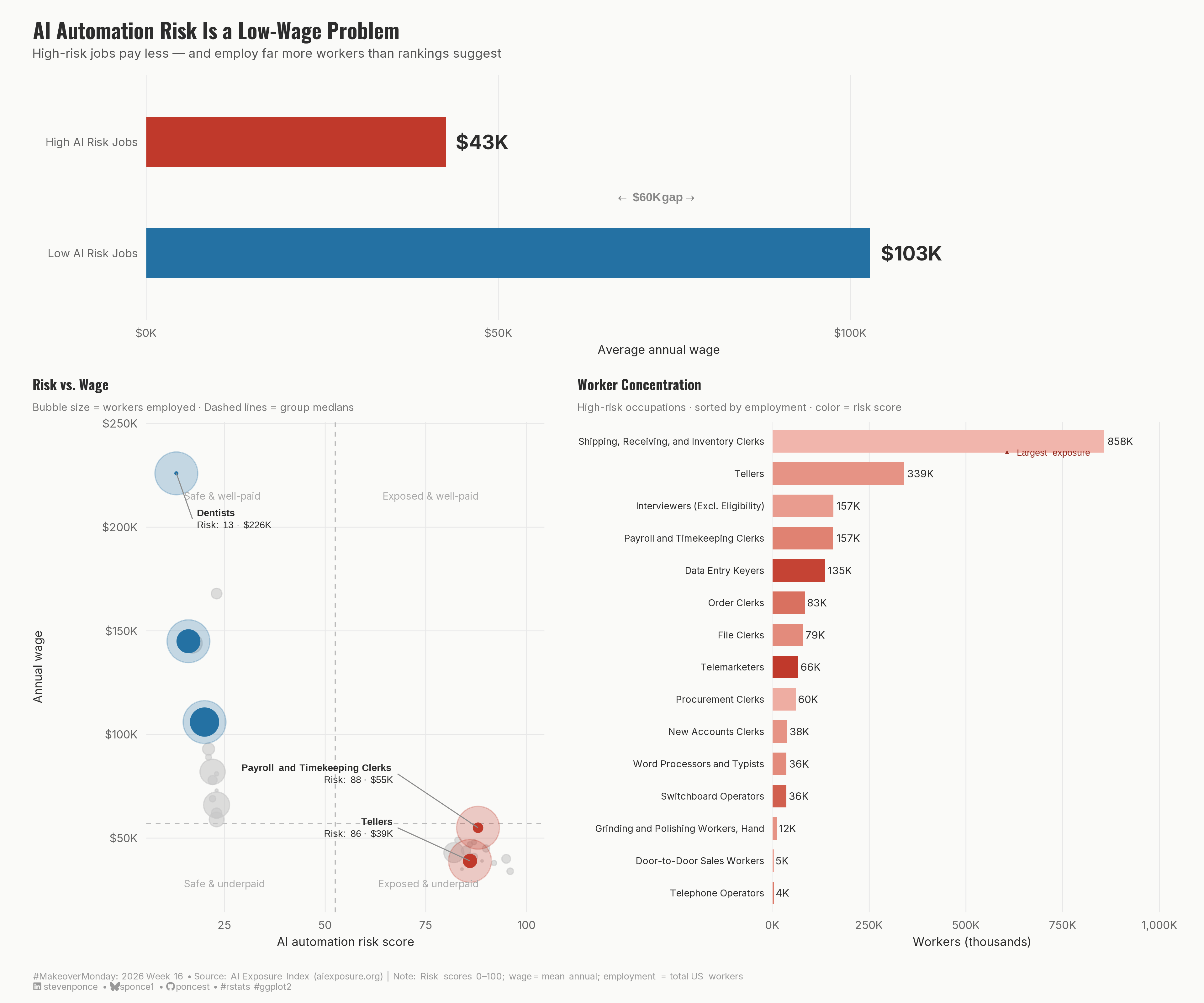
A three-panel makeover of an AI job risk rankings table. Using a wage gap bar, risk-versus-wage scatter plot, and employment concentration chart, this redesign reveals that AI automation risk is not evenly distributed — it falls heaviest on lower-paid occupations that collectively employ hundreds of thousands of workers. Built with ggplot2 and patchwork in R.
Author

Steven Ponce

Published

April 20, 2026

Original

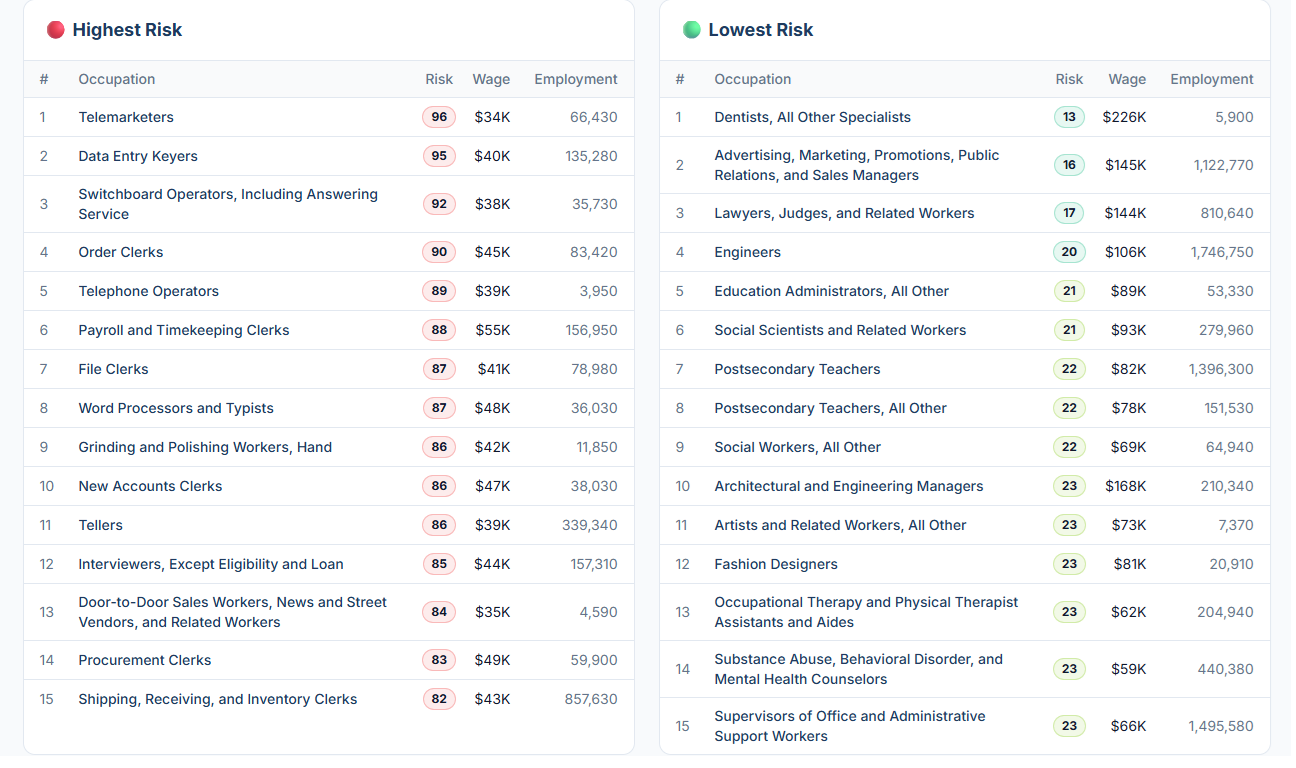
The original visualization comes from AI Risk Rankings

Original visualization

Makeover

Figure 1: A three-panel data visualization titled “AI Automation Risk Is a Low-Wage Problem.” The top panel shows two horizontal bars comparing average annual wages: high AI risk jobs average $43K, while low AI risk jobs average $103K, a $60K gap. The bottom-left scatter plot shows AI automation risk score on the x-axis and annual wage on the y-axis, with bubble size representing the number of workers employed. Jobs are clustered into two groups: low-risk occupations in the upper-left (safe and well-paid) and high-risk occupations in the lower-right (exposed and underpaid), with labeled callouts for Dentists, Engineers, Advertising and Marketing Managers, Payroll and Timekeeping Clerks, and Tellers. The bottom-right horizontal bar chart shows worker concentration among high-risk occupations sorted by employment, revealing that Shipping, Receiving, and Inventory Clerks (858K workers) and Tellers (339K) account for the largest share of AI exposure. Data source: AI Exposure Index, aiexposure.org.

Steps to Create this Graphic

1. Load Packages & Setup

Show code
```{r}
#| label: load
#| warning: false
#| message: false      
#| results: "hide"     

## 1. LOAD PACKAGES & SETUP ----
suppressPackageStartupMessages({
  if (!require("pacman")) install.packages("pacman")
  pacman::p_load(
    tidyverse, ggtext, showtext, scales, 
    glue, janitor, patchwork
)
})

### |- figure size ----
camcorder::gg_record(
  dir    = here::here("temp_plots"),
  device = "png",
  width  = 12,
  height = 10,
  units  = "in",
  dpi    = 320
)

# Source utility functions
suppressMessages(source(here::here("R/utils/fonts.R")))
source(here::here("R/utils/social_icons.R"))
source(here::here("R/utils/image_utils.R"))
source(here::here("R/themes/base_theme.R"))
```

2. Read in the Data

Show code
```{r}
#| label: read
#| include: true
#| eval: true
#| warning: false
#| 

df_raw <- readxl::read_excel(
  here::here("data/MakeoverMonday/2026/AI Jobs Risk.xlsx")) |>
  clean_names()
```

3. Examine the Data

Show code
```{r}
#| label: examine
#| include: true
#| eval: true
#| results: 'hide'
#| warning: false

glimpse(df_raw)
skimr::skim_without_charts(df_raw)
```

4. Tidy Data

Show code
```{r}
#| label: tidy
#| warning: false

df <- df_raw |>
  mutate(
    category = factor(category, levels = c("Highest Risk", "Lowest Risk")),
    # Shorten long occupation names for plot readability
    occupation_short = case_when(
      occupation == "Advertising, Marketing, Promotions, Public Relations, and Sales Managers" ~
        "Advertising & Marketing Managers",
      occupation == "Switchboard Operators, Including Answering Service" ~
        "Switchboard Operators",
      occupation == "Door-to-Door Sales Workers, News and Street Vendors, and Related Workers" ~
        "Door-to-Door Sales Workers",
      occupation == "Occupational Therapy and Physical Therapist Assistants and Aides" ~
        "OT & PT Assistants and Aides",
      occupation == "Substance Abuse, Behavioral Disorder, and Mental Health Counselors" ~
        "Substance Abuse & MH Counselors",
      occupation == "Supervisors of Office and Administrative Support Workers" ~
        "Office & Admin Support Supervisors",
      occupation == "Interviewers, Except Eligibility and Loan" ~
        "Interviewers (Excl. Eligibility)",
      occupation == "Dentists, All Other Specialists" ~ "Dentists",
      occupation == "Lawyers, Judges, and Related Workers" ~ "Lawyers & Judges",
      occupation == "Architectural and Engineering Managers" ~ "Architectural & Engineering Mgrs",
      occupation == "Artists and Related Workers, All Other" ~ "Artists & Related Workers",
      occupation == "Postsecondary Teachers, All Other" ~ "Postsecondary Teachers (Other)",
      TRUE ~ occupation
    )
  )

### |- Act 1 summary stats ----
act1_summary <- df |>
  group_by(category) |>
  summarise(
    avg_wage = mean(wage),
    total_emp = sum(employment),
    .groups = "drop"
  ) |>
  mutate(
    avg_wage_label = dollar(avg_wage, scale = 1 / 1000, suffix = "K", accuracy = 1)
  )

wage_gap <- act1_summary |>
  summarise(gap = diff(avg_wage)) |>
  pull(gap) |>
  abs() |>
  dollar(scale = 1 / 1000, suffix = "K", accuracy = 1)

### |- Act 2 scatter data ----
# Medians for quadrant lines
risk_median <- median(df$risk)
wage_median <- median(df$wage)

# Hero occupations: anchors for the narrative
heroes <- c(
  "Tellers",
  "Payroll and Timekeeping Clerks",
  "Dentists",
  "Engineers",
  "Advertising & Marketing Managers"
)

df_scatter <- df |>
  mutate(
    is_hero = occupation_short %in% heroes,
    hero_color = case_when(
      category == "Highest Risk" & is_hero ~ "hero_high",
      category == "Lowest Risk" & is_hero ~ "hero_low",
      category == "Highest Risk" ~ "field_high",
      TRUE ~ "field_low"
    )
  )

# Extract hero coordinates for annotate() callouts
hero_coords <- df_scatter |>
  filter(is_hero) |>
  select(occupation_short, risk, wage, employment, category)

### |- Act 3 employment bars (high-risk only) ----
df_act3 <- df |>
  filter(category == "Highest Risk") |>
  arrange(desc(employment)) |>
  mutate(
    occupation_short = fct_reorder(occupation_short, employment),
    emp_label = case_when(
      employment >= 1e6 ~ paste0(round(employment / 1e6, 1), "M"),
      employment >= 1e3 ~ paste0(round(employment / 1e3, 0), "K"),
      TRUE ~ as.character(employment)
    )
  )
```

5. Visualization Parameters

Show code
```{r}
#| label: params
#| include: true
#| warning: false

### |- plot aesthetics ----
colors <- get_theme_colors(
  palette = list(
    col_high      = "#C0392B",   
    col_low       = "#2471A3",   
    col_hero_high = "#922B21",   
    col_hero_low  = "#1A5276",   
    col_field     = "#C8C8C8",   
    col_bg        = "#FAFAF8",
    col_text      = "#2D2D2D",
    col_grid      = "#E8E8E8",
    col_quad      = "#BBBBBB",   
    col_segment   = "gray55"     
  )
)

# Convenience aliases 
col_high      <- colors$palette$col_high
col_low       <- colors$palette$col_low
col_hero_high <- colors$palette$col_hero_high
col_hero_low  <- colors$palette$col_hero_low
col_field     <- colors$palette$col_field
col_bg        <- colors$palette$col_bg
col_text      <- colors$palette$col_text
col_grid      <- colors$palette$col_grid
col_quad      <- colors$palette$col_quad
col_segment   <- colors$palette$col_segment

### |- titles and caption ----
title_text    <- "AI Automation Risk Is a Low-Wage Problem"
subtitle_text <- "High-risk jobs pay less — and employ far more workers than rankings suggest"

caption_text <- create_mm_caption(
  mm_year     = 2026,
  mm_week     = 16,
  source_text = "AI Exposure Index (aiexposure.org) | Note: Risk scores 0–100; wage = mean annual; employment = total US workers"
)

### |- fonts ----
setup_fonts()
fonts <- get_font_families()

### |- base theme ----
base_theme  <- create_base_theme(colors = list(background = col_bg, text = col_text))

weekly_theme <- extend_weekly_theme(
  base_theme,
  theme(
    plot.background  = element_rect(fill = col_bg, color = NA),
    panel.background = element_rect(fill = col_bg, color = NA),
    panel.grid.major = element_line(color = col_grid, linewidth = 0.3),
    panel.grid.minor = element_blank(),
    axis.ticks = element_blank(),
    axis.text = element_text(size = 8, color = "#666666"),
    axis.title = element_text(size = 8.5, color = col_text, face = "plain"),
    plot.margin = margin(8, 12, 8, 12)
  )
)

theme_set(weekly_theme)
```

6. Plot

Show code
```{r}
#| label: plot
#| warning: false

### |- ACT 1: Wage gap headline bar ----
p1 <- act1_summary |>
  mutate(
    # More explicit category labels
    category_label = case_when(
      category == "Highest Risk" ~ "High AI Risk Jobs",
      category == "Lowest Risk" ~ "Low AI Risk Jobs"
    ),
    category_label = fct_rev(factor(category_label,
                                    levels = c("High AI Risk Jobs", "Low AI Risk Jobs")
    ))
  ) |>
  ggplot(aes(x = avg_wage, y = category_label, fill = category)) +
  # Geoms
  geom_col(width = 0.45, show.legend = FALSE) +
  geom_text(
    aes(label = avg_wage_label),
    hjust = -0.2,
    size = 5,
    fontface = "bold",
    color = col_text,
    family = fonts$text
  ) +
  # Annotate
  annotate(
    "richtext",
    x = mean(act1_summary$avg_wage),
    y = 1.5,
    label = glue("<span style='color:#888888'>← &nbsp; <b>{wage_gap} gap</b> &nbsp; →</span>"),
    size = 3.0,
    fill = NA, label.color = NA,
    color = col_text
  ) +
  # Scales
  scale_x_continuous(
    labels  = dollar_format(scale = 1 / 1000, suffix = "K", accuracy = 1),
    expand  = expansion(mult = c(0, 0.18)),
    limits  = c(0, max(act1_summary$avg_wage) * 1.2)
  ) +
  scale_fill_manual(values = c("Highest Risk" = col_high, "Lowest Risk" = col_low)) +
  # Labs
  labs(
    title    = title_text,
    subtitle = subtitle_text,
    x        = "Average annual wage",
    y        = NULL
  ) +
  # Theme
  theme(
    panel.grid.major.y = element_blank(),
    panel.grid.major.x = element_line(color = col_grid, linewidth = 0.3),
    plot.title = element_text(
      size = 15, face = "bold", color = col_text,
      family = fonts$title, margin = margin(b = 4)
    ),
    plot.subtitle = element_text(
      size = 9, color = "#555555",
      family = fonts$subtitle, margin = margin(b = 10)
    )
  )


### |- ACT 2: Risk × Wage scatter ----
callout_df <- hero_coords |>
  mutate(
    lx = case_when(
      occupation_short == "Tellers" ~ risk - 18,
      occupation_short == "Payroll and Timekeeping Clerks" ~ risk - 20,
      occupation_short == "Dentists" ~ risk + 4,
      occupation_short == "Engineers" ~ risk - 18,
      occupation_short == "Advertising & Marketing Managers" ~ risk - 18,
      TRUE ~ risk
    ),
    ly = case_when(
      occupation_short == "Tellers" ~ wage + 16000,
      occupation_short == "Payroll and Timekeeping Clerks" ~ wage + 26000,
      occupation_short == "Dentists" ~ wage - 22000,
      occupation_short == "Engineers" ~ wage + 20000,
      occupation_short == "Advertising & Marketing Managers" ~ wage - 22000,
      TRUE ~ wage
    ),
    hjust_val = case_when(
      occupation_short %in% c(
        "Tellers", "Payroll and Timekeeping Clerks",
        "Engineers", "Advertising & Marketing Managers"
      ) ~ 1,
      TRUE ~ 0
    )
  )

p2 <- df_scatter |>
  ggplot(aes(x = risk, y = wage)) +
  
  # Geoms
  geom_vline(xintercept = risk_median, color = col_quad, linewidth = 0.4, linetype = "dashed") +
  geom_hline(yintercept = wage_median, color = col_quad, linewidth = 0.4, linetype = "dashed") +
  geom_point(
    data = filter(df_scatter, !is_hero),
    aes(size = employment),
    color = col_field, alpha = 0.6, show.legend = FALSE
  ) +
  geom_point(
    data = filter(df_scatter, is_hero),
    aes(size = employment),
    color = ifelse(
      filter(df_scatter, is_hero)$category == "Highest Risk", col_high, col_low
    ),
    alpha = 0.25, show.legend = FALSE,
    size = 14
  ) +
  geom_point(
    data = filter(df_scatter, is_hero),
    aes(
      size  = employment,
      color = category
    ),
    show.legend = FALSE
  ) +
  # Annotate
  annotate("text",
           x = 15, y = 215000, label = "Safe & well-paid",
           size = 2.5, color = "#AAAAAA", hjust = 0, family = fonts$text
  ) +
  annotate("text",
           x = 88, y = 215000, label = "Exposed & well-paid",
           size = 2.5, color = "#AAAAAA", hjust = 1, family = fonts$text
  ) +
  annotate("text",
           x = 15, y = 28000, label = "Safe & underpaid",
           size = 2.5, color = "#AAAAAA", hjust = 0, family = fonts$text
  ) +
  annotate("text",
           x = 88, y = 28000, label = "Exposed & underpaid",
           size = 2.5, color = "#AAAAAA", hjust = 1, family = fonts$text
  ) +
  annotate("segment",
           x = callout_df$risk, xend = callout_df$lx,
           y = callout_df$wage, yend = callout_df$ly,
           color = col_segment, linewidth = 0.35
  ) +
  annotate("richtext",
           x = callout_df$lx,
           y = callout_df$ly,
           label = glue::glue(
             "<span style='font-size:7pt'><b>{callout_df$occupation_short}</b><br>",
             "Risk: {callout_df$risk} · {dollar(callout_df$wage, scale=1/1000, suffix='K', accuracy=1)}</span>"
           ),
           hjust = callout_df$hjust_val,
           fill = NA, label.color = NA,
           size = 2.5,
           color = col_text
  ) +
  # Scales
  scale_color_manual(values = c("Highest Risk" = col_high, "Lowest Risk" = col_low)) +
  scale_size_area(max_size = 9) +
  scale_y_continuous(
    labels = dollar_format(scale = 1 / 1000, suffix = "K", accuracy = 1),
    limits = c(25000, 240000)
  ) +
  scale_x_continuous(limits = c(10, 100)) +
  # Labs
  labs(
    x = "AI automation risk score",
    y = "Annual wage",
    title = "Risk vs. Wage",
    subtitle = "Bubble size = workers employed · Dashed lines = group medians"
  ) +
  # Theme
  theme(
    plot.title = element_text(size = 10, face = "bold", color = col_text, family = fonts$title),
    plot.subtitle = element_text(
      size = 7.5, color = "#777777", family = fonts$subtitle,
      margin = margin(b = 6)
    )
  )


### |- ACT 3: Employment concentration bars ----
p3 <- df_act3 |>
  ggplot(aes(x = employment, y = occupation_short, fill = risk)) +
  # Geoms
  geom_col(show.legend = FALSE, width = 0.7) +
  geom_text(
    aes(label = emp_label),
    hjust = -0.15,
    size = 2.6,
    color = col_text,
    family = fonts$text
  ) +
  # Annotate
  annotate(
    "richtext",
    x = max(df_act3$employment) * 0.98,
    y = nlevels(df_act3$occupation_short) - 0.3,
    label = "<span style='font-size:6.5pt; color:#922B21'>▲ Largest exposure</span>",
    hjust = 1, fill = NA, label.color = NA
  ) +
  # Scales
  scale_x_continuous(
    labels = label_comma(scale = 1 / 1000, suffix = "K"),
    expand = expansion(mult = c(0, 0.2))
  ) +
  scale_fill_gradient(
    low    = "#F5C6C0",
    high   = col_high,
    limits = c(80, 96)
  ) +
  # Labs
  labs(
    x = "Workers (thousands)",
    y = NULL,
    title = "Worker Concentration",
    subtitle = "High-risk occupations · sorted by employment · color = risk score"
  ) +
  # Theme
  theme(
    axis.text.y = element_text(size = 6.8, color = col_text, hjust = 1),
    panel.grid.major.y = element_blank(),
    panel.grid.major.x = element_line(color = col_grid, linewidth = 0.3),
    plot.title = element_text(size = 10, face = "bold", color = col_text, family = fonts$title),
    plot.subtitle = element_text(
      size = 7.5, color = "#777777", family = fonts$subtitle,
      margin = margin(b = 6)
    )
  )


### |- Combine plots ----
layout <- "
AAAA
BBCC
"

p_final <- p1 + p2 + p3 +
  plot_layout(
    design    = layout,
    heights   = c(0.8, 1.6),
    widths    = c(1.25, 0.9)  
  ) +
  plot_annotation(
    caption = caption_text,
    theme   = theme(
      plot.background = element_rect(fill = col_bg, color = NA),
      plot.caption    = element_markdown(
        size    = 6.5,
        color   = "#999999",
        hjust   = 0,
        margin  = margin(t = 8),
        family = fonts$captions
      )
    )
  )
```

7. Save

Show code
```{r}
#| label: save
#| warning: false

### |-  plot image ----  
save_plot_patchwork(
  plot = p_final, 
  type = "makeovermonday", 
  year = current_year,
  week = current_week,
  width = 12, 
  height = 10
  )
```

8. Session Info

TipExpand for Session Info
R version 4.5.3 (2026-03-11 ucrt)
Platform: x86_64-w64-mingw32/x64
Running under: Windows 11 x64 (build 26100)

Matrix products: default
  LAPACK version 3.12.1

locale:
[1] LC_COLLATE=English_United States.utf8 
[2] LC_CTYPE=English_United States.utf8   
[3] LC_MONETARY=English_United States.utf8
[4] LC_NUMERIC=C                          
[5] LC_TIME=English_United States.utf8    

time zone: America/New_York
tzcode source: internal

attached base packages:
[1] stats     graphics  grDevices utils     datasets  methods   base     

other attached packages:
 [1] here_1.0.2      patchwork_1.3.2 janitor_2.2.1   glue_1.8.0     
 [5] scales_1.4.0    showtext_0.9-8  showtextdb_3.0  sysfonts_0.8.9 
 [9] ggtext_0.1.2    lubridate_1.9.5 forcats_1.0.1   stringr_1.6.0  
[13] dplyr_1.2.1     purrr_1.2.2     readr_2.2.0     tidyr_1.3.2    
[17] tibble_3.3.1    ggplot2_4.0.2   tidyverse_2.0.0 pacman_0.5.1   

loaded via a namespace (and not attached):
 [1] gtable_0.3.6       xfun_0.57          htmlwidgets_1.6.4  tzdb_0.5.0        
 [5] yulab.utils_0.2.4  vctrs_0.7.3        tools_4.5.3        generics_0.1.4    
 [9] curl_7.0.0         gifski_1.32.0-2    pkgconfig_2.0.3    ggplotify_0.1.3   
[13] RColorBrewer_1.1-3 skimr_2.2.2        S7_0.2.1           readxl_1.4.5      
[17] lifecycle_1.0.5    compiler_4.5.3     farver_2.1.2       textshaping_1.0.5 
[21] repr_1.1.7         codetools_0.2-20   snakecase_0.11.1   litedown_0.9      
[25] htmltools_0.5.9    yaml_2.3.12        pillar_1.11.1      camcorder_0.1.0   
[29] magick_2.9.1       commonmark_2.0.0   tidyselect_1.2.1   digest_0.6.39     
[33] stringi_1.8.7      labeling_0.4.3     rsvg_2.7.0         rprojroot_2.1.1   
[37] fastmap_1.2.0      grid_4.5.3         cli_3.6.6          magrittr_2.0.5    
[41] base64enc_0.1-6    withr_3.0.2        rappdirs_0.3.4     timechange_0.4.0  
[45] rmarkdown_2.31     otel_0.2.0         cellranger_1.1.0   hms_1.1.4         
[49] evaluate_1.0.5     knitr_1.51         markdown_2.0       gridGraphics_0.5-1
[53] rlang_1.2.0        gridtext_0.1.6     Rcpp_1.1.1         xml2_1.5.2        
[57] svglite_2.2.2      rstudioapi_0.18.0  jsonlite_2.0.0     R6_2.6.1          
[61] fs_2.0.1           systemfonts_1.3.2 

9. GitHub Repository

TipExpand for GitHub Repo

The complete code for this analysis is available in mm_2026_16.qmd.

For the full repository, click here.

10. References

TipExpand for References

Primary Data (Makeover Monday):

  1. Makeover Monday 2026 Week 16: AI Risk Rankings

  2. Original Chart: AI Exposure Index — aiexposure.org

    • Source: AI Exposure Index (aiexposure.org)
    • Coverage: 30 occupations ranked by AI automation risk score (0–100), with mean annual wage and total US employment

Source Data:

  1. AI Exposure Index Rankings
    • Coverage: Occupation-level AI automation risk scores, mean annual wages, and total US worker counts
    • Unit: Risk score 0–100; wage = mean annual in USD; employment = total US workers per occupation

Note: The dataset covers 15 highest-risk and 15 lowest-risk occupations as ranked by the AI Exposure Index. Average wages and employment figures are reported at the occupation level. No normalization beyond the published risk scores was applied. No additional data sources were used.

11. Custom Functions Documentation

Note📦 Custom Helper Functions

This analysis uses custom functions from my personal module library for efficiency and consistency across projects.

Functions Used:

  • fonts.R: setup_fonts(), get_font_families() - Font management with showtext
  • social_icons.R: create_social_caption() - Generates formatted social media captions
  • image_utils.R: save_plot() - Consistent plot saving with naming conventions
  • base_theme.R: create_base_theme(), extend_weekly_theme(), get_theme_colors() - Custom ggplot2 themes

Why custom functions?
These utilities standardize theming, fonts, and output across all my data visualizations. The core analysis (data tidying and visualization logic) uses only standard tidyverse packages.

Source Code:
View all custom functions → GitHub: R/utils

Back to top

Citation

BibTeX citation:
@online{ponce2026,
  author = {Ponce, Steven},
  title = {AI {Automation} {Risk} {Is} a {Low-Wage} {Problem}},
  date = {2026-04-20},
  url = {https://stevenponce.netlify.app/data_visualizations/MakeoverMonday/2026/mm_2026_16.html},
  langid = {en}
}
For attribution, please cite this work as:
Ponce, Steven. 2026. “AI Automation Risk Is a Low-Wage Problem.” April 20, 2026. https://stevenponce.netlify.app/data_visualizations/MakeoverMonday/2026/mm_2026_16.html.
Source Code
---
title: "AI Automation Risk Is a Low-Wage Problem"
subtitle: "High-risk jobs pay less — and employ far more workers than rankings suggest"
description: "A three-panel makeover of an AI job risk rankings table. Using a wage gap bar, risk-versus-wage scatter plot, and employment concentration chart, this redesign reveals that AI automation risk is not evenly distributed — it falls heaviest on lower-paid occupations that collectively employ hundreds of thousands of workers. Built with ggplot2 and patchwork in R."
date: "2026-04-20"
author:
  - name: "Steven Ponce"
    url: "https://stevenponce.netlify.app"
citation:
  url: "https://stevenponce.netlify.app/data_visualizations/MakeoverMonday/2026/mm_2026_16.html"
categories: ["MakeoverMonday", "Data Visualization", "R Programming", "2026"]   
tags: [
  "makeover-monday",
  "data-visualization",
  "ggplot2",
  "patchwork",
  "scatter-plot",
  "bar-chart",
  "multi-panel",
  "artificial-intelligence",
  "labor-economics",
  "wage-gap",
  "employment",
  "automation",
  "2026"
]
image: "thumbnails/mm_2026_16.png"
format:
  html:
    toc: true
    toc-depth: 5
    code-link: true
    code-fold: true
    code-tools: true
    code-summary: "Show code"
    self-contained: true
    theme: 
      light: [flatly, assets/styling/custom_styles.scss]
      dark: [darkly, assets/styling/custom_styles_dark.scss]
editor_options: 
  chunk_output_type: inline
execute: 
  freeze: true                                      
  cache: true                                       
  error: false
  message: false
  warning: false
  eval: true
editor: 
  markdown: 
    wrap: 72
---

```{r}
#| label: setup-links
#| include: false

# CENTRALIZED LINK MANAGEMENT

## Project-specific info 
current_year <- 2026
current_week <- 16
project_file <- "mm_2026_16.qmd"
project_image <- "mm_2026_16.png"

## Data Sources
data_main <- "https://data.world/makeovermonday/ai-risk-rankings"
data_secondary <- "https://data.world/makeovermonday/ai-risk-rankings"

## Repository Links  
repo_main <- "https://github.com/poncest/personal-website/"
repo_file <- paste0("https://github.com/poncest/personal-website/blob/master/data_visualizations/MakeoverMonday/", current_year, "/", project_file)

## External Resources/Images
chart_original <- "https://raw.githubusercontent.com/poncest/MakeoverMonday/refs/heads/master/2026/Week_16/original_chart.png"

## Organization/Platform Links
org_primary <- "https://www.aiexposure.org/rankings"
org_secondary <- "https://www.aiexposure.org/rankings"

# Helper function to create markdown links
create_link <- function(text, url) {
  paste0("[", text, "](", url, ")")
}

# Helper function for citation-style links
create_citation_link <- function(text, url, title = NULL) {
  if (is.null(title)) {
    paste0("[", text, "](", url, ")")
  } else {
    paste0("[", text, "](", url, ' "', title, '")')
  }
}
```

### Original

The original visualization comes from `r create_link("AI Risk Rankings", data_secondary)`
![Original visualization](https://raw.githubusercontent.com/poncest/MakeoverMonday/refs/heads/master/2026/Week_16/original_chart.png)

### Makeover

![A three-panel data visualization titled "AI Automation Risk Is a Low-Wage Problem." The top panel shows two horizontal bars comparing average annual wages: high AI risk jobs average $43K, while low AI risk jobs average $103K, a $60K gap. The bottom-left scatter plot shows AI automation risk score on the x-axis and annual wage on the y-axis, with bubble size representing the number of workers employed. Jobs are clustered into two groups: low-risk occupations in the upper-left (safe and well-paid) and high-risk occupations in the lower-right (exposed and underpaid), with labeled callouts for Dentists, Engineers, Advertising and Marketing Managers, Payroll and Timekeeping Clerks, and Tellers. The bottom-right horizontal bar chart shows worker concentration among high-risk occupations sorted by employment, revealing that Shipping, Receiving, and Inventory Clerks (858K workers) and Tellers (339K) account for the largest share of AI exposure. Data source: AI Exposure Index, aiexposure.org.](mm_2026_16.png){#fig-1}

### [**Steps to Create this Graphic**]{.mark}

#### [1. Load Packages & Setup]{.smallcaps}

```{r}
#| label: load
#| warning: false
#| message: false      
#| results: "hide"     

## 1. LOAD PACKAGES & SETUP ----
suppressPackageStartupMessages({
  if (!require("pacman")) install.packages("pacman")
  pacman::p_load(
    tidyverse, ggtext, showtext, scales, 
    glue, janitor, patchwork
)
})

### |- figure size ----
camcorder::gg_record(
  dir    = here::here("temp_plots"),
  device = "png",
  width  = 12,
  height = 10,
  units  = "in",
  dpi    = 320
)

# Source utility functions
suppressMessages(source(here::here("R/utils/fonts.R")))
source(here::here("R/utils/social_icons.R"))
source(here::here("R/utils/image_utils.R"))
source(here::here("R/themes/base_theme.R"))
```

#### [2. Read in the Data]{.smallcaps}

```{r}
#| label: read
#| include: true
#| eval: true
#| warning: false
#| 

df_raw <- readxl::read_excel(
  here::here("data/MakeoverMonday/2026/AI Jobs Risk.xlsx")) |>
  clean_names()
```

#### [3. Examine the Data]{.smallcaps}

```{r}
#| label: examine
#| include: true
#| eval: true
#| results: 'hide'
#| warning: false

glimpse(df_raw)
skimr::skim_without_charts(df_raw)
```

#### [4. Tidy Data]{.smallcaps}

```{r}
#| label: tidy
#| warning: false

df <- df_raw |>
  mutate(
    category = factor(category, levels = c("Highest Risk", "Lowest Risk")),
    # Shorten long occupation names for plot readability
    occupation_short = case_when(
      occupation == "Advertising, Marketing, Promotions, Public Relations, and Sales Managers" ~
        "Advertising & Marketing Managers",
      occupation == "Switchboard Operators, Including Answering Service" ~
        "Switchboard Operators",
      occupation == "Door-to-Door Sales Workers, News and Street Vendors, and Related Workers" ~
        "Door-to-Door Sales Workers",
      occupation == "Occupational Therapy and Physical Therapist Assistants and Aides" ~
        "OT & PT Assistants and Aides",
      occupation == "Substance Abuse, Behavioral Disorder, and Mental Health Counselors" ~
        "Substance Abuse & MH Counselors",
      occupation == "Supervisors of Office and Administrative Support Workers" ~
        "Office & Admin Support Supervisors",
      occupation == "Interviewers, Except Eligibility and Loan" ~
        "Interviewers (Excl. Eligibility)",
      occupation == "Dentists, All Other Specialists" ~ "Dentists",
      occupation == "Lawyers, Judges, and Related Workers" ~ "Lawyers & Judges",
      occupation == "Architectural and Engineering Managers" ~ "Architectural & Engineering Mgrs",
      occupation == "Artists and Related Workers, All Other" ~ "Artists & Related Workers",
      occupation == "Postsecondary Teachers, All Other" ~ "Postsecondary Teachers (Other)",
      TRUE ~ occupation
    )
  )

### |- Act 1 summary stats ----
act1_summary <- df |>
  group_by(category) |>
  summarise(
    avg_wage = mean(wage),
    total_emp = sum(employment),
    .groups = "drop"
  ) |>
  mutate(
    avg_wage_label = dollar(avg_wage, scale = 1 / 1000, suffix = "K", accuracy = 1)
  )

wage_gap <- act1_summary |>
  summarise(gap = diff(avg_wage)) |>
  pull(gap) |>
  abs() |>
  dollar(scale = 1 / 1000, suffix = "K", accuracy = 1)

### |- Act 2 scatter data ----
# Medians for quadrant lines
risk_median <- median(df$risk)
wage_median <- median(df$wage)

# Hero occupations: anchors for the narrative
heroes <- c(
  "Tellers",
  "Payroll and Timekeeping Clerks",
  "Dentists",
  "Engineers",
  "Advertising & Marketing Managers"
)

df_scatter <- df |>
  mutate(
    is_hero = occupation_short %in% heroes,
    hero_color = case_when(
      category == "Highest Risk" & is_hero ~ "hero_high",
      category == "Lowest Risk" & is_hero ~ "hero_low",
      category == "Highest Risk" ~ "field_high",
      TRUE ~ "field_low"
    )
  )

# Extract hero coordinates for annotate() callouts
hero_coords <- df_scatter |>
  filter(is_hero) |>
  select(occupation_short, risk, wage, employment, category)

### |- Act 3 employment bars (high-risk only) ----
df_act3 <- df |>
  filter(category == "Highest Risk") |>
  arrange(desc(employment)) |>
  mutate(
    occupation_short = fct_reorder(occupation_short, employment),
    emp_label = case_when(
      employment >= 1e6 ~ paste0(round(employment / 1e6, 1), "M"),
      employment >= 1e3 ~ paste0(round(employment / 1e3, 0), "K"),
      TRUE ~ as.character(employment)
    )
  )
```

#### [5. Visualization Parameters]{.smallcaps}

```{r}
#| label: params
#| include: true
#| warning: false

### |- plot aesthetics ----
colors <- get_theme_colors(
  palette = list(
    col_high      = "#C0392B",   
    col_low       = "#2471A3",   
    col_hero_high = "#922B21",   
    col_hero_low  = "#1A5276",   
    col_field     = "#C8C8C8",   
    col_bg        = "#FAFAF8",
    col_text      = "#2D2D2D",
    col_grid      = "#E8E8E8",
    col_quad      = "#BBBBBB",   
    col_segment   = "gray55"     
  )
)

# Convenience aliases 
col_high      <- colors$palette$col_high
col_low       <- colors$palette$col_low
col_hero_high <- colors$palette$col_hero_high
col_hero_low  <- colors$palette$col_hero_low
col_field     <- colors$palette$col_field
col_bg        <- colors$palette$col_bg
col_text      <- colors$palette$col_text
col_grid      <- colors$palette$col_grid
col_quad      <- colors$palette$col_quad
col_segment   <- colors$palette$col_segment

### |- titles and caption ----
title_text    <- "AI Automation Risk Is a Low-Wage Problem"
subtitle_text <- "High-risk jobs pay less — and employ far more workers than rankings suggest"

caption_text <- create_mm_caption(
  mm_year     = 2026,
  mm_week     = 16,
  source_text = "AI Exposure Index (aiexposure.org) | Note: Risk scores 0–100; wage = mean annual; employment = total US workers"
)

### |- fonts ----
setup_fonts()
fonts <- get_font_families()

### |- base theme ----
base_theme  <- create_base_theme(colors = list(background = col_bg, text = col_text))

weekly_theme <- extend_weekly_theme(
  base_theme,
  theme(
    plot.background  = element_rect(fill = col_bg, color = NA),
    panel.background = element_rect(fill = col_bg, color = NA),
    panel.grid.major = element_line(color = col_grid, linewidth = 0.3),
    panel.grid.minor = element_blank(),
    axis.ticks = element_blank(),
    axis.text = element_text(size = 8, color = "#666666"),
    axis.title = element_text(size = 8.5, color = col_text, face = "plain"),
    plot.margin = margin(8, 12, 8, 12)
  )
)

theme_set(weekly_theme)
```

#### [6. Plot]{.smallcaps}

```{r}
#| label: plot
#| warning: false

### |- ACT 1: Wage gap headline bar ----
p1 <- act1_summary |>
  mutate(
    # More explicit category labels
    category_label = case_when(
      category == "Highest Risk" ~ "High AI Risk Jobs",
      category == "Lowest Risk" ~ "Low AI Risk Jobs"
    ),
    category_label = fct_rev(factor(category_label,
                                    levels = c("High AI Risk Jobs", "Low AI Risk Jobs")
    ))
  ) |>
  ggplot(aes(x = avg_wage, y = category_label, fill = category)) +
  # Geoms
  geom_col(width = 0.45, show.legend = FALSE) +
  geom_text(
    aes(label = avg_wage_label),
    hjust = -0.2,
    size = 5,
    fontface = "bold",
    color = col_text,
    family = fonts$text
  ) +
  # Annotate
  annotate(
    "richtext",
    x = mean(act1_summary$avg_wage),
    y = 1.5,
    label = glue("<span style='color:#888888'>← &nbsp; <b>{wage_gap} gap</b> &nbsp; →</span>"),
    size = 3.0,
    fill = NA, label.color = NA,
    color = col_text
  ) +
  # Scales
  scale_x_continuous(
    labels  = dollar_format(scale = 1 / 1000, suffix = "K", accuracy = 1),
    expand  = expansion(mult = c(0, 0.18)),
    limits  = c(0, max(act1_summary$avg_wage) * 1.2)
  ) +
  scale_fill_manual(values = c("Highest Risk" = col_high, "Lowest Risk" = col_low)) +
  # Labs
  labs(
    title    = title_text,
    subtitle = subtitle_text,
    x        = "Average annual wage",
    y        = NULL
  ) +
  # Theme
  theme(
    panel.grid.major.y = element_blank(),
    panel.grid.major.x = element_line(color = col_grid, linewidth = 0.3),
    plot.title = element_text(
      size = 15, face = "bold", color = col_text,
      family = fonts$title, margin = margin(b = 4)
    ),
    plot.subtitle = element_text(
      size = 9, color = "#555555",
      family = fonts$subtitle, margin = margin(b = 10)
    )
  )


### |- ACT 2: Risk × Wage scatter ----
callout_df <- hero_coords |>
  mutate(
    lx = case_when(
      occupation_short == "Tellers" ~ risk - 18,
      occupation_short == "Payroll and Timekeeping Clerks" ~ risk - 20,
      occupation_short == "Dentists" ~ risk + 4,
      occupation_short == "Engineers" ~ risk - 18,
      occupation_short == "Advertising & Marketing Managers" ~ risk - 18,
      TRUE ~ risk
    ),
    ly = case_when(
      occupation_short == "Tellers" ~ wage + 16000,
      occupation_short == "Payroll and Timekeeping Clerks" ~ wage + 26000,
      occupation_short == "Dentists" ~ wage - 22000,
      occupation_short == "Engineers" ~ wage + 20000,
      occupation_short == "Advertising & Marketing Managers" ~ wage - 22000,
      TRUE ~ wage
    ),
    hjust_val = case_when(
      occupation_short %in% c(
        "Tellers", "Payroll and Timekeeping Clerks",
        "Engineers", "Advertising & Marketing Managers"
      ) ~ 1,
      TRUE ~ 0
    )
  )

p2 <- df_scatter |>
  ggplot(aes(x = risk, y = wage)) +
  
  # Geoms
  geom_vline(xintercept = risk_median, color = col_quad, linewidth = 0.4, linetype = "dashed") +
  geom_hline(yintercept = wage_median, color = col_quad, linewidth = 0.4, linetype = "dashed") +
  geom_point(
    data = filter(df_scatter, !is_hero),
    aes(size = employment),
    color = col_field, alpha = 0.6, show.legend = FALSE
  ) +
  geom_point(
    data = filter(df_scatter, is_hero),
    aes(size = employment),
    color = ifelse(
      filter(df_scatter, is_hero)$category == "Highest Risk", col_high, col_low
    ),
    alpha = 0.25, show.legend = FALSE,
    size = 14
  ) +
  geom_point(
    data = filter(df_scatter, is_hero),
    aes(
      size  = employment,
      color = category
    ),
    show.legend = FALSE
  ) +
  # Annotate
  annotate("text",
           x = 15, y = 215000, label = "Safe & well-paid",
           size = 2.5, color = "#AAAAAA", hjust = 0, family = fonts$text
  ) +
  annotate("text",
           x = 88, y = 215000, label = "Exposed & well-paid",
           size = 2.5, color = "#AAAAAA", hjust = 1, family = fonts$text
  ) +
  annotate("text",
           x = 15, y = 28000, label = "Safe & underpaid",
           size = 2.5, color = "#AAAAAA", hjust = 0, family = fonts$text
  ) +
  annotate("text",
           x = 88, y = 28000, label = "Exposed & underpaid",
           size = 2.5, color = "#AAAAAA", hjust = 1, family = fonts$text
  ) +
  annotate("segment",
           x = callout_df$risk, xend = callout_df$lx,
           y = callout_df$wage, yend = callout_df$ly,
           color = col_segment, linewidth = 0.35
  ) +
  annotate("richtext",
           x = callout_df$lx,
           y = callout_df$ly,
           label = glue::glue(
             "<span style='font-size:7pt'><b>{callout_df$occupation_short}</b><br>",
             "Risk: {callout_df$risk} · {dollar(callout_df$wage, scale=1/1000, suffix='K', accuracy=1)}</span>"
           ),
           hjust = callout_df$hjust_val,
           fill = NA, label.color = NA,
           size = 2.5,
           color = col_text
  ) +
  # Scales
  scale_color_manual(values = c("Highest Risk" = col_high, "Lowest Risk" = col_low)) +
  scale_size_area(max_size = 9) +
  scale_y_continuous(
    labels = dollar_format(scale = 1 / 1000, suffix = "K", accuracy = 1),
    limits = c(25000, 240000)
  ) +
  scale_x_continuous(limits = c(10, 100)) +
  # Labs
  labs(
    x = "AI automation risk score",
    y = "Annual wage",
    title = "Risk vs. Wage",
    subtitle = "Bubble size = workers employed · Dashed lines = group medians"
  ) +
  # Theme
  theme(
    plot.title = element_text(size = 10, face = "bold", color = col_text, family = fonts$title),
    plot.subtitle = element_text(
      size = 7.5, color = "#777777", family = fonts$subtitle,
      margin = margin(b = 6)
    )
  )


### |- ACT 3: Employment concentration bars ----
p3 <- df_act3 |>
  ggplot(aes(x = employment, y = occupation_short, fill = risk)) +
  # Geoms
  geom_col(show.legend = FALSE, width = 0.7) +
  geom_text(
    aes(label = emp_label),
    hjust = -0.15,
    size = 2.6,
    color = col_text,
    family = fonts$text
  ) +
  # Annotate
  annotate(
    "richtext",
    x = max(df_act3$employment) * 0.98,
    y = nlevels(df_act3$occupation_short) - 0.3,
    label = "<span style='font-size:6.5pt; color:#922B21'>▲ Largest exposure</span>",
    hjust = 1, fill = NA, label.color = NA
  ) +
  # Scales
  scale_x_continuous(
    labels = label_comma(scale = 1 / 1000, suffix = "K"),
    expand = expansion(mult = c(0, 0.2))
  ) +
  scale_fill_gradient(
    low    = "#F5C6C0",
    high   = col_high,
    limits = c(80, 96)
  ) +
  # Labs
  labs(
    x = "Workers (thousands)",
    y = NULL,
    title = "Worker Concentration",
    subtitle = "High-risk occupations · sorted by employment · color = risk score"
  ) +
  # Theme
  theme(
    axis.text.y = element_text(size = 6.8, color = col_text, hjust = 1),
    panel.grid.major.y = element_blank(),
    panel.grid.major.x = element_line(color = col_grid, linewidth = 0.3),
    plot.title = element_text(size = 10, face = "bold", color = col_text, family = fonts$title),
    plot.subtitle = element_text(
      size = 7.5, color = "#777777", family = fonts$subtitle,
      margin = margin(b = 6)
    )
  )


### |- Combine plots ----
layout <- "
AAAA
BBCC
"

p_final <- p1 + p2 + p3 +
  plot_layout(
    design    = layout,
    heights   = c(0.8, 1.6),
    widths    = c(1.25, 0.9)  
  ) +
  plot_annotation(
    caption = caption_text,
    theme   = theme(
      plot.background = element_rect(fill = col_bg, color = NA),
      plot.caption    = element_markdown(
        size    = 6.5,
        color   = "#999999",
        hjust   = 0,
        margin  = margin(t = 8),
        family = fonts$captions
      )
    )
  )
```

#### [7. Save]{.smallcaps}

```{r}
#| label: save
#| warning: false

### |-  plot image ----  
save_plot_patchwork(
  plot = p_final, 
  type = "makeovermonday", 
  year = current_year,
  week = current_week,
  width = 12, 
  height = 10
  )
```

#### [8. Session Info]{.smallcaps}

::: {.callout-tip collapse="true"}
##### Expand for Session Info

```{r, echo = FALSE}
#| eval: true
#| warning: false

sessionInfo()
```
:::

#### [9. GitHub Repository]{.smallcaps}

::: {.callout-tip collapse="true"}
##### Expand for GitHub Repo

The complete code for this analysis is available in `r create_link(project_file, repo_file)`.

For the full repository, `r create_link("click here", repo_main)`.
:::


#### [10. References]{.smallcaps}
::: {.callout-tip collapse="true"}
##### Expand for References
**Primary Data (Makeover Monday):**

1. Makeover Monday `r current_year` Week `r current_week`: `r create_link("AI Risk Rankings", data_main)`

2. Original Chart: `r create_link("AI Exposure Index — aiexposure.org", "https://www.aiexposure.org/rankings")`
   - Source: AI Exposure Index (aiexposure.org)
   - Coverage: 30 occupations ranked by AI automation risk score (0–100), with mean annual wage and total US employment

**Source Data:**

3. `r create_link("AI Exposure Index Rankings", "https://www.aiexposure.org/rankings")`
   - Coverage: Occupation-level AI automation risk scores, mean annual wages, and total US worker counts
   - Unit: Risk score 0–100; wage = mean annual in USD; employment = total US workers per occupation

**Note:** The dataset covers 15 highest-risk and 15 lowest-risk
occupations as ranked by the AI Exposure Index. Average wages and
employment figures are reported at the occupation level. No
normalization beyond the published risk scores was applied. No
additional data sources were used.
:::


#### [11. Custom Functions Documentation]{.smallcaps}

::: {.callout-note collapse="true"}
##### 📦 Custom Helper Functions

This analysis uses custom functions from my personal module library for efficiency and consistency across projects.

**Functions Used:**

-   **`fonts.R`**: `setup_fonts()`, `get_font_families()` - Font management with showtext
-   **`social_icons.R`**: `create_social_caption()` - Generates formatted social media captions
-   **`image_utils.R`**: `save_plot()` - Consistent plot saving with naming conventions
-   **`base_theme.R`**: `create_base_theme()`, `extend_weekly_theme()`, `get_theme_colors()` - Custom ggplot2 themes

**Why custom functions?**\
These utilities standardize theming, fonts, and output across all my data visualizations. The core analysis (data tidying and visualization logic) uses only standard tidyverse packages.

**Source Code:**\
View all custom functions → [GitHub: R/utils](https://github.com/poncest/personal-website/tree/master/R)
:::

© 2024 Steven Ponce

Source Issues
