• Steven Ponce
  • About
  • Data Visualizations
  • Projects
  • Resume
  • Email

On this page

  • Original
  • Makeover
  • Steps to Create this Graphic
    • 1. Load Packages & Setup
    • 2. Read in the Data
    • 3. Examine the Data
    • 4. Tidy Data
    • 5. Visualization Parameters
    • 6. Plot
    • 7. Save
    • 8. Session Info
    • 9. GitHub Repository
    • 10. References
    • 11. Custom Functions Documentation

San Diego taco ratings barely separate the best from the rest

  • Show All Code
  • Hide All Code

  • View Source

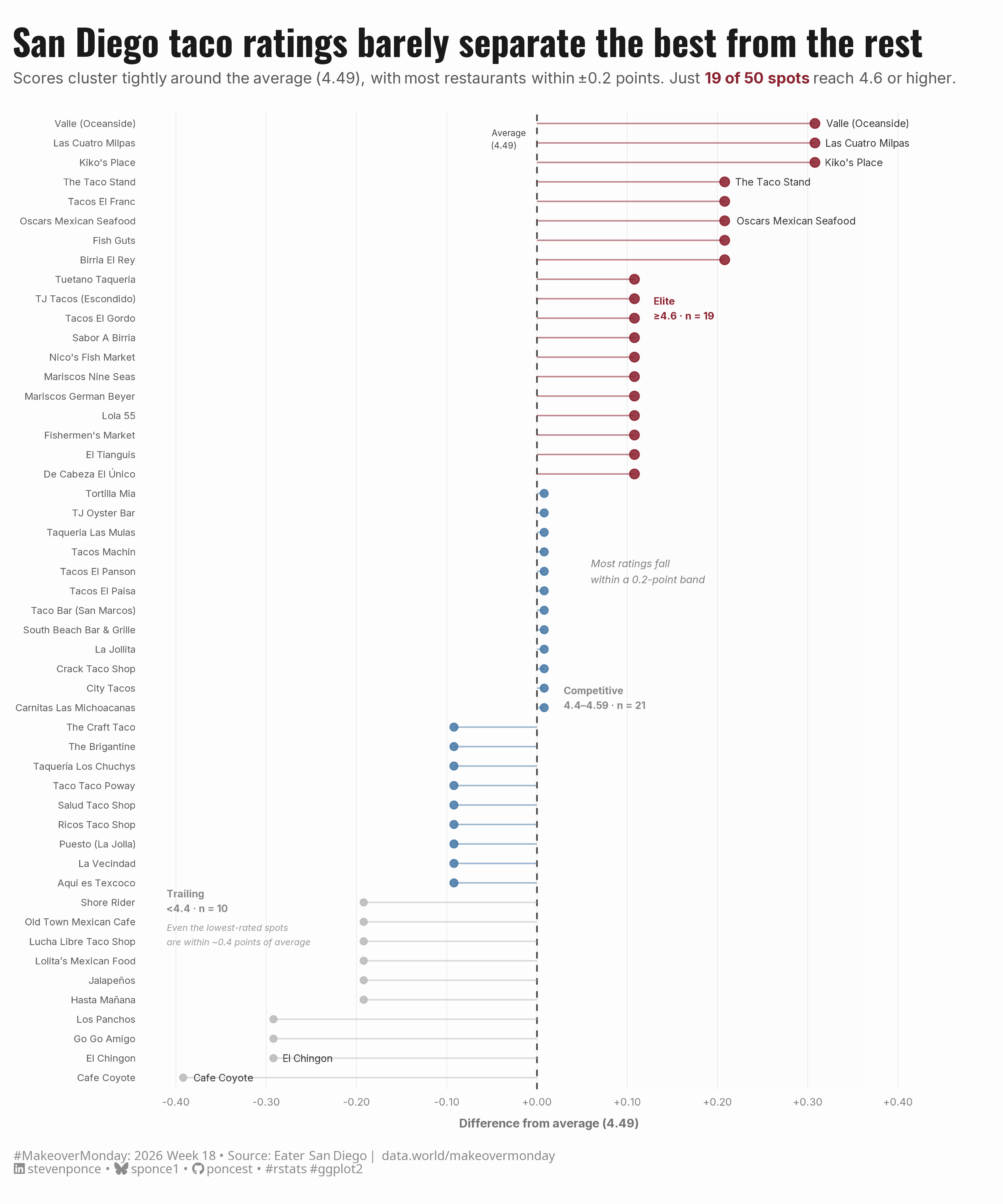
Scores cluster tightly around the average (4.49), with most restaurants within ±0.2 points. Just 19 of 50 spots reach 4.6 or higher.

MakeoverMonday
Data Visualization
R Programming
2026
A lollipop chart redesigning the original Makeover Monday Week 18 dashboard, which visualized Eater San Diego’s top 50 taco spots. Rather than displaying raw scores, this makeover reframes performance relative to the field mean (4.49), revealing how tightly ratings cluster across all 50 restaurants. Three tiers — Elite, Competitive, and Trailing — are encoded through color, with selective annotation highlighting both top performers and the narrow spread among the lowest-rated spots. Built with R and ggplot2.
Author

Steven Ponce

Published

May 4, 2026

Original

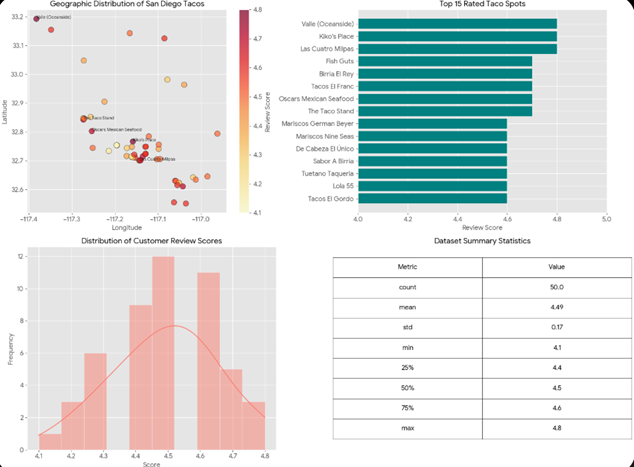
The original visualization comes from Eater San Diego

Original visualization

Makeover

Figure 1: A horizontal lollipop chart showing 50 San Diego taco restaurants ranked by their review score relative to the field average of 4.49. A dot represents each restaurant, and a stem extending left or right from a central dashed reference line at zero. Dots are colored by performance tier: burgundy for elite restaurants scoring 4.6 or higher, steel blue for competitive restaurants scoring 4.4-4.59, and gray for trailing restaurants scoring below 4.4. Valle (Oceanside) and Las Cuatro Milpas lead the field. Zone labels identify three tiers — Elite (n = 19), Competitive (n = 21), and Trailing (n = 10). An annotation notes that most ratings fall within a 0.2-point band, and even the lowest-rated spots are within approximately 0.4 points of average, reinforcing the chart’s central message: taco ratings in San Diego are tightly clustered, with little separation between the best and the rest.

Steps to Create this Graphic

1. Load Packages & Setup

Show code
```{r}
#| label: load
#| warning: false
#| message: false      
#| results: "hide"     

## 1. LOAD PACKAGES & SETUP ----
suppressPackageStartupMessages({
  if (!require("pacman")) install.packages("pacman")
  pacman::p_load(
    tidyverse, ggtext, showtext, scales, 
  glue, janitor, patchwork, ggrepel
)
})

### |- figure size ----
camcorder::gg_record(
  dir    = here::here("temp_plots"),
  device = "png",
  width  = 10,
  height = 12,
  units  = "in",
  dpi    = 320
)

# Source utility functions
suppressMessages(source(here::here("R/utils/fonts.R")))
source(here::here("R/utils/social_icons.R"))
source(here::here("R/utils/image_utils.R"))
source(here::here("R/themes/base_theme.R"))
```

2. Read in the Data

Show code
```{r}
#| label: read
#| include: true
#| eval: true
#| warning: false
#| 

df_raw <- readxl::read_excel(
  here::here("data/MakeoverMonday/2026/top_tacos_in_san_diego_tc26.xlsx")) |>
  clean_names()
```

3. Examine the Data

Show code
```{r}
#| label: examine
#| include: true
#| eval: true
#| results: 'hide'
#| warning: false

glimpse(df_raw)
skimr::skim_without_charts(df_raw)
```

4. Tidy Data

Show code
```{r}
#| label: tidy
#| warning: false

field_mean <- mean(df_raw$score)

# Score band boundaries (from data distribution)
elite_cut <- 4.6 # ~75th percentile
trailing_cut <- 4.4 # ~25th percentile

df <- df_raw |>
  mutate(
    score_vs_mean = score - field_mean,
    tier = case_when(
      score >= elite_cut ~ "elite",
      score >= trailing_cut ~ "competitive",
      TRUE ~ "trailing"
    ),
    tier = factor(tier, levels = c("elite", "competitive", "trailing")),
    rank = rank(-score, ties.method = "first"),

    # Label: top 5 + 2 notable below-mean spots for contrast
    label = case_when(
      rank <= 5 ~ restaurant_name,
      restaurant_name == "Cafe Coyote" ~ restaurant_name, # lowest rated
      restaurant_name == "El Chingon" ~ restaurant_name, # 2nd lowest
      TRUE ~ NA_character_
    )
  ) |>
  arrange(score_vs_mean)

# Tier n counts for zone annotations
n_elite <- sum(df$tier == "elite")
n_competitive <- sum(df$tier == "competitive")
n_trailing <- sum(df$tier == "trailing")

# X axis bounds
x_min <- floor(min(df$score_vs_mean) * 10) / 10 - 0.02
x_max <- max(df$score_vs_mean) + 0.06
```

5. Visualization Parameters

Show code
```{r}
#| label: params
#| include: true
#| warning: false

### |-  plot aesthetics ----
colors <- get_theme_colors(
  palette = list(
    elite       = "#8B2331",   
    competitive = "#4A7BA7",   
    trailing    = "#BBBBBB",   
    mean_line   = "#444444",   
    band_elite  = "#FDF5F5",   
    band_trail  = "#F8F8F8",   
    zone_text   = "#888888"    
  )
)

### |-  titles and caption ----
title_text <- "San Diego taco ratings barely separate the best from the rest"

subtitle_text <- glue(
  "Scores cluster tightly around the average ({round(field_mean, 2)}), ",
  "with most restaurants within ±0.2 points. ",
  "Just **<span style='color:{colors$palette$elite}'>{n_elite} of 50 spots</span>** ",
  "reach 4.6 or higher."
)

caption_text <- create_mm_caption(
  mm_year     = 2026,
  mm_week     = 18,
  source_text = "Eater San Diego | data.world/makeovermonday"
)

### |-  fonts ----
setup_fonts()
fonts <- get_font_families()

### |-  plot theme ----
base_theme <- create_base_theme(colors)

weekly_theme <- extend_weekly_theme(
  base_theme,
  theme(
    axis.title.x = element_text(
      size = 8.5, color = "gray45",
      margin = margin(t = 8), family = fonts$text
    ),
    axis.title.y = element_blank(),
    axis.text.x = element_text(size = 7.5, color = "gray50"),
    axis.text.y = element_text(size = 7, color = "gray35", hjust = 1),
    axis.ticks = element_blank(),
    panel.grid.major.x = element_line(color = "gray93", linewidth = 0.3),
    panel.grid.major.y = element_blank(),
    panel.grid.minor = element_blank(),
    plot.margin = margin(t = 20, r = 35, b = 20, l = 10)
  )
)

theme_set(weekly_theme)
```

6. Plot

Show code
```{r}
#| label: plot
#| warning: false

### |-  zone thresholds on relative scale ----
elite_rel    <- elite_cut    - field_mean
trailing_rel <- trailing_cut - field_mean


### |-  Main plot ----
p <- df |>
  ggplot(aes(x = score_vs_mean, y = reorder(restaurant_name, score_vs_mean))) +

  # Rect
  annotate("rect",
    xmin = elite_rel, xmax = x_max,
    ymin = -Inf, ymax = Inf,
    fill = colors$palette$band_elite, alpha = 0.07
  ) +
  annotate("rect",
    xmin = x_min, xmax = trailing_rel,
    ymin = -Inf, ymax = Inf,
    fill = colors$palette$band_trail, alpha = 0.07
  ) +

  # Geoms
  geom_vline(
    xintercept = 0,
    color      = colors$palette$mean_line,
    linewidth  = 0.55,
    linetype   = "dashed"
  ) +
  geom_segment(
    aes(
      x = 0, xend = score_vs_mean,
      y = reorder(restaurant_name, score_vs_mean),
      yend = reorder(restaurant_name, score_vs_mean),
      color = tier
    ),
    linewidth = 0.5,
    alpha = 0.55
  ) +
  geom_point(
    aes(color = tier, size = tier),
    alpha = 0.88
  ) +
  geom_text_repel(
    aes(label = label),
    size = 2.55,
    color = "gray20",
    family = fonts$text,
    hjust = 0,
    direction = "y",
    nudge_x = 0.01,
    segment.color = "gray75",
    segment.size = 0.25,
    max.overlaps = 15,
    na.rm = TRUE
  ) +

  # Annotate
  annotate("text",
    x = 0.13,
    y = 40.5,
    label = glue("Elite\n≥{elite_cut} · n = {n_elite}"),
    hjust = 0,
    size = 2.5,
    color = colors$palette$elite,
    family = fonts$text,
    fontface = "bold",
    lineheight = 1.25
  ) +
  annotate("text",
    x = 0.03,
    y = n_trailing + (n_competitive * 0.5),
    label = glue("Competitive\n{trailing_cut}–{elite_cut - 0.01} · n = {n_competitive}"),
    hjust = 0,
    size = 2.5,
    color = colors$palette$zone_text,
    family = fonts$text,
    fontface = "bold",
    lineheight = 1.25
  ) +
  annotate("text",
    x = -0.41,
    y = 9.5,
    label = glue("Trailing\n<{trailing_cut} · n = {n_trailing}"),
    hjust = 0,
    vjust = 0,
    size = 2.5,
    color = colors$palette$zone_text,
    family = fonts$text,
    fontface = "bold",
    lineheight = 1.25
  ) +
  annotate("text",
    x = 0.06,
    y = 27,
    label = "Most ratings fall\nwithin a 0.2-point band",
    hjust = 0,
    size = 2.6,
    color = "gray50",
    family = fonts$text,
    fontface = "italic",
    lineheight = 1.3
  ) +
  annotate("text",
    x = -0.41,
    y = 7.8,
    label = "Even the lowest-rated spots\nare within ~0.4 points of average",
    hjust = 0,
    vjust = 0,
    size = 2.3,
    color = "gray60",
    family = fonts$text,
    fontface = "italic",
    lineheight = 1.3
  ) +
  annotate("text",
    x = -0.05,
    y = 49.2,
    label = glue("Average\n({round(field_mean, 2)})"),
    hjust = 0,
    size = 2.2,
    color = colors$palette$mean_line,
    family = fonts$text,
    lineheight = 1.2
  ) +

  # Scales
  scale_color_manual(
    values = c(
      "elite" = colors$palette$elite,
      "competitive" = colors$palette$competitive,
      "trailing"= colors$palette$trailing
    ),
    guide = "none"
  ) +
  scale_size_manual(
    values = c(
      "elite" = 2.8,
      "competitive" = 2.2,
      "trailing"= 1.9
    ),
    guide = "none"
  ) +
  scale_x_continuous(
    labels = function(x) sprintf("%+.2f", x),
    breaks = seq(-0.4, 0.4, by = 0.1),
    expand = expansion(mult = c(0.02, 0.12))
  ) +

  # Labs
  labs(
    title = title_text,
    subtitle = subtitle_text,
    caption = caption_text,
    x = glue("Difference from average ({round(field_mean, 2)})")
  ) +
  # Theme
  theme(
    plot.title = element_text(
      size = 26, face = "bold", color = "gray10",
      family = fonts$title, margin = margin(b = 6)
    ),
    plot.subtitle = element_markdown(
      size = 11, color = "gray35", family = fonts$subtitle,
      lineheight = 1.4, margin = margin(b = 18)
    ),
    plot.caption = element_markdown(
      size = 9, color = "gray55", family = fonts$captio,
      hjust = 0, margin = margin(t = 15)
    )
  )
```

7. Save

Show code
```{r}
#| label: save
#| warning: false

### |-  plot image ----  
save_plot(
  plot = p, 
  type = "makeovermonday", 
  year = current_year,
  week = current_week,
  width = 10, 
  height = 12
  )
```

8. Session Info

TipExpand for Session Info
R version 4.5.3 (2026-03-11 ucrt)
Platform: x86_64-w64-mingw32/x64
Running under: Windows 11 x64 (build 26100)

Matrix products: default
  LAPACK version 3.12.1

locale:
[1] LC_COLLATE=English_United States.utf8 
[2] LC_CTYPE=English_United States.utf8   
[3] LC_MONETARY=English_United States.utf8
[4] LC_NUMERIC=C                          
[5] LC_TIME=English_United States.utf8    

time zone: America/New_York
tzcode source: internal

attached base packages:
[1] stats     graphics  grDevices utils     datasets  methods   base     

other attached packages:
 [1] here_1.0.2      ggrepel_0.9.8   patchwork_1.3.2 janitor_2.2.1  
 [5] glue_1.8.0      scales_1.4.0    showtext_0.9-8  showtextdb_3.0 
 [9] sysfonts_0.8.9  ggtext_0.1.2    lubridate_1.9.5 forcats_1.0.1  
[13] stringr_1.6.0   dplyr_1.2.1     purrr_1.2.2     readr_2.2.0    
[17] tidyr_1.3.2     tibble_3.3.1    ggplot2_4.0.3   tidyverse_2.0.0
[21] pacman_0.5.1   

loaded via a namespace (and not attached):
 [1] gtable_0.3.6       xfun_0.57          htmlwidgets_1.6.4  tzdb_0.5.0        
 [5] vctrs_0.7.3        tools_4.5.3        generics_0.1.4     curl_7.0.0        
 [9] gifski_1.32.0-2    pkgconfig_2.0.3    skimr_2.2.2        RColorBrewer_1.1-3
[13] S7_0.2.1           readxl_1.4.5       lifecycle_1.0.5    compiler_4.5.3    
[17] farver_2.1.2       textshaping_1.0.5  repr_1.1.7         codetools_0.2-20  
[21] snakecase_0.11.1   litedown_0.9       htmltools_0.5.9    yaml_2.3.12       
[25] pillar_1.11.1      camcorder_0.1.0    magick_2.9.1       commonmark_2.0.0  
[29] tidyselect_1.2.1   digest_0.6.39      stringi_1.8.7      rsvg_2.7.0        
[33] rprojroot_2.1.1    fastmap_1.2.0      grid_4.5.3         cli_3.6.6         
[37] magrittr_2.0.5     base64enc_0.1-6    withr_3.0.2        timechange_0.4.0  
[41] rmarkdown_2.31     otel_0.2.0         cellranger_1.1.0   ragg_1.5.2        
[45] hms_1.1.4          evaluate_1.0.5     knitr_1.51         markdown_2.0      
[49] rlang_1.2.0        gridtext_0.1.6     Rcpp_1.1.1         xml2_1.5.2        
[53] svglite_2.2.2      rstudioapi_0.18.0  jsonlite_2.0.0     R6_2.6.1          
[57] systemfonts_1.3.2 

9. GitHub Repository

TipExpand for GitHub Repo

The complete code for this analysis is available in mm_2026_18.qmd.

For the full repository, click here.

10. References

TipExpand for References

Primary Data (Makeover Monday):

  1. Makeover Monday 2026 Week 18: Best Tacos in San Diego

  2. Original Chart: Eater San Diego — The Best Local Tacos

    • Source: Eater San Diego curated list with AI-assisted data compilation via Google Gemini
    • Coverage: 50 taco restaurants across the San Diego area, scored on a 4.1–4.8 scale

Source Data:

  1. Eater San Diego — Best Local Tacos
    • Coverage: 50 restaurants with review scores, geographic coordinates (latitude/longitude), and editorial review snippets
    • Unit: Composite review score (4.1–4.8); three performance tiers defined as Elite (≥ 4.6), Competitive (4.4–4.59), and Trailing (< 4.4)
  2. Google Gemini — Data Compilation
    • AI-assisted structuring of restaurant data from the Eater San Diego source list

Note: Analysis reframes raw scores relative to the field mean (4.49), revealing the narrow spread across all 50 restaurants. Tier classifications are based on score distribution quartiles (25th and 75th percentile thresholds). No geographic or population-based normalization was applied.

11. Custom Functions Documentation

Note📦 Custom Helper Functions

This analysis uses custom functions from my personal module library for efficiency and consistency across projects.

Functions Used:

  • fonts.R: setup_fonts(), get_font_families() - Font management with showtext
  • social_icons.R: create_social_caption() - Generates formatted social media captions
  • image_utils.R: save_plot() - Consistent plot saving with naming conventions
  • base_theme.R: create_base_theme(), extend_weekly_theme(), get_theme_colors() - Custom ggplot2 themes

Why custom functions?
These utilities standardize theming, fonts, and output across all my data visualizations. The core analysis (data tidying and visualization logic) uses only standard tidyverse packages.

Source Code:
View all custom functions → GitHub: R/utils

Back to top

Citation

BibTeX citation:
@online{ponce2026,
  author = {Ponce, Steven},
  title = {San {Diego} Taco Ratings Barely Separate the Best from the
    Rest},
  date = {2026-05-04},
  url = {https://stevenponce.netlify.app/data_visualizations/MakeoverMonday/2026/mm_2026_18.html},
  langid = {en}
}
For attribution, please cite this work as:
Ponce, Steven. 2026. “San Diego Taco Ratings Barely Separate the Best from the Rest.” May 4. https://stevenponce.netlify.app/data_visualizations/MakeoverMonday/2026/mm_2026_18.html.
Source Code
---
title: "San Diego taco ratings barely separate the best from the rest"
subtitle: "Scores cluster tightly around the average (4.49), with most restaurants within ±0.2 points. Just 19 of 50 spots reach 4.6 or higher."
description: "A lollipop chart redesigning the original Makeover Monday Week 18 dashboard, which visualized Eater San Diego's top 50 taco spots. Rather than displaying raw scores, this makeover reframes performance relative to the field mean (4.49), revealing how tightly ratings cluster across all 50 restaurants. Three tiers — Elite, Competitive, and Trailing — are encoded through color, with selective annotation highlighting both top performers and the narrow spread among the lowest-rated spots. Built with R and ggplot2."
date: "2026-05-04"
author:
  - name: "Steven Ponce"
    url: "https://stevenponce.netlify.app"
citation:
  url: "https://stevenponce.netlify.app/data_visualizations/MakeoverMonday/2026/mm_2026_18.html"
categories: ["MakeoverMonday", "Data Visualization", "R Programming", "2026"]   
tags: [
  "makeover-monday",
  "data-visualization",
  "ggplot2",
  "lollipop-chart",
  "ranking",
  "restaurants",
  "food",
  "san-diego",
  "relative-performance",
  "annotation",
  "2026"
]
image: "thumbnails/mm_2026_18.png"
format:
  html:
    toc: true
    toc-depth: 5
    code-link: true
    code-fold: true
    code-tools: true
    code-summary: "Show code"
    self-contained: true
    theme: 
      light: [flatly, assets/styling/custom_styles.scss]
      dark: [darkly, assets/styling/custom_styles_dark.scss]
editor_options: 
  chunk_output_type: inline
execute: 
  freeze: true                                      
  cache: true                                       
  error: false
  message: false
  warning: false
  eval: true
editor: 
  markdown: 
    wrap: 72
---

```{r}
#| label: setup-links
#| include: false

# CENTRALIZED LINK MANAGEMENT

## Project-specific info 
current_year <- 2026
current_week <- 18
project_file <- "mm_2026_18.qmd"
project_image <- "mm_2026_18.png"

## Data Sources
data_main <- "https://data.world/makeovermonday/2026w18-best-tacos-in-san-diego/"
data_secondary <- "https://data.world/makeovermonday/2026w18-best-tacos-in-san-diego/"

## Repository Links  
repo_main <- "https://github.com/poncest/personal-website/"
repo_file <- paste0("https://github.com/poncest/personal-website/blob/master/data_visualizations/MakeoverMonday/", current_year, "/", project_file)

## External Resources/Images
chart_original <- "https://raw.githubusercontent.com/poncest/MakeoverMonday/refs/heads/master/2026/Week_18/original_chart.png"

## Organization/Platform Links
org_primary <- "https://sandiego.eater.com/maps/san-diego-best-local-tacos"
org_secondary <- "https://sandiego.eater.com/maps/san-diego-best-local-tacos"

# Helper function to create markdown links
create_link <- function(text, url) {
  paste0("[", text, "](", url, ")")
}

# Helper function for citation-style links
create_citation_link <- function(text, url, title = NULL) {
  if (is.null(title)) {
    paste0("[", text, "](", url, ")")
  } else {
    paste0("[", text, "](", url, ' "', title, '")')
  }
}
```

### Original

The original visualization comes from `r create_link("Eater San Diego", data_secondary)`
![Original visualization](https://raw.githubusercontent.com/poncest/MakeoverMonday/refs/heads/master/2026/Week_18/original_chart.png)

### Makeover

![A horizontal lollipop chart showing 50 San Diego taco restaurants ranked by their review score relative to the field average of 4.49. A dot represents each restaurant, and a stem extending left or right from a central dashed reference line at zero. Dots are colored by performance tier: burgundy for elite restaurants scoring 4.6 or higher, steel blue for competitive restaurants scoring 4.4-4.59, and gray for trailing restaurants scoring below 4.4. Valle (Oceanside) and Las Cuatro Milpas lead the field. Zone labels identify three tiers — Elite (n = 19), Competitive (n = 21), and Trailing (n = 10). An annotation notes that most ratings fall within a 0.2-point band, and even the lowest-rated spots are within approximately 0.4 points of average, reinforcing the chart's central message: taco ratings in San Diego are tightly clustered, with little separation between the best and the rest.](mm_2026_18.png){#fig-1}

### [**Steps to Create this Graphic**]{.mark}

#### [1. Load Packages & Setup]{.smallcaps}

```{r}
#| label: load
#| warning: false
#| message: false      
#| results: "hide"     

## 1. LOAD PACKAGES & SETUP ----
suppressPackageStartupMessages({
  if (!require("pacman")) install.packages("pacman")
  pacman::p_load(
    tidyverse, ggtext, showtext, scales, 
  glue, janitor, patchwork, ggrepel
)
})

### |- figure size ----
camcorder::gg_record(
  dir    = here::here("temp_plots"),
  device = "png",
  width  = 10,
  height = 12,
  units  = "in",
  dpi    = 320
)

# Source utility functions
suppressMessages(source(here::here("R/utils/fonts.R")))
source(here::here("R/utils/social_icons.R"))
source(here::here("R/utils/image_utils.R"))
source(here::here("R/themes/base_theme.R"))
```

#### [2. Read in the Data]{.smallcaps}

```{r}
#| label: read
#| include: true
#| eval: true
#| warning: false
#| 

df_raw <- readxl::read_excel(
  here::here("data/MakeoverMonday/2026/top_tacos_in_san_diego_tc26.xlsx")) |>
  clean_names()
```

#### [3. Examine the Data]{.smallcaps}

```{r}
#| label: examine
#| include: true
#| eval: true
#| results: 'hide'
#| warning: false

glimpse(df_raw)
skimr::skim_without_charts(df_raw)
```

#### [4. Tidy Data]{.smallcaps}

```{r}
#| label: tidy
#| warning: false

field_mean <- mean(df_raw$score)

# Score band boundaries (from data distribution)
elite_cut <- 4.6 # ~75th percentile
trailing_cut <- 4.4 # ~25th percentile

df <- df_raw |>
  mutate(
    score_vs_mean = score - field_mean,
    tier = case_when(
      score >= elite_cut ~ "elite",
      score >= trailing_cut ~ "competitive",
      TRUE ~ "trailing"
    ),
    tier = factor(tier, levels = c("elite", "competitive", "trailing")),
    rank = rank(-score, ties.method = "first"),

    # Label: top 5 + 2 notable below-mean spots for contrast
    label = case_when(
      rank <= 5 ~ restaurant_name,
      restaurant_name == "Cafe Coyote" ~ restaurant_name, # lowest rated
      restaurant_name == "El Chingon" ~ restaurant_name, # 2nd lowest
      TRUE ~ NA_character_
    )
  ) |>
  arrange(score_vs_mean)

# Tier n counts for zone annotations
n_elite <- sum(df$tier == "elite")
n_competitive <- sum(df$tier == "competitive")
n_trailing <- sum(df$tier == "trailing")

# X axis bounds
x_min <- floor(min(df$score_vs_mean) * 10) / 10 - 0.02
x_max <- max(df$score_vs_mean) + 0.06

```

#### [5. Visualization Parameters]{.smallcaps}

```{r}
#| label: params
#| include: true
#| warning: false

### |-  plot aesthetics ----
colors <- get_theme_colors(
  palette = list(
    elite       = "#8B2331",   
    competitive = "#4A7BA7",   
    trailing    = "#BBBBBB",   
    mean_line   = "#444444",   
    band_elite  = "#FDF5F5",   
    band_trail  = "#F8F8F8",   
    zone_text   = "#888888"    
  )
)

### |-  titles and caption ----
title_text <- "San Diego taco ratings barely separate the best from the rest"

subtitle_text <- glue(
  "Scores cluster tightly around the average ({round(field_mean, 2)}), ",
  "with most restaurants within ±0.2 points. ",
  "Just **<span style='color:{colors$palette$elite}'>{n_elite} of 50 spots</span>** ",
  "reach 4.6 or higher."
)

caption_text <- create_mm_caption(
  mm_year     = 2026,
  mm_week     = 18,
  source_text = "Eater San Diego | data.world/makeovermonday"
)

### |-  fonts ----
setup_fonts()
fonts <- get_font_families()

### |-  plot theme ----
base_theme <- create_base_theme(colors)

weekly_theme <- extend_weekly_theme(
  base_theme,
  theme(
    axis.title.x = element_text(
      size = 8.5, color = "gray45",
      margin = margin(t = 8), family = fonts$text
    ),
    axis.title.y = element_blank(),
    axis.text.x = element_text(size = 7.5, color = "gray50"),
    axis.text.y = element_text(size = 7, color = "gray35", hjust = 1),
    axis.ticks = element_blank(),
    panel.grid.major.x = element_line(color = "gray93", linewidth = 0.3),
    panel.grid.major.y = element_blank(),
    panel.grid.minor = element_blank(),
    plot.margin = margin(t = 20, r = 35, b = 20, l = 10)
  )
)

theme_set(weekly_theme)
```

#### [6. Plot]{.smallcaps}

```{r}
#| label: plot
#| warning: false

### |-  zone thresholds on relative scale ----
elite_rel    <- elite_cut    - field_mean
trailing_rel <- trailing_cut - field_mean


### |-  Main plot ----
p <- df |>
  ggplot(aes(x = score_vs_mean, y = reorder(restaurant_name, score_vs_mean))) +

  # Rect
  annotate("rect",
    xmin = elite_rel, xmax = x_max,
    ymin = -Inf, ymax = Inf,
    fill = colors$palette$band_elite, alpha = 0.07
  ) +
  annotate("rect",
    xmin = x_min, xmax = trailing_rel,
    ymin = -Inf, ymax = Inf,
    fill = colors$palette$band_trail, alpha = 0.07
  ) +

  # Geoms
  geom_vline(
    xintercept = 0,
    color      = colors$palette$mean_line,
    linewidth  = 0.55,
    linetype   = "dashed"
  ) +
  geom_segment(
    aes(
      x = 0, xend = score_vs_mean,
      y = reorder(restaurant_name, score_vs_mean),
      yend = reorder(restaurant_name, score_vs_mean),
      color = tier
    ),
    linewidth = 0.5,
    alpha = 0.55
  ) +
  geom_point(
    aes(color = tier, size = tier),
    alpha = 0.88
  ) +
  geom_text_repel(
    aes(label = label),
    size = 2.55,
    color = "gray20",
    family = fonts$text,
    hjust = 0,
    direction = "y",
    nudge_x = 0.01,
    segment.color = "gray75",
    segment.size = 0.25,
    max.overlaps = 15,
    na.rm = TRUE
  ) +

  # Annotate
  annotate("text",
    x = 0.13,
    y = 40.5,
    label = glue("Elite\n≥{elite_cut} · n = {n_elite}"),
    hjust = 0,
    size = 2.5,
    color = colors$palette$elite,
    family = fonts$text,
    fontface = "bold",
    lineheight = 1.25
  ) +
  annotate("text",
    x = 0.03,
    y = n_trailing + (n_competitive * 0.5),
    label = glue("Competitive\n{trailing_cut}–{elite_cut - 0.01} · n = {n_competitive}"),
    hjust = 0,
    size = 2.5,
    color = colors$palette$zone_text,
    family = fonts$text,
    fontface = "bold",
    lineheight = 1.25
  ) +
  annotate("text",
    x = -0.41,
    y = 9.5,
    label = glue("Trailing\n<{trailing_cut} · n = {n_trailing}"),
    hjust = 0,
    vjust = 0,
    size = 2.5,
    color = colors$palette$zone_text,
    family = fonts$text,
    fontface = "bold",
    lineheight = 1.25
  ) +
  annotate("text",
    x = 0.06,
    y = 27,
    label = "Most ratings fall\nwithin a 0.2-point band",
    hjust = 0,
    size = 2.6,
    color = "gray50",
    family = fonts$text,
    fontface = "italic",
    lineheight = 1.3
  ) +
  annotate("text",
    x = -0.41,
    y = 7.8,
    label = "Even the lowest-rated spots\nare within ~0.4 points of average",
    hjust = 0,
    vjust = 0,
    size = 2.3,
    color = "gray60",
    family = fonts$text,
    fontface = "italic",
    lineheight = 1.3
  ) +
  annotate("text",
    x = -0.05,
    y = 49.2,
    label = glue("Average\n({round(field_mean, 2)})"),
    hjust = 0,
    size = 2.2,
    color = colors$palette$mean_line,
    family = fonts$text,
    lineheight = 1.2
  ) +

  # Scales
  scale_color_manual(
    values = c(
      "elite" = colors$palette$elite,
      "competitive" = colors$palette$competitive,
      "trailing"= colors$palette$trailing
    ),
    guide = "none"
  ) +
  scale_size_manual(
    values = c(
      "elite" = 2.8,
      "competitive" = 2.2,
      "trailing"= 1.9
    ),
    guide = "none"
  ) +
  scale_x_continuous(
    labels = function(x) sprintf("%+.2f", x),
    breaks = seq(-0.4, 0.4, by = 0.1),
    expand = expansion(mult = c(0.02, 0.12))
  ) +

  # Labs
  labs(
    title = title_text,
    subtitle = subtitle_text,
    caption = caption_text,
    x = glue("Difference from average ({round(field_mean, 2)})")
  ) +
  # Theme
  theme(
    plot.title = element_text(
      size = 26, face = "bold", color = "gray10",
      family = fonts$title, margin = margin(b = 6)
    ),
    plot.subtitle = element_markdown(
      size = 11, color = "gray35", family = fonts$subtitle,
      lineheight = 1.4, margin = margin(b = 18)
    ),
    plot.caption = element_markdown(
      size = 9, color = "gray55", family = fonts$captio,
      hjust = 0, margin = margin(t = 15)
    )
  )
```

#### [7. Save]{.smallcaps}

```{r}
#| label: save
#| warning: false

### |-  plot image ----  
save_plot(
  plot = p, 
  type = "makeovermonday", 
  year = current_year,
  week = current_week,
  width = 10, 
  height = 12
  )
```

#### [8. Session Info]{.smallcaps}

::: {.callout-tip collapse="true"}
##### Expand for Session Info

```{r, echo = FALSE}
#| eval: true
#| warning: false

sessionInfo()
```
:::

#### [9. GitHub Repository]{.smallcaps}

::: {.callout-tip collapse="true"}
##### Expand for GitHub Repo

The complete code for this analysis is available in `r create_link(project_file, repo_file)`.

For the full repository, `r create_link("click here", repo_main)`.
:::

#### [10. References]{.smallcaps}
::: {.callout-tip collapse="true"}
##### Expand for References

**Primary Data (Makeover Monday):**

1. Makeover Monday `r current_year` Week `r current_week`: `r create_link("Best Tacos in San Diego", data_main)`

2. Original Chart: `r create_link("Eater San Diego — The Best Local Tacos", "https://sandiego.eater.com/maps/san-diego-best-local-tacos")`
   - Source: Eater San Diego curated list with AI-assisted data compilation via Google Gemini
   - Coverage: 50 taco restaurants across the San Diego area, scored on a 4.1–4.8 scale

**Source Data:**

3. `r create_link("Eater San Diego — Best Local Tacos", "https://sandiego.eater.com/maps/san-diego-best-local-tacos")`
   - Coverage: 50 restaurants with review scores, geographic coordinates (latitude/longitude), and editorial review snippets
   - Unit: Composite review score (4.1–4.8); three performance tiers defined as Elite (≥ 4.6), Competitive (4.4–4.59), and Trailing (< 4.4)

4. `r create_link("Google Gemini — Data Compilation", "https://gemini.google.com/share/672e1babcb27")`
   - AI-assisted structuring of restaurant data from the Eater San Diego source list

**Note:** Analysis reframes raw scores relative to the field mean (4.49),
revealing the narrow spread across all 50 restaurants. Tier classifications
are based on score distribution quartiles (25th and 75th percentile thresholds).
No geographic or population-based normalization was applied.
:::

#### [11. Custom Functions Documentation]{.smallcaps}

::: {.callout-note collapse="true"}
##### 📦 Custom Helper Functions

This analysis uses custom functions from my personal module library for efficiency and consistency across projects.

**Functions Used:**

-   **`fonts.R`**: `setup_fonts()`, `get_font_families()` - Font management with showtext
-   **`social_icons.R`**: `create_social_caption()` - Generates formatted social media captions
-   **`image_utils.R`**: `save_plot()` - Consistent plot saving with naming conventions
-   **`base_theme.R`**: `create_base_theme()`, `extend_weekly_theme()`, `get_theme_colors()` - Custom ggplot2 themes

**Why custom functions?**\
These utilities standardize theming, fonts, and output across all my data visualizations. The core analysis (data tidying and visualization logic) uses only standard tidyverse packages.

**Source Code:**\
View all custom functions → [GitHub: R/utils](https://github.com/poncest/personal-website/tree/master/R)
:::

© 2024 Steven Ponce

Source Issues
