• Steven Ponce
  • About
  • Data Visualizations
  • Projects
  • Resume
  • Email

On this page

  • Original
  • Makeover
  • Steps to Create this Graphic
    • 1. Load Packages & Setup
    • 2. Read in the Data
    • 3. Examine the Data
    • 4. Tidy Data
    • 5. Visualization Parameters
    • 6. Plot
    • 7. Save
    • 8. Session Info
    • 9. GitHub Repository
    • 10. References
    • 11. Custom Functions Documentation

The Sun Belt Drove America’s Net Migration Gains

  • Show All Code
  • Hide All Code

  • View Source

State-level migration rates during the 2010s and differences between female and male migration patterns

MakeoverMonday
Data Visualization
R Programming
2026
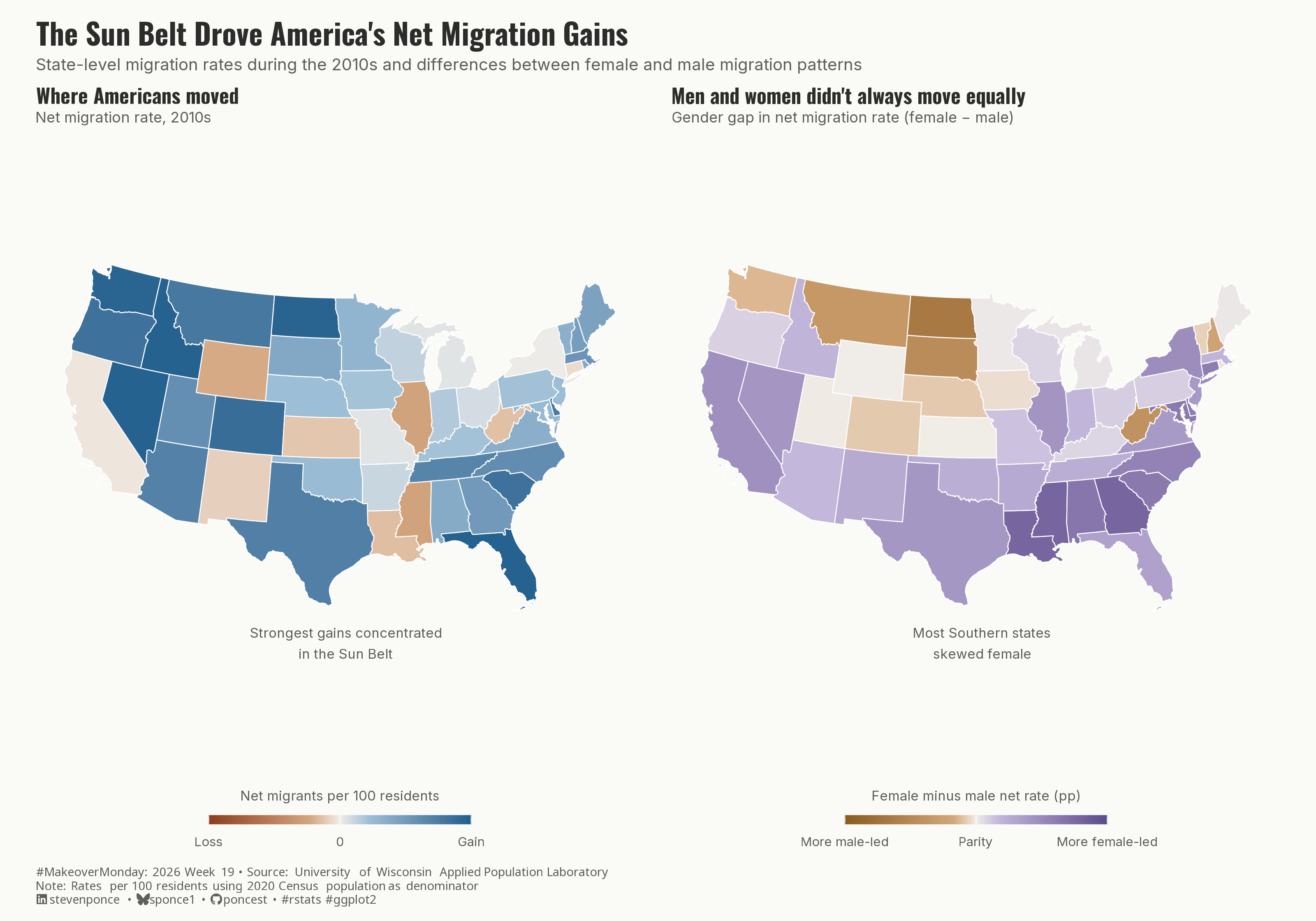
A redesign of the MakeoverMonday 2026 Week 19 visualization on U.S. population migration. The original county-level choropleth is replaced with a two-panel state-level map that surfaces a hidden dimension in the data: net migration during the 2010s was not gender-neutral. The left panel shows where population gains and losses occurred, with the Sun Belt emerging as the dominant destination. The right panel reveals that in most Southern and Eastern states, women relocated at higher rates than men, while Northern Plains states showed the reverse. Built with ggplot2, sf, tigris, and patchwork in R.
Author

Steven Ponce

Published

May 11, 2026

Original

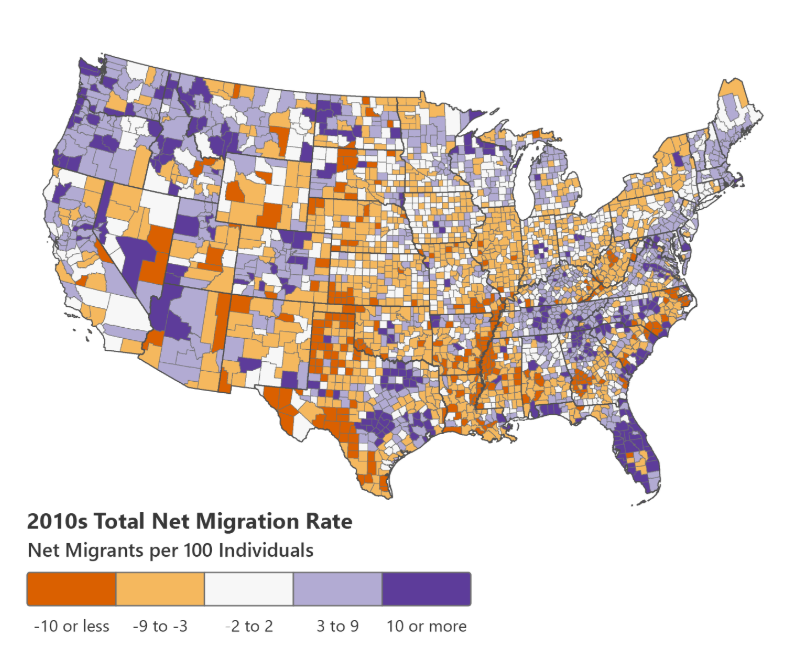
The original visualization comes from US Population Migration

Original visualization

Makeover

Figure 1: A two-panel choropleth map of the contiguous United States showing state-level net migration patterns during the 2010s. The left panel, titled “Where Americans moved,” uses a rust-to-blue color scale to show net migration rates per 100 residents. States across the Sun Belt — including Florida, Texas, the Carolinas, and much of the Mountain West — show the strongest gains in deep blue, while parts of the Midwest and a few Southern states show modest losses in rust. The right panel, titled “Men and women didn’t always move equally,” uses an amber-to-purple diverging scale centered at parity to show the female minus male net migration rate. Most Southern and Eastern states appear in purple, indicating women relocated at higher rates than men, while a cluster of Northern Plains states — Montana, Wyoming, North and South Dakota — appear in amber, indicating male-led migration. The overall title reads: “The Sun Belt Drove America’s Net Migration Gains.”

Steps to Create this Graphic

1. Load Packages & Setup

Show code
```{r}
#| label: load
#| warning: false
#| message: false      
#| results: "hide"     

## 1. LOAD PACKAGES & SETUP ----
suppressPackageStartupMessages({
  if (!require("pacman")) install.packages("pacman")
  pacman::p_load(
    tidyverse, ggtext, showtext, scales, 
  glue, janitor, patchwork, sf, tigris
)
})

### |- figure size ----
camcorder::gg_record(
  dir    = here::here("temp_plots"),
  device = "png",
  width  = 10,
  height = 7,
  units  = "in",
  dpi    = 320
)

# Source utility functions
suppressMessages(source(here::here("R/utils/fonts.R")))
source(here::here("R/utils/social_icons.R"))
source(here::here("R/utils/image_utils.R"))
source(here::here("R/themes/base_theme.R"))
```

2. Read in the Data

Show code
```{r}
#| label: read
#| include: true
#| eval: true
#| warning: false
#| 

df_raw <- read_csv(
  here::here("data/MakeoverMonday/2026/US County PopMigration.csv")) |>
  clean_names()
```

3. Examine the Data

Show code
```{r}
#| label: examine
#| include: true
#| eval: true
#| results: 'hide'
#| warning: false

glimpse(df_raw)
skimr::skim_without_charts(df_raw)
```

4. Tidy Data

Show code
```{r}
#| label: tidy
#| warning: false

### |- state shapefile ----
states_sf <- states(cb = TRUE, resolution = "20m", year = 2020) |>
  filter(!STUSPS %in% c("AK", "HI", "PR", "GU", "VI", "MP", "AS")) |>
  select(STATEFP, NAME, geometry)

### |- state-level aggregation ----
df_states <- df_raw |>
  filter(county == "State Total") |>
  transmute(
    state,
    state_fips,
    female_pop = female_population_2020,
    male_pop = male_population_2020,
    total_pop = female_pop + male_pop,
    net_female = net_female_migrants,
    net_male = net_male_migrants,
    net_total = net_female + net_male,

    # Rates per 100 residents (2020 population as denominator)
    female_rate  = net_female / female_pop * 100,
    male_rate = net_male / male_pop * 100,
    net_rate = net_total / total_pop * 100,

    # Gender gap: positive = female rate exceeds male rate
    gender_gap = female_rate - male_rate
  )

### |- winsorize net_rate at 5th/95th ----
rate_lo <- quantile(df_states$net_rate, 0.05, na.rm = TRUE)
rate_hi <- quantile(df_states$net_rate, 0.95, na.rm = TRUE)

### |- winsorize gender gap at 2nd/98th percentile ----
gap_lo <- quantile(df_states$gender_gap, 0.02, na.rm = TRUE)
gap_hi <- quantile(df_states$gender_gap, 0.98, na.rm = TRUE)

df_states <- df_states |>
  mutate(
    net_rate_w    = pmin(pmax(net_rate, rate_lo), rate_hi),
    gender_gap_w  = pmin(pmax(gender_gap, gap_lo), gap_hi)
  )

### |- join to shapefile ----
df_map <- states_sf |>
  left_join(df_states, by = c("STATEFP" = "state_fips")) |>
  filter(!is.na(net_rate))
```

  |                                                                            
  |                                                                      |   0%
  |                                                                            
  |==                                                                    |   3%
  |                                                                            
  |===                                                                   |   4%
  |                                                                            
  |====                                                                  |   5%
  |                                                                            
  |========                                                              |  12%
  |                                                                            
  |=========                                                             |  12%
  |                                                                            
  |==========                                                            |  14%
  |                                                                            
  |===========                                                           |  15%
  |                                                                            
  |============                                                          |  17%
  |                                                                            
  |==================                                                    |  26%
  |                                                                            
  |===================                                                   |  28%
  |                                                                            
  |======================                                                |  32%
  |                                                                            
  |========================                                              |  34%
  |                                                                            
  |========================                                              |  35%
  |                                                                            
  |==============================                                        |  43%
  |                                                                            
  |================================                                      |  46%
  |                                                                            
  |==================================                                    |  48%
  |                                                                            
  |=====================================                                 |  53%
  |                                                                            
  |==========================================                            |  59%
  |                                                                            
  |===========================================                           |  62%
  |                                                                            
  |=================================================                     |  71%
  |                                                                            
  |======================================================                |  77%
  |                                                                            
  |========================================================              |  80%
  |                                                                            
  |==========================================================            |  83%
  |                                                                            
  |=============================================================         |  87%
  |                                                                            
  |==================================================================    |  94%
  |                                                                            
  |======================================================================| 100%

5. Visualization Parameters

Show code
```{r}
#| label: params
#| include: true
#| warning: false

### |-  plot aesthetics ----
colors <- get_theme_colors(
  palette = list(
    gain_hi     = "#1D5E8C",
    gain_lo     = "#9DBFD6",
    neutral     = "#F0EDE8",
    loss_lo     = "#D4A882",
    loss_hi     = "#8C3D1D",
    female_hi   = "#5C4B8A",
    female_lo   = "#C4B8DC",
    gap_neutral = "#F0EDE8",
    male_lo     = "#D4A87A",
    male_hi     = "#8A5C1D",
    text_dark   = "#2C2C2A",
    text_mid    = "#5F5E5A",
    background  = "#FAFAF7"
  )
)

col_gain_hi <- colors$palette$gain_hi
col_gain_lo <- colors$palette$gain_lo
col_neutral <- colors$palette$neutral
col_loss_lo <- colors$palette$loss_lo
col_loss_hi <- colors$palette$loss_hi
col_female_hi <- colors$palette$female_hi
col_female_lo <- colors$palette$female_lo
col_gap_neu <- colors$palette$gap_neutral
col_male_lo <- colors$palette$male_lo
col_male_hi <- colors$palette$male_hi
col_text <- colors$palette$text_dark
col_sub <- colors$palette$text_mid
col_bg <- colors$palette$background

### |-  titles and caption ----
title_text <- str_glue("The Sun Belt Drove America's Net Migration Gains")

subtitle_text <- str_glue(
  "State-level migration rates during the 2010s and differences between female and male migration patterns"
)

caption_text <- create_mm_caption(
  mm_year = 2026,
  mm_week = 19,
  source_text = "University of Wisconsin Applied Population Laboratory<br>
  Note: Rates per 100 residents using 2020 Census population as denominator"
)

### |-  fonts ----
setup_fonts()
fonts <- get_font_families()

### |-  plot theme ----
base_theme <- create_base_theme(colors)

weekly_theme <- extend_weekly_theme(
  base_theme,
  theme(
    # Background
    plot.background = element_rect(fill = col_bg, color = NA),
    panel.background = element_rect(fill = col_bg, color = NA),

    # Grid 
    panel.grid = element_blank(),
    axis.text = element_blank(),
    axis.ticks = element_blank(),

    # Legend 
    legend.position = "bottom",
    legend.direction = "horizontal",
    legend.title = element_text(size = 7.5, color = col_sub),
    legend.text = element_text(size = 7, color = col_sub),
    legend.key.width = unit(1.6, "cm"),
    legend.key.height = unit(0.3, "cm"),
    legend.margin = margin(t = 2, b = 0), 
    legend.box.margin = margin(t = -8), 

    strip.text = element_blank(),
    plot.margin = margin(2, 8, 2, 8) 
  )
)

theme_set(weekly_theme)
```

6. Plot

Show code
```{r}
#| label: plot
#| warning: false

### |-  Panel A scale limits ----
rate_abs_max <- max(abs(c(rate_lo, rate_hi))) |> ceiling()

### |-  Panel A: Net Migration Rate ----
p_net <- ggplot(df_map) +
  geom_sf(
    aes(fill = net_rate_w),
    color = "white",
    linewidth = 0.25
  ) +
  scale_fill_gradientn(
    colors = c(col_loss_hi, col_loss_lo, col_neutral, col_gain_lo, col_gain_hi),
    values = rescale(c(-rate_abs_max, -2, 0, 2, rate_abs_max)),
    limits = c(-rate_abs_max, rate_abs_max),
    oob = squish,
    breaks = c(-rate_abs_max, 0, rate_abs_max),
    labels = c("Loss", "0", "Gain"),
    name = "Net migrants per 100 residents",
    guide = guide_colorbar(
      title.position = "top",
      title.hjust = 0.5,
      barwidth = 10,
      barheight = 0.35,
      ticks = FALSE
    )
  ) +
  annotate(
    "text",
    x = -78, y = 30,
    label = "Strongest gains concentrated\nin the Sun Belt",
    size = 2.6,
    color = col_sub,
    fontface = "plain",
    hjust = 0.5,
    lineheight = 1.3
  ) +
  labs(
    title = "Where Americans moved",
    subtitle = "Net migration rate, 2010s"
  ) +
  coord_sf(crs = 5070) +
  theme(
    plot.title = element_text(
      size = 11, face = "bold", color = col_text,
      margin = margin(b = 2), family = fonts$title
    ),
    plot.subtitle = element_text(
      size = 8, color = col_sub, family = fonts$subtitle,
      margin = margin(b = 4)
    )
  )

### |-  Panel B: Gender Gap (female rate − male rate) ----
gap_abs_max <- max(abs(c(gap_lo, gap_hi))) |> ceiling()

p_gap <- ggplot(df_map) +
  geom_sf(
    aes(fill = gender_gap_w),
    color = "white",
    linewidth = 0.25
  ) +
  scale_fill_gradientn(
    colors = c(col_male_hi, col_male_lo, col_gap_neu, col_female_lo, col_female_hi),
    values = rescale(c(-gap_abs_max, -0.5, 0, 0.5, gap_abs_max)),
    limits = c(-gap_abs_max, gap_abs_max),
    oob = squish,
    breaks = c(-gap_abs_max, 0, gap_abs_max),
    labels = c("More male-led", "Parity", "More female-led"),
    name = "Female minus male net rate (pp)",
    guide = guide_colorbar(
      title.position = "top",
      title.hjust = 0.5,
      barwidth = 10,
      barheight = 0.35,
      ticks = FALSE
    )
  ) +
  annotate(
    "text",
    x = -78, y = 30,
    label = "Most Southern states\nskewed female",
    size = 2.6,
    color = col_sub,
    fontface = "plain",
    hjust = 0.5,
    lineheight = 1.3
  ) +
  labs(
    title = "Men and women didn't always move equally",
    subtitle = "Gender gap in net migration rate (female − male)"
  ) +
  coord_sf(crs = 5070) +
  theme(
    plot.title = element_text(
      size = 11, face = "bold", color = col_text,
      margin = margin(b = 2), family = fonts$title
    ),
    plot.subtitle = element_text(
      size = 8, color = col_sub,
      margin = margin(b = 4), family = fonts$subtitle
    )
  )

### |-  Combine plots ----
p_combined <- (p_net | p_gap) +
  plot_annotation(
    title = title_text,
    subtitle = subtitle_text,
    caption = caption_text,
    theme = theme(
      plot.title = element_text(
        size = 16, face = "bold", color = col_text,
        margin = margin(b = 4), family = fonts$title
      ),
      plot.subtitle = element_text(
        size = 9, color = col_sub, lineheight = 1.4,
        margin = margin(b = 6), family = fonts$subtitle          
      ),
      plot.caption = element_markdown(
        size = 6.5, color = col_sub, hjust = 0,
        margin = margin(t = 6), family = fonts$caption
      ),
      plot.background = element_rect(fill = col_bg, color = NA),
      plot.margin = margin(12, 12, 8, 12)  
    )
  ) +
  plot_layout(widths = c(1, 1))
```

7. Save

Show code
```{r}
#| label: save
#| warning: false

### |-  plot image ----  
save_plot_patchwork(
  plot = p_combined, 
  type = "makeovermonday", 
  year = current_year,
  week = current_week,
  width = 10, 
  height = 7
  )
```

8. Session Info

TipExpand for Session Info
R version 4.5.3 (2026-03-11 ucrt)
Platform: x86_64-w64-mingw32/x64
Running under: Windows 11 x64 (build 26100)

Matrix products: default
  LAPACK version 3.12.1

locale:
[1] LC_COLLATE=English_United States.utf8 
[2] LC_CTYPE=English_United States.utf8   
[3] LC_MONETARY=English_United States.utf8
[4] LC_NUMERIC=C                          
[5] LC_TIME=English_United States.utf8    

time zone: America/New_York
tzcode source: internal

attached base packages:
[1] stats     graphics  grDevices utils     datasets  methods   base     

other attached packages:
 [1] here_1.0.2      tigris_2.2.1    sf_1.1-0        patchwork_1.3.2
 [5] janitor_2.2.1   glue_1.8.0      scales_1.4.0    showtext_0.9-8 
 [9] showtextdb_3.0  sysfonts_0.8.9  ggtext_0.1.2    lubridate_1.9.5
[13] forcats_1.0.1   stringr_1.6.0   dplyr_1.2.1     purrr_1.2.2    
[17] readr_2.2.0     tidyr_1.3.2     tibble_3.3.1    ggplot2_4.0.3  
[21] tidyverse_2.0.0 pacman_0.5.1   

loaded via a namespace (and not attached):
 [1] tidyselect_1.2.1   farver_2.1.2       S7_0.2.1           fastmap_1.2.0     
 [5] digest_0.6.39      timechange_0.4.0   lifecycle_1.0.5    rsvg_2.7.0        
 [9] magrittr_2.0.5     compiler_4.5.3     rlang_1.2.0        tools_4.5.3       
[13] yaml_2.3.12        knitr_1.51         skimr_2.2.2        htmlwidgets_1.6.4 
[17] curl_7.0.0         bit_4.6.0          classInt_0.4-11    xml2_1.5.2        
[21] camcorder_0.1.0    repr_1.1.7         RColorBrewer_1.1-3 KernSmooth_2.23-26
[25] withr_3.0.2        grid_4.5.3         e1071_1.7-17       cli_3.6.6         
[29] rmarkdown_2.31     crayon_1.5.3       generics_0.1.4     otel_0.2.0        
[33] rstudioapi_0.18.0  httr_1.4.8         tzdb_0.5.0         commonmark_2.0.0  
[37] DBI_1.3.0          proxy_0.4-29       parallel_4.5.3     ggplotify_0.1.3   
[41] yulab.utils_0.2.4  base64enc_0.1-6    vctrs_0.7.3        jsonlite_2.0.0    
[45] litedown_0.9       gridGraphics_0.5-1 hms_1.1.4          bit64_4.6.0-1     
[49] systemfonts_1.3.2  magick_2.9.1       units_1.0-1        gifski_1.32.0-2   
[53] codetools_0.2-20   stringi_1.8.7      gtable_0.3.6       pillar_1.11.1     
[57] rappdirs_0.3.4     htmltools_0.5.9    R6_2.6.1           textshaping_1.0.5 
[61] rprojroot_2.1.1    vroom_1.7.1        evaluate_1.0.5     markdown_2.0      
[65] gridtext_0.1.6     snakecase_0.11.1   class_7.3-23       Rcpp_1.1.1        
[69] uuid_1.2-2         svglite_2.2.2      xfun_0.57          fs_2.0.1          
[73] pkgconfig_2.0.3   

9. GitHub Repository

TipExpand for GitHub Repo

The complete code for this analysis is available in mm_2026_19.qmd.

For the full repository, click here.

10. References

TipExpand for References

Primary Data (Makeover Monday):

  1. Makeover Monday 2026 Week 19: US Population Migration
  2. Original Chart: University of Wisconsin Applied Population Laboratory — Net Migration
    • Source: UW Applied Population Laboratory; county-level net migration estimates for the 2010s decade
    • Coverage: 3,190 county records across 50 states + DC, split by female and male net migrants

Source Data:

  1. UW Applied Population Laboratory — NetMigration.wisc.edu
    • Coverage: State and county-level net migration estimates, 2010s decade; female and male migrants reported separately
    • Unit: Net migrants (absolute count); rates derived as net migrants per 100 residents using 2020 Census population as denominator
  2. U.S. Census Bureau — TIGER/Line Shapefiles via tigris
    • State boundary geometries (cb = TRUE, resolution = 20m, year = 2020)
    • Projected to Albers Equal-Area Conic (EPSG:5070) for CONUS display

Note: Analysis aggregates county-level records to state totals using the “State Total” rows provided in the source data. Gender gap computed as female net rate minus male net rate (percentage points), where each rate is normalized by the respective sex’s 2020 Census population. Net rates winsorized at the 5th/95th percentile (total rate) and 2nd/98th percentile (gender gap) to reduce outlier distortion on the color scales. “State Total” rows used directly; county-level rows excluded from all aggregations to prevent double-counting.

11. Custom Functions Documentation

Note📦 Custom Helper Functions

This analysis uses custom functions from my personal module library for efficiency and consistency across projects.

Functions Used:

  • fonts.R: setup_fonts(), get_font_families() - Font management with showtext
  • social_icons.R: create_social_caption() - Generates formatted social media captions
  • image_utils.R: save_plot() - Consistent plot saving with naming conventions
  • base_theme.R: create_base_theme(), extend_weekly_theme(), get_theme_colors() - Custom ggplot2 themes

Why custom functions?
These utilities standardize theming, fonts, and output across all my data visualizations. The core analysis (data tidying and visualization logic) uses only standard tidyverse packages.

Source Code:
View all custom functions → GitHub: R/utils

Back to top

Citation

BibTeX citation:
@online{ponce2026,
  author = {Ponce, Steven},
  title = {The {Sun} {Belt} {Drove} {America’s} {Net} {Migration}
    {Gains}},
  date = {2026-05-11},
  url = {https://stevenponce.netlify.app/data_visualizations/MakeoverMonday/2026/mm_2026_19.html},
  langid = {en}
}
For attribution, please cite this work as:
Ponce, Steven. 2026. “The Sun Belt Drove America’s Net Migration Gains.” May 11. https://stevenponce.netlify.app/data_visualizations/MakeoverMonday/2026/mm_2026_19.html.
Source Code
---
title: "The Sun Belt Drove America's Net Migration Gains"
subtitle: "State-level migration rates during the 2010s and differences between female and male migration patterns"
description: "A redesign of the MakeoverMonday 2026 Week 19 visualization on U.S. population migration. The original county-level choropleth is replaced with a two-panel state-level map that surfaces a hidden dimension in the data: net migration during the 2010s was not gender-neutral. The left panel shows where population gains and losses occurred, with the Sun Belt emerging as the dominant destination. The right panel reveals that in most Southern and Eastern states, women relocated at higher rates than men, while Northern Plains states showed the reverse. Built with ggplot2, sf, tigris, and patchwork in R."
date: "2026-05-11"
author:
  - name: "Steven Ponce"
    url: "https://stevenponce.netlify.app"
citation:
  url: "https://stevenponce.netlify.app/data_visualizations/MakeoverMonday/2026/mm_2026_19.html"
categories: ["MakeoverMonday", "Data Visualization", "R Programming", "2026"]   
tags: [
  "makeover-monday",
  "data-visualization",
  "ggplot2",
  "patchwork",
  "choropleth",
  "maps",
  "migration",
  "demographics",
  "gender",
  "united-states",
  "sf",
  "tigris",
  "2026"
]
image: "thumbnails/mm_2026_19.png"
format:
  html:
    toc: true
    toc-depth: 5
    code-link: true
    code-fold: true
    code-tools: true
    code-summary: "Show code"
    self-contained: true
    theme: 
      light: [flatly, assets/styling/custom_styles.scss]
      dark: [darkly, assets/styling/custom_styles_dark.scss]
editor_options: 
  chunk_output_type: inline
execute: 
  freeze: true                                      
  cache: true                                       
  error: false
  message: false
  warning: false
  eval: true
editor: 
  markdown: 
    wrap: 72
---

```{r}
#| label: setup-links
#| include: false

# CENTRALIZED LINK MANAGEMENT

## Project-specific info 
current_year <- 2026
current_week <- 19
project_file <- "mm_2026_19.qmd"
project_image <- "mm_2026_19.png"

## Data Sources
data_main <- "https://data.world/makeovermonday/2026w19-us-population-migration"
data_secondary <- "https://data.world/makeovermonday/2026w19-us-population-migration"

## Repository Links  
repo_main <- "https://github.com/poncest/personal-website/"
repo_file <- paste0("https://github.com/poncest/personal-website/blob/master/data_visualizations/MakeoverMonday/", current_year, "/", project_file)

## External Resources/Images
chart_original <- "https://raw.githubusercontent.com/poncest/MakeoverMonday/refs/heads/master/2026/Week_19/original_chart.png"

## Organization/Platform Links
org_primary <- "https://netmigration.wisc.edu/"
org_secondary <- "https://netmigration.wisc.edu/"

# Helper function to create markdown links
create_link <- function(text, url) {
  paste0("[", text, "](", url, ")")
}

# Helper function for citation-style links
create_citation_link <- function(text, url, title = NULL) {
  if (is.null(title)) {
    paste0("[", text, "](", url, ")")
  } else {
    paste0("[", text, "](", url, ' "', title, '")')
  }
}
```

### Original

The original visualization comes from `r create_link("US Population Migration", data_secondary)`
![Original visualization](https://raw.githubusercontent.com/poncest/MakeoverMonday/refs/heads/master/2026/Week_19/original_chart.png)

### Makeover

![A two-panel choropleth map of the contiguous United States showing state-level net migration patterns during the 2010s. The left panel, titled "Where Americans moved," uses a rust-to-blue color scale to show net migration rates per 100 residents. States across the Sun Belt — including Florida, Texas, the Carolinas, and much of the Mountain West — show the strongest gains in deep blue, while parts of the Midwest and a few Southern states show modest losses in rust. The right panel, titled "Men and women didn't always move equally," uses an amber-to-purple diverging scale centered at parity to show the female minus male net migration rate. Most Southern and Eastern states appear in purple, indicating women relocated at higher rates than men, while a cluster of Northern Plains states — Montana, Wyoming, North and South Dakota — appear in amber, indicating male-led migration. The overall title reads: "The Sun Belt Drove America's Net Migration Gains."](mm_2026_19.png){#fig-1}

### [**Steps to Create this Graphic**]{.mark}

#### [1. Load Packages & Setup]{.smallcaps}

```{r}
#| label: load
#| warning: false
#| message: false      
#| results: "hide"     

## 1. LOAD PACKAGES & SETUP ----
suppressPackageStartupMessages({
  if (!require("pacman")) install.packages("pacman")
  pacman::p_load(
    tidyverse, ggtext, showtext, scales, 
  glue, janitor, patchwork, sf, tigris
)
})

### |- figure size ----
camcorder::gg_record(
  dir    = here::here("temp_plots"),
  device = "png",
  width  = 10,
  height = 7,
  units  = "in",
  dpi    = 320
)

# Source utility functions
suppressMessages(source(here::here("R/utils/fonts.R")))
source(here::here("R/utils/social_icons.R"))
source(here::here("R/utils/image_utils.R"))
source(here::here("R/themes/base_theme.R"))
```

#### [2. Read in the Data]{.smallcaps}

```{r}
#| label: read
#| include: true
#| eval: true
#| warning: false
#| 

df_raw <- read_csv(
  here::here("data/MakeoverMonday/2026/US County PopMigration.csv")) |>
  clean_names()
```

#### [3. Examine the Data]{.smallcaps}

```{r}
#| label: examine
#| include: true
#| eval: true
#| results: 'hide'
#| warning: false

glimpse(df_raw)
skimr::skim_without_charts(df_raw)
```

#### [4. Tidy Data]{.smallcaps}

```{r}
#| label: tidy
#| warning: false

### |- state shapefile ----
states_sf <- states(cb = TRUE, resolution = "20m", year = 2020) |>
  filter(!STUSPS %in% c("AK", "HI", "PR", "GU", "VI", "MP", "AS")) |>
  select(STATEFP, NAME, geometry)

### |- state-level aggregation ----
df_states <- df_raw |>
  filter(county == "State Total") |>
  transmute(
    state,
    state_fips,
    female_pop = female_population_2020,
    male_pop = male_population_2020,
    total_pop = female_pop + male_pop,
    net_female = net_female_migrants,
    net_male = net_male_migrants,
    net_total = net_female + net_male,

    # Rates per 100 residents (2020 population as denominator)
    female_rate  = net_female / female_pop * 100,
    male_rate = net_male / male_pop * 100,
    net_rate = net_total / total_pop * 100,

    # Gender gap: positive = female rate exceeds male rate
    gender_gap = female_rate - male_rate
  )

### |- winsorize net_rate at 5th/95th ----
rate_lo <- quantile(df_states$net_rate, 0.05, na.rm = TRUE)
rate_hi <- quantile(df_states$net_rate, 0.95, na.rm = TRUE)

### |- winsorize gender gap at 2nd/98th percentile ----
gap_lo <- quantile(df_states$gender_gap, 0.02, na.rm = TRUE)
gap_hi <- quantile(df_states$gender_gap, 0.98, na.rm = TRUE)

df_states <- df_states |>
  mutate(
    net_rate_w    = pmin(pmax(net_rate, rate_lo), rate_hi),
    gender_gap_w  = pmin(pmax(gender_gap, gap_lo), gap_hi)
  )

### |- join to shapefile ----
df_map <- states_sf |>
  left_join(df_states, by = c("STATEFP" = "state_fips")) |>
  filter(!is.na(net_rate))
```

#### [5. Visualization Parameters]{.smallcaps}

```{r}
#| label: params
#| include: true
#| warning: false

### |-  plot aesthetics ----
colors <- get_theme_colors(
  palette = list(
    gain_hi     = "#1D5E8C",
    gain_lo     = "#9DBFD6",
    neutral     = "#F0EDE8",
    loss_lo     = "#D4A882",
    loss_hi     = "#8C3D1D",
    female_hi   = "#5C4B8A",
    female_lo   = "#C4B8DC",
    gap_neutral = "#F0EDE8",
    male_lo     = "#D4A87A",
    male_hi     = "#8A5C1D",
    text_dark   = "#2C2C2A",
    text_mid    = "#5F5E5A",
    background  = "#FAFAF7"
  )
)

col_gain_hi <- colors$palette$gain_hi
col_gain_lo <- colors$palette$gain_lo
col_neutral <- colors$palette$neutral
col_loss_lo <- colors$palette$loss_lo
col_loss_hi <- colors$palette$loss_hi
col_female_hi <- colors$palette$female_hi
col_female_lo <- colors$palette$female_lo
col_gap_neu <- colors$palette$gap_neutral
col_male_lo <- colors$palette$male_lo
col_male_hi <- colors$palette$male_hi
col_text <- colors$palette$text_dark
col_sub <- colors$palette$text_mid
col_bg <- colors$palette$background

### |-  titles and caption ----
title_text <- str_glue("The Sun Belt Drove America's Net Migration Gains")

subtitle_text <- str_glue(
  "State-level migration rates during the 2010s and differences between female and male migration patterns"
)

caption_text <- create_mm_caption(
  mm_year = 2026,
  mm_week = 19,
  source_text = "University of Wisconsin Applied Population Laboratory<br>
  Note: Rates per 100 residents using 2020 Census population as denominator"
)

### |-  fonts ----
setup_fonts()
fonts <- get_font_families()

### |-  plot theme ----
base_theme <- create_base_theme(colors)

weekly_theme <- extend_weekly_theme(
  base_theme,
  theme(
    # Background
    plot.background = element_rect(fill = col_bg, color = NA),
    panel.background = element_rect(fill = col_bg, color = NA),

    # Grid 
    panel.grid = element_blank(),
    axis.text = element_blank(),
    axis.ticks = element_blank(),

    # Legend 
    legend.position = "bottom",
    legend.direction = "horizontal",
    legend.title = element_text(size = 7.5, color = col_sub),
    legend.text = element_text(size = 7, color = col_sub),
    legend.key.width = unit(1.6, "cm"),
    legend.key.height = unit(0.3, "cm"),
    legend.margin = margin(t = 2, b = 0), 
    legend.box.margin = margin(t = -8), 

    strip.text = element_blank(),
    plot.margin = margin(2, 8, 2, 8) 
  )
)

theme_set(weekly_theme)

```

#### [6. Plot]{.smallcaps}

```{r}
#| label: plot
#| warning: false

### |-  Panel A scale limits ----
rate_abs_max <- max(abs(c(rate_lo, rate_hi))) |> ceiling()

### |-  Panel A: Net Migration Rate ----
p_net <- ggplot(df_map) +
  geom_sf(
    aes(fill = net_rate_w),
    color = "white",
    linewidth = 0.25
  ) +
  scale_fill_gradientn(
    colors = c(col_loss_hi, col_loss_lo, col_neutral, col_gain_lo, col_gain_hi),
    values = rescale(c(-rate_abs_max, -2, 0, 2, rate_abs_max)),
    limits = c(-rate_abs_max, rate_abs_max),
    oob = squish,
    breaks = c(-rate_abs_max, 0, rate_abs_max),
    labels = c("Loss", "0", "Gain"),
    name = "Net migrants per 100 residents",
    guide = guide_colorbar(
      title.position = "top",
      title.hjust = 0.5,
      barwidth = 10,
      barheight = 0.35,
      ticks = FALSE
    )
  ) +
  annotate(
    "text",
    x = -78, y = 30,
    label = "Strongest gains concentrated\nin the Sun Belt",
    size = 2.6,
    color = col_sub,
    fontface = "plain",
    hjust = 0.5,
    lineheight = 1.3
  ) +
  labs(
    title = "Where Americans moved",
    subtitle = "Net migration rate, 2010s"
  ) +
  coord_sf(crs = 5070) +
  theme(
    plot.title = element_text(
      size = 11, face = "bold", color = col_text,
      margin = margin(b = 2), family = fonts$title
    ),
    plot.subtitle = element_text(
      size = 8, color = col_sub, family = fonts$subtitle,
      margin = margin(b = 4)
    )
  )

### |-  Panel B: Gender Gap (female rate − male rate) ----
gap_abs_max <- max(abs(c(gap_lo, gap_hi))) |> ceiling()

p_gap <- ggplot(df_map) +
  geom_sf(
    aes(fill = gender_gap_w),
    color = "white",
    linewidth = 0.25
  ) +
  scale_fill_gradientn(
    colors = c(col_male_hi, col_male_lo, col_gap_neu, col_female_lo, col_female_hi),
    values = rescale(c(-gap_abs_max, -0.5, 0, 0.5, gap_abs_max)),
    limits = c(-gap_abs_max, gap_abs_max),
    oob = squish,
    breaks = c(-gap_abs_max, 0, gap_abs_max),
    labels = c("More male-led", "Parity", "More female-led"),
    name = "Female minus male net rate (pp)",
    guide = guide_colorbar(
      title.position = "top",
      title.hjust = 0.5,
      barwidth = 10,
      barheight = 0.35,
      ticks = FALSE
    )
  ) +
  annotate(
    "text",
    x = -78, y = 30,
    label = "Most Southern states\nskewed female",
    size = 2.6,
    color = col_sub,
    fontface = "plain",
    hjust = 0.5,
    lineheight = 1.3
  ) +
  labs(
    title = "Men and women didn't always move equally",
    subtitle = "Gender gap in net migration rate (female − male)"
  ) +
  coord_sf(crs = 5070) +
  theme(
    plot.title = element_text(
      size = 11, face = "bold", color = col_text,
      margin = margin(b = 2), family = fonts$title
    ),
    plot.subtitle = element_text(
      size = 8, color = col_sub,
      margin = margin(b = 4), family = fonts$subtitle
    )
  )

### |-  Combine plots ----
p_combined <- (p_net | p_gap) +
  plot_annotation(
    title = title_text,
    subtitle = subtitle_text,
    caption = caption_text,
    theme = theme(
      plot.title = element_text(
        size = 16, face = "bold", color = col_text,
        margin = margin(b = 4), family = fonts$title
      ),
      plot.subtitle = element_text(
        size = 9, color = col_sub, lineheight = 1.4,
        margin = margin(b = 6), family = fonts$subtitle          
      ),
      plot.caption = element_markdown(
        size = 6.5, color = col_sub, hjust = 0,
        margin = margin(t = 6), family = fonts$caption
      ),
      plot.background = element_rect(fill = col_bg, color = NA),
      plot.margin = margin(12, 12, 8, 12)  
    )
  ) +
  plot_layout(widths = c(1, 1))

```

#### [7. Save]{.smallcaps}

```{r}
#| label: save
#| warning: false

### |-  plot image ----  
save_plot_patchwork(
  plot = p_combined, 
  type = "makeovermonday", 
  year = current_year,
  week = current_week,
  width = 10, 
  height = 7
  )
```

#### [8. Session Info]{.smallcaps}

::: {.callout-tip collapse="true"}
##### Expand for Session Info

```{r, echo = FALSE}
#| eval: true
#| warning: false

sessionInfo()
```
:::

#### [9. GitHub Repository]{.smallcaps}

::: {.callout-tip collapse="true"}
##### Expand for GitHub Repo

The complete code for this analysis is available in `r create_link(project_file, repo_file)`.

For the full repository, `r create_link("click here", repo_main)`.
:::


#### [10. References]{.smallcaps}

::: {.callout-tip collapse="true"}
##### Expand for References

**Primary Data (Makeover Monday):**

1. Makeover Monday `r current_year` Week `r current_week`: `r create_link("US Population Migration", data_main)`
2. Original Chart: `r create_link("University of Wisconsin Applied Population Laboratory — Net Migration", "https://netmigration.wisc.edu/")`
   - Source: UW Applied Population Laboratory; county-level net migration estimates for the 2010s decade
   - Coverage: 3,190 county records across 50 states + DC, split by female and male net migrants

**Source Data:**

3. `r create_link("UW Applied Population Laboratory — NetMigration.wisc.edu", "https://netmigration.wisc.edu/")`
   - Coverage: State and county-level net migration estimates, 2010s decade; female and male migrants reported separately
   - Unit: Net migrants (absolute count); rates derived as net migrants per 100 residents using 2020 Census population as denominator

4. `r create_link("U.S. Census Bureau — TIGER/Line Shapefiles via tigris", "https://www.census.gov/geographies/mapping-files/time-series/geo/tiger-line-file.html")`
   - State boundary geometries (cb = TRUE, resolution = 20m, year = 2020)
   - Projected to Albers Equal-Area Conic (EPSG:5070) for CONUS display

**Note:** Analysis aggregates county-level records to state totals using
the "State Total" rows provided in the source data. Gender gap computed
as female net rate minus male net rate (percentage points), where each
rate is normalized by the respective sex's 2020 Census population.
Net rates winsorized at the 5th/95th percentile (total rate) and
2nd/98th percentile (gender gap) to reduce outlier distortion on the
color scales. "State Total" rows used directly; county-level rows
excluded from all aggregations to prevent double-counting.
:::


#### [11. Custom Functions Documentation]{.smallcaps}

::: {.callout-note collapse="true"}
##### 📦 Custom Helper Functions

This analysis uses custom functions from my personal module library for efficiency and consistency across projects.

**Functions Used:**

-   **`fonts.R`**: `setup_fonts()`, `get_font_families()` - Font management with showtext
-   **`social_icons.R`**: `create_social_caption()` - Generates formatted social media captions
-   **`image_utils.R`**: `save_plot()` - Consistent plot saving with naming conventions
-   **`base_theme.R`**: `create_base_theme()`, `extend_weekly_theme()`, `get_theme_colors()` - Custom ggplot2 themes

**Why custom functions?**\
These utilities standardize theming, fonts, and output across all my data visualizations. The core analysis (data tidying and visualization logic) uses only standard tidyverse packages.

**Source Code:**\
View all custom functions → [GitHub: R/utils](https://github.com/poncest/personal-website/tree/master/R)
:::

© 2024 Steven Ponce

Source Issues
