---
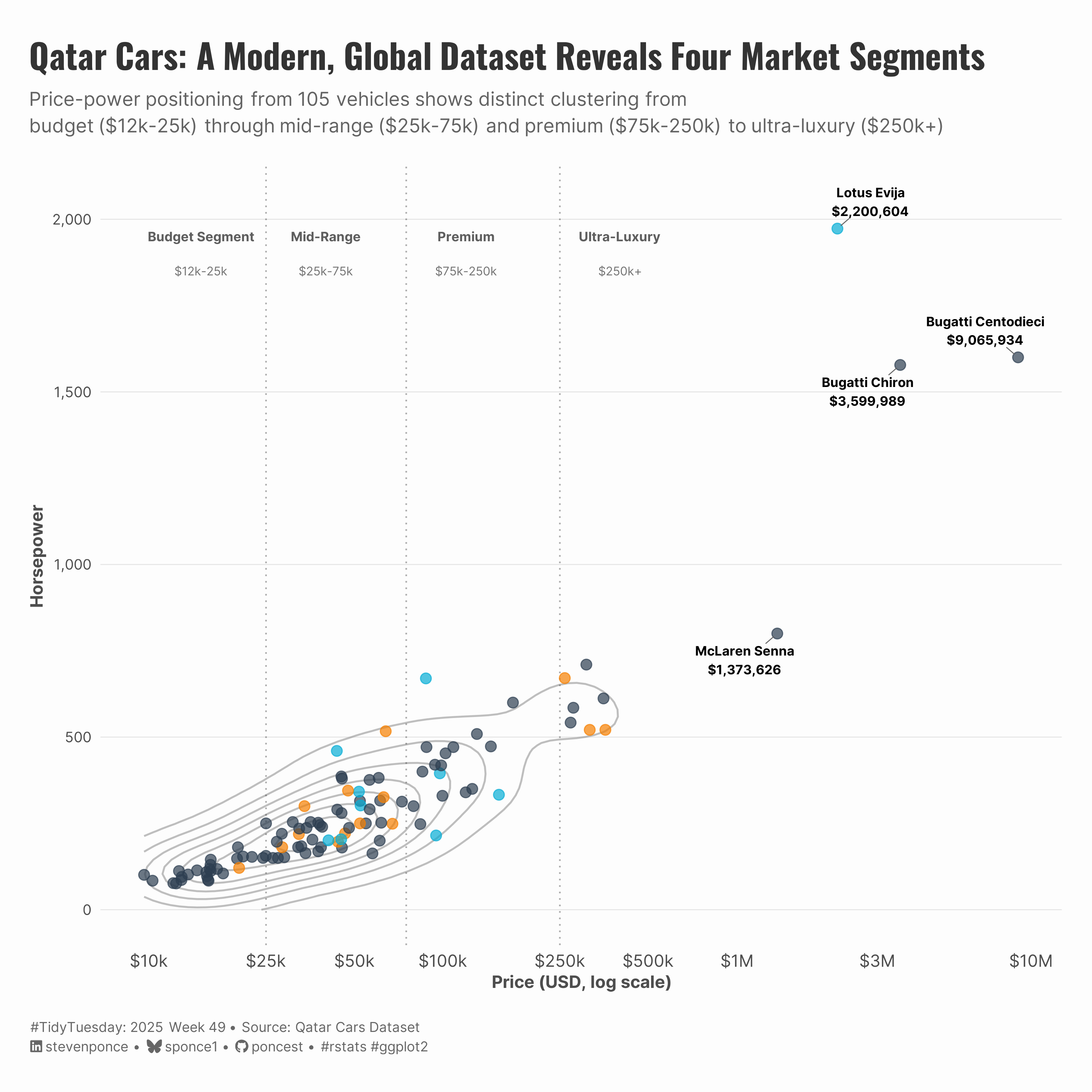
title: "Qatar Cars: A Modern, Global Dataset Reveals Four Market Segments"
subtitle: "Price-power positioning from 105 vehicles shows distinct clustering from<br>budget ($12k-25k) through mid-range ($25k-75k) and premium ($75k-250k) to ultra-luxury ($250k+)"
description: "Exploring the Qatar Cars dataset—a modern, internationally-focused alternative to mtcars—through price-power positioning analysis. This scatter plot visualization reveals four distinct market segments and demonstrates how the dataset captures the full automotive spectrum from budget vehicles to multi-million dollar hypercars."
date: "2025-12-08"
author:
- name: "Steven Ponce"
url: "https://stevenponce.netlify.app"
citation:
url: "https://stevenponce.netlify.app/data_visualizations/TidyTuesday/2025/tt_2025_49.html"
categories: ["TidyTuesday", "2025"]
tags: [
"Qatar Cars",
"Automotive Data",
"Market Segmentation",
"Scatter Plot",
"Log Scale",
"Density Contours",
"ggplot2",
"ggrepel",
"Electric Vehicles",
"Luxury Cars",
"International Dataset",
"Price Analysis",
"Horsepower",
"Modern mtcars Alternative"
]
image: "thumbnails/tt_2025_49.png"
format:
html:
toc: true
toc-depth: 5
code-link: true
code-fold: true
code-tools: true
code-summary: "Show code"
editor_options:
chunk_output_type: inline
execute:
freeze: true
cache: true
error: false
message: false
warning: false
eval: true
---
{#fig-1}
### <mark> **Steps to Create this Graphic** </mark>
#### 1. Load Packages & Setup
```{r}
#| label: load
#| warning: false
#| message: false
#| results: "hide"

## 1. LOAD PACKAGES & SETUP ----
suppressPackageStartupMessages({
if (!require("pacman")) install.packages("pacman")
pacman::p_load(
    tidyverse,     # Easily Install and Load the 'Tidyverse'
    ggtext,        # Improved Text Rendering Support for 'ggplot2'
    showtext,      # Using Fonts More Easily in R Graphs
    janitor,       # Simple Tools for Examining and Cleaning Dirty Data
    scales,        # Scale Functions for Visualization
    glue,          # Interpreted String Literals
    ggrepel        # Automatically Position Non-Overlapping Text Labels
)
})

### |- figure size ----
camcorder::gg_record(
  dir    = here::here("temp_plots"),
  device = "png",
  width  = 10,
  height = 10,
  units  = "in",
  dpi    = 320
)

# Source utility functions
suppressMessages(source(here::here("R/utils/fonts.R")))
source(here::here("R/utils/social_icons.R"))
source(here::here("R/utils/image_utils.R"))
source(here::here("R/themes/base_theme.R"))
```
#### 2. Read in the Data
```{r}
#| label: read
#| include: true
#| eval: true
#| warning: false

tt <- tidytuesdayR::tt_load(2025, week = 49)

qatarcars <- tt$qatarcars |> clean_names()

tidytuesdayR::readme(tt)
rm(tt)
```
#### 3. Examine the Data
```{r}
#| label: examine
#| include: true
#| eval: true
#| results: 'hide'
#| warning: false

glimpse(qatarcars)
skimr::skim(qatarcars) |> summary()
```
#### 4. Tidy Data
```{r}
#| label: tidy-fixed
#| warning: false

qatarcars_tidy <- qatarcars |>
  mutate(
    price_usd = price / 3.64,
    price_eur = price / 4.15
  )

# Identify top 4 most expensive cars
top4_cars <- qatarcars_tidy |>
  arrange(desc(price_usd)) |>
  head(4) |>
  mutate(
    label = paste0(make, " ", model, "\n$", label_comma(accuracy = 1)(price_usd))
  )

# Define market segments
segment_labels <- tibble(
  segment = c("Budget Segment", "Mid-Range", "Premium", "Ultra-Luxury"),
  price_usd = c(15000, 40000, 120000, 400000),
  horsepower = c(1950, 1950, 1950, 1950),
  price_range = c("$12k-25k", "$25k-75k", "$75k-250k", "$250k+")
)
```
#### 5. Visualization Parameters
```{r}
#| label: params
#| include: true
#| warning: false

### |- plot aesthetics ----
colors <- get_theme_colors(
    palette = list(
        "Electric" = "#06AED5",
        "Hybrid" = "#F77F00",
        "Petrol" = "#2C3E50",
        col_gray = "gray70"
    )
)

### |- titles and caption ----
title_text <- str_glue("Qatar Cars: A Modern, Global Dataset Reveals Four Market Segments")
subtitle_text <- str_glue(
    "Price-power positioning from 105 vehicles shows distinct clustering from<br>",
    "**budget** ($12k-25k) through **mid-range** ($25k-75k) and **premium** ($75k-250k) to **ultra-luxury** ($250k+)"
)

caption_text <- create_social_caption(
    tt_year  = 2025,
    tt_week  = 49,
    source_text = str_glue(
        "Qatar Cars Dataset",
    )
)

### |-  fonts ----
setup_fonts()
fonts <- get_font_families()

### |-  plot theme ----
# Start with base theme
base_theme <- create_base_theme(colors)

# Add weekly-specific theme elements
weekly_theme <- extend_weekly_theme(
  base_theme,
  theme(
    # Text styling
    plot.title = element_markdown(
      face = "bold", family = fonts$title, size = rel(1.4),
      color = colors$title, margin = margin(b = 10), hjust = 0
    ),
    plot.subtitle = element_markdown(
      face = "italic", family = fonts$subtitle, lineheight = 1.2,
      color = colors$subtitle, size = rel(0.9), margin = margin(b = 20), hjust = 0
    ),

    # Grid
    panel.grid.minor = element_blank(),
    # panel.grid.major.x = element_blank(),
    panel.grid.major = element_line(color = "gray90", linewidth = 0.3),

    # Axes
    axis.title = element_text(size = rel(0.8), color = "gray30"),
    axis.text = element_text(color = "gray30"),
    axis.text.y = element_text(size = rel(0.85)),
    axis.ticks = element_blank(),

    # Facets
    strip.background = element_rect(fill = "gray95", color = NA),
    strip.text = element_text(
      face = "bold",
      color = "gray20",
      size = rel(0.9),
      margin = margin(t = 6, b = 4)
    ),
    panel.spacing = unit(1.5, "lines"),

    # Legend elements
    legend.position = "plot",
    legend.title = element_text(
      family = fonts$subtitle,
      color = colors$text, size = rel(0.8), face = "bold"
    ),
    legend.text = element_text(
      family = fonts$tsubtitle,
      color = colors$text, size = rel(0.7)
    ),
    legend.margin = margin(t = 15),

    # Plot margin
    plot.margin = margin(20, 20, 20, 20)
  )
)

# Set theme
theme_set(weekly_theme)
```
#### 6. Plot
```{r}
#| label: plot
#| warning: false

# labeling function for x-axis (k for thousands, M for millions)
custom_dollar_labels <- function(x) {
    case_when(
        x >= 1e6 ~ paste0("$", x / 1e6, "M"),
        x >= 1e3 ~ paste0("$", x / 1e3, "k"),
        TRUE ~ paste0("$", x)
    )
}

### |-  main plot ----
p <- qatarcars_tidy |>
  ggplot(aes(x = price_usd, y = horsepower)) +
  # Geoms
  geom_density2d(color = "gray50", alpha = 0.5, linewidth = 0.6) +
  geom_vline(xintercept = 25000, linetype = "dotted", color = "gray20", alpha = 0.4) +
  geom_vline(xintercept = 75000, linetype = "dotted", color = "gray20", alpha = 0.4) +
  geom_vline(xintercept = 250000, linetype = "dotted", color = "gray20", alpha = 0.4) +
  geom_text(
    data = segment_labels,
    aes(x = price_usd, y = horsepower, label = segment),
    size = 3,
    fontface = "bold",
    color = "gray30",
    alpha = 0.9,
    family = fonts$text
  ) +
  geom_text(
    data = segment_labels,
    aes(x = price_usd, y = 1850, label = price_range),
    size = 2.8,
    color = "gray40",
    alpha = 0.9,
    family = fonts$text
  ) +
  geom_point(aes(color = enginetype), alpha = 0.7, size = 3) +
  geom_text_repel(
    data = top4_cars,
    aes(label = label),
    size = 3,
    fontface = "bold",
    box.padding = 0.5,
    point.padding = 0.3,
    segment.color = "gray40",
    segment.size = 0.3,
    min.segment.length = 0,
    family = fonts$text,
    seed = 1234
  ) +
  # Scales
  scale_x_log10(
    labels = custom_dollar_labels,
    breaks = c(10000, 25000, 50000, 100000, 250000, 500000, 1e6, 3e6, 10e6)
  ) +
  scale_y_continuous(labels = label_comma(), limits = c(0, 2050)) +
  scale_color_manual(
    values = colors$palette,
    name = "Engine Type"
  ) +
  # Labs
  labs(
    title = title_text,
    subtitle = subtitle_text,
    x = "Price (USD, log scale)",
    y = "Horsepower",
    caption = caption_text
  ) +
  # Theme
  theme(
    plot.title = element_markdown(
      size = rel(1.6),
      family = fonts$title,
      face = "bold",
      color = colors$title,
      lineheight = 1.15,
      margin = margin(t = 8, b = 5)
    ),
    plot.subtitle = element_markdown(
      size = rel(0.9),
      family = fonts$subtitle,
      color = alpha(colors$subtitle, 0.88),
      lineheight = 1.4,
      margin = margin(t = 5, b = 20)
    ),
    plot.caption = element_markdown(
      size = rel(0.65),
      family = fonts$subtitle,
      color = colors$caption,
      hjust = 0,
      lineheight = 1.4,
      margin = margin(t = 20, b = 5)
    ),
    panel.grid.minor.x = element_blank(),
    panel.grid.major.x = element_blank(),
  )
```
#### 7. Save
```{r}
#| label: save
#| warning: false

### |-  plot image ----
save_plot(
  plot = p,
  type = "tidytuesday",
  year = 2025,
  week = 49,
  width  = 10,
  height = 10,
  )
```
#### 8. Session Info
::: {.callout-tip collapse="true"}
##### Expand for Session Info
```{r, echo = FALSE}
#| eval: true
#| warning: false
sessionInfo()
```
:::
#### 9. GitHub Repository
::: {.callout-tip collapse="true"}
##### Expand for GitHub Repo
The complete code for this analysis is available in [`tt_2025_49.qmd`](https://github.com/poncest/personal-website/blob/master/data_visualizations/TidyTuesday/2025/tt_2025_49.qmd).
For the full repository, [click here](https://github.com/poncest/personal-website/).
:::
#### 10. References
::: {.callout-tip collapse="true"}
##### Expand for References
1. **Data Source:**
- TidyTuesday 2025 Week 49: [Cars in Qatar](https://github.com/rfordatascience/tidytuesday/blob/main/data/2025/2025-12-09/readme.md)
:::
#### 11. Custom Functions Documentation
::: {.callout-note collapse="true"}
##### 📦 Custom Helper Functions
This analysis uses custom functions from my personal module library for efficiency and consistency across projects.
**Functions Used:**
- **`fonts.R`**: `setup_fonts()`, `get_font_families()` - Font management with showtext
- **`social_icons.R`**: `create_social_caption()` - Generates formatted social media captions
- **`image_utils.R`**: `save_plot()` - Consistent plot saving with naming conventions
- **`base_theme.R`**: `create_base_theme()`, `extend_weekly_theme()`, `get_theme_colors()` - Custom ggplot2 themes
**Why custom functions?**\
These utilities standardize theming, fonts, and output across all my data visualizations. The core analysis (data tidying and visualization logic) uses only standard tidyverse packages.
**Source Code:**\
View all custom functions → [GitHub: R/utils](https://github.com/poncest/personal-website/tree/master/R)
:::
