• Steven Ponce
  • About
  • Data Visualizations
  • Projects
  • Resume
  • Email

On this page

  • Steps to Create this Graphic
    • 1. Load Packages & Setup
    • 2. Read in the Data
    • 3. Examine the Data
    • 4. Tidy Data
    • 5. Visualization Parameters
    • 6. Plot
    • 7. Save
    • 8. Session Info
    • 9. GitHub Repository
    • 10. References
    • 11. Custom Functions Documentation

Lost in the Middle

  • Show All Code
  • Hide All Code

  • View Source

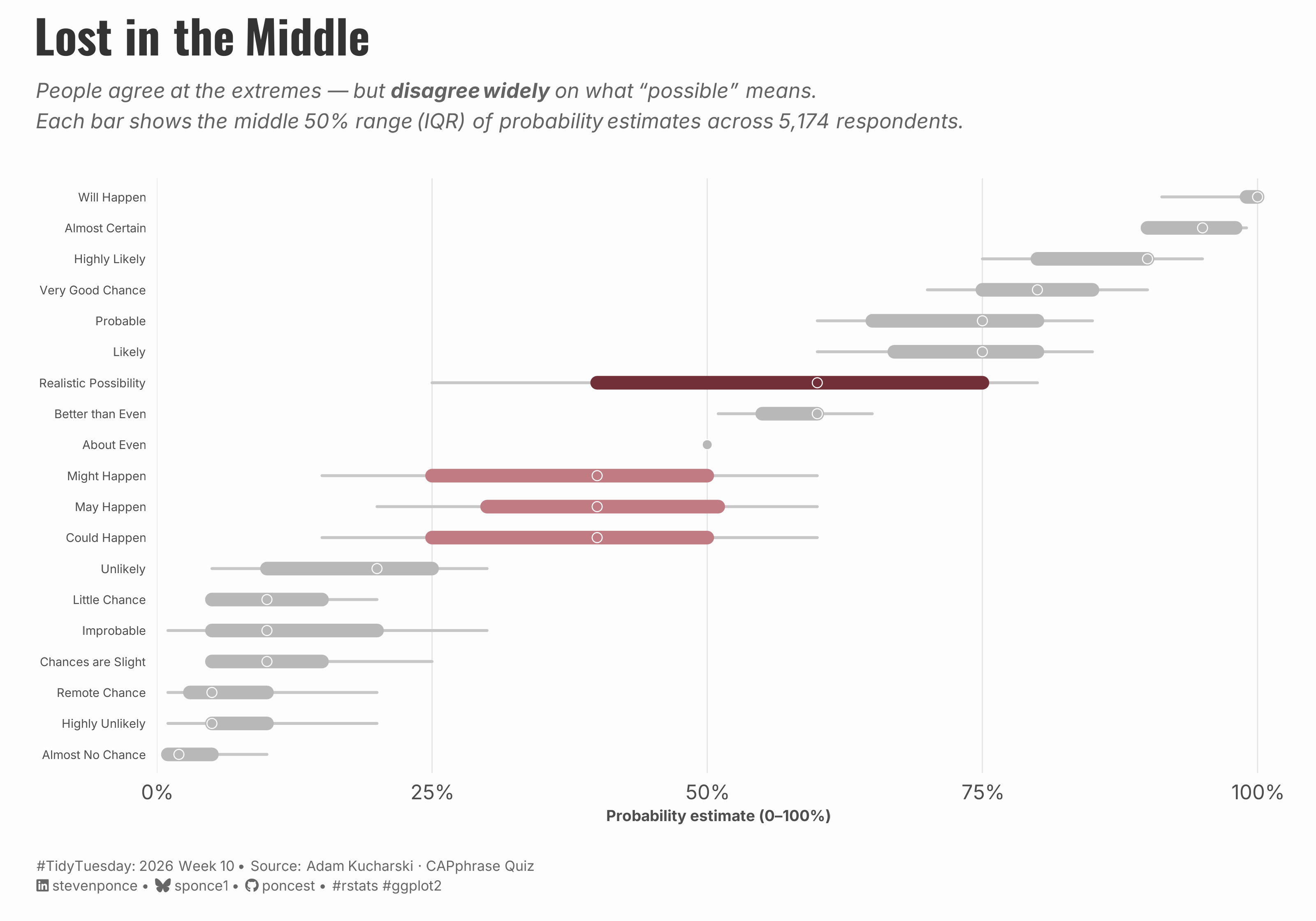
People agree at the extremes — but disagree widely on what ‘possible’ means. Each bar shows the middle 50% range (IQR) of probability estimates across 5,174 respondents.

TidyTuesday
Data Visualization
R Programming
2026
A horizontal range chart exploring how 5,174 respondents interpreted 19 common probability phrases. Phrases at the extremes — ‘Will Happen’, ‘Almost Certain’, ‘Almost No Chance’ — show near-perfect consensus. The contested middle tells a different story: ‘Realistic Possibility’ spans a 50-point IQR, while ‘Might’, ‘May’, and ‘Could Happen’ share an identical median despite being distinct words.
Author

Steven Ponce

Published

March 8, 2026

Figure 1: A horizontal range chart titled “Lost in the Middle” showing how 5,174 respondents assigned numerical probabilities (0–100%) to 19 common probability phrases. Each row displays a phrase ordered from lowest to highest median estimate. The thick bar represents the middle 50% of responses (IQR) and thin lines show the 10th–90th percentile range. Phrases at the extremes — such as “Will Happen” (median 100%), “Almost Certain” (95%), and “Almost No Chance” (2%) — show narrow, tightly clustered bars in gray, indicating strong agreement. In contrast, “Realistic Possibility” (highlighted in deep burgundy, IQR spanning 25–75%) and three semantically similar phrases — “Might Happen,” “May Happen,” and “Could Happen” (shown in muted rose, all with median 40%) — display wide bars indicating substantial disagreement. “About Even” stands out as a single gray dot with zero spread, the only phrase on which respondents achieved perfect consensus at 50%.

Steps to Create this Graphic

1. Load Packages & Setup

Show code
```{r}
#| label: load
#| warning: false
#| message: false      
#| results: "hide"     

## 1. LOAD PACKAGES & SETUP ----
suppressPackageStartupMessages({
if (!require("pacman")) install.packages("pacman")
pacman::p_load(
    tidyverse, ggtext, showtext, janitor,      
    scales, glue, skimr 
    )
})

### |- figure size ----
camcorder::gg_record(
  dir    = here::here("temp_plots"),
  device = "png",
  width  = 10,
  height = 7,
  units  = "in",
  dpi    = 320
)

# Source utility functions
suppressMessages(source(here::here("R/utils/fonts.R")))
source(here::here("R/utils/social_icons.R"))
source(here::here("R/utils/image_utils.R"))
source(here::here("R/themes/base_theme.R"))
```

2. Read in the Data

Show code
```{r}
#| label: read
#| include: true
#| eval: true
#| warning: false

# tt <- tidytuesdayR::tt_load(2026, week = 10)
# absolute_judgements <- tt$absolute_judgements |> clean_names()
# pairwise_comparisons <- tt$pairwise_comparisons |> clean_names()
# respondent_metadata <- tt$respondent_metadata |> clean_names() 
# rm(tt)

# Option 2: Read directly from GitHub
base_url <- "https://raw.githubusercontent.com/rfordatascience/tidytuesday/main/data/2026/2026-03-10/"

absolute_judgements  <- read_csv(paste0(base_url, "absolute_judgements.csv"))  |> clean_names()
pairwise_comparisons <- read_csv(paste0(base_url, "pairwise_comparisons.csv")) |> clean_names()
respondent_metadata  <- read_csv(paste0(base_url, "respondent_metadata.csv"))  |> clean_names()
```

3. Examine the Data

Show code
```{r}
#| label: examine
#| include: true
#| eval: true
#| results: 'hide'
#| warning: false

glimpse(absolute_judgements)
glimpse(pairwise_comparisons)
glimpse(respondent_metadata)

skim(absolute_judgements)
skim(pairwise_comparisons)
skim(respondent_metadata)
```

4. Tidy Data

Show code
```{r}
#| label: tidy
#| warning: false

### |- term-level summary statistics ----
term_summary <- absolute_judgements |>
    group_by(term) |>
    summarise(
        n = n(),
        mean = mean(probability),
        median = median(probability),
        iqr = IQR(probability),
        p10 = quantile(probability, 0.10),
        p90 = quantile(probability, 0.90),
        q25 = quantile(probability, 0.25),
        q75 = quantile(probability, 0.75),
        .groups = "drop"
    ) |>
    arrange(median, term)

### |- define highlight hierarchy ----
term_summary <- term_summary |>
    mutate(
        highlight = case_when(
            term == "Realistic Possibility" ~ "standout",
            term %in% c("Could Happen", "Might Happen", "May Happen") ~ "cluster",
            TRUE ~ "other"
        ),
        term = fct_reorder(term, median)
    )
```

5. Visualization Parameters

Show code
```{r}
#| label: params
#| include: true
#| warning: false

### |-  plot aesthetics ----
colors <- get_theme_colors(
    palette = list(
        "standout" = "#722F37",  
        "cluster"  = "#C17B82",  
        "other"    = "gray72",   
        # "bg"       = "#FAFAF8",
        "text"     = "#2C2C2C"
    )
)

### |- titles and caption ----
title_text    <- str_glue("Lost in the Middle")

subtitle_text <- str_glue(
    "People agree at the extremes — but **disagree widely** on what *\"possible\"* means.<br>",
    "Each bar shows the middle 50% range (IQR) of probability estimates across 5,174 respondents."
)

caption_text  <- create_social_caption(
    tt_year     = 2026,
    tt_week     = 10,
    source_text = "Adam Kucharski · CAPphrase Quiz"
)

### |-  fonts ----
setup_fonts()
fonts <- get_font_families()

### |-  plot theme ----
# Start with base theme
base_theme <- create_base_theme(colors)

# Add weekly-specific theme elements
weekly_theme <- extend_weekly_theme(
  base_theme,
  theme(
    # Text styling
    plot.title = element_text(
      face = "bold", family = fonts$title, size = rel(1.1),
      color = colors$title, margin = margin(b = 10), hjust = 0
    ),
    plot.subtitle = element_markdown(
      face = "italic", family = fonts$subtitle, lineheight = 1.2,
      color = colors$subtitle, size = rel(0.7), margin = margin(b = 20), hjust = 0
    ),

    # Grid
    panel.grid.major.x = element_line(color = "gray90", linewidth = 0.3),
    panel.grid.major.y = element_blank(),
    panel.grid.minor   = element_blank(),
    
    # Axes
    axis.title = element_text(size = rel(0.6), color = "gray30"),
    axis.text = element_text(color = "gray30"),
    axis.text.y = element_text(size = rel(0.6)),
    axis.ticks = element_blank(),
    axis.title.y = element_blank(),

    # Facets
    strip.background = element_rect(fill = "gray95", color = NA),
    strip.text = element_text(
      face = "bold",
      color = "gray20",
      size = rel(0.9),
      margin = margin(t = 6, b = 4)
    ),
    panel.spacing = unit(1.5, "lines"),

    # Legend elements
    legend.position = "plot",
    legend.title = element_text(
      family = fonts$subtitle,
      color = colors$text, size = rel(0.8), face = "bold"
    ),
    legend.text = element_text(
      family = fonts$tsubtitle,
      color = colors$text, size = rel(0.7)
    ),
    legend.margin = margin(t = 15),

    # Plot margin
    plot.margin = margin(10, 20, 10, 20),
  )
)

# Set theme
theme_set(weekly_theme)
```

6. Plot

Show code
```{r}
#| label: plot
#| warning: false

p <- ggplot(term_summary, aes(y = term)) +
  # Geoms
  geom_segment(
    aes(x = p10, xend = p90, yend = term),
    color = "gray78",
    linewidth = 0.75,
    lineend = "round"
  ) +
  geom_segment(
    aes(x = q25, xend = q75, yend = term, color = highlight),
    linewidth = 3.5,
    lineend = "round"
  ) +
  geom_point(
    aes(x = median, fill = highlight),
    shape = 21,
    size = 2.3,
    color = "white",
    stroke = 0.4
  ) +
  # Annotate
  annotate(
    "text",
    x          = 83,
    y          = "Realistic Possibility",
    label      = "Spans 25–80%\nfor the middle 50%",
    hjust      = 0,
    size       = 3,
    color      = colors$palette$standout,
    family     = fonts$body,
    fontface   = "italic",
    lineheight = 1.3
  ) +
  # Scales
  scale_color_manual(
    values = c(
      "standout" = colors$palette$standout,
      "cluster"  = colors$palette$cluster,
      "other"    = colors$palette$other
    ),
    guide = "none"
  ) +
  scale_fill_manual(
    values = c(
      "standout" = colors$palette$standout,
      "cluster"  = colors$palette$cluster,
      "other"    = colors$palette$other
    ),
    guide = "none"
  ) +
  scale_x_continuous(
    limits = c(0, 102),
    breaks = seq(0, 100, 25),
    labels = label_percent(scale = 1),
    expand = c(0, 0)
  ) +
  # Labs
  labs(
    title    = title_text,
    subtitle = subtitle_text,
    caption  = caption_text,
    x        = "Probability estimate (0–100%)"
  ) +
  # Theme
  theme(
    plot.title = element_markdown(
      size = rel(1.8),
      family = fonts$title,
      face = "bold",
      color = colors$title,
      lineheight = 1.15,
      margin = margin(t = 0, b = 5)
    ),
    plot.subtitle = element_markdown(
      size = rel(0.8),
      family = fonts$subtitle,
      face = "italic",
      color = alpha(colors$subtitle, 0.88),
      lineheight = 1.5,
      margin = margin(t = 5, b = 25)
    ),
    plot.caption = element_markdown(
      size = rel(0.55),
      family = fonts$subtitle,
      color = colors$caption,
      hjust = 0,
      lineheight = 1.4,
      margin = margin(t = 20, b = 5)
    )
  )
```

7. Save

Show code
```{r}
#| label: save
#| warning: false

### |-  plot image ----  
save_plot(
  plot = p, 
  type = "tidytuesday", 
  year = 2026, 
  week = 10, 
  width  = 10,
  height = 7,
  )
```

8. Session Info

TipExpand for Session Info
R version 4.3.1 (2023-06-16 ucrt)
Platform: x86_64-w64-mingw32/x64 (64-bit)
Running under: Windows 11 x64 (build 26100)

Matrix products: default


locale:
[1] LC_COLLATE=English_United States.utf8 
[2] LC_CTYPE=English_United States.utf8   
[3] LC_MONETARY=English_United States.utf8
[4] LC_NUMERIC=C                          
[5] LC_TIME=English_United States.utf8    

time zone: America/New_York
tzcode source: internal

attached base packages:
[1] stats     graphics  grDevices utils     datasets  methods   base     

other attached packages:
 [1] here_1.0.2      skimr_2.2.2     glue_1.8.0      scales_1.4.0   
 [5] janitor_2.2.1   showtext_0.9-7  showtextdb_3.0  sysfonts_0.8.9 
 [9] ggtext_0.1.2    lubridate_1.9.5 forcats_1.0.1   stringr_1.6.0  
[13] dplyr_1.2.0     purrr_1.2.1     readr_2.2.0     tidyr_1.3.2    
[17] tibble_3.2.1    ggplot2_4.0.2   tidyverse_2.0.0 pacman_0.5.1   

loaded via a namespace (and not attached):
 [1] gtable_0.3.6       xfun_0.56          htmlwidgets_1.6.4  tzdb_0.5.0        
 [5] vctrs_0.7.1        tools_4.3.1        generics_0.1.4     curl_7.0.0        
 [9] parallel_4.3.1     gifski_1.32.0-2    pkgconfig_2.0.3    RColorBrewer_1.1-3
[13] S7_0.2.0           lifecycle_1.0.5    compiler_4.3.1     farver_2.1.2      
[17] textshaping_1.0.4  repr_1.1.7         codetools_0.2-19   snakecase_0.11.1  
[21] litedown_0.9       htmltools_0.5.9    yaml_2.3.10        crayon_1.5.3      
[25] pillar_1.10.2      camcorder_0.1.0    magick_2.8.6       commonmark_2.0.0  
[29] tidyselect_1.2.1   digest_0.6.37      stringi_1.8.7      rsvg_2.6.2        
[33] rprojroot_2.1.1    fastmap_1.2.0      grid_4.3.1         cli_3.6.4         
[37] magrittr_2.0.3     base64enc_0.1-6    withr_3.0.2        bit64_4.6.0-1     
[41] timechange_0.4.0   rmarkdown_2.30     bit_4.6.0          otel_0.2.0        
[45] ragg_1.5.0         hms_1.1.4          evaluate_1.0.5     knitr_1.51        
[49] markdown_2.0       rlang_1.1.7        gridtext_0.1.6     Rcpp_1.1.1        
[53] xml2_1.5.2         svglite_2.1.3      rstudioapi_0.18.0  vroom_1.7.0       
[57] jsonlite_2.0.0     R6_2.6.1           systemfonts_1.3.2 

9. GitHub Repository

TipExpand for GitHub Repo

The complete code for this analysis is available in tt_2026_10.qmd.

For the full repository, click here.

10. References

TipExpand for References
  1. Data Source:
    • TidyTuesday 2026 Week 10: How likely is ‘likely’?

11. Custom Functions Documentation

Note📦 Custom Helper Functions

This analysis uses custom functions from my personal module library for efficiency and consistency across projects.

Functions Used:

  • fonts.R: setup_fonts(), get_font_families() - Font management with showtext
  • social_icons.R: create_social_caption() - Generates formatted social media captions
  • image_utils.R: save_plot() - Consistent plot saving with naming conventions
  • base_theme.R: create_base_theme(), extend_weekly_theme(), get_theme_colors() - Custom ggplot2 themes

Why custom functions?
These utilities standardize theming, fonts, and output across all my data visualizations. The core analysis (data tidying and visualization logic) uses only standard tidyverse packages.

Source Code:
View all custom functions → GitHub: R/utils

Back to top

Citation

BibTeX citation:
@online{ponce2026,
  author = {Ponce, Steven},
  title = {Lost in the {Middle}},
  date = {2026-03-08},
  url = {https://stevenponce.netlify.app/data_visualizations/TidyTuesday/2026/tt_2026_10.html},
  langid = {en}
}
For attribution, please cite this work as:
Ponce, Steven. 2026. “Lost in the Middle.” March 8, 2026. https://stevenponce.netlify.app/data_visualizations/TidyTuesday/2026/tt_2026_10.html.
Source Code
---
title: "Lost in the Middle"
subtitle: "People agree at the extremes — but disagree widely on what 'possible' means. Each bar shows the middle 50% range (IQR) of probability estimates across 5,174 respondents."
description: "A horizontal range chart exploring how 5,174 respondents interpreted 19 common probability phrases. Phrases at the extremes — 'Will Happen', 'Almost Certain', 'Almost No Chance' — show near-perfect consensus. The contested middle tells a different story: 'Realistic Possibility' spans a 50-point IQR, while 'Might', 'May', and 'Could Happen' share an identical median despite being distinct words. "
date: "2026-03-08"
author:
  - name: "Steven Ponce"
    url: "https://stevenponce.netlify.app"
citation:
  url: "https://stevenponce.netlify.app/data_visualizations/TidyTuesday/2026/tt_2026_10.html" 
categories: ["TidyTuesday", "Data Visualization", "R Programming", "2026"]
tags: [
  "probability",
  "linguistics",
  "uncertainty",
  "perception",
  "range chart",
  "IQR",
  "dot plot",
  "survey data",
  "ggplot2",
  "behavioral science",
  "communication",
  "TidyTuesday"
]
image: "thumbnails/tt_2026_10.png"
format:
  html:
    toc: true
    toc-depth: 5
    code-link: true
    code-fold: true
    code-tools: true
    code-summary: "Show code"
    self-contained: true
    theme: 
      light: [flatly, assets/styling/custom_styles.scss]
      dark: [darkly, assets/styling/custom_styles_dark.scss]
editor_options: 
  chunk_output_type: inline
execute: 
  freeze: true                                    
  cache: true                                       
  error: false
  message: false
  warning: false
  eval: true
---
![A horizontal range chart titled "Lost in the Middle" showing how 5,174 respondents assigned numerical probabilities (0–100%) to 19 common probability phrases. Each row displays a phrase ordered from lowest to highest median estimate. The thick bar represents the middle 50% of responses (IQR) and thin lines show the 10th–90th percentile range. Phrases at the extremes — such as "Will Happen" (median 100%), "Almost Certain" (95%), and "Almost No Chance" (2%) — show narrow, tightly clustered bars in gray, indicating strong agreement. In contrast, "Realistic Possibility" (highlighted in deep burgundy, IQR spanning 25–75%) and three semantically similar phrases — "Might Happen," "May Happen," and "Could Happen" (shown in muted rose, all with median 40%) — display wide bars indicating substantial disagreement. "About Even" stands out as a single gray dot with zero spread, the only phrase on which respondents achieved perfect consensus at 50%.](tt_2026_10.png){#fig-1}

### [**Steps to Create this Graphic**]{.mark}

#### [1. Load Packages & Setup]{.smallcaps}

```{r}
#| label: load
#| warning: false
#| message: false      
#| results: "hide"     

## 1. LOAD PACKAGES & SETUP ----
suppressPackageStartupMessages({
if (!require("pacman")) install.packages("pacman")
pacman::p_load(
    tidyverse, ggtext, showtext, janitor,      
    scales, glue, skimr 
    )
})

### |- figure size ----
camcorder::gg_record(
  dir    = here::here("temp_plots"),
  device = "png",
  width  = 10,
  height = 7,
  units  = "in",
  dpi    = 320
)

# Source utility functions
suppressMessages(source(here::here("R/utils/fonts.R")))
source(here::here("R/utils/social_icons.R"))
source(here::here("R/utils/image_utils.R"))
source(here::here("R/themes/base_theme.R"))
```

#### [2. Read in the Data]{.smallcaps}

```{r}
#| label: read
#| include: true
#| eval: true
#| warning: false

# tt <- tidytuesdayR::tt_load(2026, week = 10)
# absolute_judgements <- tt$absolute_judgements |> clean_names()
# pairwise_comparisons <- tt$pairwise_comparisons |> clean_names()
# respondent_metadata <- tt$respondent_metadata |> clean_names() 
# rm(tt)

# Option 2: Read directly from GitHub
base_url <- "https://raw.githubusercontent.com/rfordatascience/tidytuesday/main/data/2026/2026-03-10/"

absolute_judgements  <- read_csv(paste0(base_url, "absolute_judgements.csv"))  |> clean_names()
pairwise_comparisons <- read_csv(paste0(base_url, "pairwise_comparisons.csv")) |> clean_names()
respondent_metadata  <- read_csv(paste0(base_url, "respondent_metadata.csv"))  |> clean_names()
```

#### [3. Examine the Data]{.smallcaps}

```{r}
#| label: examine
#| include: true
#| eval: true
#| results: 'hide'
#| warning: false

glimpse(absolute_judgements)
glimpse(pairwise_comparisons)
glimpse(respondent_metadata)

skim(absolute_judgements)
skim(pairwise_comparisons)
skim(respondent_metadata)
```

#### [4. Tidy Data]{.smallcaps}

```{r}
#| label: tidy
#| warning: false

### |- term-level summary statistics ----
term_summary <- absolute_judgements |>
    group_by(term) |>
    summarise(
        n = n(),
        mean = mean(probability),
        median = median(probability),
        iqr = IQR(probability),
        p10 = quantile(probability, 0.10),
        p90 = quantile(probability, 0.90),
        q25 = quantile(probability, 0.25),
        q75 = quantile(probability, 0.75),
        .groups = "drop"
    ) |>
    arrange(median, term)

### |- define highlight hierarchy ----
term_summary <- term_summary |>
    mutate(
        highlight = case_when(
            term == "Realistic Possibility" ~ "standout",
            term %in% c("Could Happen", "Might Happen", "May Happen") ~ "cluster",
            TRUE ~ "other"
        ),
        term = fct_reorder(term, median)
    )
```

#### [5. Visualization Parameters]{.smallcaps}

```{r}
#| label: params
#| include: true
#| warning: false

### |-  plot aesthetics ----
colors <- get_theme_colors(
    palette = list(
        "standout" = "#722F37",  
        "cluster"  = "#C17B82",  
        "other"    = "gray72",   
        # "bg"       = "#FAFAF8",
        "text"     = "#2C2C2C"
    )
)

### |- titles and caption ----
title_text    <- str_glue("Lost in the Middle")

subtitle_text <- str_glue(
    "People agree at the extremes — but **disagree widely** on what *\"possible\"* means.<br>",
    "Each bar shows the middle 50% range (IQR) of probability estimates across 5,174 respondents."
)

caption_text  <- create_social_caption(
    tt_year     = 2026,
    tt_week     = 10,
    source_text = "Adam Kucharski · CAPphrase Quiz"
)

### |-  fonts ----
setup_fonts()
fonts <- get_font_families()

### |-  plot theme ----
# Start with base theme
base_theme <- create_base_theme(colors)

# Add weekly-specific theme elements
weekly_theme <- extend_weekly_theme(
  base_theme,
  theme(
    # Text styling
    plot.title = element_text(
      face = "bold", family = fonts$title, size = rel(1.1),
      color = colors$title, margin = margin(b = 10), hjust = 0
    ),
    plot.subtitle = element_markdown(
      face = "italic", family = fonts$subtitle, lineheight = 1.2,
      color = colors$subtitle, size = rel(0.7), margin = margin(b = 20), hjust = 0
    ),

    # Grid
    panel.grid.major.x = element_line(color = "gray90", linewidth = 0.3),
    panel.grid.major.y = element_blank(),
    panel.grid.minor   = element_blank(),
    
    # Axes
    axis.title = element_text(size = rel(0.6), color = "gray30"),
    axis.text = element_text(color = "gray30"),
    axis.text.y = element_text(size = rel(0.6)),
    axis.ticks = element_blank(),
    axis.title.y = element_blank(),

    # Facets
    strip.background = element_rect(fill = "gray95", color = NA),
    strip.text = element_text(
      face = "bold",
      color = "gray20",
      size = rel(0.9),
      margin = margin(t = 6, b = 4)
    ),
    panel.spacing = unit(1.5, "lines"),

    # Legend elements
    legend.position = "plot",
    legend.title = element_text(
      family = fonts$subtitle,
      color = colors$text, size = rel(0.8), face = "bold"
    ),
    legend.text = element_text(
      family = fonts$tsubtitle,
      color = colors$text, size = rel(0.7)
    ),
    legend.margin = margin(t = 15),

    # Plot margin
    plot.margin = margin(10, 20, 10, 20),
  )
)

# Set theme
theme_set(weekly_theme)
```

#### [6. Plot]{.smallcaps}

```{r}
#| label: plot
#| warning: false

p <- ggplot(term_summary, aes(y = term)) +
  # Geoms
  geom_segment(
    aes(x = p10, xend = p90, yend = term),
    color = "gray78",
    linewidth = 0.75,
    lineend = "round"
  ) +
  geom_segment(
    aes(x = q25, xend = q75, yend = term, color = highlight),
    linewidth = 3.5,
    lineend = "round"
  ) +
  geom_point(
    aes(x = median, fill = highlight),
    shape = 21,
    size = 2.3,
    color = "white",
    stroke = 0.4
  ) +
  # Annotate
  annotate(
    "text",
    x          = 83,
    y          = "Realistic Possibility",
    label      = "Spans 25–80%\nfor the middle 50%",
    hjust      = 0,
    size       = 3,
    color      = colors$palette$standout,
    family     = fonts$body,
    fontface   = "italic",
    lineheight = 1.3
  ) +
  # Scales
  scale_color_manual(
    values = c(
      "standout" = colors$palette$standout,
      "cluster"  = colors$palette$cluster,
      "other"    = colors$palette$other
    ),
    guide = "none"
  ) +
  scale_fill_manual(
    values = c(
      "standout" = colors$palette$standout,
      "cluster"  = colors$palette$cluster,
      "other"    = colors$palette$other
    ),
    guide = "none"
  ) +
  scale_x_continuous(
    limits = c(0, 102),
    breaks = seq(0, 100, 25),
    labels = label_percent(scale = 1),
    expand = c(0, 0)
  ) +
  # Labs
  labs(
    title    = title_text,
    subtitle = subtitle_text,
    caption  = caption_text,
    x        = "Probability estimate (0–100%)"
  ) +
  # Theme
  theme(
    plot.title = element_markdown(
      size = rel(1.8),
      family = fonts$title,
      face = "bold",
      color = colors$title,
      lineheight = 1.15,
      margin = margin(t = 0, b = 5)
    ),
    plot.subtitle = element_markdown(
      size = rel(0.8),
      family = fonts$subtitle,
      face = "italic",
      color = alpha(colors$subtitle, 0.88),
      lineheight = 1.5,
      margin = margin(t = 5, b = 25)
    ),
    plot.caption = element_markdown(
      size = rel(0.55),
      family = fonts$subtitle,
      color = colors$caption,
      hjust = 0,
      lineheight = 1.4,
      margin = margin(t = 20, b = 5)
    )
  )
```

#### [7. Save]{.smallcaps}

```{r}
#| label: save
#| warning: false

### |-  plot image ----  
save_plot(
  plot = p, 
  type = "tidytuesday", 
  year = 2026, 
  week = 10, 
  width  = 10,
  height = 7,
  )
```

#### [8. Session Info]{.smallcaps}

::: {.callout-tip collapse="true"}
##### Expand for Session Info

```{r, echo = FALSE}
#| eval: true
#| warning: false

sessionInfo()
```
:::

#### [9. GitHub Repository]{.smallcaps}

::: {.callout-tip collapse="true"}
##### Expand for GitHub Repo

The complete code for this analysis is available in [`tt_2026_10.qmd`](https://github.com/poncest/personal-website/blob/master/data_visualizations/TidyTuesday/2026/tt_2026_10.qmd).

For the full repository, [click here](https://github.com/poncest/personal-website/).
:::

#### [10. References]{.smallcaps}

::: {.callout-tip collapse="true"}
##### Expand for References
1.  **Data Source:**
    -   TidyTuesday 2026 Week 10: [How likely is 'likely'?](https://github.com/rfordatascience/tidytuesday/blob/main/data/2026/2026-03-10/readme.md)

:::


#### [11. Custom Functions Documentation]{.smallcaps}

::: {.callout-note collapse="true"}
##### 📦 Custom Helper Functions

This analysis uses custom functions from my personal module library for efficiency and consistency across projects.

**Functions Used:**

-   **`fonts.R`**: `setup_fonts()`, `get_font_families()` - Font management with showtext
-   **`social_icons.R`**: `create_social_caption()` - Generates formatted social media captions
-   **`image_utils.R`**: `save_plot()` - Consistent plot saving with naming conventions
-   **`base_theme.R`**: `create_base_theme()`, `extend_weekly_theme()`, `get_theme_colors()` - Custom ggplot2 themes

**Why custom functions?**\
These utilities standardize theming, fonts, and output across all my data visualizations. The core analysis (data tidying and visualization logic) uses only standard tidyverse packages.

**Source Code:**\
View all custom functions → [GitHub: R/utils](https://github.com/poncest/personal-website/tree/master/R)
:::

© 2024 Steven Ponce

Source Issues