• Steven Ponce
  • About
  • Data Visualizations
  • Projects
  • Resume
  • Email

On this page

  • Steps to Create this Graphic
    • 1. Load Packages & Setup
    • 2. Read in the Data
    • 3. Examine the Data
    • 4. Tidy Data
    • 5. Visualization Parameters
    • 6. Plot
    • 7. Save
    • 8. Session Info
    • 9. GitHub Repository
    • 10. References
    • 11. Custom Functions Documentation

A Million Decisions, No Destination

  • Show All Code
  • Hide All Code

  • View Source

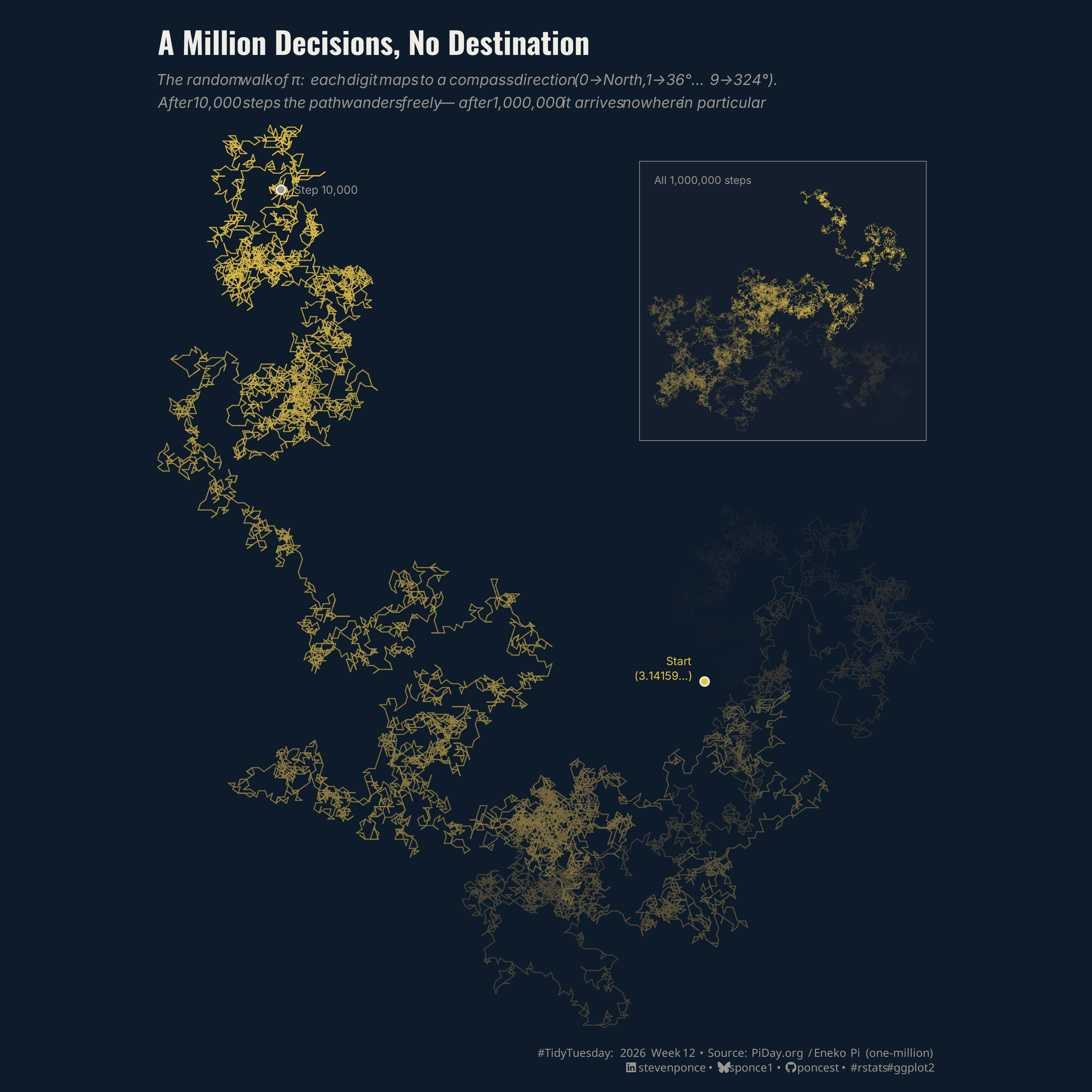
The random walk of π: each digit maps to a compass direction (0→North, 1→36°… 9→324°) After 10,000 steps the path wanders freely — after 1,000,000 it arrives nowhere in particular.

TidyTuesday
Data Visualization
R Programming
2026
A random walk visualization of π’s first 10,000 digits, where each digit maps to one of ten compass directions (0→North through 9→324°). The gold path on a dark navy background wanders freely with no discernible pattern — and an inset showing all 1,000,000 steps confirms it arrives nowhere in particular.
Author

Steven Ponce

Published

March 21, 2026

Figure 1: A dark navy background shows the random walk of π’s first 10,000 digits as a gold fractal-like path. Each digit (0–9) maps to one of ten compass directions, producing a wandering trail with no apparent pattern. The path begins near the center-right (marked “Start – 3.14159…”) and ends in the upper-left (marked “Step 10,000”), colored from near-black at the start to bright gold at the end. An inset in the upper-right shows the full 1,000,000-step walk as a dense cloud — drifting nowhere in particular, confirming π’s statistical randomness at scale.

Steps to Create this Graphic

1. Load Packages & Setup

Show code
```{r}
#| label: load
#| warning: false
#| message: false      
#| results: "hide"     

## 1. LOAD PACKAGES & SETUP ----
suppressPackageStartupMessages({
if (!require("pacman")) install.packages("pacman")
pacman::p_load(
    tidyverse, ggtext, showtext, janitor,      
    scales, glue, skimr, patchwork, lubridate    
    )
})

### |- figure size ----
camcorder::gg_record(
  dir    = here::here("temp_plots"),
  device = "png",
  width  = 12,
  height = 10,
  units  = "in",
  dpi    = 320
)

# Source utility functions
suppressMessages(source(here::here("R/utils/fonts.R")))
source(here::here("R/utils/social_icons.R"))
source(here::here("R/utils/image_utils.R"))
source(here::here("R/themes/base_theme.R"))
```

2. Read in the Data

Show code
```{r}
#| label: read
#| include: true
#| eval: true
#| warning: false

tt <- tidytuesdayR::tt_load(2026, week = 12)
pi_digits <- tt$pi_digits |> clean_names()
rm(tt)
```

3. Examine the Data

Show code
```{r}
#| label: examine
#| include: true
#| eval: true
#| results: 'hide'
#| warning: false

glimpse(pi_digits)

skim_without_charts(pi_digits)
```

4. Tidy Data

Show code
```{r}
#| label: tidy
#| warning: false

### |- Compute random walk coordinates ----
# Each digit maps to a compass direction: digit × 36° (evenly divides 360°)
# Cumulative sum of unit steps gives the 2D trajectory.
walk_data <- pi_digits |>
  arrange(digit_position) |>
  mutate(
    angle_rad = digit * (2 * pi / 10), # digit × 36° in radians
    dx        = cos(angle_rad),
    dy        = sin(angle_rad),
    x         = cumsum(dx),
    y         = cumsum(dy)
  )

### |- Main chart: first 10K steps ----
n_main <- 10000L

walk_main <- walk_data |>
  slice_head(n = n_main + 1L) |>
  mutate(
    x_end         = lead(x),
    y_end         = lead(y),
    position_norm = (digit_position - 1) / n_main
  ) |>
  filter(!is.na(x_end))

### |- Inset: full 1M walk ----
walk_inset <- walk_data |>
  filter(digit_position %% 50 == 0 | digit_position == 1L) |>
  mutate(position_norm = (digit_position - 1) / max(digit_position))

### |- annotation coordinates ----
start_pt <- walk_main |> slice_head(n = 1)
end_pt <- walk_main |> slice_tail(n = 1)
start_label_x <- start_pt$x - 2
start_label_y <- start_pt$y + 2
end_label_x <- end_pt$x_end - 2
end_label_y <- end_pt$y_end + 4
```

5. Visualization Parameters

Show code
```{r}
#| label: params
#| include: true
#| warning: false

### |-  plot aesthetics ----
colors <- get_theme_colors(
    palette = list(
        start      = "#0D1B2A",   
        end        = "#E8C547",   
        bg         = "#0D1B2A",   
        text_main  = "#F0EDE6",   
        text_muted = "#9A9690",
        inset_bg   = "#141E2D",   
        highlight  = "#E8C547"  
    )
)

### |- color scale (shared between main + inset) ----
walk_color_scale <- scale_color_gradient(
    low   = colors$palette$start,
    high  = colors$palette$end,
    guide = "none"
)

### |- titles and caption ----
title_text    <- "A Million Decisions, No Destination"

subtitle_text <- str_glue(
    "The random walk of \u03c0: each digit maps to a compass direction ",
    "(0\u2192North, 1\u219236\u00b0\u2026 9\u2192324\u00b0).<br>",
    "After 10,000 steps the path wanders freely \u2014 ",
    "after 1,000,000 it arrives <i>nowhere in particular</i>."
)
caption_text <- create_social_caption(
    tt_year     = 2026,
    tt_week     = 12,
    source_text = "PiDay.org / Eneko Pi (one-million)"
)

### |- fonts ----
setup_fonts()
fonts <- get_font_families()

### |-  plot theme ----
# Start with base theme
base_theme <- create_base_theme(colors)

# Add weekly-specific theme elements
weekly_theme <- extend_weekly_theme(
  base_theme,
  theme(
    # Text styling
    plot.title = element_text(
      face = "bold", family = fonts$title, size = rel(1.1),
      color = colors$title, margin = margin(b = 10), hjust = 0
    ),
    plot.subtitle = element_text(
      face = "italic", family = fonts$subtitle, lineheight = 1.2,
      color = colors$subtitle, size = rel(0.7), margin = margin(b = 20), hjust = 0
    ),

    # Grid
    panel.grid.major.x = element_line(color = "gray90", linewidth = 0.3),
    panel.grid.major.y = element_blank(),
    panel.grid.minor   = element_blank(),
    
    # Axes
    axis.title = element_text(size = rel(0.6), color = "gray30"),
    axis.text = element_text(color = "gray30"),
    axis.text.y = element_text(size = rel(0.6)),
    axis.ticks = element_blank(),
    axis.title.y = element_blank(),

    # Facets
    strip.background = element_rect(fill = "gray95", color = NA),
    strip.text = element_text(
      face = "bold",
      color = "gray20",
      size = rel(0.9),
      margin = margin(t = 6, b = 4)
    ),
    panel.spacing = unit(1.5, "lines"),

    # Legend elements
    legend.position = "plot",
    legend.title = element_text(
      family = fonts$subtitle,
      color = colors$text, size = rel(0.8), face = "bold"
    ),
    legend.text = element_text(
      family = fonts$tsubtitle,
      color = colors$text, size = rel(0.7)
    ),
    legend.margin = margin(t = 15),

    # Plot margin
    plot.margin = margin(10, 20, 10, 20),
  )
)

# Set theme
theme_set(weekly_theme)
```

6. Plot

Show code
```{r}
#| label: plot
#| warning: false

### |- Panel A: National Trend ----
p_main <- walk_main |>
  ggplot(aes(x = x, y = y, color = position_norm)) +
  geom_segment(
    aes(xend = x_end, yend = y_end),
    linewidth = 0.35, alpha = 0.85, lineend = "round"
  ) +
  # Start marker
  geom_point(
    data = start_pt, aes(x = x, y = y),
    color = colors$palette$text_main, size = 2.2, shape = 21,
    fill = colors$palette$end, stroke = 0.8
  ) +
  # End marker
  geom_point(
    data = end_pt, aes(x = x_end, y = y_end),
    color = colors$palette$text_main, size = 2.2, shape = 21,
    fill = colors$palette$text_muted, stroke = 0.8
  ) +
  # Start label
  annotate(
    "text",
    x = start_label_x,
    y = start_label_y,
    label = "Start\n(3.14159\u2026)",
    hjust = 1, size = 2.6, lineheight = 1.1,
    family = fonts$text, color = colors$palette$highlight
  ) +
  # End label
  annotate(
    "text",
    x = end_label_x + 4,
    y = end_label_y - 4,
    label = "Step 10,000",
    hjust = 0, size = 2.6,
    family = fonts$text, color = colors$palette$text_muted
  ) +
  walk_color_scale +
  coord_equal(expand = FALSE) +
  labs(x = NULL, y = NULL) +
  theme_void() +
  theme(
    plot.background  = element_rect(fill = colors$palette$bg, color = NA),
    panel.background = element_rect(fill = colors$palette$bg, color = NA),
    plot.margin      = margin(5, 5, 5, 5)
  )

### |- INSET: full 1M walk ----
p_inset <- walk_inset |>
  ggplot(aes(x = x, y = y, color = position_norm)) +
  geom_path(linewidth = 0.15, alpha = 0.6, lineend = "round") +
  walk_color_scale +
  coord_equal(expand = FALSE) +
  labs(title = "All 1,000,000 steps") +
  theme_void() +
  theme(
    plot.background = element_rect(
      fill      = colors$palette$inset_bg,
      color     = colors$palette$text_muted,
      linewidth = 0.4
    ),
    panel.background = element_rect(fill = colors$palette$inset_bg, color = NA),
    plot.title = element_text(
      size = 7, family = fonts$text, color = colors$palette$text_muted,
      margin = margin(4, 0, 2, 4), hjust = 0
    ),
    plot.margin = margin(6, 6, 6, 6)
  )

### |- Combined Plots ----
combined_plots <- p_main +
  inset_element(
    p_inset,
    left     = 0.62, right  = 0.99,
    bottom   = 0.62, top    = 0.99,
    align_to = "panel"
  ) +
  plot_annotation(
    title = title_text,
    subtitle = subtitle_text,
    caption = caption_text,
    theme = theme(
      plot.background = element_rect(fill = colors$palette$bg, color = NA),
      plot.title = element_text(
        face = "bold", size = 20, family = fonts$title,
        color = colors$palette$text_main,
        margin = margin(b = 8)
      ),
      plot.subtitle = element_markdown(
        size = 10, family = fonts$text, lineheight = 1.5,
        color = colors$palette$text_muted,
        margin = margin(b = 4)
      ),
      plot.caption = element_markdown(
        size = 7.5, family = fonts$caption,
        color = colors$palette$text_muted,
        lineheight = 1.3,
        margin = margin(t = 8)
      ),
      plot.margin = margin(20, 20, 12, 20)
    )
  )
```

7. Save

Show code
```{r}
#| label: save
#| warning: false

### |-  plot image ----  
save_plot_patchwork_map(
  plot = combined_plots, 
  type = "tidytuesday", 
  year = 2026, 
  week = 12, 
  width  = 10,
  height = 10,
  bg       = "#0D1B2A"
  )
```

8. Session Info

TipExpand for Session Info
R version 4.3.1 (2023-06-16 ucrt)
Platform: x86_64-w64-mingw32/x64 (64-bit)
Running under: Windows 11 x64 (build 26100)

Matrix products: default


locale:
[1] LC_COLLATE=English_United States.utf8 
[2] LC_CTYPE=English_United States.utf8   
[3] LC_MONETARY=English_United States.utf8
[4] LC_NUMERIC=C                          
[5] LC_TIME=English_United States.utf8    

time zone: America/New_York
tzcode source: internal

attached base packages:
[1] stats     graphics  grDevices utils     datasets  methods   base     

other attached packages:
 [1] here_1.0.2      patchwork_1.3.2 skimr_2.2.2     glue_1.8.0     
 [5] scales_1.4.0    janitor_2.2.1   showtext_0.9-7  showtextdb_3.0 
 [9] sysfonts_0.8.9  ggtext_0.1.2    lubridate_1.9.5 forcats_1.0.1  
[13] stringr_1.6.0   dplyr_1.2.0     purrr_1.2.1     readr_2.2.0    
[17] tidyr_1.3.2     tibble_3.2.1    ggplot2_4.0.2   tidyverse_2.0.0
[21] pacman_0.5.1   

loaded via a namespace (and not attached):
 [1] gtable_0.3.6       httr2_1.2.2        xfun_0.56          htmlwidgets_1.6.4 
 [5] gh_1.4.1           tzdb_0.5.0         yulab.utils_0.2.4  vctrs_0.7.1       
 [9] tools_4.3.1        generics_0.1.4     parallel_4.3.1     curl_7.0.0        
[13] gifski_1.32.0-2    pkgconfig_2.0.3    ggplotify_0.1.3    RColorBrewer_1.1-3
[17] S7_0.2.0           lifecycle_1.0.5    compiler_4.3.1     farver_2.1.2      
[21] repr_1.1.7         codetools_0.2-19   snakecase_0.11.1   litedown_0.9      
[25] htmltools_0.5.9    yaml_2.3.12        crayon_1.5.3       pillar_1.11.1     
[29] camcorder_0.1.0    magick_2.8.6       commonmark_2.0.0   tidyselect_1.2.1  
[33] digest_0.6.39      stringi_1.8.7      labeling_0.4.3     rsvg_2.6.2        
[37] rprojroot_2.1.1    fastmap_1.2.0      grid_4.3.1         cli_3.6.4         
[41] magrittr_2.0.3     base64enc_0.1-6    withr_3.0.2        rappdirs_0.3.4    
[45] bit64_4.6.0-1      timechange_0.4.0   rmarkdown_2.30     tidytuesdayR_1.2.1
[49] gitcreds_0.1.2     bit_4.6.0          otel_0.2.0         hms_1.1.4         
[53] evaluate_1.0.5     knitr_1.51         markdown_2.0       gridGraphics_0.5-1
[57] rlang_1.1.7        gridtext_0.1.6     Rcpp_1.1.1         xml2_1.5.2        
[61] vroom_1.7.0        svglite_2.1.3      rstudioapi_0.18.0  jsonlite_2.0.0    
[65] R6_2.6.1           fs_1.6.7           systemfonts_1.3.2 

9. GitHub Repository

TipExpand for GitHub Repo

The complete code for this analysis is available in tt_2026_12.qmd.

For the full repository, click here.

10. References

TipExpand for References
  1. Data Source:
    • TidyTuesday 2026 Week 12: One Million Digits of Pi

11. Custom Functions Documentation

Note📦 Custom Helper Functions

This analysis uses custom functions from my personal module library for efficiency and consistency across projects.

Functions Used:

  • fonts.R: setup_fonts(), get_font_families() - Font management with showtext
  • social_icons.R: create_social_caption() - Generates formatted social media captions
  • image_utils.R: save_plot() - Consistent plot saving with naming conventions
  • base_theme.R: create_base_theme(), extend_weekly_theme(), get_theme_colors() - Custom ggplot2 themes

Why custom functions?
These utilities standardize theming, fonts, and output across all my data visualizations. The core analysis (data tidying and visualization logic) uses only standard tidyverse packages.

Source Code:
View all custom functions → GitHub: R/utils

Back to top

Citation

BibTeX citation:
@online{ponce2026,
  author = {Ponce, Steven},
  title = {A {Million} {Decisions,} {No} {Destination}},
  date = {2026-03-21},
  url = {https://stevenponce.netlify.app/data_visualizations/TidyTuesday/2026/tt_2026_12.html},
  langid = {en}
}
For attribution, please cite this work as:
Ponce, Steven. 2026. “A Million Decisions, No Destination.” March 21, 2026. https://stevenponce.netlify.app/data_visualizations/TidyTuesday/2026/tt_2026_12.html.
Source Code
---
title: "A Million Decisions, No Destination"
subtitle: "The random walk of π: each digit maps to a compass direction (0→North, 1→36°… 9→324°) After 10,000 steps the path wanders freely — after 1,000,000 it arrives nowhere in particular."
description: "A random walk visualization of π's first 10,000 digits, where each digit maps to one of ten compass directions (0→North through 9→324°). The gold path on a dark navy background wanders freely with no discernible pattern — and an inset showing all 1,000,000 steps confirms it arrives nowhere in particular."
date: "2026-03-21"
author:
  - name: "Steven Ponce"
    url: "https://stevenponce.netlify.app"
citation:
  url: "https://stevenponce.netlify.app/data_visualizations/TidyTuesday/2026/tt_2026_12.html" 
categories: ["TidyTuesday", "Data Visualization", "R Programming", "2026"]
tags: [
  "Pi",
  "Random Walk",
  "Mathematics",
  "Number Theory",
  "Pi Day",
  "Generative Art",
  "ggplot2",
  "patchwork",
  "geom_segment",
  "Dark Theme",
  "Experimental",
  "Single Chart",
  "Spatial",
  "Irrational Numbers"
]
image: "thumbnails/tt_2026_12.png"
format:
  html:
    toc: true
    toc-depth: 5
    code-link: true
    code-fold: true
    code-tools: true
    code-summary: "Show code"
    self-contained: true
    theme: 
      light: [flatly, assets/styling/custom_styles.scss]
      dark: [darkly, assets/styling/custom_styles_dark.scss]
editor_options: 
  chunk_output_type: inline
execute: 
  freeze: true                                    
  cache: true                                       
  error: false
  message: false
  warning: false
  eval: true
---
![A dark navy background shows the random walk of π's first 10,000 digits as a gold fractal-like path. Each digit (0–9) maps to one of ten compass directions, producing a wandering trail with no apparent pattern. The path begins near the center-right (marked "Start – 3.14159…") and ends in the upper-left (marked "Step 10,000"), colored from near-black at the start to bright gold at the end. An inset in the upper-right shows the full 1,000,000-step walk as a dense cloud — drifting nowhere in particular, confirming π's statistical randomness at scale.](tt_2026_12.png){#fig-1}

### [**Steps to Create this Graphic**]{.mark}

#### [1. Load Packages & Setup]{.smallcaps}

```{r}
#| label: load
#| warning: false
#| message: false      
#| results: "hide"     

## 1. LOAD PACKAGES & SETUP ----
suppressPackageStartupMessages({
if (!require("pacman")) install.packages("pacman")
pacman::p_load(
    tidyverse, ggtext, showtext, janitor,      
    scales, glue, skimr, patchwork, lubridate    
    )
})

### |- figure size ----
camcorder::gg_record(
  dir    = here::here("temp_plots"),
  device = "png",
  width  = 12,
  height = 10,
  units  = "in",
  dpi    = 320
)

# Source utility functions
suppressMessages(source(here::here("R/utils/fonts.R")))
source(here::here("R/utils/social_icons.R"))
source(here::here("R/utils/image_utils.R"))
source(here::here("R/themes/base_theme.R"))
```

#### [2. Read in the Data]{.smallcaps}

```{r}
#| label: read
#| include: true
#| eval: true
#| warning: false

tt <- tidytuesdayR::tt_load(2026, week = 12)
pi_digits <- tt$pi_digits |> clean_names()
rm(tt)
```

#### [3. Examine the Data]{.smallcaps}

```{r}
#| label: examine
#| include: true
#| eval: true
#| results: 'hide'
#| warning: false

glimpse(pi_digits)

skim_without_charts(pi_digits)
```

#### [4. Tidy Data]{.smallcaps}

```{r}
#| label: tidy
#| warning: false

### |- Compute random walk coordinates ----
# Each digit maps to a compass direction: digit × 36° (evenly divides 360°)
# Cumulative sum of unit steps gives the 2D trajectory.
walk_data <- pi_digits |>
  arrange(digit_position) |>
  mutate(
    angle_rad = digit * (2 * pi / 10), # digit × 36° in radians
    dx        = cos(angle_rad),
    dy        = sin(angle_rad),
    x         = cumsum(dx),
    y         = cumsum(dy)
  )

### |- Main chart: first 10K steps ----
n_main <- 10000L

walk_main <- walk_data |>
  slice_head(n = n_main + 1L) |>
  mutate(
    x_end         = lead(x),
    y_end         = lead(y),
    position_norm = (digit_position - 1) / n_main
  ) |>
  filter(!is.na(x_end))

### |- Inset: full 1M walk ----
walk_inset <- walk_data |>
  filter(digit_position %% 50 == 0 | digit_position == 1L) |>
  mutate(position_norm = (digit_position - 1) / max(digit_position))

### |- annotation coordinates ----
start_pt <- walk_main |> slice_head(n = 1)
end_pt <- walk_main |> slice_tail(n = 1)
start_label_x <- start_pt$x - 2
start_label_y <- start_pt$y + 2
end_label_x <- end_pt$x_end - 2
end_label_y <- end_pt$y_end + 4
```

#### [5. Visualization Parameters]{.smallcaps}

```{r}
#| label: params
#| include: true
#| warning: false

### |-  plot aesthetics ----
colors <- get_theme_colors(
    palette = list(
        start      = "#0D1B2A",   
        end        = "#E8C547",   
        bg         = "#0D1B2A",   
        text_main  = "#F0EDE6",   
        text_muted = "#9A9690",
        inset_bg   = "#141E2D",   
        highlight  = "#E8C547"  
    )
)

### |- color scale (shared between main + inset) ----
walk_color_scale <- scale_color_gradient(
    low   = colors$palette$start,
    high  = colors$palette$end,
    guide = "none"
)

### |- titles and caption ----
title_text    <- "A Million Decisions, No Destination"

subtitle_text <- str_glue(
    "The random walk of \u03c0: each digit maps to a compass direction ",
    "(0\u2192North, 1\u219236\u00b0\u2026 9\u2192324\u00b0).<br>",
    "After 10,000 steps the path wanders freely \u2014 ",
    "after 1,000,000 it arrives <i>nowhere in particular</i>."
)
caption_text <- create_social_caption(
    tt_year     = 2026,
    tt_week     = 12,
    source_text = "PiDay.org / Eneko Pi (one-million)"
)

### |- fonts ----
setup_fonts()
fonts <- get_font_families()

### |-  plot theme ----
# Start with base theme
base_theme <- create_base_theme(colors)

# Add weekly-specific theme elements
weekly_theme <- extend_weekly_theme(
  base_theme,
  theme(
    # Text styling
    plot.title = element_text(
      face = "bold", family = fonts$title, size = rel(1.1),
      color = colors$title, margin = margin(b = 10), hjust = 0
    ),
    plot.subtitle = element_text(
      face = "italic", family = fonts$subtitle, lineheight = 1.2,
      color = colors$subtitle, size = rel(0.7), margin = margin(b = 20), hjust = 0
    ),

    # Grid
    panel.grid.major.x = element_line(color = "gray90", linewidth = 0.3),
    panel.grid.major.y = element_blank(),
    panel.grid.minor   = element_blank(),
    
    # Axes
    axis.title = element_text(size = rel(0.6), color = "gray30"),
    axis.text = element_text(color = "gray30"),
    axis.text.y = element_text(size = rel(0.6)),
    axis.ticks = element_blank(),
    axis.title.y = element_blank(),

    # Facets
    strip.background = element_rect(fill = "gray95", color = NA),
    strip.text = element_text(
      face = "bold",
      color = "gray20",
      size = rel(0.9),
      margin = margin(t = 6, b = 4)
    ),
    panel.spacing = unit(1.5, "lines"),

    # Legend elements
    legend.position = "plot",
    legend.title = element_text(
      family = fonts$subtitle,
      color = colors$text, size = rel(0.8), face = "bold"
    ),
    legend.text = element_text(
      family = fonts$tsubtitle,
      color = colors$text, size = rel(0.7)
    ),
    legend.margin = margin(t = 15),

    # Plot margin
    plot.margin = margin(10, 20, 10, 20),
  )
)

# Set theme
theme_set(weekly_theme)
```

#### [6. Plot]{.smallcaps}

```{r}
#| label: plot
#| warning: false

### |- Panel A: National Trend ----
p_main <- walk_main |>
  ggplot(aes(x = x, y = y, color = position_norm)) +
  geom_segment(
    aes(xend = x_end, yend = y_end),
    linewidth = 0.35, alpha = 0.85, lineend = "round"
  ) +
  # Start marker
  geom_point(
    data = start_pt, aes(x = x, y = y),
    color = colors$palette$text_main, size = 2.2, shape = 21,
    fill = colors$palette$end, stroke = 0.8
  ) +
  # End marker
  geom_point(
    data = end_pt, aes(x = x_end, y = y_end),
    color = colors$palette$text_main, size = 2.2, shape = 21,
    fill = colors$palette$text_muted, stroke = 0.8
  ) +
  # Start label
  annotate(
    "text",
    x = start_label_x,
    y = start_label_y,
    label = "Start\n(3.14159\u2026)",
    hjust = 1, size = 2.6, lineheight = 1.1,
    family = fonts$text, color = colors$palette$highlight
  ) +
  # End label
  annotate(
    "text",
    x = end_label_x + 4,
    y = end_label_y - 4,
    label = "Step 10,000",
    hjust = 0, size = 2.6,
    family = fonts$text, color = colors$palette$text_muted
  ) +
  walk_color_scale +
  coord_equal(expand = FALSE) +
  labs(x = NULL, y = NULL) +
  theme_void() +
  theme(
    plot.background  = element_rect(fill = colors$palette$bg, color = NA),
    panel.background = element_rect(fill = colors$palette$bg, color = NA),
    plot.margin      = margin(5, 5, 5, 5)
  )

### |- INSET: full 1M walk ----
p_inset <- walk_inset |>
  ggplot(aes(x = x, y = y, color = position_norm)) +
  geom_path(linewidth = 0.15, alpha = 0.6, lineend = "round") +
  walk_color_scale +
  coord_equal(expand = FALSE) +
  labs(title = "All 1,000,000 steps") +
  theme_void() +
  theme(
    plot.background = element_rect(
      fill      = colors$palette$inset_bg,
      color     = colors$palette$text_muted,
      linewidth = 0.4
    ),
    panel.background = element_rect(fill = colors$palette$inset_bg, color = NA),
    plot.title = element_text(
      size = 7, family = fonts$text, color = colors$palette$text_muted,
      margin = margin(4, 0, 2, 4), hjust = 0
    ),
    plot.margin = margin(6, 6, 6, 6)
  )

### |- Combined Plots ----
combined_plots <- p_main +
  inset_element(
    p_inset,
    left     = 0.62, right  = 0.99,
    bottom   = 0.62, top    = 0.99,
    align_to = "panel"
  ) +
  plot_annotation(
    title = title_text,
    subtitle = subtitle_text,
    caption = caption_text,
    theme = theme(
      plot.background = element_rect(fill = colors$palette$bg, color = NA),
      plot.title = element_text(
        face = "bold", size = 20, family = fonts$title,
        color = colors$palette$text_main,
        margin = margin(b = 8)
      ),
      plot.subtitle = element_markdown(
        size = 10, family = fonts$text, lineheight = 1.5,
        color = colors$palette$text_muted,
        margin = margin(b = 4)
      ),
      plot.caption = element_markdown(
        size = 7.5, family = fonts$caption,
        color = colors$palette$text_muted,
        lineheight = 1.3,
        margin = margin(t = 8)
      ),
      plot.margin = margin(20, 20, 12, 20)
    )
  )
```

#### [7. Save]{.smallcaps}

```{r}
#| label: save
#| warning: false

### |-  plot image ----  
save_plot_patchwork_map(
  plot = combined_plots, 
  type = "tidytuesday", 
  year = 2026, 
  week = 12, 
  width  = 10,
  height = 10,
  bg       = "#0D1B2A"
  )
```

#### [8. Session Info]{.smallcaps}

::: {.callout-tip collapse="true"}
##### Expand for Session Info

```{r, echo = FALSE}
#| eval: true
#| warning: false

sessionInfo()
```
:::

#### [9. GitHub Repository]{.smallcaps}

::: {.callout-tip collapse="true"}
##### Expand for GitHub Repo

The complete code for this analysis is available in [`tt_2026_12.qmd`](https://github.com/poncest/personal-website/blob/master/data_visualizations/TidyTuesday/2026/tt_2026_12.qmd).

For the full repository, [click here](https://github.com/poncest/personal-website/).
:::

#### [10. References]{.smallcaps}

::: {.callout-tip collapse="true"}
##### Expand for References
1.  **Data Source:**
    -   TidyTuesday 2026 Week 12: [One Million Digits of Pi](https://github.com/rfordatascience/tidytuesday/blob/main/data/2026/2026-03-24/readme.md)

:::


#### [11. Custom Functions Documentation]{.smallcaps}

::: {.callout-note collapse="true"}
##### 📦 Custom Helper Functions

This analysis uses custom functions from my personal module library for efficiency and consistency across projects.

**Functions Used:**

-   **`fonts.R`**: `setup_fonts()`, `get_font_families()` - Font management with showtext
-   **`social_icons.R`**: `create_social_caption()` - Generates formatted social media captions
-   **`image_utils.R`**: `save_plot()` - Consistent plot saving with naming conventions
-   **`base_theme.R`**: `create_base_theme()`, `extend_weekly_theme()`, `get_theme_colors()` - Custom ggplot2 themes

**Why custom functions?**\
These utilities standardize theming, fonts, and output across all my data visualizations. The core analysis (data tidying and visualization logic) uses only standard tidyverse packages.

**Source Code:**\
View all custom functions → [GitHub: R/utils](https://github.com/poncest/personal-website/tree/master/R)
:::

© 2024 Steven Ponce

Source Issues