• Steven Ponce
  • About
  • Data Visualizations
  • Projects
  • Resume
  • Email

On this page

  • Steps to Create this Graphic
    • 1. Load Packages & Setup
    • 2. Read in the Data
    • 3. Examine the Data
    • 4. Tidy Data
    • 5. Visualization Parameters
    • 6. Plot
    • 7. Save
    • 8. Session Info
    • 9. GitHub Repository
    • 10. References
    • 11. Custom Functions Documentation

Where Governments Spend Less, Households Spend More

  • Show All Code
  • Hide All Code

  • View Source

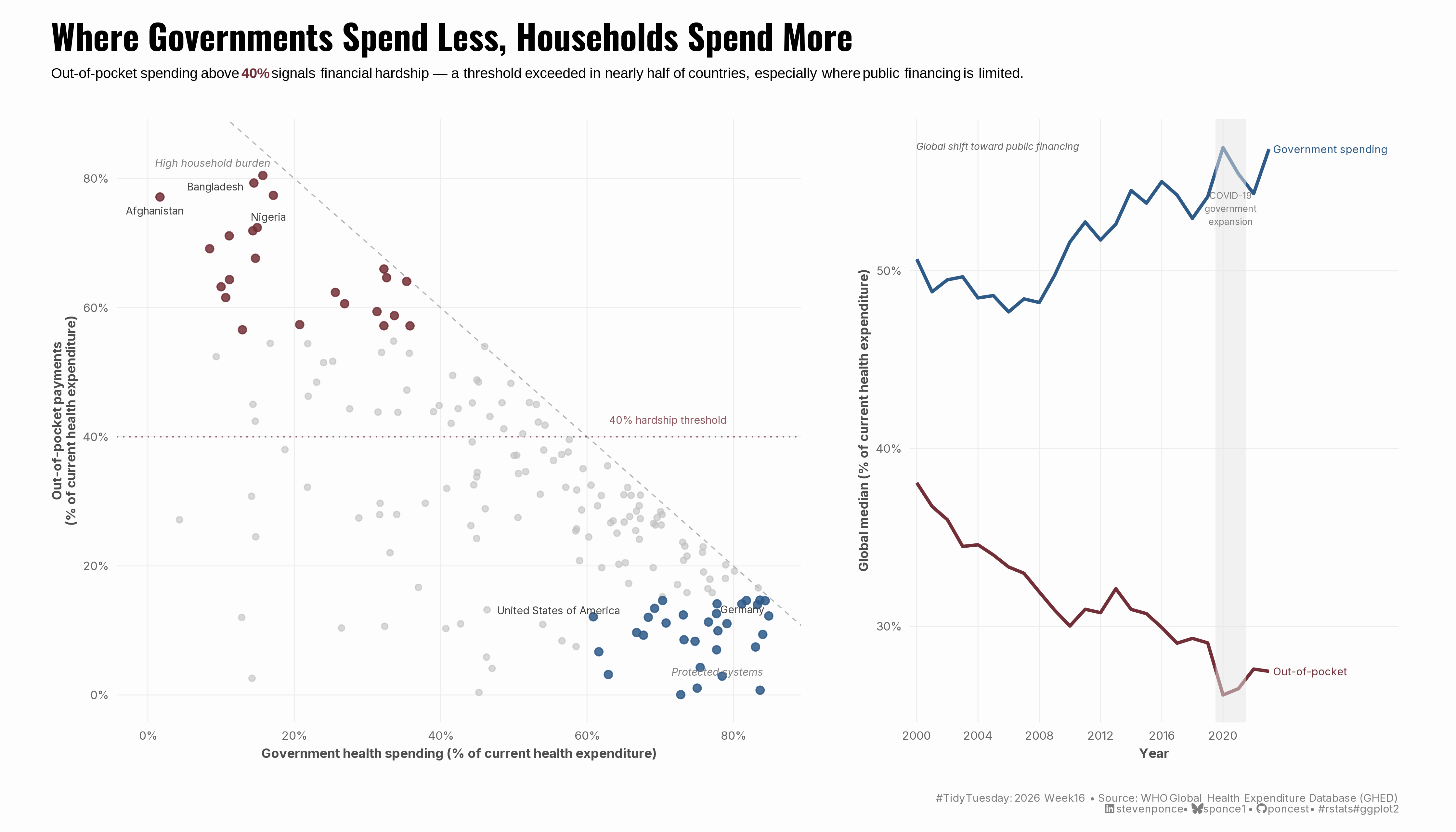
Out-of-pocket spending above 40% signals financial hardship — a threshold exceeded in nearly half of countries, especially where public financing is limited.

TidyTuesday
Data Visualization
R Programming
2026
Cross-country analysis of health financing using WHO Global Health Expenditure Database data for 195 countries. Explores the inverse association between government health spending and household out-of-pocket burden, benchmarked against the WHO 40% financial hardship threshold. Built with ggplot2 and patchwork in R.
Author

Steven Ponce

Published

April 18, 2026

Figure 1: A two-panel data visualization. The left panel is a scatter plot showing government health spending versus out-of-pocket payments as a percentage of current health expenditure for 195 countries in 2023. Countries with lower government spending cluster in the upper-left with high out-of-pocket burden, highlighted in burgundy. Countries with high government spending cluster in the lower-right with low out-of-pocket burden, highlighted in steel blue. A dashed diagonal reference line and a dotted 40% hardship threshold line provide analytical anchors. The right panel shows global median trends from 2000 to 2023: government spending (blue) rising steadily, out-of-pocket payments (burgundy) declining. A shaded band marks COVID-19 years. Together, the panels show where governments spend less, households spend more — and that this pattern has slowly improved globally over two decades.

Steps to Create this Graphic

1. Load Packages & Setup

Show code
```{r}
#| label: load
#| warning: false
#| message: false      
#| results: "hide"     

## 1. LOAD PACKAGES & SETUP ----
suppressPackageStartupMessages({
if (!require("pacman")) install.packages("pacman")
pacman::p_load(
    tidyverse, ggtext, showtext, janitor, ggrepel,      
    scales, glue, skimr, patchwork 
    )
})

### |- figure size ----
camcorder::gg_record(
  dir    = here::here("temp_plots"),
  device = "png",
  width  = 14,
  height = 8,
  units  = "in",
  dpi    = 320
)

# Source utility functions
suppressMessages(source(here::here("R/utils/fonts.R")))
source(here::here("R/utils/social_icons.R"))
source(here::here("R/utils/image_utils.R"))
source(here::here("R/themes/base_theme.R"))
```

2. Read in the Data

Show code
```{r}
#| label: read
#| include: true
#| eval: true
#| warning: false

tt <- tidytuesdayR::tt_load(2026, week = 16)

financing_schemes <- tt$financing_schemes |> clean_names()
health_spending   <- tt$health_spending   |> clean_names()
spending_purpose  <- tt$spending_purpose  |> clean_names()

rm(tt)
```

3. Examine the Data

Show code
```{r}
#| label: examine
#| include: true
#| eval: true
#| results: 'hide'
#| warning: false

glimpse(financing_schemes)
glimpse(health_spending)
glimpse(spending_purpose)

health_spending |> distinct(indicator_code, expenditure_type, unit)
health_spending |> summarise(max_year = max(year), min_year = min(year))
```

4. Tidy Data

Show code
```{r}
#| label: tidy
#| warning: false

### |- Panel A: Scatter — government vs. OOP, most recent year per country ----

# Government spending
gov_data <- health_spending |>
    filter(
        indicator_code == "gghed_che",
        unit == "% of current health expenditure"
    ) |>
    group_by(iso3_code, country_name) |>
    slice_max(year, n = 1, with_ties = FALSE) |>
    ungroup() |>
    select(iso3_code, country_name, year_gov = year, gghed_che = value)

# OOP
oop_data <- financing_schemes |>
    filter(
        indicator_code == "hf3_che",
        unit == "% of current health expenditure"
    ) |>
    group_by(iso3_code) |>
    slice_max(year, n = 1, with_ties = FALSE) |>
    ungroup() |>
    select(iso3_code, year_oop = year, oops_che = value)

# Join on iso3_code — years may differ slightly by country
scatter_data <- gov_data |>
    inner_join(oop_data, by = "iso3_code") |>
    drop_na(gghed_che, oops_che) |>
    filter((gghed_che + oops_che) <= 115)

# Annotate only the most diagnostic cases
annotate_countries <- c(
    "AFG", # lowest gov / highest OOP anchor
    "BGD", # high OOP
    "NGA", # high OOP, large population
    "DEU", # well-protected exemplar
    "USA"  # anomaly: high gov AND moderate OOP
)

scatter_plot_data <- scatter_data |>
    mutate(
        highlight = case_when(
            oops_che >= 55 ~ "high_oop",
            oops_che <= 15 & gghed_che >= 60 ~ "protected",
            TRUE ~ "other"
        ),
        label = if_else(iso3_code %in% annotate_countries, country_name, NA_character_)
    )

### |- Panel B: Time series — global medians 2000–2023 ----

# Government
trend_gov <- health_spending |>
    filter(
        indicator_code == "gghed_che",
        unit == "% of current health expenditure",
        year >= 2000
    ) |>
    group_by(year) |>
    summarise(median_pct = median(value, na.rm = TRUE), .groups = "drop") |>
    mutate(series = "gov", series_label = "Government spending")

# OOP
trend_oop <- financing_schemes |>
    filter(
        indicator_code == "hf3_che",
        unit == "% of current health expenditure",
        year >= 2000
    ) |>
    group_by(year) |>
    summarise(median_pct = median(value, na.rm = TRUE), .groups = "drop") |>
    mutate(series = "oop", series_label = "Out-of-pocket payments")

trend_data <- bind_rows(trend_gov, trend_oop)
```

5. Visualization Parameters

Show code
```{r}
#| label: params
#| include: true
#| warning: false

### |- plot aesthetics ----
colors <- get_theme_colors(
    palette = list(
        "high_oop"  = "#722F37",   
        "protected" = "#2E5A87",   
        "other"     = "gray75",   
        "gov"       = "#2E5A87",   
        "oop"       = "#722F37"   
    )
)

### |- titles and caption ----
title_text <- str_glue("Where Governments Spend Less, Households Spend More")

subtitle_text <- str_glue(
    "Out-of-pocket spending above **<span style='color:#722F37'>40%</span>** signals financial hardship — ",
    "a threshold exceeded in nearly half of countries, especially where public financing is limited."
)

caption_text <- create_social_caption(
    tt_year = 2026,
    tt_week = 16,
    source_text = "WHO Global Health Expenditure Database (GHED)"
)

### |- fonts ----
setup_fonts()
fonts <- get_font_families()

### |- base theme ----
base_theme <- create_base_theme(colors)

weekly_theme <- extend_weekly_theme(
    base_theme,
    theme(
        plot.title = element_text(
            size = 18, face = "bold", family = fonts$title,
            margin = margin(b = 6)
        ),
        plot.subtitle = element_markdown(
            size = 10.5, family = fonts$text, lineheight = 1.4,
            margin = margin(b = 16)
        ),
        plot.caption = element_markdown(
            size = 7.5, family = fonts$text, color = "gray50",
            margin = margin(t = 12)
        ),
        axis.title = element_text(size = 9, family = fonts$text, color = "gray30"),
        axis.text = element_text(size = 8, family = fonts$text, color = "gray40"),
        panel.grid.major = element_line(color = "gray93", linewidth = 0.3),
        panel.grid.minor = element_blank(),
        axis.ticks = element_blank(),
        strip.text = element_blank()
    )
)

theme_set(weekly_theme)
```

6. Plot

Show code
```{r}
#| label: plot
#| warning: false

### |- Panel A: Scatter ----
p_scatter <- scatter_plot_data |>
  ggplot(aes(x = gghed_che, y = oops_che)) +

  # Geoms
  geom_abline(
    slope = -1, intercept = 100,
    linetype = "dashed", color = "gray70", linewidth = 0.4
  ) +
  geom_hline(
    yintercept = 40,
    linetype = "dotted", color = "#722F37", linewidth = 0.5, alpha = 0.7
  ) +
  geom_point(
    data = filter(scatter_plot_data, highlight == "other"),
    color = colors$palette$other, size = 1.6, alpha = 0.6
  ) +
  geom_point(
    data = filter(scatter_plot_data, highlight == "high_oop"),
    color = colors$palette$high_oop, size = 2.2, alpha = 0.85
  ) +
  geom_point(
    data = filter(scatter_plot_data, highlight == "protected"),
    color = colors$palette$protected, size = 2.2, alpha = 0.85
  ) +
  geom_text_repel(
    aes(label = label),
    size = 2.5,
    family = fonts$text,
    color = "gray25",
    segment.color = "gray70",
    segment.size = 0.3,
    box.padding = 0.4,
    point.padding = 0.3,
    max.overlaps = 15,
    na.rm = TRUE,
    seed = 123
  ) +

  # Annotate
  annotate(
    "text",
    x = 1, y = 83, label = "High household burden",
    size = 2.5, color = "gray50", family = fonts$text, fontface = "italic",
    hjust = 0, vjust = 1
  ) +
  annotate(
    "text",
    x = 84, y = 3, label = "Protected systems",
    size = 2.5, color = "gray50", family = fonts$text, fontface = "italic",
    hjust = 1, vjust = 0
  ) +
  annotate(
    "text",
    x = 79, y = 42, label = "40% hardship threshold",
    size = 2.5, color = "#722F37", family = fonts$text, alpha = 0.8,
    hjust = 1, vjust = 0
  ) +

  # Scales
  scale_x_continuous(
    limits = c(0, 85),
    breaks = seq(0, 80, 20),
    labels = label_number(suffix = "%")
  ) +
  scale_y_continuous(
    limits = c(0, 85),
    breaks = seq(0, 80, 20),
    labels = label_number(suffix = "%")
  ) +

  # Labs
  labs(
    x = "Government health spending (% of current health expenditure)",
    y = "Out-of-pocket payments\n(% of current health expenditure)"
  )

### |- Panel B: Time series ----
# End-of-line labels 
trend_labels <- trend_data |>
    group_by(series_label) |>
    slice_max(year, n = 1, with_ties = FALSE)

p_trend <- trend_data |>
    ggplot(aes(x = year, y = median_pct, color = series)) +
    
    # Geoms
    geom_line(linewidth = 1.1) +
    geom_text(
        data = filter(trend_labels, series == "gov"),
        aes(label = series_label),
        hjust = 0, nudge_x = 0.3,
        size = 2.6, family = fonts$text,
        color = colors$palette$gov
    ) +
    geom_text(
        data = filter(trend_labels, series == "oop") |>
            mutate(series_label = "Out-of-pocket"),
        aes(label = series_label),
        hjust = 0, nudge_x = 0.3,
        size = 2.6, family = fonts$text,
        color = colors$palette$oop
    ) +
    
    # Annotate
    annotate(
        "rect",
        xmin = 2019.5, xmax = 2021.5,
        ymin = -Inf, ymax = Inf,
        fill = "gray90", alpha = 0.5
    ) +
    annotate(
        "text", x = 2020.5, y = 53.5,
        label = "COVID-19\ngovernment\nexpansion",
        size = 2.2, color = "gray50", family = fonts$text,
        lineheight = 1.2
    ) +
    annotate(
        "text", x = 2000, y = 57,
        label = "Global shift toward public financing",
        size = 2.4, color = "gray40", family = fonts$text,
        fontface = "italic", hjust = 0
    ) +
    
    # Scales
    scale_color_manual(
        values = c(
            "gov" = colors$palette$gov,
            "oop" = colors$palette$oop
        )
    ) +
    scale_x_continuous(
        breaks = seq(2000, 2022, 4),
        expand = expansion(mult = c(0.02, 0.35))  
    ) +
    scale_y_continuous(
        breaks = seq(20, 60, 10),
        labels = label_number(suffix = "%")
    ) +
    
    # Labs
    labs(
        x = "Year",
        y = "Global median (% of current health expenditure)"
    ) +
    # Theme
    theme(legend.position = "none")

### |- combined plots ----
combined_plot <- p_scatter + p_trend +
    plot_layout(widths = c(1.4, 1)) +
    plot_annotation(
        title = title_text,
        subtitle = subtitle_text,
        caption = caption_text,
        theme = theme(
            plot.title = element_text(
                size = 24, face = "bold", family = fonts$title,
                margin = margin(b = 6)
            ),
            plot.subtitle = element_markdown(
                size = 10, family = 'sans', lineheight = 1.4,
                margin = margin(b = 16)
            ),
            plot.caption = element_markdown(
                size = 7.5, family = fonts$text, color = "gray50",
                margin = margin(t = 12)
            ),
            plot.margin   = margin(t = 16, r = 20, b = 12, l = 16)
        )
    )
```

7. Save

Show code
```{r}
#| label: save
#| warning: false

### |-  plot image ----  
save_plot_patchwork(
  plot = combined_plot, 
  type = "tidytuesday", 
  year = 2026, 
  week = 16, 
  width  = 14,
  height = 8
  )
```

8. Session Info

TipExpand for Session Info
R version 4.5.3 (2026-03-11 ucrt)
Platform: x86_64-w64-mingw32/x64
Running under: Windows 11 x64 (build 26100)

Matrix products: default
  LAPACK version 3.12.1

locale:
[1] LC_COLLATE=English_United States.utf8 
[2] LC_CTYPE=English_United States.utf8   
[3] LC_MONETARY=English_United States.utf8
[4] LC_NUMERIC=C                          
[5] LC_TIME=English_United States.utf8    

time zone: America/New_York
tzcode source: internal

attached base packages:
[1] stats     graphics  grDevices utils     datasets  methods   base     

other attached packages:
 [1] here_1.0.2      patchwork_1.3.2 skimr_2.2.2     glue_1.8.0     
 [5] scales_1.4.0    ggrepel_0.9.8   janitor_2.2.1   showtext_0.9-8 
 [9] showtextdb_3.0  sysfonts_0.8.9  ggtext_0.1.2    lubridate_1.9.5
[13] forcats_1.0.1   stringr_1.6.0   dplyr_1.2.1     purrr_1.2.2    
[17] readr_2.2.0     tidyr_1.3.2     tibble_3.3.1    ggplot2_4.0.2  
[21] tidyverse_2.0.0 pacman_0.5.1   

loaded via a namespace (and not attached):
 [1] tidyselect_1.2.1   farver_2.1.2       S7_0.2.1           fastmap_1.2.0     
 [5] gh_1.5.0           digest_0.6.39      timechange_0.4.0   lifecycle_1.0.5   
 [9] rsvg_2.7.0         magrittr_2.0.5     compiler_4.5.3     rlang_1.2.0       
[13] tools_4.5.3        utf8_1.2.6         yaml_2.3.12        knitr_1.51        
[17] htmlwidgets_1.6.4  bit_4.6.0          curl_7.0.0         xml2_1.5.2        
[21] camcorder_0.1.0    repr_1.1.7         RColorBrewer_1.1-3 tidytuesdayR_1.3.2
[25] withr_3.0.2        grid_4.5.3         gitcreds_0.1.2     cli_3.6.6         
[29] rmarkdown_2.31     crayon_1.5.3       generics_0.1.4     otel_0.2.0        
[33] rstudioapi_0.18.0  tzdb_0.5.0         commonmark_2.0.0   parallel_4.5.3    
[37] ggplotify_0.1.3    base64enc_0.1-6    vctrs_0.7.3        yulab.utils_0.2.4 
[41] jsonlite_2.0.0     litedown_0.9       gridGraphics_0.5-1 hms_1.1.4         
[45] bit64_4.6.0-1      systemfonts_1.3.2  magick_2.9.1       gifski_1.32.0-2   
[49] codetools_0.2-20   stringi_1.8.7      gtable_0.3.6       pillar_1.11.1     
[53] rappdirs_0.3.4     htmltools_0.5.9    R6_2.6.1           httr2_1.2.2       
[57] textshaping_1.0.5  rprojroot_2.1.1    vroom_1.7.1        evaluate_1.0.5    
[61] markdown_2.0       gridtext_0.1.6     snakecase_0.11.1   Rcpp_1.1.1        
[65] svglite_2.2.2      xfun_0.57          fs_2.0.1           pkgconfig_2.0.3   

9. GitHub Repository

TipExpand for GitHub Repo

The complete code for this analysis is available in tt_2026_16.qmd.

For the full repository, click here.

10. References

TipExpand for References
  1. Data Source:
    • TidyTuesday 2026 Week 16: Global Health Spending

11. Custom Functions Documentation

Note📦 Custom Helper Functions

This analysis uses custom functions from my personal module library for efficiency and consistency across projects.

Functions Used:

  • fonts.R: setup_fonts(), get_font_families() - Font management with showtext
  • social_icons.R: create_social_caption() - Generates formatted social media captions
  • image_utils.R: save_plot() - Consistent plot saving with naming conventions
  • base_theme.R: create_base_theme(), extend_weekly_theme(), get_theme_colors() - Custom ggplot2 themes

Why custom functions?
These utilities standardize theming, fonts, and output across all my data visualizations. The core analysis (data tidying and visualization logic) uses only standard tidyverse packages.

Source Code:
View all custom functions → GitHub: R/utils

Back to top

Citation

BibTeX citation:
@online{ponce2026,
  author = {Ponce, Steven},
  title = {Where {Governments} {Spend} {Less,} {Households} {Spend}
    {More}},
  date = {2026-04-18},
  url = {https://stevenponce.netlify.app/data_visualizations/TidyTuesday/2026/tt_2026_16.html},
  langid = {en}
}
For attribution, please cite this work as:
Ponce, Steven. 2026. “Where Governments Spend Less, Households Spend More.” April 18, 2026. https://stevenponce.netlify.app/data_visualizations/TidyTuesday/2026/tt_2026_16.html.
Source Code
---
title: "Where Governments Spend Less, Households Spend More"
subtitle: "Out-of-pocket spending above **<span style='color:#722F37'>40%</span>** signals financial hardship — a threshold exceeded in nearly half of countries, especially where public financing is limited."
description: "Cross-country analysis of health financing using WHO Global Health Expenditure Database data for 195 countries. Explores the inverse association between government health spending and household out-of-pocket burden, benchmarked against the WHO 40% financial hardship threshold. Built with ggplot2 and patchwork in R."
date: "2026-04-18"
author:
  - name: "Steven Ponce"
    url: "https://stevenponce.netlify.app"
citation:
  url: "https://stevenponce.netlify.app/data_visualizations/TidyTuesday/2026/tt_2026_16.html" 
categories: ["TidyTuesday", "Data Visualization", "R Programming", "2026"]
tags: [
  "Global Health", "Health Policy", "Health Spending", "Out-of-Pocket",
  "WHO", "Equity", "Scatter Plot", "Time Series", "Patchwork", "ggplot2"
]
image: "thumbnails/tt_2026_16.png"
format:
  html:
    toc: true
    toc-depth: 5
    code-link: true
    code-fold: true
    code-tools: true
    code-summary: "Show code"
    self-contained: true
    theme: 
      light: [flatly, assets/styling/custom_styles.scss]
      dark: [darkly, assets/styling/custom_styles_dark.scss]
editor_options: 
  chunk_output_type: inline
execute: 
  freeze: true                                    
  cache: true                                       
  error: false
  message: false
  warning: false
  eval: true
---
![A two-panel data visualization. The left panel is a scatter plot showing government health spending versus out-of-pocket payments as a percentage of current health expenditure for 195 countries in 2023. Countries with lower government spending cluster in the upper-left with high out-of-pocket burden, highlighted in burgundy. Countries with high government spending cluster in the lower-right with low out-of-pocket burden, highlighted in steel blue. A dashed diagonal reference line and a dotted 40% hardship threshold line provide analytical anchors. The right panel shows global median trends from 2000 to 2023: government spending (blue) rising steadily, out-of-pocket payments (burgundy) declining. A shaded band marks COVID-19 years. Together, the panels show where governments spend less, households spend more — and that this pattern has slowly improved globally over two decades.](tt_2026_16.png){#fig-1}

### [**Steps to Create this Graphic**]{.mark}

#### [1. Load Packages & Setup]{.smallcaps}

```{r}
#| label: load
#| warning: false
#| message: false      
#| results: "hide"     

## 1. LOAD PACKAGES & SETUP ----
suppressPackageStartupMessages({
if (!require("pacman")) install.packages("pacman")
pacman::p_load(
    tidyverse, ggtext, showtext, janitor, ggrepel,      
    scales, glue, skimr, patchwork 
    )
})

### |- figure size ----
camcorder::gg_record(
  dir    = here::here("temp_plots"),
  device = "png",
  width  = 14,
  height = 8,
  units  = "in",
  dpi    = 320
)

# Source utility functions
suppressMessages(source(here::here("R/utils/fonts.R")))
source(here::here("R/utils/social_icons.R"))
source(here::here("R/utils/image_utils.R"))
source(here::here("R/themes/base_theme.R"))
```

#### [2. Read in the Data]{.smallcaps}

```{r}
#| label: read
#| include: true
#| eval: true
#| warning: false

tt <- tidytuesdayR::tt_load(2026, week = 16)

financing_schemes <- tt$financing_schemes |> clean_names()
health_spending   <- tt$health_spending   |> clean_names()
spending_purpose  <- tt$spending_purpose  |> clean_names()

rm(tt)

```

#### [3. Examine the Data]{.smallcaps}

```{r}
#| label: examine
#| include: true
#| eval: true
#| results: 'hide'
#| warning: false

glimpse(financing_schemes)
glimpse(health_spending)
glimpse(spending_purpose)

health_spending |> distinct(indicator_code, expenditure_type, unit)
health_spending |> summarise(max_year = max(year), min_year = min(year))
```

#### [4. Tidy Data]{.smallcaps}

```{r}
#| label: tidy
#| warning: false

### |- Panel A: Scatter — government vs. OOP, most recent year per country ----

# Government spending
gov_data <- health_spending |>
    filter(
        indicator_code == "gghed_che",
        unit == "% of current health expenditure"
    ) |>
    group_by(iso3_code, country_name) |>
    slice_max(year, n = 1, with_ties = FALSE) |>
    ungroup() |>
    select(iso3_code, country_name, year_gov = year, gghed_che = value)

# OOP
oop_data <- financing_schemes |>
    filter(
        indicator_code == "hf3_che",
        unit == "% of current health expenditure"
    ) |>
    group_by(iso3_code) |>
    slice_max(year, n = 1, with_ties = FALSE) |>
    ungroup() |>
    select(iso3_code, year_oop = year, oops_che = value)

# Join on iso3_code — years may differ slightly by country
scatter_data <- gov_data |>
    inner_join(oop_data, by = "iso3_code") |>
    drop_na(gghed_che, oops_che) |>
    filter((gghed_che + oops_che) <= 115)

# Annotate only the most diagnostic cases
annotate_countries <- c(
    "AFG", # lowest gov / highest OOP anchor
    "BGD", # high OOP
    "NGA", # high OOP, large population
    "DEU", # well-protected exemplar
    "USA"  # anomaly: high gov AND moderate OOP
)

scatter_plot_data <- scatter_data |>
    mutate(
        highlight = case_when(
            oops_che >= 55 ~ "high_oop",
            oops_che <= 15 & gghed_che >= 60 ~ "protected",
            TRUE ~ "other"
        ),
        label = if_else(iso3_code %in% annotate_countries, country_name, NA_character_)
    )

### |- Panel B: Time series — global medians 2000–2023 ----

# Government
trend_gov <- health_spending |>
    filter(
        indicator_code == "gghed_che",
        unit == "% of current health expenditure",
        year >= 2000
    ) |>
    group_by(year) |>
    summarise(median_pct = median(value, na.rm = TRUE), .groups = "drop") |>
    mutate(series = "gov", series_label = "Government spending")

# OOP
trend_oop <- financing_schemes |>
    filter(
        indicator_code == "hf3_che",
        unit == "% of current health expenditure",
        year >= 2000
    ) |>
    group_by(year) |>
    summarise(median_pct = median(value, na.rm = TRUE), .groups = "drop") |>
    mutate(series = "oop", series_label = "Out-of-pocket payments")

trend_data <- bind_rows(trend_gov, trend_oop)
```

#### [5. Visualization Parameters]{.smallcaps}

```{r}
#| label: params
#| include: true
#| warning: false

### |- plot aesthetics ----
colors <- get_theme_colors(
    palette = list(
        "high_oop"  = "#722F37",   
        "protected" = "#2E5A87",   
        "other"     = "gray75",   
        "gov"       = "#2E5A87",   
        "oop"       = "#722F37"   
    )
)

### |- titles and caption ----
title_text <- str_glue("Where Governments Spend Less, Households Spend More")

subtitle_text <- str_glue(
    "Out-of-pocket spending above **<span style='color:#722F37'>40%</span>** signals financial hardship — ",
    "a threshold exceeded in nearly half of countries, especially where public financing is limited."
)

caption_text <- create_social_caption(
    tt_year = 2026,
    tt_week = 16,
    source_text = "WHO Global Health Expenditure Database (GHED)"
)

### |- fonts ----
setup_fonts()
fonts <- get_font_families()

### |- base theme ----
base_theme <- create_base_theme(colors)

weekly_theme <- extend_weekly_theme(
    base_theme,
    theme(
        plot.title = element_text(
            size = 18, face = "bold", family = fonts$title,
            margin = margin(b = 6)
        ),
        plot.subtitle = element_markdown(
            size = 10.5, family = fonts$text, lineheight = 1.4,
            margin = margin(b = 16)
        ),
        plot.caption = element_markdown(
            size = 7.5, family = fonts$text, color = "gray50",
            margin = margin(t = 12)
        ),
        axis.title = element_text(size = 9, family = fonts$text, color = "gray30"),
        axis.text = element_text(size = 8, family = fonts$text, color = "gray40"),
        panel.grid.major = element_line(color = "gray93", linewidth = 0.3),
        panel.grid.minor = element_blank(),
        axis.ticks = element_blank(),
        strip.text = element_blank()
    )
)

theme_set(weekly_theme)
```

#### [6. Plot]{.smallcaps}

```{r}
#| label: plot
#| warning: false

### |- Panel A: Scatter ----
p_scatter <- scatter_plot_data |>
  ggplot(aes(x = gghed_che, y = oops_che)) +

  # Geoms
  geom_abline(
    slope = -1, intercept = 100,
    linetype = "dashed", color = "gray70", linewidth = 0.4
  ) +
  geom_hline(
    yintercept = 40,
    linetype = "dotted", color = "#722F37", linewidth = 0.5, alpha = 0.7
  ) +
  geom_point(
    data = filter(scatter_plot_data, highlight == "other"),
    color = colors$palette$other, size = 1.6, alpha = 0.6
  ) +
  geom_point(
    data = filter(scatter_plot_data, highlight == "high_oop"),
    color = colors$palette$high_oop, size = 2.2, alpha = 0.85
  ) +
  geom_point(
    data = filter(scatter_plot_data, highlight == "protected"),
    color = colors$palette$protected, size = 2.2, alpha = 0.85
  ) +
  geom_text_repel(
    aes(label = label),
    size = 2.5,
    family = fonts$text,
    color = "gray25",
    segment.color = "gray70",
    segment.size = 0.3,
    box.padding = 0.4,
    point.padding = 0.3,
    max.overlaps = 15,
    na.rm = TRUE,
    seed = 123
  ) +

  # Annotate
  annotate(
    "text",
    x = 1, y = 83, label = "High household burden",
    size = 2.5, color = "gray50", family = fonts$text, fontface = "italic",
    hjust = 0, vjust = 1
  ) +
  annotate(
    "text",
    x = 84, y = 3, label = "Protected systems",
    size = 2.5, color = "gray50", family = fonts$text, fontface = "italic",
    hjust = 1, vjust = 0
  ) +
  annotate(
    "text",
    x = 79, y = 42, label = "40% hardship threshold",
    size = 2.5, color = "#722F37", family = fonts$text, alpha = 0.8,
    hjust = 1, vjust = 0
  ) +

  # Scales
  scale_x_continuous(
    limits = c(0, 85),
    breaks = seq(0, 80, 20),
    labels = label_number(suffix = "%")
  ) +
  scale_y_continuous(
    limits = c(0, 85),
    breaks = seq(0, 80, 20),
    labels = label_number(suffix = "%")
  ) +

  # Labs
  labs(
    x = "Government health spending (% of current health expenditure)",
    y = "Out-of-pocket payments\n(% of current health expenditure)"
  )

### |- Panel B: Time series ----
# End-of-line labels 
trend_labels <- trend_data |>
    group_by(series_label) |>
    slice_max(year, n = 1, with_ties = FALSE)

p_trend <- trend_data |>
    ggplot(aes(x = year, y = median_pct, color = series)) +
    
    # Geoms
    geom_line(linewidth = 1.1) +
    geom_text(
        data = filter(trend_labels, series == "gov"),
        aes(label = series_label),
        hjust = 0, nudge_x = 0.3,
        size = 2.6, family = fonts$text,
        color = colors$palette$gov
    ) +
    geom_text(
        data = filter(trend_labels, series == "oop") |>
            mutate(series_label = "Out-of-pocket"),
        aes(label = series_label),
        hjust = 0, nudge_x = 0.3,
        size = 2.6, family = fonts$text,
        color = colors$palette$oop
    ) +
    
    # Annotate
    annotate(
        "rect",
        xmin = 2019.5, xmax = 2021.5,
        ymin = -Inf, ymax = Inf,
        fill = "gray90", alpha = 0.5
    ) +
    annotate(
        "text", x = 2020.5, y = 53.5,
        label = "COVID-19\ngovernment\nexpansion",
        size = 2.2, color = "gray50", family = fonts$text,
        lineheight = 1.2
    ) +
    annotate(
        "text", x = 2000, y = 57,
        label = "Global shift toward public financing",
        size = 2.4, color = "gray40", family = fonts$text,
        fontface = "italic", hjust = 0
    ) +
    
    # Scales
    scale_color_manual(
        values = c(
            "gov" = colors$palette$gov,
            "oop" = colors$palette$oop
        )
    ) +
    scale_x_continuous(
        breaks = seq(2000, 2022, 4),
        expand = expansion(mult = c(0.02, 0.35))  
    ) +
    scale_y_continuous(
        breaks = seq(20, 60, 10),
        labels = label_number(suffix = "%")
    ) +
    
    # Labs
    labs(
        x = "Year",
        y = "Global median (% of current health expenditure)"
    ) +
    # Theme
    theme(legend.position = "none")

### |- combined plots ----
combined_plot <- p_scatter + p_trend +
    plot_layout(widths = c(1.4, 1)) +
    plot_annotation(
        title = title_text,
        subtitle = subtitle_text,
        caption = caption_text,
        theme = theme(
            plot.title = element_text(
                size = 24, face = "bold", family = fonts$title,
                margin = margin(b = 6)
            ),
            plot.subtitle = element_markdown(
                size = 10, family = 'sans', lineheight = 1.4,
                margin = margin(b = 16)
            ),
            plot.caption = element_markdown(
                size = 7.5, family = fonts$text, color = "gray50",
                margin = margin(t = 12)
            ),
            plot.margin   = margin(t = 16, r = 20, b = 12, l = 16)
        )
    )

```

#### [7. Save]{.smallcaps}

```{r}
#| label: save
#| warning: false

### |-  plot image ----  
save_plot_patchwork(
  plot = combined_plot, 
  type = "tidytuesday", 
  year = 2026, 
  week = 16, 
  width  = 14,
  height = 8
  )
```

#### [8. Session Info]{.smallcaps}

::: {.callout-tip collapse="true"}
##### Expand for Session Info

```{r, echo = FALSE}
#| eval: true
#| warning: false

sessionInfo()
```
:::

#### [9. GitHub Repository]{.smallcaps}

::: {.callout-tip collapse="true"}
##### Expand for GitHub Repo

The complete code for this analysis is available in [`tt_2026_16.qmd`](https://github.com/poncest/personal-website/blob/master/data_visualizations/TidyTuesday/2026/tt_2026_16.qmd).

For the full repository, [click here](https://github.com/poncest/personal-website/).
:::

#### [10. References]{.smallcaps}

::: {.callout-tip collapse="true"}
##### Expand for References
1.  **Data Source:**
    -   TidyTuesday 2026 Week 16: [Global Health Spending](https://github.com/rfordatascience/tidytuesday/blob/main/data/2026/2026-04-21/readme.md)

:::


#### [11. Custom Functions Documentation]{.smallcaps}

::: {.callout-note collapse="true"}
##### 📦 Custom Helper Functions

This analysis uses custom functions from my personal module library for efficiency and consistency across projects.

**Functions Used:**

-   **`fonts.R`**: `setup_fonts()`, `get_font_families()` - Font management with showtext
-   **`social_icons.R`**: `create_social_caption()` - Generates formatted social media captions
-   **`image_utils.R`**: `save_plot()` - Consistent plot saving with naming conventions
-   **`base_theme.R`**: `create_base_theme()`, `extend_weekly_theme()`, `get_theme_colors()` - Custom ggplot2 themes

**Why custom functions?**\
These utilities standardize theming, fonts, and output across all my data visualizations. The core analysis (data tidying and visualization logic) uses only standard tidyverse packages.

**Source Code:**\
View all custom functions → [GitHub: R/utils](https://github.com/poncest/personal-website/tree/master/R)
:::

© 2024 Steven Ponce

Source Issues