• Steven Ponce
  • About
  • Data Visualizations
  • Projects
  • Resume
  • Email

On this page

  • Why this project
  • The challenge
  • Designing for three personas
    • Executive overview
    • Operations analytics
    • Revenue intelligence
  • Key insights from the data
    • Network performance (Jan–Apr 2024)
    • Route concentration risk
    • Operational patterns
    • Digital adoption gap
    • Revenue optimization potential
  • Design decisions that elevated the dashboard
    • 1. Executive takeaway box
    • 2. Trend indicators on KPIs
    • 3. Info tooltips for clarity
    • 4. Unified visual language
    • 5. Horizontal bar charts
  • Technical architecture
    • Core structure
    • Technology stack
    • Performance results
  • Making the dashboard production-ready
    • Dependency management
    • Modal implementation
    • Deployment
  • Strategic recommendations
    • 1. Channel migration initiative
    • 2. Peak period capacity management
    • 3. Revenue optimization
  • Five lessons from building executive-grade dashboards
  • Potential extensions
  • Closing takeaway
  • Session Info
  • GitHub Repository
  • References

Building an Executive-Grade Train Operations Dashboard

Turning 31,653 UK rail journeys into actionable insights for operations and revenue teams

R Programming
Shiny
Business Intelligence
2025
A case study in designing a modern R Shiny dashboard using the Appsilon stack—balancing executive clarity with operational depth for multi-stakeholder decision support.
Author

Steven Ponce

Published

December 19, 2025

🚀 Live app: https://0l6jpd-steven-ponce.shinyapps.io/UK_train_operations/
💻 Source code: https://github.com/poncest/UK_train_operations


Why this project

Most dashboards fail not because of poor data, but because they try to serve everyone at once. This project explores how to design a single Shiny application that supports executive, operations, and revenue decisions—without sacrificing clarity, performance, or trust.

This project explores how to design a single Shiny application that supports three distinct decision-makers—without sacrificing usability, performance, or narrative focus. The goal was not to visualize everything, but to help the right people answer the right questions quickly.

Note: All data, benchmarks, and financial impacts shown here are synthetic and illustrative, used solely to demonstrate analytical thinking and dashboard design.


The challenge

Rail operations generate vast amounts of data—journeys, delays, ticket sales, booking patterns—but these signals are often fragmented across systems. As a result:

  • Executives struggle to spot performance shifts quickly
  • Operations teams lack a unified view of delay drivers
  • Revenue analysts miss cross-route pricing and concentration risks

The challenge wasn’t building a dashboard. It was building three dashboards in one, each tailored to a distinct stakeholder—without creating a cluttered, one-size-fits-all interface that satisfies no one.


Designing for three personas

Rather than present everything at once, the dashboard is structured around three clear use cases.

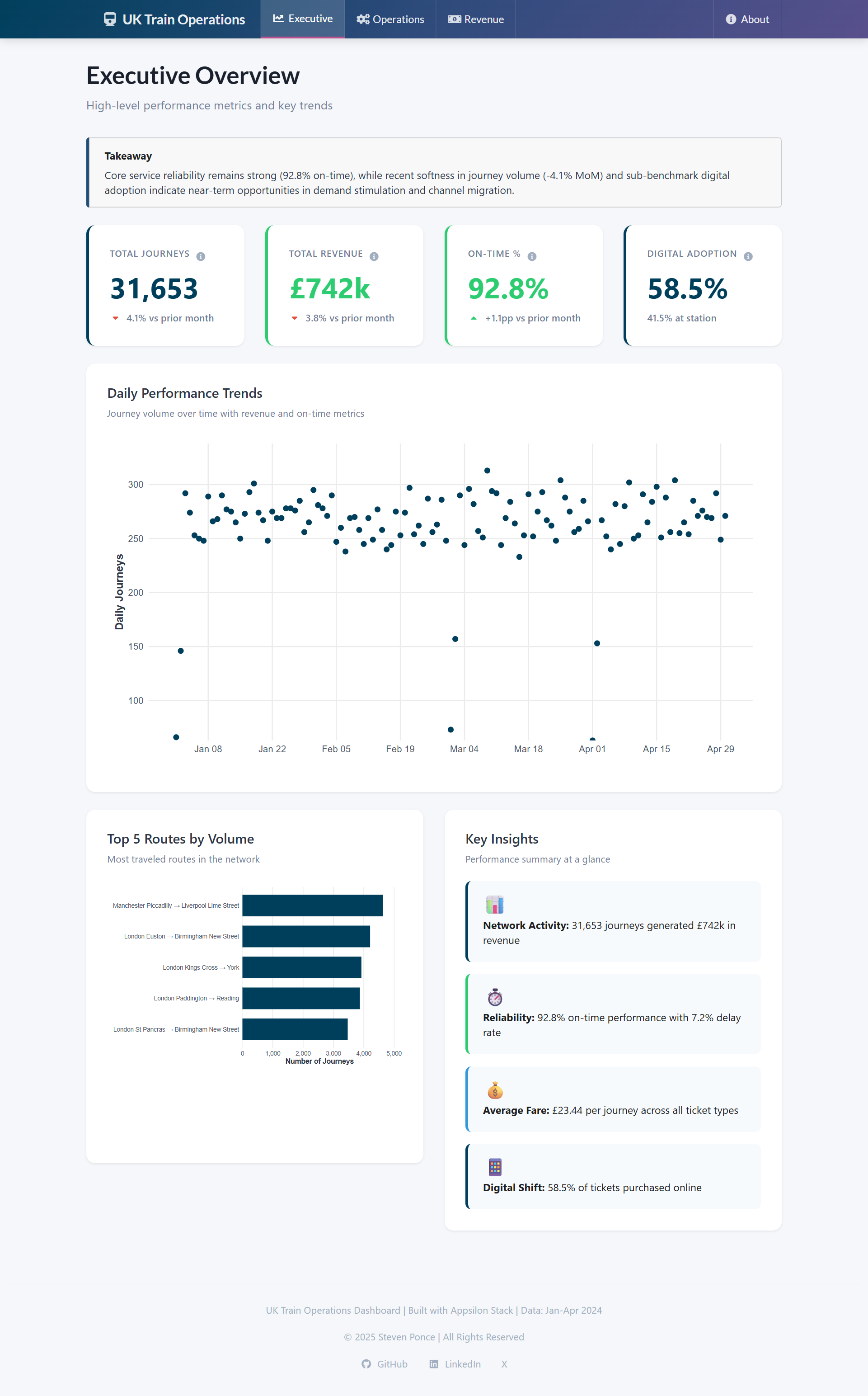
Executive overview

Purpose: Monitor performance at a glance, identify trends, and surface opportunities

Key elements:

  • Four headline KPIs with month-over-month trend indicators
  • A one-sentence executive takeaway using consulting-style language
  • Daily journey volume trends for context
  • A concise insights panel summarizing what matters most
Figure 1: Executive Overview showing KPIs with trend indicators, executive summary, and daily performance trends.

Operations analytics

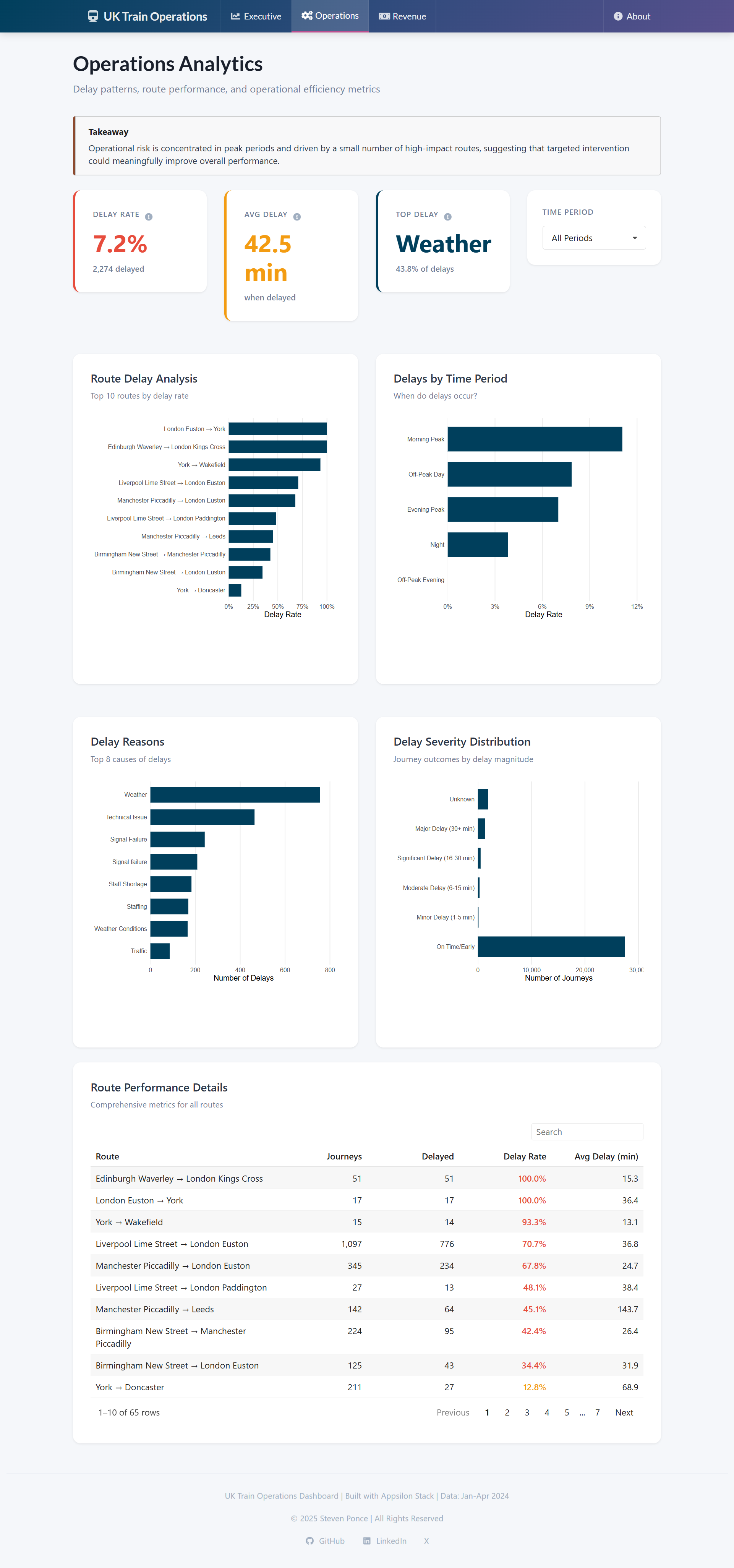
Purpose: Diagnose delay drivers and prioritize operational interventions

Key elements:

  • Time-period filtering (Morning Peak, Evening Peak, Off-Peak)
  • Route-level delay rate analysis
  • Delay reason breakdown highlighting root causes
  • Severity distribution showing operational impact
Figure 2: Operations Analytics with time period filtering, delay diagnostics, and route performance metrics.

Revenue intelligence

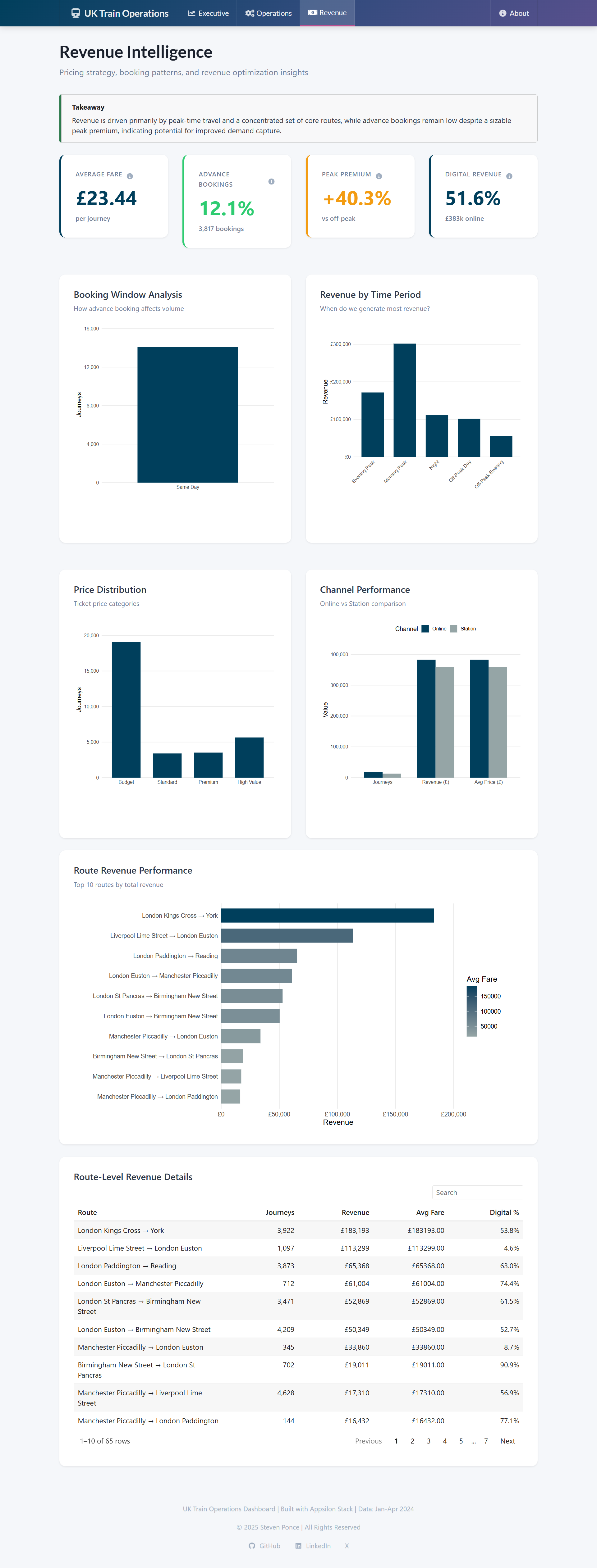
Purpose: Analyze booking behavior, pricing patterns, and revenue concentration

Key elements:

  • Booking window analysis (same-day vs. advance)
  • Revenue by time period
  • Ticket price distribution
  • Channel performance (online vs. station)
  • Route-level revenue concentration metrics
Figure 3: Revenue Intelligence analyzing pricing strategies, booking patterns, and channel performance.

Key insights from the data

Network performance (Jan–Apr 2024)

Takeaway: Reliability is strong, but volume softness and delay duration still pose risk.

  • 31,653 journeys generated £742k in revenue (£23.44 average fare)
  • 92.8% on-time performance (above 89% industry benchmark)
  • 7.2% delay rate, with average delays of 42.5 minutes when they occur

Route concentration risk

Takeaway: A small number of routes drive a disproportionate share of value.

  • Top 5 routes account for 28% of total journey volume
  • Manchester Piccadilly → Liverpool Lime Street leads with 5,128 journeys
  • Top 10 routes represent 45% of total revenue, increasing concentration risk

Operational patterns

Takeaway: Delays cluster in predictable windows, enabling targeted intervention.

  • Morning Peak has the highest delay rate (12.5%)
  • Weather is the leading delay cause (42.8%), followed by Technical Issues (18.3%)
  • Delay patterns are consistent by time period, not random

Digital adoption gap

Takeaway: Channel migration represents a clear near-term opportunity.

  • 58.5% digital adoption vs. 65% industry benchmark
  • Online channel generates 51.6% of revenue despite 58.5% of volume
  • Lower average online fares suggest pricing or product mix opportunity

Revenue optimization potential

Takeaway: Yield management levers remain underutilized.

  • Peak fares are +40.3% higher than off-peak
  • Only 12.1% of tickets are purchased 8+ days in advance
  • 62% of tickets fall in the “Budget” category (<£15)

Design decisions that elevated the dashboard

Five specific choices that elevated usability and stakeholder engagement:

1. Executive takeaway box

A single, consulting-style summary at the top of the Executive tab reframed how users engage:

Core service reliability remains strong (92.8% on-time), while recent softness in journey volume and sub-benchmark digital adoption indicate near-term opportunities in demand stimulation and channel migration.

This immediately answers: What’s working? What’s not? What should we do next?

2. Trend indicators on KPIs

Month-over-month arrows provide context that raw numbers cannot. Executives care more about direction than magnitude.

3. Info tooltips for clarity

Subtle ℹ️ icons explain metrics like “Digital Adoption” without cluttering the interface, reducing friction for new users.

4. Unified visual language

A restrained color palette replaced early rainbow gradients, resulting in a cohesive, consulting-grade aesthetic.

5. Horizontal bar charts

Long route and time-period labels remain readable, reducing cognitive load and improving scanability.


Technical architecture

The application uses a modular Shiny architecture optimized for performance through aggressive reactive caching.

Core structure

  • app.R — Main application entry point
  • R/mod_executive.R — Executive overview module
  • R/mod_operations.R — Operations analytics module
  • R/mod_revenue.R — Revenue intelligence module

Technology stack

  • shiny.semantic — Modern Semantic UI framework
  • ggiraph — Interactive, hover-enabled charts
  • reactable — Professional data tables
  • ggplot2 + dplyr + tidyr — Data manipulation and visualization
  • bindCache() — Reactive caching for performance

Performance results

  • Initial load time reduced from ~8–10 seconds to <2 seconds
  • Expensive computations cached
  • Summary metrics pre-aggregated

Making the dashboard production-ready

Dependency management

  • Removed all install.packages() calls from runtime code
  • Used explicit package imports
  • Excluded development artifacts via .rscignore

Modal implementation

  • Used Semantic UI modals (create_modal()) instead of shiny::modalDialog()
  • Ensured reliable triggering via JavaScript event handling

Deployment

rsconnect::deployApp(
  appName = "UK_train_operations",
  forceUpdate = TRUE
)

Strategic recommendations

The following recommendations are illustrative examples of how this dashboard could support strategic decision-making.

1. Channel migration initiative

Goal: Increase digital adoption from 58.5% → 65%

Tactics:

  • Incentivize first-time online booking
  • Improve mobile UX
  • Expand digital partnerships

Expected impact: +£45k annual revenue (illustrative)

2. Peak period capacity management

Goal: Reduce Morning Peak delay rate from 12.5% → 9.0%

Tactics:

  • Add rolling stock on high-impact routes
  • Dynamic crew scheduling

Expected impact: +3.5pp on-time performance

3. Revenue optimization

Goal: Increase advance booking rate from 12.1% → 18%

Tactics:

  • Advance-purchase discounts
  • Fare bundling experiments

Expected impact: +£28k annual revenue (illustrative)


Five lessons from building executive-grade dashboards

  1. Clarity beats completeness — Fewer metrics, better decisions
  2. Performance matters — Slow dashboards don’t get used
  3. Language matters — Consulting-style framing builds credibility
  4. Design is strategic — UX decisions shape adoption
  5. Documentation is part of the product — Explaining why matters as much as how

Potential extensions

If this were a production deployment, next priorities would include:

  • Predictive delay forecasting using historical patterns
  • Automated alert system for performance anomalies
  • Integration with real-time operations data
  • Mobile-optimized responsive design
  • Multi-language support for international routes

Closing takeaway

Effective business intelligence isn’t about showing all available data—it’s about answering the right questions for the right people. In dashboard design and stakeholder communication alike, clarity consistently beats complexity.


Session Info

Expand for Session Info
R version 4.4.1 (2024-06-14 ucrt)
Platform: x86_64-w64-mingw32/x64
Running under: Windows 11 x64 (build 26100)

Matrix products: default


locale:
[1] LC_COLLATE=English_United States.utf8 
[2] LC_CTYPE=English_United States.utf8   
[3] LC_MONETARY=English_United States.utf8
[4] LC_NUMERIC=C                          
[5] LC_TIME=English_United States.utf8    

time zone: America/La_Paz
tzcode source: internal

attached base packages:
[1] stats     graphics  grDevices datasets  utils     methods   base     

loaded via a namespace (and not attached):
 [1] htmlwidgets_1.6.4 compiler_4.4.0    fastmap_1.2.0     cli_3.6.4        
 [5] htmltools_0.5.8.1 tools_4.4.0       rstudioapi_0.17.1 yaml_2.3.10      
 [9] rmarkdown_2.29    knitr_1.49        jsonlite_1.8.9    xfun_0.49        
[13] digest_0.6.37     rlang_1.1.6       renv_1.0.3        evaluate_1.0.1   

GitHub Repository

Expand for GitHub Repo

Access the GitHub repository here


References

Expand for References
  • Maven Analytics — UK Train Operations (Synthetic Dataset)
  • Shiny Documentation: https://shiny.posit.co/
  • Appsilon shiny.semantic: https://appsilon.github.io/shiny.semantic/
  • ggiraph: https://davidgohel.github.io/ggiraph/
  • reactable: https://glin.github.io/reactable/
Back to top

Citation

BibTeX citation:
@online{ponce2025,
  author = {Ponce, Steven},
  title = {Building an {Executive-Grade} {Train} {Operations}
    {Dashboard}},
  date = {2025-12-19},
  url = {https://stevenponce.netlify.app/projects/standalone_visualizations/uk_train_operations.html},
  langid = {en}
}
For attribution, please cite this work as:
Ponce, Steven. 2025. “Building an Executive-Grade Train Operations Dashboard.” December 19, 2025. https://stevenponce.netlify.app/projects/standalone_visualizations/uk_train_operations.html.
Source Code
---
title: "Building an Executive-Grade Train Operations Dashboard"
subtitle: "Turning 31,653 UK rail journeys into actionable insights for operations and revenue teams"
description: "A case study in designing a modern R Shiny dashboard using the Appsilon stack—balancing executive clarity with operational depth for multi-stakeholder decision support."
date: "2025-12-19"
author:
  - name: "Steven Ponce"
    url: "https://stevenponce.netlify.app"
    orcid: "0000-0003-4457-1633"
citation:
  url: "https://stevenponce.netlify.app/projects/standalone_visualizations/uk_train_operations.html"
categories: ["R Programming", "Shiny", "Business Intelligence", "2025"]
tags: ["r-shiny", "dashboard", "appsilon", "transportation", "executive-dashboard", "kpi-design"]
image: "thumbnails/sa_2025-12918.png"
format:
  html:
    toc: true
    toc-depth: 4
    code-link: true
    code-fold: true
    code-tools: true
    code-summary: "Show code"
    self-contained: true
    theme:
      light: [flatly, assets/styling/custom_styles.scss]
      dark: [darkly, assets/styling/custom_styles_dark.scss]
editor_options:  
  chunk_output_type: inline
execute:
  freeze: true
  cache: true
  error: false
  message: false
  warning: false
  eval: true
---

```{r setup}
#| label: setup
#| include: false
knitr::opts_chunk$set(dev = "png", fig.width = 9, fig.height = 10, dpi = 320)
```

🚀 **Live app**: <https://0l6jpd-steven-ponce.shinyapps.io/UK_train_operations/>  
💻 **Source code**: <https://github.com/poncest/UK_train_operations>

------------------------------------------------------------------------

## Why this project

Most dashboards fail not because of poor data, but because they try to serve everyone at once. This project explores how to design a single Shiny application that supports executive, operations, and revenue decisions—without sacrificing clarity, performance, or trust.

This project explores how to design a **single Shiny application** that supports three distinct decision-makers—without sacrificing usability, performance, or narrative focus. The goal was not to visualize everything, but to help the *right people* answer the *right questions* quickly.

> **Note:** All data, benchmarks, and financial impacts shown here are **synthetic and illustrative**, used solely to demonstrate analytical thinking and dashboard design.

------------------------------------------------------------------------

## The challenge

Rail operations generate vast amounts of data—journeys, delays, ticket sales, booking patterns—but these signals are often fragmented across systems. As a result:

- Executives struggle to spot performance shifts quickly
- Operations teams lack a unified view of delay drivers
- Revenue analysts miss cross-route pricing and concentration risks

The challenge wasn't building *a* dashboard. It was building **three dashboards in one**, each tailored to a distinct stakeholder—without creating a cluttered, one-size-fits-all interface that satisfies no one.

------------------------------------------------------------------------

## Designing for three personas

Rather than present everything at once, the dashboard is structured around three clear use cases.

### Executive overview

**Purpose:** Monitor performance at a glance, identify trends, and surface opportunities

**Key elements:**

- Four headline KPIs with month-over-month trend indicators
- A one-sentence executive takeaway using consulting-style language
- Daily journey volume trends for context
- A concise insights panel summarizing what matters most
![Executive Overview showing KPIs with trend indicators, executive summary, and daily performance trends.](https://raw.githubusercontent.com/poncest/UK_train_operations/main/screenshots/executive_overview.png){#fig-1}

### Operations analytics

**Purpose:** Diagnose delay drivers and prioritize operational interventions

**Key elements:**

- Time-period filtering (Morning Peak, Evening Peak, Off-Peak)
- Route-level delay rate analysis
- Delay reason breakdown highlighting root causes
- Severity distribution showing operational impact
![Operations Analytics with time period filtering, delay diagnostics, and route performance metrics.](https://raw.githubusercontent.com/poncest/UK_train_operations/main/screenshots/operations_analytics.png){#fig-2}

### Revenue intelligence

**Purpose:** Analyze booking behavior, pricing patterns, and revenue concentration

**Key elements:**

- Booking window analysis (same-day vs. advance)
- Revenue by time period
- Ticket price distribution
- Channel performance (online vs. station)
- Route-level revenue concentration metrics
![Revenue Intelligence analyzing pricing strategies, booking patterns, and channel performance.](https://raw.githubusercontent.com/poncest/UK_train_operations/main/screenshots/revenue_intelligence.png){#fig-3}

------------------------------------------------------------------------

## Key insights from the data

### Network performance (Jan–Apr 2024)

**Takeaway:** Reliability is strong, but volume softness and delay duration still pose risk.

- 31,653 journeys generated £742k in revenue (£23.44 average fare)
- 92.8% on-time performance (above 89% industry benchmark)
- 7.2% delay rate, with average delays of 42.5 minutes when they occur

### Route concentration risk

**Takeaway:** A small number of routes drive a disproportionate share of value.

- Top 5 routes account for 28% of total journey volume
- Manchester Piccadilly → Liverpool Lime Street leads with 5,128 journeys
- Top 10 routes represent 45% of total revenue, increasing concentration risk

### Operational patterns

**Takeaway:** Delays cluster in predictable windows, enabling targeted intervention.

- Morning Peak has the highest delay rate (12.5%)
- Weather is the leading delay cause (42.8%), followed by Technical Issues (18.3%)
- Delay patterns are consistent by time period, not random

### Digital adoption gap

**Takeaway:** Channel migration represents a clear near-term opportunity.

- 58.5% digital adoption vs. 65% industry benchmark
- Online channel generates 51.6% of revenue despite 58.5% of volume
- Lower average online fares suggest pricing or product mix opportunity

### Revenue optimization potential

**Takeaway:** Yield management levers remain underutilized.

- Peak fares are +40.3% higher than off-peak
- Only 12.1% of tickets are purchased 8+ days in advance
- 62% of tickets fall in the "Budget" category (<£15)

------------------------------------------------------------------------

## Design decisions that elevated the dashboard

Five specific choices that elevated usability and stakeholder engagement:

### 1. Executive takeaway box

A single, consulting-style summary at the top of the Executive tab reframed how users engage:

> *Core service reliability remains strong (92.8% on-time), while recent softness in journey volume and sub-benchmark digital adoption indicate near-term opportunities in demand stimulation and channel migration.*

This immediately answers: *What's working? What's not? What should we do next?*

### 2. Trend indicators on KPIs

Month-over-month arrows provide context that raw numbers cannot. Executives care more about **direction** than magnitude.

### 3. Info tooltips for clarity

Subtle ℹ️ icons explain metrics like "Digital Adoption" without cluttering the interface, reducing friction for new users.

### 4. Unified visual language

A restrained color palette replaced early rainbow gradients, resulting in a cohesive, consulting-grade aesthetic.

### 5. Horizontal bar charts

Long route and time-period labels remain readable, reducing cognitive load and improving scanability.

------------------------------------------------------------------------

## Technical architecture

The application uses a **modular Shiny architecture** optimized for performance through aggressive reactive caching.

### Core structure

- `app.R` — Main application entry point
- `R/mod_executive.R` — Executive overview module
- `R/mod_operations.R` — Operations analytics module
- `R/mod_revenue.R` — Revenue intelligence module

### Technology stack

- **shiny.semantic** — Modern Semantic UI framework
- **ggiraph** — Interactive, hover-enabled charts
- **reactable** — Professional data tables
- **ggplot2 + dplyr + tidyr** — Data manipulation and visualization
- **bindCache()** — Reactive caching for performance

### Performance results

- Initial load time reduced from ~8–10 seconds to <2 seconds
- Expensive computations cached
- Summary metrics pre-aggregated

------------------------------------------------------------------------

## Making the dashboard production-ready

### Dependency management

- Removed all `install.packages()` calls from runtime code
- Used explicit package imports
- Excluded development artifacts via `.rscignore`

### Modal implementation

- Used Semantic UI modals (`create_modal()`) instead of `shiny::modalDialog()`
- Ensured reliable triggering via JavaScript event handling

### Deployment

```r
rsconnect::deployApp(
  appName = "UK_train_operations",
  forceUpdate = TRUE
)
```

------------------------------------------------------------------------

## Strategic recommendations

The following recommendations are illustrative examples of how this dashboard could support strategic decision-making.

### 1. Channel migration initiative

**Goal:** Increase digital adoption from 58.5% → 65%

**Tactics:**

- Incentivize first-time online booking
- Improve mobile UX
- Expand digital partnerships

**Expected impact:** +£45k annual revenue (illustrative)

### 2. Peak period capacity management

**Goal:** Reduce Morning Peak delay rate from 12.5% → 9.0%

**Tactics:**

- Add rolling stock on high-impact routes
- Dynamic crew scheduling

**Expected impact:** +3.5pp on-time performance

### 3. Revenue optimization

**Goal:** Increase advance booking rate from 12.1% → 18%

**Tactics:**

- Advance-purchase discounts
- Fare bundling experiments

**Expected impact:** +£28k annual revenue (illustrative)

------------------------------------------------------------------------

## Five lessons from building executive-grade dashboards

1. **Clarity beats completeness** — Fewer metrics, better decisions
2. **Performance matters** — Slow dashboards don't get used
3. **Language matters** — Consulting-style framing builds credibility
4. **Design is strategic** — UX decisions shape adoption
5. **Documentation is part of the product** — Explaining *why* matters as much as *how*

------------------------------------------------------------------------

## Potential extensions

If this were a production deployment, next priorities would include:

- Predictive delay forecasting using historical patterns
- Automated alert system for performance anomalies
- Integration with real-time operations data
- Mobile-optimized responsive design
- Multi-language support for international routes

------------------------------------------------------------------------

## Closing takeaway

Effective business intelligence isn't about showing all available data—it's about answering the right questions for the right people. In dashboard design and stakeholder communication alike, **clarity consistently beats complexity**.

------------------------------------------------------------------------

## Session Info

::: {.callout-tip collapse="true"}
##### Expand for Session Info

```{r, echo = FALSE}
#| eval: true
#| warning: false

sessionInfo()
```
:::

## GitHub Repository

::: {.callout-tip collapse="true"}
##### Expand for GitHub Repo

[Access the GitHub repository here](https://github.com/poncest/UK_train_operations)
:::

------------------------------------------------------------------------

## References

::: {.callout-tip collapse="true"}
##### Expand for References

- Maven Analytics — UK Train Operations (Synthetic Dataset)
- Shiny Documentation: <https://shiny.posit.co/>
- Appsilon shiny.semantic: <https://appsilon.github.io/shiny.semantic/>
- ggiraph: <https://davidgohel.github.io/ggiraph/>
- reactable: <https://glin.github.io/reactable/>
:::

© 2024 Steven Ponce

Source Issues